Python Security Checklist
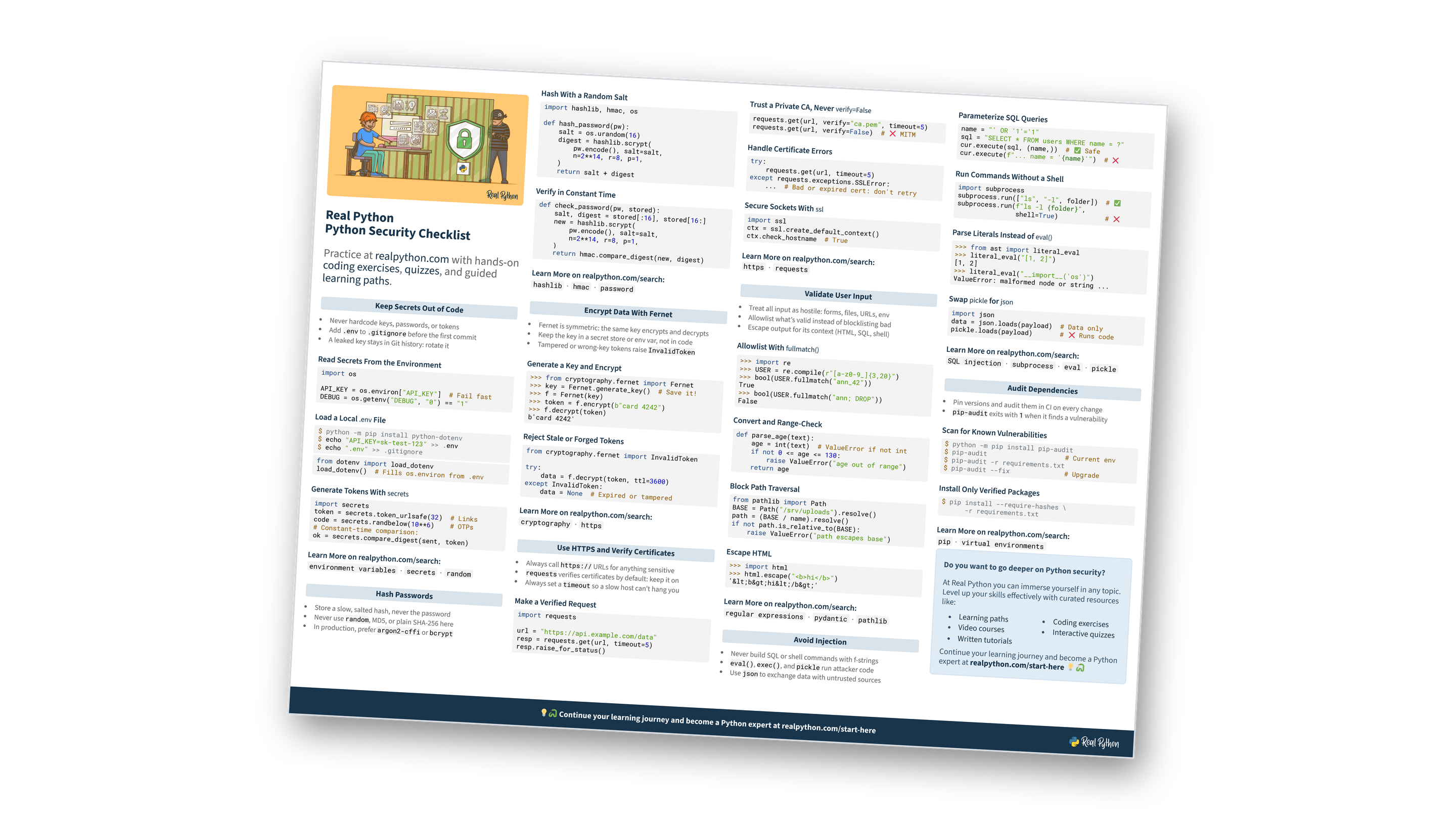
This page contains a condensed checklist for writing secure Python code. It covers keeping secrets out of your code, hashing passwords, encrypting data with Fernet, using HTTPS with certificate verification, validating user input, avoiding injection attacks, and auditing your dependencies. You can also download the information as a printable checklist:
Free Bonus: Python Security Checklist
Get a Python Security Checklist (PDF) and keep secrets, passwords, encryption, HTTPS, input validation, and dependency audits on one printable page:
Practice with hands-on coding exercises, quizzes, and guided learning paths. Not sure where to begin? Start here.
New to Python security?
Keep Secrets Out of Code
- Never hardcode keys, passwords, or tokens
- Add
.envto.gitignorebefore the first commit - A leaked key stays in Git history: rotate it
Read Secrets From the Environment
import os

API_KEY = os.environ["API_KEY"]  # Fail fast
DEBUG = os.getenv("DEBUG", "0") == "1"
Load a Local `.env` File
$ python -m pip install python-dotenv
$ echo "API_KEY=sk-test-123" >> .env
$ echo ".env" >> .gitignore
from dotenv import load_dotenv
load_dotenv()  # Fills os.environ from .env
Generate Tokens With `secrets`
import secrets
token = secrets.token_urlsafe(32)  # Links
code = secrets.randbelow(10**6)    # OTPs
# Constant-time comparison:
ok = secrets.compare_digest(sent, token)
Want to go deeper on managing secrets?
Hash Passwords
- Store a slow, salted hash, never the password
- Never use
random, MD5, or plain SHA-256 here - In production, prefer
argon2-cffiorbcrypt
Hash With a Random Salt
import hashlib, hmac, os

def hash_password(pw):
    salt = os.urandom(16)
    digest = hashlib.scrypt(
        pw.encode(), salt=salt,
        n=2**14, r=8, p=1,
    )
    return salt + digest
Verify in Constant Time
def check_password(pw, stored):
    salt, digest = stored[:16], stored[16:]
    new = hashlib.scrypt(
        pw.encode(), salt=salt,
        n=2**14, r=8, p=1,
    )
    return hmac.compare_digest(new, digest)
Why not just SHA-256?
Encrypt Data With Fernet
- Fernet is symmetric: the same key encrypts and decrypts
- Keep the key in a secret store or env var, not in code
- Tampered or wrong-key tokens raise
InvalidToken
Generate a Key and Encrypt
>>> from cryptography.fernet import Fernet
>>> key = Fernet.generate_key()  # Save it!
>>> f = Fernet(key)
>>> token = f.encrypt(b"card 4242")
>>> f.decrypt(token)
b'card 4242'
Reject Stale or Forged Tokens
from cryptography.fernet import InvalidToken

try:
    data = f.decrypt(token, ttl=3600)
except InvalidToken:
    data = None  # Expired or tampered
Still fuzzy on hashing versus encryption?
Use HTTPS and Verify Certificates
- Always call
https://URLs for anything sensitive requestsverifies certificates by default: keep it on- Always set a
timeoutso a slow host can’t hang you
Make a Verified Request
import requests

url = "https://api.example.com/data"
resp = requests.get(url, timeout=5)
resp.raise_for_status()
Trust a Private CA, Never `verify=False`
requests.get(url, verify="ca.pem", timeout=5)
requests.get(url, verify=False)  # ❌ MITM
Handle Certificate Errors
try:
    requests.get(url, timeout=5)
except requests.exceptions.SSLError:
    ...  # Bad or expired cert: don't retry
Secure Sockets With `ssl`
import ssl
ctx = ssl.create_default_context()
ctx.check_hostname  # True
Think you’ve got HTTPS down?
Free Bonus: Download the Python Security Checklist PDF and keep the essentials at hand.
Validate User Input
- Treat all input as hostile: forms, files, URLs, env
- Allowlist what’s valid instead of blocklisting bad
- Escape output for its context (HTML, SQL, shell)
Allowlist With `fullmatch()`
>>> import re
>>> USER = re.compile(r"[a-z0-9_]{3,20}")
>>> bool(USER.fullmatch("ann_42"))
True
>>> bool(USER.fullmatch("ann; DROP"))
False
Convert and Range-Check
def parse_age(text):
    age = int(text)  # ValueError if not int
    if not 0 <= age <= 130:
        raise ValueError("age out of range")
    return age
Block Path Traversal
from pathlib import Path
BASE = Path("/srv/uploads").resolve()
path = (BASE / name).resolve()
if not path.is_relative_to(BASE):
    raise ValueError("path escapes base")
Escape HTML
>>> import html
>>> html.escape("<b>hi</b>")
'<b>hi</b>'
Want to go deeper on input validation?
Avoid Injection
- Never build SQL or shell commands with f-strings
eval(),exec(), andpicklerun attacker code- Use
jsonto exchange data with untrusted sources
Parameterize SQL Queries
name = "' OR '1'='1"
sql = "SELECT * FROM users WHERE name = ?"
cur.execute(sql, (name,))  # ✅ Safe
cur.execute(f"... name = '{name}'")  # ❌
Run Commands Without a Shell
import subprocess
subprocess.run(["ls", "-l", folder])  # ✅
subprocess.run(f"ls -l {folder}",
               shell=True)            # ❌
Parse Literals Instead of `eval()`
>>> from ast import literal_eval
>>> literal_eval("[1, 2]")
[1, 2]
>>> literal_eval("__import__('os')")
ValueError: malformed node or string ...
Swap `pickle` for `json`
import json
data = json.loads(payload)  # Data only
pickle.loads(payload)       # ❌ Runs code
Ready to test yourself on injection?
Audit Dependencies
- Pin versions and audit them in CI on every change
pip-auditexits with1when it finds a vulnerability
Scan for Known Vulnerabilities
$ python -m pip install pip-audit
$ pip-audit                    # Current env
$ pip-audit -r requirements.txt
$ pip-audit --fix              # Upgrade
Install Only Verified Packages
$ pip install --require-hashes \
      -r requirements.txt
Where do the hashes come from?
Do you want to go deeper on Python security?
At Real Python you can immerse yourself in any topic. Level up your skills effectively with curated resources like:
Continue your learning journey and become a Python expert at realpython.com/start-here 💡🐍
Ready to go beyond the checklist?
You can download this information as a printable checklist:
Free Bonus: Python Security Checklist
Get a Python Security Checklist (PDF) and keep secrets, passwords, encryption, HTTPS, input validation, and dependency audits on one printable page:
