scikit-learn Workflow Cheat Sheet
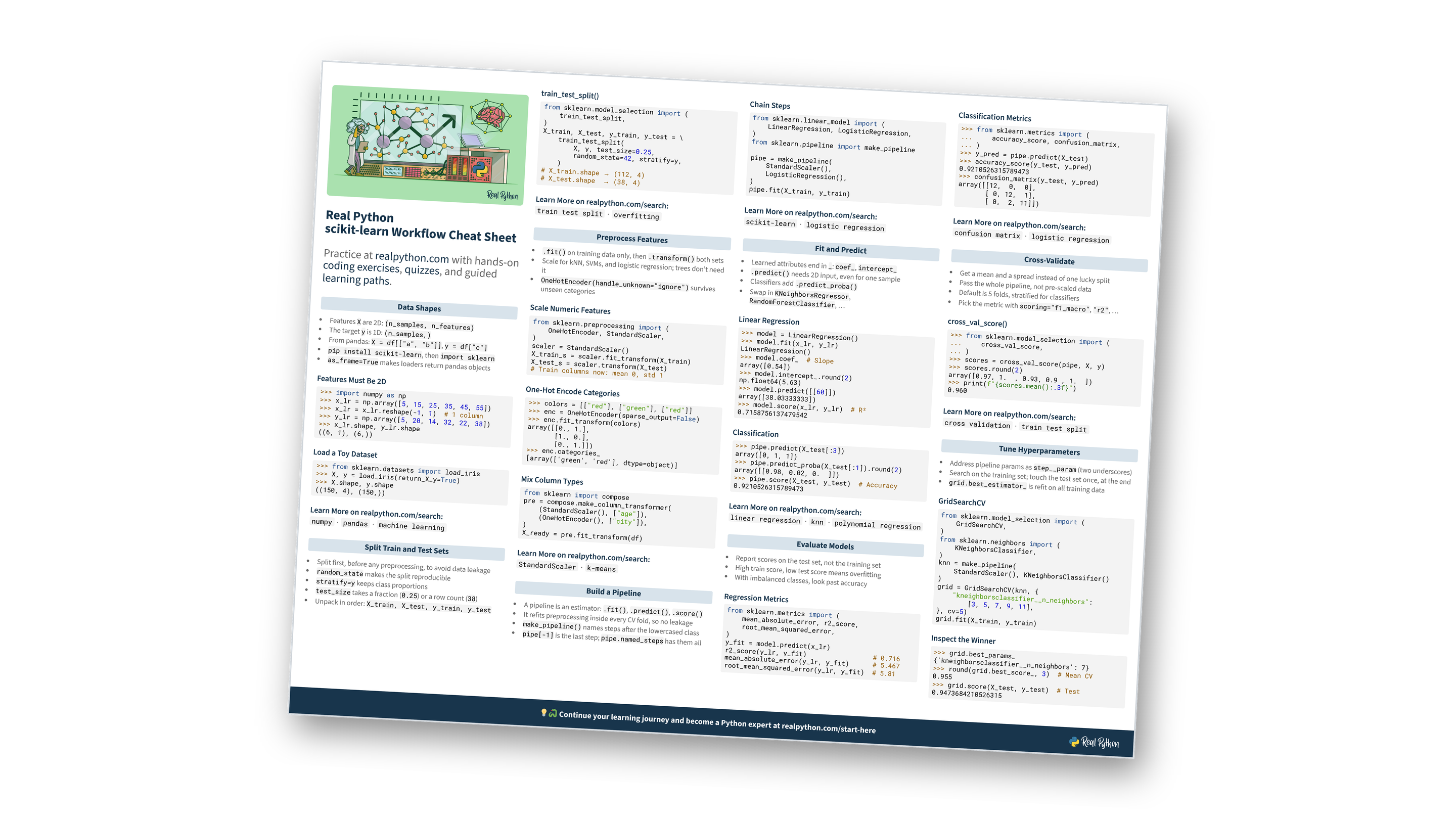
This page contains a condensed overview of the scikit-learn machine learning workflow. It covers data shapes, splitting train and test sets, preprocessing features, building pipelines, fitting and predicting, evaluating models, cross-validation, and hyperparameter tuning. You can also download the information as a printable cheat sheet:
Free Bonus: scikit-learn Workflow Cheat Sheet
Get a scikit-learn Workflow Cheat Sheet (PDF) and keep the full machine learning workflow at hand, from splitting data and building pipelines to cross-validation and hyperparameter tuning:
Practice with hands-on coding exercises, quizzes, and guided learning paths. Not sure where to begin? Start here.
New to machine learning with scikit-learn?
Data Shapes
- Features
Xare 2D:(n_samples, n_features) - The target
yis 1D:(n_samples,) - From pandas:
X = df[["a", "b"]],y = df["c"] pip install scikit-learn, thenimport sklearnas_frame=Truemakes loaders return pandas objects
Features Must Be 2D
>>> import numpy as np
>>> x_lr = np.array([5, 15, 25, 35, 45, 55])
>>> x_lr = x_lr.reshape(-1, 1)  # 1 column
>>> y_lr = np.array([5, 20, 14, 32, 22, 38])
>>> x_lr.shape, y_lr.shape
((6, 1), (6,))
Load a Toy Dataset
>>> from sklearn.datasets import load_iris
>>> X, y = load_iris(return_X_y=True)
>>> X.shape, y.shape
((150, 4), (150,))
Tripped up by array shapes before?
Split Train and Test Sets
- Split first, before any preprocessing, to avoid data leakage
random_statemakes the split reproduciblestratify=ykeeps class proportionstest_sizetakes a fraction (0.25) or a row count (38)- Unpack in order:
X_train, X_test, y_train, y_test
train_test_split()
from sklearn.model_selection import (
    train_test_split,
)
X_train, X_test, y_train, y_test = \
    train_test_split(
        X, y, test_size=0.25,
        random_state=42, stratify=y,
    )
# X_train.shape → (112, 4)
# X_test.shape  → (38, 4)
Want to go deeper on splitting data?
Preprocess Features
.fit()on training data only, then.transform()both sets- Scale for kNN, SVMs, and logistic regression; trees don’t need it
OneHotEncoder(handle_unknown="ignore")survives unseen categories
Scale Numeric Features
from sklearn.preprocessing import (
    OneHotEncoder, StandardScaler,
)
scaler = StandardScaler()
X_train_s = scaler.fit_transform(X_train)
X_test_s = scaler.transform(X_test)
# Train columns now: mean 0, std 1
One-Hot Encode Categories
>>> colors = [["red"], ["green"], ["red"]]
>>> enc = OneHotEncoder(sparse_output=False)
>>> enc.fit_transform(colors)
array([[0., 1.],
       [1., 0.],
       [0., 1.]])
>>> enc.categories_
[array(['green', 'red'], dtype=object)]
Mix Column Types
from sklearn import compose
pre = compose.make_column_transformer(
    (StandardScaler(), ["age"]),
    (OneHotEncoder(), ["city"]),
)
X_ready = pre.fit_transform(df)
Why fit on the training data only?
Build a Pipeline
- A pipeline is an estimator:
.fit(),.predict(),.score() - It refits preprocessing inside every CV fold, so no leakage
make_pipeline()names steps after the lowercased classpipe[-1]is the last step;pipe.named_stepshas them all
Chain Steps
from sklearn.linear_model import (
    LinearRegression, LogisticRegression,
)
from sklearn.pipeline import make_pipeline

pipe = make_pipeline(
    StandardScaler(),
    LogisticRegression(),
)
pipe.fit(X_train, y_train)
Still fuzzy on why pipelines matter?
Free Bonus: Download the scikit-learn Workflow Cheat Sheet PDF and keep the essentials at hand.
Fit and Predict
- Learned attributes end in
_:coef_,intercept_ .predict()needs 2D input, even for one sample- Classifiers add
.predict_proba() - Swap in
KNeighborsRegressor,RandomForestClassifier, …
Linear Regression
>>> model = LinearRegression()
>>> model.fit(x_lr, y_lr)
LinearRegression()
>>> model.coef_  # Slope
array([0.54])
>>> model.intercept_.round(2)
np.float64(5.63)
>>> model.predict([[60]])
array([38.03333333])
>>> model.score(x_lr, y_lr)  # R²
0.7158756137479542
Classification
>>> pipe.predict(X_test[:3])
array([0, 1, 1])
>>> pipe.predict_proba(X_test[:1]).round(2)
array([[0.98, 0.02, 0.  ]])
>>> pipe.score(X_test, y_test)  # Accuracy
0.9210526315789473
Think you’ve got fit and predict down?
Evaluate Models
- Report scores on the test set, not the training set
- High train score, low test score means overfitting
- With imbalanced classes, look past accuracy
Regression Metrics
from sklearn.metrics import (
    mean_absolute_error, r2_score,
    root_mean_squared_error,
)
y_fit = model.predict(x_lr)
r2_score(y_lr, y_fit)                 # 0.716
mean_absolute_error(y_lr, y_fit)      # 5.467
root_mean_squared_error(y_lr, y_fit)  # 5.81
Classification Metrics
>>> from sklearn.metrics import (
...     accuracy_score, confusion_matrix,
... )
>>> y_pred = pipe.predict(X_test)
>>> accuracy_score(y_test, y_pred)
0.9210526315789473
>>> confusion_matrix(y_test, y_pred)
array([[12,  0,  0],
       [ 0, 12,  1],
       [ 0,  2, 11]])
Is accuracy telling the whole story?
Cross-Validate
- Get a mean and a spread instead of one lucky split
- Pass the whole pipeline, not pre-scaled data
- Default is 5 folds, stratified for classifiers
- Pick the metric with
scoring="f1_macro","r2", …
cross_val_score()
>>> from sklearn.model_selection import (
...     cross_val_score,
... )
>>> scores = cross_val_score(pipe, X, y)
>>> scores.round(2)
array([0.97, 1.  , 0.93, 0.9 , 1.  ])
>>> print(f"{scores.mean():.3f}")
0.960
Pipeline or pre-scaled data?
Tune Hyperparameters
- Address pipeline params as
step__param(two underscores) - Search on the training set; touch the test set once, at the end
grid.best_estimator_is refit on all training data
GridSearchCV
from sklearn.model_selection import (
    GridSearchCV,
)
from sklearn.neighbors import (
    KNeighborsClassifier,
)
knn = make_pipeline(
    StandardScaler(), KNeighborsClassifier()
)
grid = GridSearchCV(knn, {
    "kneighborsclassifier__n_neighbors":
        [3, 5, 7, 9, 11],
}, cv=5)
grid.fit(X_train, y_train)
Inspect the Winner
>>> grid.best_params_
{'kneighborsclassifier__n_neighbors': 7}
>>> round(grid.best_score_, 3)  # Mean CV
0.955
>>> grid.score(X_test, y_test)  # Test
0.9473684210526315
Ready to test yourself on tuning?
Ready to go beyond the cheat sheet?
You can download this information as a printable cheat sheet:
Free Bonus: scikit-learn Workflow Cheat Sheet
Get a scikit-learn Workflow Cheat Sheet (PDF) and keep the full machine learning workflow at hand, from splitting data and building pipelines to cross-validation and hyperparameter tuning:
