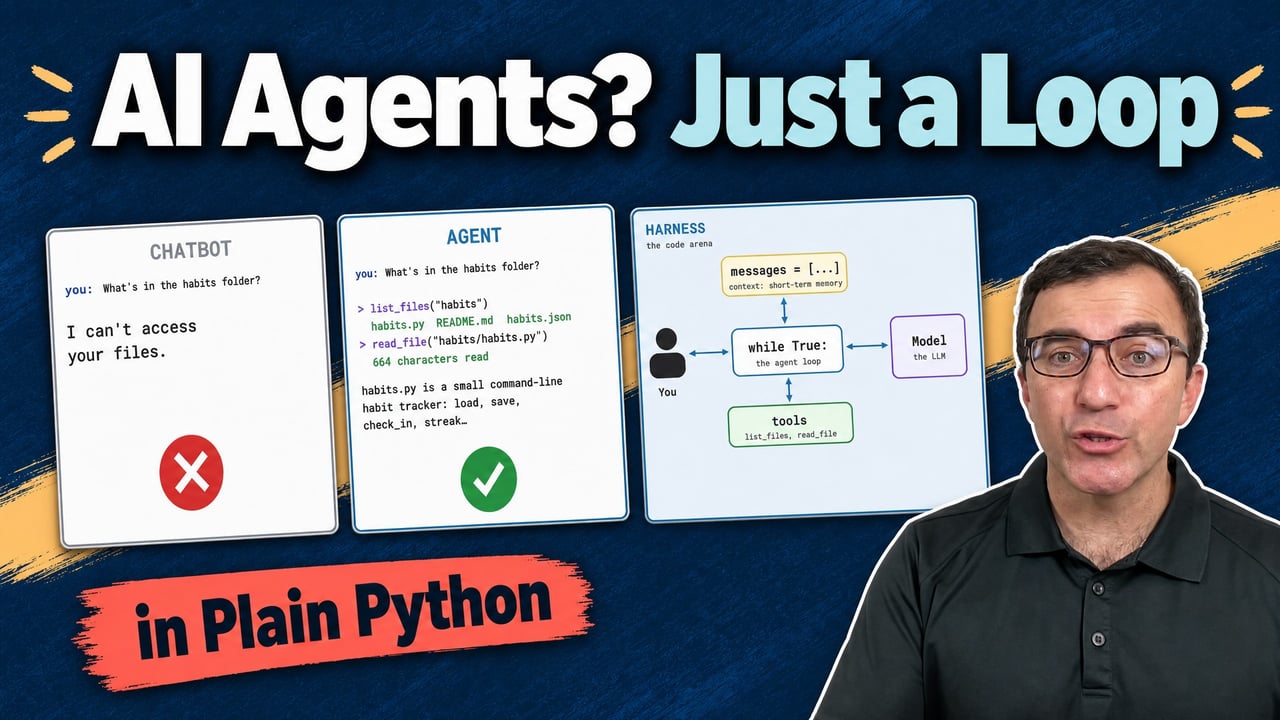

Loading video player…

How AI Agents Work: Build One From Scratch in Python

You use AI agents every day, but an agent isn’t an LLM. It’s an LLM wrapped in a harness of plain code. In this video, Stephen Gruppetta builds that harness from scratch in Python with the OpenAI API and shows the single change that turns a chatbot into an agent.

You’ll start with one chat-completion call that can’t see your files. Then you’ll add a loop, a growing message history so the model remembers the conversation, and tool definitions so it can ask the harness to list and read files. The last step swaps an if for a while, and the model starts chaining tool calls on its own until it has an answer.

By the end, agents like Claude Code and Codex stop being a mystery: you’ll know what they send to the model, why long conversations get expensive, and where permissions and memory fit in.

Resources mentioned in this lesson:
PydanticAI: Typed LLM Agents With Structured Outputs

Tutorial

Pydantic AI: Build Type-Safe LLM Agents in Python

Learn how to use Pydantic AI to build type-safe LLM agents in Python with structured outputs, function calling, and dependency injection patterns.

intermediate ai

00:00 Here’s the same prompt twice. What’s in this folder? The chatbot on the left says, I can’t access your files. The agent on the right finds them, reads them, and answers.

00:11 Same model, different code. You know how LLMs work, and you’ve possibly been using agents or are planning to use agents, but the two are not the same thing.

00:22 An agent is not an LLM, and an LLM is not an agent. So in this session, we’re actually going to bridge the gap. We’re going to understand how we get from an LLM to an agent by writing our own agents.

00:33 Not in Claude code or in Codex, but we’re going to write it ourselves. In fact, we’re going to write our own harness. The harness is that infrastructure that sits around an LLM that, if done right, makes it into an agent.

00:47 So let me start by talking to an LLM directly. And I’m going to be using OpenAI. And let’s create a client. This is how we’re going to talk to the LLM at OpenAI.

00:59 And I’m going to then go for chat completions, and I’m going to create a chat completion. This is the magic formula to talk to the LLM. I’m going to say what model I want to use.

01:10 In this case, I’m going to use GPT-6 Luna, which is a good model that doesn’t cost too much. And then we need to pass our message or messages because typically, we’re going to have more than one.

01:21 And we need to say what role this message is, I am the user. Now, I’ve got a folder here called habits, you can actually access this, you can download this and the code we’re going to write in this session.

01:34 But I’m not going to show you what’s in habits for two reasons. First of all, it doesn’t matter. And secondly, we are going to actually ask our agent to figure that out.

01:43 So what’s in the habits folder, that’s the message I’m going to send to my agent. Before I carry on, since we’re using OpenAI, you’re going to need an OpenAI key, which you can place in your .env.

01:59 Let’s call this our response. So whatever comes back from the score is our response, which gives us choices. It’s plural, because you can have more than one response.

02:09 But typically, we’re going to have only one. So we’ll take the first one. Let’s run this. So you’ve run ai_agent.py. So this is what we got back, I can’t access your file system from this chat, it gave me back a response and responses, I cannot help you because I cannot actually read what’s in that folder.

02:27 So we’ll start chipping at this and improving how much this bit of code can do. So let’s first define the model here so that we don’t have to hard code it anywhere.

02:36 And then of course, if you want to change it, you can easily change it. Let’s also create a loop, a while true loop. Now, what I’m building here is the harness.

02:46 So the infrastructure I’m going to put around my LLM, instead of hard coding the input, let’s say user input is equal to whatever. Notice that I’m not sending information to the model yet.

02:58 So we’re going to see that the harness is going to be the in between, between me as a user and the model and some other things. So I’m going to be communicating with this while loop, which is the harness, let’s create our messages, if I can spell it, especially, and my content is no longer going to be that string, instead, it’s going to be the user input.

03:22 So I’m going to define a bit of a helper function, this is just to help us see what’s going on, right, this is not needed for the harness in itself. And I’m going to say there’s going to be a sender and the receiver because we’re going to be sending in the receiving information throughout the system, the sender is sending information to the receiver.

03:42 This means that I can now, for example, here, say, I want to show the trace, where the harness is sending information to the model. Now we’ve already seen that response.

03:54 So let’s call it reply. And now it’s the time for the model to send information to the harness, the harness is now going to pass on the message to me. At the moment, the model is sending information into the while loop.

04:11 Remember, the while loop is the harness. So let’s run this code now. So now it says you to harness and I’m going to say what’s in the habits folder. And you can see that the harness has sent the message sending a message, the model, the model then sent a message back to the harness, it’s 128 characters, and the harness gave it back to us.

04:35 So I’m going to say, Can you run that for me, the model replies back and says, What would you like me to run, paste the command or code here and I can help you with it.

04:48 And you’re like, What do you mean, you just told me you can list its contents with ls -la habits, it should be obvious. It’s not an agent yet, right? Why is this thing not remembering what we did before?

05:02 Can you spot why? And the answer is that at the moment, we are only ever sending that message, whatever user input, only one message went to the model. That’s not good.

05:14 Let’s fix this. I’m going to create a list called messages, which is for the time being empty. And instead of overwriting it here, I’m going to append to it.

05:25 Why? Because now message is going to be a list that is going to grow. You may already know this about LLMs. The reply that the LLM gives us is part of the conversation.

05:36 So next time, I’m going to send anything to the LLM again, I actually want to append the reply. This is why, by the way, that when your conversations get long, they get more expensive, because you’re always even if you just write, thank you, at the end, you’re actually sending the whole conversation, all the messages you sent and all the replies the LLM gave you here, it says sending a message.

05:59 Well, this is now not technically correct. I want to say sending how many messages. So now we can see it is sending one message. I made a typo there, but as a matter of fact, LLMs are quite good at that.

06:14 This is how now it said sending three messages, why my original message, the reply from the LLM, and then my follow up message. So there are three messages going through.

06:25 And notice how this time, it still doesn’t do it for us, that’s going to be next. But at least it remembers what we talked about earlier, we don’t have an agent yet right here, we just have a chat with an LLM see what we need to do next, I need to give my system my harness, the ability to run a tool by a tool here, I mean a function.

06:44 So let me create the function I need, I would like to say, well, how about if you knew how to list files that were very helpful for me, let’s actually import from pathlib.

06:54 And if you’re familiar with the pathlib, Path objects, then you can sort of get the path of the folder iterator means iterate through each item. And we’re simply creating a nice string with a new line joining them all.

07:05 Before I can use this tool, I need to do a few things, the harness will use this tool, but the LLM needs to know that this tool exists. So and allow me to paste this because there’s a lot of boilerplate code, right.

07:17 So this is what OpenAI needs our tools to look like. So there’s a list there. And that is the first tool I’m going to create. It’s a function and tools are functions, they do something, I need to give it the name.

07:28 So in this case, the name of called my function was list files. It is what I called it. Yeah, this files. And I need to give it a description. Why? Because this is how the LLM will know what this tool does, right?

07:39 It needs to know list the files in folder, what properties does it need? So it needs to know there’s going to need folder because that’s the argument we need to pass.

07:51 It’s a string. And is anything required? Yes, folder is. So this is how we’re going to tell the LLM what our tools are, what I can do is I can also use the tools and say that’s where my tools are.

08:05 And all I’m going to do here is to show whether my reply has any tool calls. When we’re using tools, OpenAI says we need to also say was a reasoning_effort.

08:20 And we can just put “none” here, that’s gonna be good enough. And that’s also remove the trace for now. Let’s run again. And notice how we’re sending one message.

08:32 Now, the harness to me has nothing to say. In this case, the content is a tool call. And here it’s telling us there’s a tool call, all of this fun stuff.

08:45 So the LLM was able to fill in the name of folder from the text we gave it. And it wants to call the function list file. This is great. The LLM has detected the tool.

09:00 And it told the harness, I need a tool call. What do we do next? So let’s do a bit of refactoring. Because there are two things that can happen here, right when we’re dealing with the harness and the model, we’re either asking the model something or we’re running tools, the harness can now talk to the model.

09:20 And it can run tools if the model says can you run this tool for me. So let us create an ask model, which is going to send it some messages. So I’m going to cut it from here and put it there.

09:34 Let’s also put a trace here. So now this is flowing from the model because it’s the model that asks for a tool to the harness, the model only ever talks to the harness never to us directly.

09:47 But we also need to be able to call tools. So let us add another function. And this is going to be run tool because that’s what we wanted to do. Right? Now, I’m hard coding, this is list files, just to make it easy.

10:02 In practice, we’ll have to use the function name there. Let’s say if reply has tool calls, let’s create a loop for call in reply.tool_calls our results is going to be run_tool(call).

10:21 And now we can take our messages and append. So now the role is no longer the user, it’s a tool. This should be a dictionary, right? My apologies for that.

10:34 We need to give it a tool ID, which is the call ID. And importantly, what’s the result? What did our function return? So ask the model, send the messages, we send information to the model, the model can either give us text back, that’s the contents replied of contents, or it can request the tool.

10:57 The communication is always between me and the harness harness and the model, the model always goes to the harness. And if it says I need a tool call, it’s the harness, which calls the tool, my while loop here is the harness effectively, let’s try running this.

11:14 The model says harness, please run list files folder habits, the harness then calls the tool list_files folder habits, the reply goes from harness to me, the habits folder contains habits.py, README.md, and habits.json.

11:29 And in fact, those are the three files inside my folder, the LLM can say, I would love to call a tool here. Is this one of the tools available? Yes, it is.

11:40 You have a tool for me that allows me to list files. Can I please, please, please, dear harness, have the tool called the harness might make some decisions, right?

11:49 Do I need to ask for permission here? Do I need to do something else? So what if I now ask, can you read the contents of the .py file? The first thing it did is it says, Can you list files, you can say it already had this information, right?

12:08 But it’s saying, well, the .py file, let me actually see what all the .py files are. So it’s asking to list files. Again, the model now has a response. And I can see that habits/habits.py exists, but I don’t have a tool here to read file contents.

12:22 So let’s give it another tool. Now, if you allow me here to in order to be quick, I’m going to go to my tools, you may recall, and I’m going to add another one super quickly.

12:33 And this one is a read file, read a text file and return its contents is going to accept a path, which is required. So what did I call it, read file. And we said it’s going to accept an argument called path.

12:49 And it’s simply going to take path.read_text(), we’re using the pathlib module there. Now, there was another issue we had, you may recall that in run tool, I had hard coded the name of my function, which I don’t want to do.

13:06 Let’s create a mapping between the names and the functions. There are other ways you could do this, but this is good enough. And instead of hard coding list files here, I’m going to say from this mapping, I’ve just created two functions, this makes it more generic, let us see what’s going to happen now, read the habits.py file, and tell me what’s in it.

13:33 So the next thing it did is to ask these run read file, because now it’s a bit clearer. The harness called read file, the tool, the function gave the information back to the harness, and the harness sent it to the model.

13:48 And the model now said, I have a text reply for you. habits.py is a small command line habit tracker. There we go. Now we know what’s inside habits.py. It stores habits and their check in dates, blah, blah, blah.

13:59 So it’s not giving me the whole content is just telling me there’s load, save, check in, etc. And if I check habits.py, load, save, check in streak. Now there’s one one last thing we need to do.

14:11 Let’s try it again. Summarize the content of all the Python files in the habits folder. And it did said, Okay, please run list files. Good. And then the model came back saying, please run read file.

14:29 However, we stopped there. Notice that the harness didn’t give me any information. Because and this is where we need our last step in the agent loop. And you may recall that we said here, well, you know, we can have many tool calls coming from one message.

14:48 But what if the reply from one message is another tool call? Well, all we need to do is change this to a while. So it was an if. Now we want to say while. Why?

15:01 Because keep going. First, there was a tool call, run list files. Once it got the response from that, which is the files, it said, Okay, now I need another tool call, read file.

15:13 That was an if by having it as a while, this should go again.

15:18 Famous last words, let’s find out summarize the content of all the Python files in the habits folder. And now you can see that we’ve gone into an agent loop.

15:27 So the model says, please run list files, and the harness calls the tool, the tool gives an answer, the harness sends it back to the model. The model says, Okay, I now know what the files are.

15:37 Therefore, I need to run the .py file, the tool gives it the content of that file, the harness reads the whole conversation, including the response and says, Ah, good.

15:49 There you go. I’ve got a text response for you. This is what an agent is. Of course, there’s a lot more, right? There’s permissions, you might also want to limit how many turns you have lots more tools, memory, we’ve been talking about the memory within the context, but you can also have external memory files, and then ways of extending them.

16:10 So there’s, there’s a lot more. What matters is that we have built from scratch, what is an agent? The harness that allows you to talk to the harness, the harness talks to the model, the model can either send information back for the user, or as the harness, can you run a tool for me because I’ve seen what tools you have available, the harness can make some decisions about whether to run the tool or not, run the tool, get information from the tool, send it back to the model, the model may ask for more tools back and forth until the model says, I have an answer, send it back to the user.

16:46 That’s our AI agent built from scratch. A reminder, you have access to the file we’ve created here and the habits to have a play with this, feel free to download it by looking at the link below as always.

16:59 And I hope you have enjoyed this journey through creating your own agent. Now when you go and use agents, you sort of know what’s happening a bit behind the scenes.

17:07 It’s not a mystery anymore, hopefully. Do you want to go further? For example, you want to know how agents deal with longer conversations, ones that don’t fit within the context of the model, or how they remember your conversations with them from yesterday, the week before or the month before, how you can customize permissions and a lot more.

17:25 Then join me on this live course where we will be building an agent from scratch and exploring a lot of the functionality that you may already be using in tools like Claude Code or Codex, for example.

17:38 Understanding things is how we can use them better. And the same is true for agents. If we understand what’s happening behind the scenes when our agents are working, we can communicate with them better, more effectively and get more out of them.

17:53 See you on the course.

Become a Member to join the conversation.