Python 3.15 Cheat Sheet
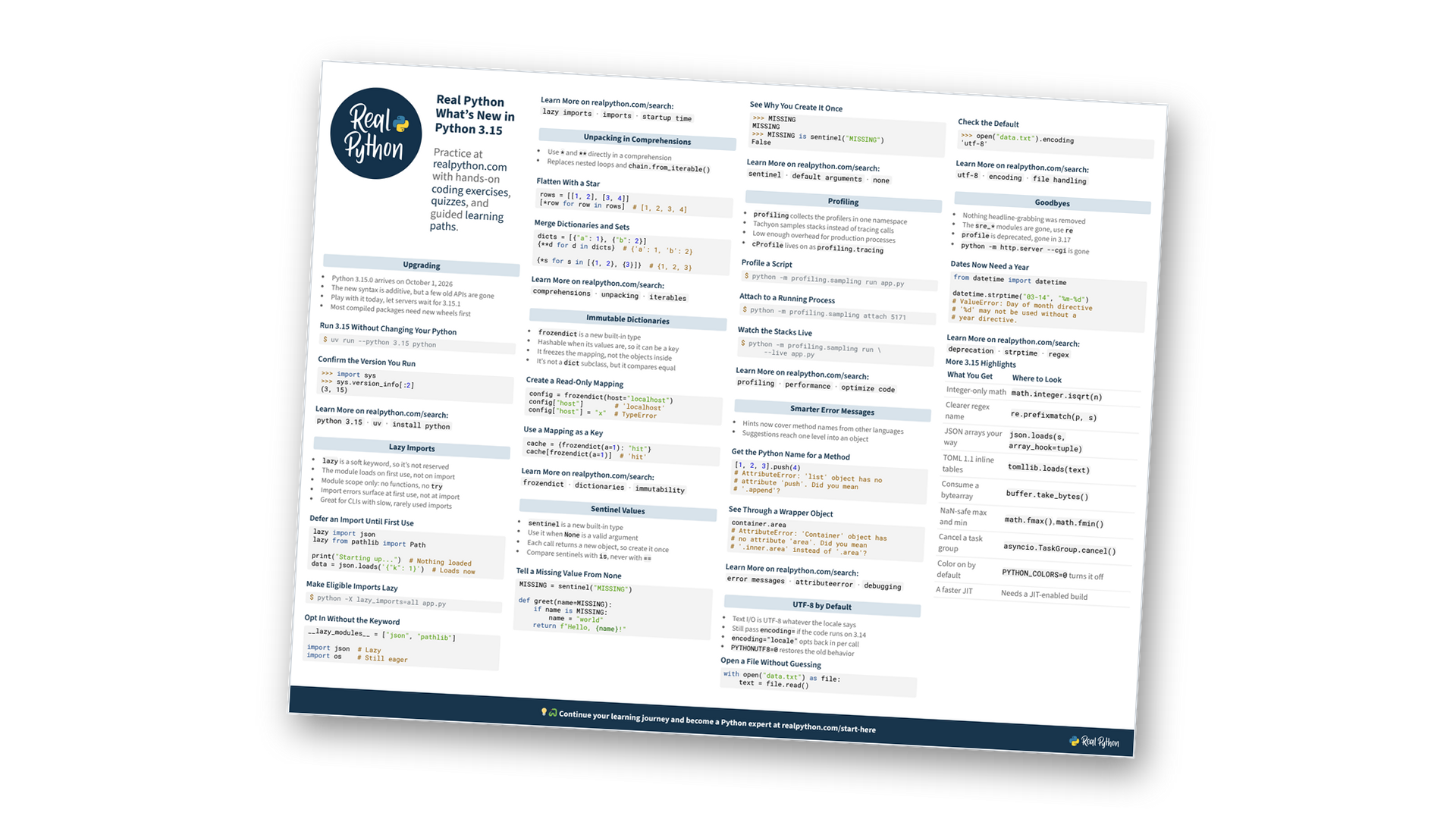
This page is a condensed reference to Python, refreshed for Python 3.15. It covers the syntax you use every day and the features that are new this release, including lazy imports, frozendict, built-in sentinels, and unpacking in comprehensions. You can also download the information as a printable cheat sheet:
Free Bonus: What's New in Python 3.15 Cheat Sheet
Get a What's New in Python 3.15 Cheat Sheet (PDF) that sums up every new feature from this tutorial on a single page:
Practice with hands-on coding exercises, quizzes, and guided learning paths. Not sure where to begin? Start here.
New to Python, or coming back to it?
What’s New in Python 3.15
- Python 3.15 is released on October 1, 2026
- New syntax is additive, but some old APIs are gone
- Upgrade your own tools now, let servers wait for 3.15.1
- The upgraded JIT compiler is 8-9% faster on benchmarks
- Labels below mark what’s new this release
Run Python 3.15 With One uv Command
$ uv run --python 3.15 python
Find Slow Code With the New Profiler
$ python -m profiling.sampling run app.py
$ python -m profiling.sampling attach 5171
Curious what else 3.15 brings?
Getting Started
Start the Interactive Shell
$ python
Run a Script
$ python my_script.py
Not set up yet?
Comments
- Always add a space after the
# - Use comments to explain “why” of your code
Write Comments
# This is a comment
# print("This code will not run.")
print("This will run.")  # Comments are ignored by Python
Not sure what belongs in a comment?
Data Types
- Python is dynamically typed
- Use
Noneto represent missing or optional values issubclass()checks if a class is a subclass
Type Investigation
type(42)                # <class 'int'>
type(3.14)              # <class 'float'>
type("Hello")           # <class 'str'>
type(None)              # <class 'NoneType'>

isinstance(3.14, float)  # True
issubclass(int, object)  # True - all inherit
Type Conversion
int("42")                # 42
float("3.14")            # 3.14
str(42)                  # "42"
list("abc")              # ["a", "b", "c"]
Think you’ve got types down?
Variables & Assignment
- Variables are created when first assigned
- Use descriptive variable names
- Follow
snake_caseconvention
Basic Assignment
name = "Leo"           # String
age = 7                # Integer
height = 5.6           # Float
is_cat = True          # Boolean
flaws = None           # None type
Parallel & Chained Assignments
x, y = 10, 20          # Assign multiple values
a = b = c = 0          # Same value, 3 names
Augmented Assignments
counter += 1
numbers += [4, 5]
permissions |= write
Why does += behave differently on lists?
Strings
- It’s recommended to use double-quotes for strings
- Use
"\n"to create a line break in a string
Creating Strings
single = 'Hello'
double = "World"
multi = """Multiple
line string"""
String Operations
greeting = "me" + "ow!"  # "meow!"
repeat = "Meow!" * 3     # "Meow!Meow!Meow!"
length = len("Python")   # 6
String Methods
"a".upper()                     # "A"
"A".lower()                     # "a"
" a ".strip()                   # "a"
"abc".replace("bc", "ha")       # "aha"
"a b".split()                   # ["a", "b"]
"-".join(["a", "b"])            # "a-b"
String Indexing & Slicing
text = "Python"
text[0]      # "P" (first)
text[-1]     # "n" (last)
text[1:4]    # "yth" (slice)
text[:3]     # "Pyt" (from start)
text[3:]     # "hon" (to end)
text[::2]    # "Pto" (every 2nd)
text[::-1]   # "nohtyP" (reverse)
String Formatting
# f-strings
name = "Aubrey"
age = 2
f"Hello, {name}!"               # "Hello, Aubrey!"
f"{name} is {age} years old"    # "Aubrey is 2 years old"
f"Debug: {age=}"                # "Debug: age=2"
f"{3.14159:.2f}"                # "3.14"

# Raw strings keep escape sequences
r"C:\new"                       # "C:\\new"
Want to go deeper on strings?
Numbers & Math
Arithmetic Operators
10 + 3    # 13
10 - 3    # 7
10 * 3    # 30
10 / 3    # 3.3333333333333335
10 // 3   # 3
10 % 3    # 1
2 ** 3    # 8
Useful Functions
abs(-5)              # 5
round(3.7)           # 4
round(3.14159, 2)    # 3.14
min(3, 1, 2)         # 1
max(3, 1, 2)         # 3
sum([1, 2, 3])       # 6
Surprised by floating-point results?
Conditionals
- Python uses indentation for code blocks
- Use 4 spaces per indentation level
If-Elif-Else
if age < 13:
    category = "child"
elif age < 20:
    category = "teenager"
else:
    category = "adult"
Comparison Operators
x == y    # Equal to
x != y    # Not equal to
x < y     # Less than (x <= y for or equal)
x > y     # Greater than (x >= y for or equal)
Logical Operators
if age >= 18 and has_car:
    print("Roadtrip!")

if is_weekend or is_holiday:
    print("No work today.")
Still fuzzy on truthiness?
Loops
range(5)generates 0 through 4- Use
enumerate()to get index and value breakexits the loop,continueskips to next- Be careful with
whileto not create an infinite loop
For Loops
# Loop through range
for i in range(5):      # 0, 1, 2, 3, 4
    print(i)

# Loop through collection
fruits = ["apple", "banana"]
for fruit in fruits:
    print(fruit)

# With enumerate for index
for i, fruit in enumerate(fruits):
    print(f"{i}: {fruit}")
While Loops
while True:
    answer = input("Enter 'quit' to exit: ")
    if answer == "quit":
        break
    print(f"You entered: {answer}")
Ready to test yourself on loops?
Functions
- Define functions with
def - Always use
()to call a function - Add
returnto send values back - Create anonymous functions with the
lambdakeyword - Use a
sentineldefault whenNoneis a valid argument
Defining Functions
def greet():
    return "Hello!"

def greet_person(name):
    return f"Hello, {name}!"

def add(x, y=10):    # Default parameter
    return x + y
Calling Functions
greet()                   # "Hello!"
add(5, 3)                 # 8
add(7)                    # 17
Return Values
def get_min_max(numbers):
    return min(numbers), max(numbers)

minimum, maximum = get_min_max([1, 5, 3])
Built-in Sentinels (New in 3.15)
MISSING = sentinel("MISSING")

def get(config, key, default=MISSING):
    value = config.get(key, default)
    if value is MISSING:
        raise KeyError(key)
    return value
Lambda Functions
square = lambda x: x**2
result = square(5)  # 25

numbers = [1, 2, 3, 4]
squared = list(map(lambda x: x**2, numbers))
evens = list(filter(lambda x: x % 2 == 0, numbers))
When is None a bad default?
Classes
- Classes are blueprints for objects
- You commonly use classes to encapsulate data
- Inside a class, you provide methods for interacting with the data
.__init__()is the constructor methodselfrefers to the instance
Defining Classes
class Dog:
    def __init__(self, name, age):
        self.name = name
        self.age = age

    def bark(self):
        return f"{self.name} says Woof!"

# Create instance
my_dog = Dog("Frieda", 3)
print(my_dog.bark())  # Frieda says Woof!
Class Attributes & Methods
class Cat:
    species = "Felis catus"   # Class attribute

    def __init__(self, name):
        self.name = name      # Instance attribute

    def meow(self):
        return f"{self.name} says Meow!"
Inheritance
class Animal:
    def __init__(self, name):
        self.name = name

    def speak(self):
        pass

class Dog(Animal):
    def speak(self):
        return f"{self.name} barks!"
Not sure when to reach for a class?
Exceptions
- When Python runs and encounters an error, it creates an exception
- Use specific exception types when possible
elseruns if no exception occurredfinallyalways runs, even after errors- Python 3.15 suggests the attribute you probably meant
Try-Except
try:
    number = int(input("Enter a number: "))
    result = 10 / number
except ValueError:
    print("That's not a valid number!")
except ZeroDivisionError:
    print("Cannot divide by zero!")
else:
    print(f"Result: {result}")
finally:
    print("Calculation attempted")
Common Exceptions
ValueError         # Invalid value
TypeError          # Wrong type
IndexError         # List index out of range
KeyError           # Dict key not found
FileNotFoundError  # File doesn't exist
Smarter Error Messages (New in 3.15)
>>> ratings = [4.5, 3.8]
>>> ratings.push(4.9)
AttributeError: 'list' object has no
attribute 'push'. Did you mean '.append'?
Raising Exceptions
def validate_age(age):
    if age < 0:
        raise ValueError("Age cannot be negative")
    return age
Raise, or return?
Collections
- A collection is a container that stores multiple items
- If an object is a collection, then you can loop through it
- Use
len()to get the size of a collection - You can check if an item is in a collection with the
inkeyword - Some collections may look similar, but each data structure solves specific needs
- A
frozendictwith hashable values can be a dict key
Lists
# Creating lists
empty = []
nums = [5]
mixed = [1, "two", 3.0, True]

# List methods
nums.append("x")         # Add to end
nums.insert(0, "y")      # Insert at index 0
nums.extend(["z", 5])    # Extend with iterable
nums.remove("x")         # Remove first "x"
last = nums.pop()        # Pop returns last element

# List indexing and checks
fruits = ["banana", "apple", "orange"]
fruits[0]                # "banana"
fruits[-1]               # "orange"
"apple" in fruits        # True
len(fruits)              # 3
Tuples
# Creating tuples
point = (3, 4)
single = (1,)    # Note the comma!
empty = ()

# Basic tuple unpacking
point = (3, 4)
x, y = point
x                # 3
y                # 4

# Extended unpacking
first, *rest = (1, 2, 3, 4)
first            # 1
rest             # [2, 3, 4]
Sets
# Creating Sets
a = {1, 2, 3}
b = set([3, 4, 4, 5])

# Set Operations
a | b            # {1, 2, 3, 4, 5}
a & b            # {3}
a - b            # {1, 2}
a ^ b            # {1, 2, 4, 5}
Dictionaries
# Creating Dictionaries
empty = {}
pet = {"name": "Leo", "age": 42}

# Dictionary Operations
pet["sound"] = "Purr!"   # Add key and value
pet["age"] = 7           # Update value
age = pet.get("age", 0)  # Get with default
del pet["sound"]         # Delete key
pet.pop("age")           # Remove and return

# Dictionary Views
pet.keys()         # dict_keys(['name'])
pet.values()       # dict_values(['Leo'])
pet.items()        # dict_items([('name', 'Leo')])
Immutable Dictionaries (New in 3.15)
>>> config = frozendict({"debug": True})
>>> config | {"debug": False}
frozendict({'debug': False})
>>> config["debug"] = False
TypeError: 'frozendict' object does not
support item assignment
List, set, or dictionary?
Comprehensions
- Comprehensions are condensed
forloops, often faster
List Comprehensions
# Basic
squares = [x**2 for x in range(10)]

# With condition
evens = [x for x in range(20) if x % 2 == 0]

# Nested
matrix = [[i*j for j in range(3)]
          for i in range(3)]
Other Comprehensions
# Dictionary comprehension
words = ["hello", "world"]
lengths = {word: len(word) for word in words}

# Set comprehension
unique = {len(word) for word in words}

# Generator expression
sum_squares = sum(x**2 for x in range(1000))
Unpacking in Comprehensions (New in 3.15)
>>> temps = [[18.2, 21.7], [17.9]]
>>> [*t for t in temps]
[18.2, 21.7, 17.9]
>>> parts = [{"host": "db"}, {"port": 5432}]
>>> {**p for p in parts}
{'host': 'db', 'port': 5432}
Comprehension or generator?
File I/O
File Operations
# Read an entire file
with open("file.txt", mode="r", encoding="utf-8") as file:
    content = file.read()

# Write a file
with open("out.txt", mode="w", encoding="utf-8") as file:
    file.write("Hello, World!\n")

# Append to a File
with open("log.txt", mode="a", encoding="utf-8") as file:
    file.write("New log entry\n")
UTF-8 by Default (New in 3.15)
# 3.15 defaults to UTF-8 for text files,
# whatever the operating system's locale says
open("notes.txt").read()

# Opt back in to the locale encoding
open("legacy.txt", encoding="locale")
Wondering what UTF-8 by default changes?
Imports & Modules
- Prefer explicit imports over
import * - Group imports: standard library, third-party libraries, user-defined modules
lazyimports work at module level, outsidetrylazy from pathlib import Pathworks, too
Import Styles
# Import entire module
import math
result = math.sqrt(16)

# Import specific function
from math import sqrt
result = sqrt(16)

# Import with alias
import numpy as np
array = np.array([1, 2, 3])
Lazy Imports (New in 3.15)
import sys

lazy import json        # Bound, not loaded

"json" in sys.modules   # False
json.dumps({"a": 1})    # Imports on first use
"json" in sys.modules   # True
Should your imports be lazy?
Virtual Environments
- Use a venv to isolate a project’s packages from the system-wide ones
Create Virtual Environment
$ python -m venv .venv
Activate Virtual Environment (Windows)
PS> .venv\Scripts\activate
Activate Virtual Environment (Linux & macOS)
$ source .venv/bin/activate
Virtual environments still confusing?
Packages
- The official third-party package repository is the Python Package Index (PyPI)
Install Packages
$ python -m pip install requests
Save Requirements & Install from File
$ python -m pip freeze > requirements.txt
$ python -m pip install -r requirements.txt
Not sure how to pin dependencies?
Miscellaneous
| Truthy | Falsy |
|---|---|
-42 |
0 |
3.14 |
0.0 |
"John" |
"" |
[1, 2, 3] |
[] |
("apple", "banana") |
() |
{"key": None} |
{} |
None |
Pythonic Constructs
# Swap variables
a, b = b, a

# Remove duplicates
unique_unordered = list(set(my_list))

# Remove duplicates, preserve order
unique = list(dict.fromkeys(my_list))
More 3.15 Highlights (New in 3.15)
| Feature | What It Does |
|---|---|
math.integer |
Integer-only math |
re.prefixmatch() |
Clearer re.match() |
json.loads(array_hook=) |
Custom JSON array type |
.take_bytes() |
Cut bytes from a buffer |
TaskGroup.cancel() |
Cancel an asyncio group |
math.fmax() |
Two-float max, NaN-safe |
Want more idioms like these?
Want to go deeper on any topic in the Python curriculum?
Level up with learning paths, video courses, interactive quizzes, and reference articles.
Start here: realpython.com/start-here 💡🐍
Ready to go beyond the cheat sheet?
You can download this information as a printable cheat sheet:
Free Bonus: What's New in Python 3.15 Cheat Sheet
Get a What's New in Python 3.15 Cheat Sheet (PDF) that sums up every new feature from this tutorial on a single page:
