Regex Cheat Sheet
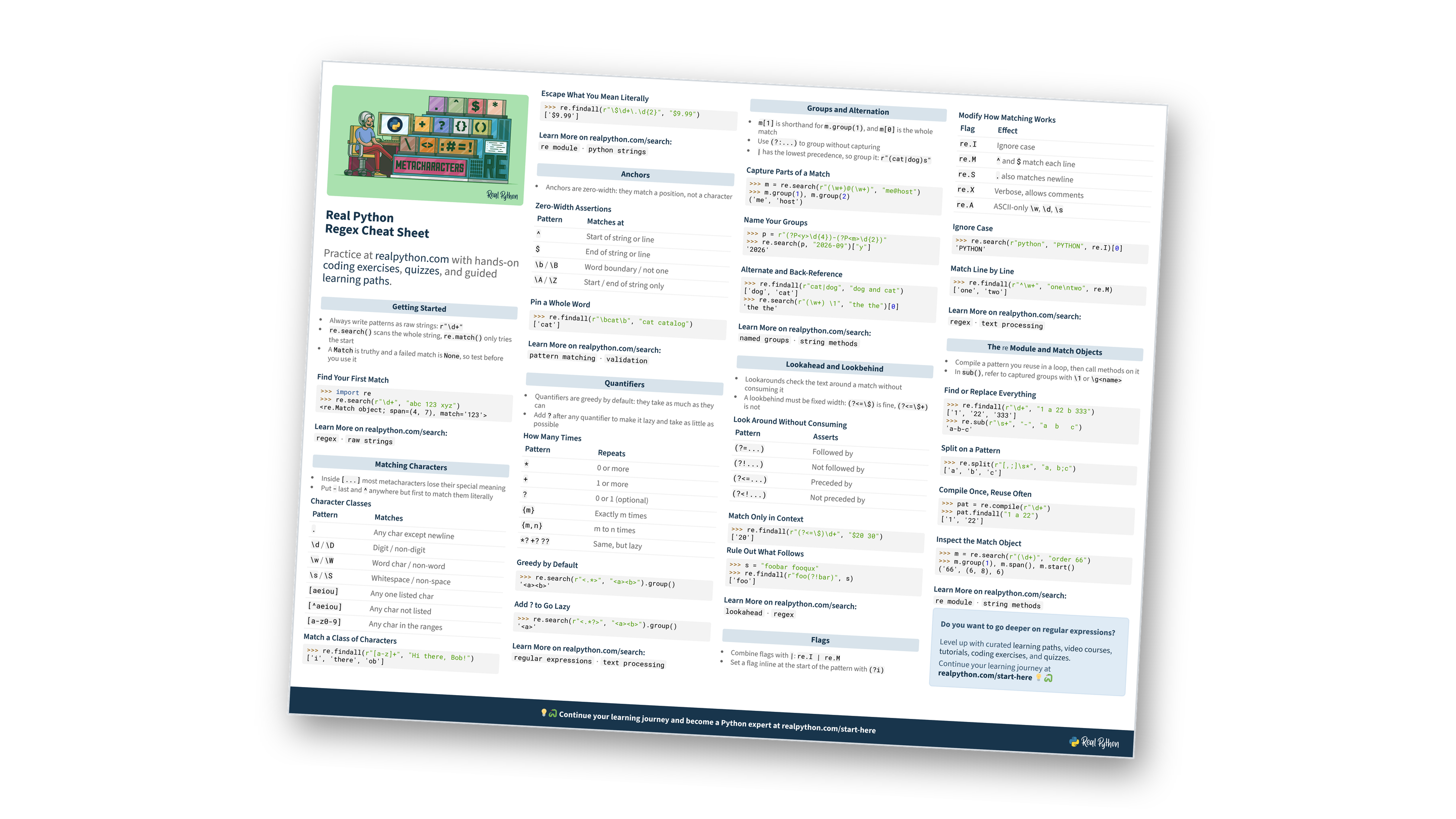
This page gives you a condensed reference for regular expressions in Python. It covers the metacharacters you reach for most, the flags that change how matching works, and the re module functions that run your patterns, with a short runnable example for each. For the full explanations, read the two-part tutorial: Regular Expressions: Regexes in Python (Part 1) and Part 2. You can also download the information as a printable cheat sheet:
Free Bonus: Python Regex Cheat Sheet
Get a Python Regex Cheat Sheet (PDF) and keep the metacharacters, quantifiers, and flags at your fingertips:
Practice with hands-on coding exercises, quizzes, and guided learning paths. Not sure where to begin? Start here.
New to regular expressions?
Getting Started
- Always write patterns as raw strings:
r"\d+" re.search()scans the whole string,re.match()only tries the start- A
Matchis truthy and a failed match isNone, so test before you use it
Find Your First Match
>>> import re
>>> re.search(r"\d+", "abc 123 xyz")
<re.Match object; span=(4, 7), match='123'>
Why the r prefix?
Matching Characters
- Inside
[...]most metacharacters lose their special meaning - Put
-last and^anywhere but first to match them literally
Character Classes
| Pattern | Matches |
|---|---|
. |
Any char except newline |
\d / \D |
Digit / non-digit |
\w / \W |
Word char / non-word |
\s / \S |
Whitespace / non-space |
[aeiou] |
Any one listed char |
[^aeiou] |
Any char not listed |
[a-z0-9] |
Any char in the ranges |
Match a Class of Characters
>>> re.findall(r"[a-z]+", "Hi there, Bob!")
['i', 'there', 'ob']
Escape What You Mean Literally
>>> re.findall(r"\$\d+\.\d{2}", "$9.99")
['$9.99']
Want more practice with character classes?
Anchors
- Anchors are zero-width: they match a position, not a character
Zero-Width Assertions
| Pattern | Matches at |
|---|---|
^ |
Start of string or line |
$ |
End of string or line |
\b / \B |
Word boundary / not one |
\A / \Z |
Start / end of string only |
Pin a Whole Word
>>> re.findall(r"\bcat\b", "cat catalog")
['cat']
Think anchors clicked?
Quantifiers
- Quantifiers are greedy by default: they take as much as they can
- Add
?after any quantifier to make it lazy and take as little as possible
How Many Times
| Pattern | Repeats |
|---|---|
* |
0 or more |
+ |
1 or more |
? |
0 or 1 (optional) |
{m} |
Exactly m times |
{m,n} |
m to n times |
*? +? ?? |
Same, but lazy |
Greedy by Default
>>> re.search(r"<.*>", "<a><b>").group()
'<a><b>'
Add ? to Go Lazy
>>> re.search(r"<.*?>", "<a><b>").group()
'<a>'
Greedy or lazy?
Free Bonus: Download the Python Regex Cheat Sheet PDF and keep the essentials at hand.
Groups and Alternation
m[1]is shorthand form.group(1), andm[0]is the whole match- Use
(?:...)to group without capturing |has the lowest precedence, so group it:r"(cat|dog)s"
Capture Parts of a Match
>>> m = re.search(r"(\w+)@(\w+)", "me@host")
>>> m.group(1), m.group(2)
('me', 'host')
Name Your Groups
>>> p = r"(?P<y>\d{4})-(?P<m>\d{2})"
>>> re.search(p, "2026-09")["y"]
'2026'
Alternate and Back-Reference
>>> re.findall(r"cat|dog", "dog and cat")
['dog', 'cat']
>>> re.search(r"(\w+) \1", "the the")[0]
'the the'
Want to go deeper on groups?
Lookahead and Lookbehind
- Lookarounds check the text around a match without consuming it
- A lookbehind must be fixed width:
(?<=\$)is fine,(?<=\$+)is not
Look Around Without Consuming
| Pattern | Asserts |
|---|---|
(?=...) |
Followed by |
(?!...) |
Not followed by |
(?<=...) |
Preceded by |
(?<!...) |
Not preceded by |
Match Only in Context
>>> re.findall(r"(?<=\$)\d+", "$20 30")
['20']
Rule Out What Follows
>>> s = "foobar fooqux"
>>> re.findall(r"foo(?!bar)", s)
['foo']
Still fuzzy on lookarounds?
Flags
- Combine flags with
|:re.I | re.M - Set a flag inline at the start of the pattern with
(?i)
Modify How Matching Works
| Flag | Effect |
|---|---|
re.I |
Ignore case |
re.M |
^ and $ match each line |
re.S |
. also matches newline |
re.X |
Verbose, allows comments |
re.A |
ASCII-only \w, \d, \s |
Ignore Case
>>> re.search(r"python", "PYTHON", re.I)[0]
'PYTHON'
Match Line by Line
>>> re.findall(r"^\w+", "one\ntwo", re.M)
['one', 'two']
Which flag do you need?
The re Module and Match Objects
- Compile a pattern you reuse in a loop, then call methods on it
- In
sub(), refer to captured groups with\1or\g<name>
Find or Replace Everything
>>> re.findall(r"\d+", "1 a 22 b 333")
['1', '22', '333']
>>> re.sub(r"\s+", "-", "a  b   c")
'a-b-c'
Split on a Pattern
>>> re.split(r"[,;]\s*", "a, b;c")
['a', 'b', 'c']
Compile Once, Reuse Often
>>> pat = re.compile(r"\d+")
>>> pat.findall("1 a 22")
['1', '22']
Inspect the Match Object
>>> m = re.search(r"(\d+)", "order 66")
>>> m.group(1), m.span(), m.start()
('66', (6, 8), 6)
Know which function to use?
Do you want to go deeper on regular expressions?
Level up with curated learning paths, video courses, tutorials, coding exercises, and quizzes.
Continue your learning journey at realpython.com/start-here 💡🐍
Ready to go beyond the cheat sheet?
You can download this information as a printable cheat sheet:
Free Bonus: Python Regex Cheat Sheet
Get a Python Regex Cheat Sheet (PDF) and keep the metacharacters, quantifiers, and flags at your fingertips:
