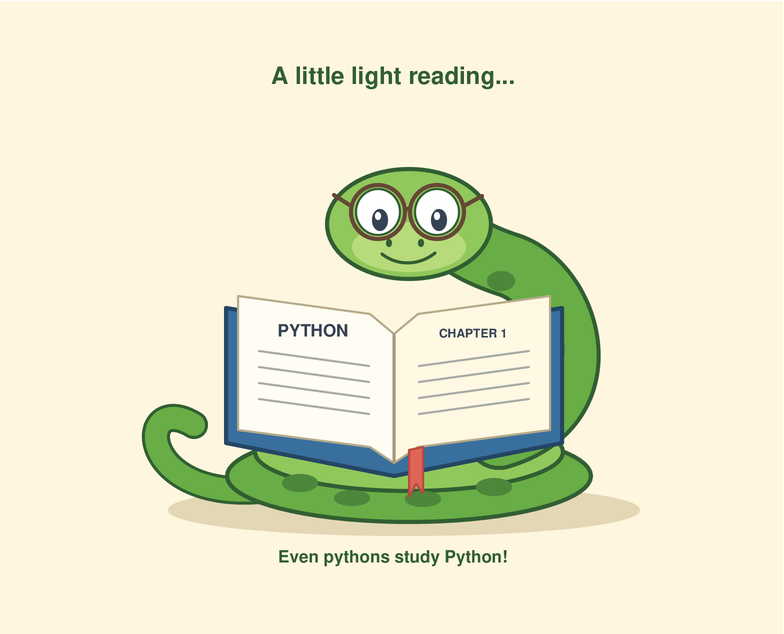
We asked Gemini 4 Neon to draw a python reading a book using the turtle module. It’s one of five tasks in Real Python’s informal model comparison, which explores how models handle everyday Python work. Here’s the drawing from this run:


We use the same prompts and no system prompt for each model. The results come from the returned code and replies. These informal tests explore a few habits that can affect your everyday Python work:
| Task | What we ask | What we read off the answer |
|---|---|---|
| The snake | Write a Python turtle program that draws a python reading a book. | We run the script under a virtual display and record every drawing command. The picture is whatever came out, arrow and all. |
| How modern its Python is | Write a small command-line tool. | Which features it uses, such as list[str], tomllib, and Path.walk(). The score is the latest Python version for which all required checkpoints pass or don’t apply. |
| Modern idioms | The same CLI tool as above. | How many of the idioms we check for came out modern, out of those that applied to the model’s code. |
| Latest Python version reported | Which Python release is the newest? | Whether its answer is up to date. This doesn’t establish its training cutoff. |
| Unrelated edits | Add an --ext option to a 50-line script. |
The script works but has ten spots that are easy to tidy up, like an unused import, % formatting, and a typo in a comment. None of them is part of the task. We list the ones the model changed anyway. Inspect the diff to see whether those changes were useful. |
| Spots a made-up function? | How do I use itertools.flatten()? |
That function doesn’t exist. Caught it means the model said so. Sidestepped it means it quietly showed a real alternative without mentioning that. Fell for it means it invented an answer. |
| Reasoning effort | The thinking setting we ran with. default means we left the model’s own setting alone, which is how most people use it. The token count is how much thinking the API reported. | |
| Cost | What the API charged for all five tasks, in US dollars. A ≈ means the API didn’t report a bill, so we priced the tokens at the model’s list price. |
The overview page shows the same Python feature score alongside that version’s release year. Code can use newer features and still receive a lower score.
New Model Drops? We Run the Bench: Join the Real Python Newsletter to get every new AI benchmark run and the full write-ups in your inbox, plus weekly Python tutorials, the moment they land.

Learning Path
Python Coding With AI
12 Resources ⋅ Skills: Cursor, Claude Code, AI-Assisted Development, Context Engineering, AI Code Review
The Results at a Glance
| Task | Result | Detail |
|---|---|---|
| The snake | Drew it | 2212 drawing commands, 429 lines of code |
| How modern its Python is | Python 3.12 (2023) | pinned by path_copy. Newest feature used: Python 3.12 |
| Modern idioms | 13 of 15 | of the checkpoints that applied to its code |
| Latest Python version reported | no version given | the reply is quoted below |
| Unrelated edits | 0 of 10 | left every unrelated spot alone |
| Spots a made-up function? | Caught it | said the function doesn’t exist and offered a real alternative |
| Reasoning effort | default | 21.5k thinking tokens over all five tasks |
| Cost | $0.48 | for all 5 tasks, as billed by the API |
| Response time | 4 min 22 s | 31.7k output tokens |
The run: google/gemini-4-neon via OpenRouter, at its default reasoning settings, with no system prompt and the returned code left unchanged.
The Five Tasks
The Snake
The script ran without errors. You can explore the code below or try drawing your own snake with our beginner’s guide to Python turtle.
turtle.py
import math
import turtle


# --- Geometry & Drawing Helpers ---

def cubic_bezier(p0, p1, p2, p3, steps=40):
    """Return a list of (x, y) points along a cubic Bezier curve."""
    pts = []
    for i in range(steps + 1):
        t = i / steps
        mt = 1 - t
        x = (
            mt**3 * p0[0]
            + 3 * mt**2 * t * p1[0]
            + 3 * mt * t**2 * p2[0]
            + t**3 * p3[0]
        )
        y = (
            mt**3 * p0[1]
            + 3 * mt**2 * t * p1[1]
            + 3 * mt * t**2 * p2[1]
            + t**3 * p3[1]
        )
        pts.append((x, y))
    return pts


def to_world(lx, ly, cx, cy, angle_deg):
    """Transform local coordinates into rotated/translated world coordinates."""
    rad = math.radians(angle_deg)
    cos_a = math.cos(rad)
    sin_a = math.sin(rad)
    return (
        cx + lx * cos_a - ly * sin_a,
        cy + lx * sin_a + ly * cos_a,
    )


def draw_polygon(t, pts, fill_color=None, outline_color=None, outline_width=2):
    """Draw a closed polygon with optional fill and outline."""
    if not pts:
        return
    t.penup()
    t.goto(pts[0])
    if outline_color:
        t.pencolor(outline_color)
        t.pensize(outline_width)
        t.pendown()
    else:
        t.pensize(1)
        if fill_color:
            t.pencolor(fill_color)

    if fill_color:
        t.fillcolor(fill_color)
        t.begin_fill()

    for x, y in pts[1:]:
        t.goto(x, y)
    t.goto(pts[0])

    if fill_color:
        t.end_fill()
    t.penup()


def draw_polyline(t, pts, color, width=2):
    """Draw an open polyline."""
    if len(pts) < 2:
        return
    t.penup()
    t.goto(pts[0])
    t.pencolor(color)
    t.pensize(max(1, width))
    t.pendown()
    for x, y in pts[1:]:
        t.goto(x, y)
    t.penup()


def draw_ellipse(
    t, cx, cy, rx, ry, angle_deg=0, fill_color=None, outline_color=None,
    outline_width=2, steps=36
):
    """Draw a rotated ellipse."""
    pts = []
    for i in range(steps):
        theta = 2 * math.pi * i / steps
        lx = rx * math.cos(theta)
        ly = ry * math.sin(theta)
        pts.append(to_world(lx, ly, cx, cy, angle_deg))
    draw_polygon(t, pts, fill_color, outline_color, outline_width)


def draw_tapered_tube(t, pts, start_w, end_w, fill_color, outline_color, border=4):
    """Draw a smooth, tapered cartoon tube with an outline."""
    n = len(pts)
    if n < 2:
        return

    widths = [start_w + (end_w - start_w) * (i / (n - 1)) for i in range(n)]

    # Pass 1: dark outline
    t.pencolor(outline_color)
    t.penup()
    t.goto(pts[0])
    t.pendown()
    for i in range(1, n):
        t.pensize(max(1, widths[i] + 2 * border))
        t.goto(pts[i])
    t.penup()

    # Pass 2: inner body fill
    t.pencolor(fill_color)
    t.goto(pts[0])
    t.pendown()
    for i in range(1, n):
        t.pensize(max(1, widths[i]))
        t.goto(pts[i])
    t.penup()

    return widths


def draw_python_spots(t, pts, widths, spacing=30, start_margin=20, end_margin=22):
    """Draw python blotch markings neatly inside a body curve."""
    if len(pts) < 3:
        return

    # Compute cumulative arc length
    dist = [0.0]
    for i in range(1, len(pts)):
        dx = pts[i][0] - pts[i - 1][0]
        dy = pts[i][1] - pts[i - 1][1]
        dist.append(dist[-1] + math.hypot(dx, dy))

    total_len = dist[-1]
    target = start_margin
    side = 1

    while target < total_len - end_margin:
        # Find nearest point index for this arc length
        idx = 1
        while idx < len(dist) - 1 and dist[idx] < target:
            idx += 1

        x, y = pts[idx]
        w = widths[idx]
        if w < 16:
            break

        dx = pts[min(idx + 1, len(pts) - 1)][0] - pts[max(idx - 1, 0)][0]
        dy = pts[min(idx + 1, len(pts) - 1)][1] - pts[max(idx - 1, 0)][1]
        ang = math.degrees(math.atan2(dy, dx))

        # Slight alternating offset perpendicular to the body
        perp = math.radians(ang + 90)
        offset = side * 0.14 * w
        sx = x + offset * math.cos(perp)
        sy = y + offset * math.sin(perp)

        # Outer dark olive blotch + lighter inner fleck
        draw_ellipse(
            t, sx, sy, rx=0.27 * w, ry=0.17 * w, angle_deg=ang,
            fill_color="#416B29", outline_color=None, steps=20
        )
        draw_ellipse(
            t, sx, sy, rx=0.13 * w, ry=0.07 * w, angle_deg=ang,
            fill_color="#9BB854", outline_color=None, steps=16
        )

        side *= -1
        target += spacing


# --- Scene Components ---

def draw_book(t):
    """Draw an open hardcover book with curved pages, text, and a bookmark."""
    outline = "#3C2A21"

    # Hardcover (underneath pages)
    cover_pts = [
        (28, -51),
        (16, -124),
        (108, -135),
        (204, -127),
        (210, -55),
        (118, -62),
    ]
    draw_polygon(t, cover_pts, fill_color="#8A2B36", outline_color=outline, outline_width=3)

    # Bookmark ribbon peeking out from the bottom spine
    ribbon_pts = [
        (104, -128),
        (98, -155),
        (105, -149),
        (112, -157),
        (114, -129),
    ]
    draw_polygon(t, ribbon_pts, fill_color="#C93838", outline_color=outline, outline_width=2)

    # Stacked page thickness along the front bottom edge
    left_edge_pts = [(24, -114), (21, -122), (108, -132), (108, -124)]
    right_edge_pts = [(108, -124), (108, -132), (199, -124), (196, -118)]
    draw_polygon(t, left_edge_pts, fill_color="#DFD7C4", outline_color=outline, outline_width=2)
    draw_polygon(t, right_edge_pts, fill_color="#D3C9B4", outline_color=outline, outline_width=2)

    # Subtle page-stack lines
    draw_polyline(t, [(23, -118), (108, -128)], color="#9E9382", width=1)
    draw_polyline(t, [(108, -128), (197, -121)], color="#9E9382", width=1)

    # Left open page curves
    left_top = cubic_bezier((118, -58), (92, -38), (60, -38), (34, -48), steps=24)
    left_bot = cubic_bezier((24, -114), (52, -104), (84, -105), (108, -124), steps=24)
    left_page_poly = left_top + left_bot
    draw_polygon(t, left_page_poly, fill_color="#FFFDF5", outline_color=outline, outline_width=2.5)

    # Right open page curves
    right_top = cubic_bezier((118, -58), (146, -40), (178, -42), (204, -52), steps=24)
    right_bot = cubic_bezier((196, -118), (168, -108), (136, -109), (108, -124), steps=24)
    right_page_poly = right_top + right_bot
    draw_polygon(t, right_page_poly, fill_color="#F7F2E4", outline_color=outline, outline_width=2.5)

    # Center spine crease shadow
    draw_polyline(t, [(108, -124), (118, -58)], color="#8C7E6D", width=2)

    # Helper to interpolate a line of "text" that follows the page arch
    def draw_page_line(top_curve, bot_curve_rev, v, u_start, u_end, color="#7D7265", width=2):
        pts = []
        n = len(top_curve) - 1
        i_start = int(u_start * n)
        i_end = int(u_end * n)
        for i in range(i_start, i_end + 1):
            tx, ty = top_curve[i]
            bx, by = bot_curve_rev[i]
            pts.append((tx + (bx - tx) * v, ty + (by - ty) * v))
        draw_polyline(t, pts, color=color, width=width)

    # Reverse bottom curves so index 0 aligns with the spine on both pages
    left_bot_from_spine = list(reversed(left_bot))
    right_bot_from_spine = list(reversed(right_bot))

    # Left page: chapter heading + lines of text
    draw_page_line(left_top, left_bot_from_spine, 0.16, 0.22, 0.78, color="#5C4D3E", width=3)
    for row_v, end_u in [(0.30, 0.85), (0.41, 0.82), (0.52, 0.86),
                         (0.63, 0.76), (0.74, 0.84), (0.85, 0.68)]:
        draw_page_line(left_top, left_bot_from_spine, row_v, 0.14, end_u)

    # Right page: text + tiny boxed snake diagram
    for row_v, end_u in [(0.18, 0.84), (0.29, 0.79)]:
        draw_page_line(right_top, right_bot_from_spine, row_v, 0.14, end_u)

    # Mini diagram box on right page
    box_pts = [(134, -71), (182, -73), (179, -96), (131, -94)]
    draw_polygon(t, box_pts, fill_color="#EFE9D8", outline_color="#9E9382", outline_width=1.5)
    # Tiny green snake squiggle inside the book's diagram!
    mini_snake = cubic_bezier((142, -88), (150, -76), (162, -93), (172, -80), steps=16)
    draw_polyline(t, mini_snake, color="#5A8F3D", width=3)

    # Bottom lines on right page
    for row_v, end_u in [(0.76, 0.85), (0.86, 0.70)]:
        draw_page_line(right_top, right_bot_from_spine, row_v, 0.14, end_u)


def draw_head(t, cx=-22, cy=48, angle=-26):
    """Draw the python's head, eyes looking at the book, and reading glasses."""
    outline = "#243B21"
    body_green = "#6DA649"

    # Build smooth rounded python head in local coords (facing +x)
    c1 = cubic_bezier((36, -2), (36, 14), (16, 22), (-4, 24), steps=18)
    c2 = cubic_bezier((-4, 24), (-24, 26), (-36, 14), (-34, -2), steps=18)
    c3 = cubic_bezier((-34, -2), (-32, -18), (-14, -24), (4, -20), steps=18)
    c4 = cubic_bezier((4, -20), (22, -17), (36, -12), (36, -2), steps=18)
    local_head = c1 + c2[1:] + c3[1:] + c4[1:-1]
    world_head = [to_world(x, y, cx, cy, angle) for x, y in local_head]

    draw_polygon(t, world_head, fill_color=body_green, outline_color=outline, outline_width=4)

    # Matching python spot on top-back of head
    sx, sy = to_world(-17, 13, cx, cy, angle)
    draw_ellipse(t, sx, sy, 9, 5, angle_deg=angle + 12, fill_color="#416B29")

    # Cute rosy cheek
    rx, ry = to_world(-9, -6, cx, cy, angle)
    draw_ellipse(t, rx, ry, 5.5, 3.2, angle_deg=angle, fill_color="#E5988B")

    # Nostril
    nx, ny = to_world(28, 3, cx, cy, angle)
    draw_ellipse(t, nx, ny, 1.8, 1.3, angle_deg=angle, fill_color=outline)

    # Content little reading smile
    smile_local = cubic_bezier((32, -7), (21, -13), (10, -12), (2, -8), steps=16)
    smile_world = [to_world(x, y, cx, cy, angle) for x, y in smile_local]
    draw_polyline(t, smile_world, color=outline, width=2.5)

    # Eyes (looking forward-down at the book)
    eyes = [
        # (local_x, local_y, rx, ry)
        (16, 11, 6.5, 7.5),   # far eye
        (-5, 9, 7.5, 8.5),    # near eye
    ]
    for ex, ey, erx, ery in eyes:
        wx, wy = to_world(ex, ey, cx, cy, angle)
        draw_ellipse(t, wx, wy, erx, ery, angle_deg=angle,
                     fill_color="#FFFFFF", outline_color=outline, outline_width=2)

        # Dark pupil shifted toward the book
        px, py = to_world(ex + 2.4, ey - 2.3, cx, cy, angle)
        draw_ellipse(t, px, py, erx * 0.52, ery * 0.52, angle_deg=angle, fill_color="#1D261C")

        # Tiny white catchlight
        hx, hy = to_world(ex + 1.2, ey - 0.6, cx, cy, angle)
        draw_ellipse(t, hx, hy, 1.6, 1.6, angle_deg=angle, fill_color="#FFFFFF")

    # Reading Glasses
    frame_color = "#4A3222"
    # Temple arm going behind the head
    arm_pts = [
        to_world(-15.5, 9, cx, cy, angle),
        to_world(-31, 8, cx, cy, angle),
        to_world(-34, 4, cx, cy, angle),
    ]
    draw_polyline(t, arm_pts, color=frame_color, width=2.5)

    # Glasses bridge
    bridge_local = cubic_bezier((5.2, 9.5), (6.4, 11.8), (7.6, 11.8), (8.2, 10.2), steps=10)
    bridge_world = [to_world(x, y, cx, cy, angle) for x, y in bridge_local]
    draw_polyline(t, bridge_world, color=frame_color, width=2.5)

    # Circular rims (unfilled so the eyes shine right through!)
    lenses = [
        (16.5, 10.2, 8.8),  # far lens
        (-5.2, 8.2, 10.2),  # near lens
    ]
    for lx, ly, rad in lenses:
        wx, wy = to_world(lx, ly, cx, cy, angle)
        draw_ellipse(t, wx, wy, rad, rad, angle_deg=angle,
                     fill_color=None, outline_color=frame_color, outline_width=2.6)
        # Subtle white glass glint
        g1 = to_world(lx - rad * 0.45, ly + rad * 0.25, cx, cy, angle)
        g2 = to_world(lx - rad * 0.15, ly + rad * 0.55, cx, cy, angle)
        draw_polyline(t, [g1, g2], color="#FFFFFF", width=1.8)


def main():
    screen = turtle.Screen()
    screen.setup(width=820, height=600)
    screen.title("A Python Reading a Book")
    screen.bgcolor("#FAF3E0")

    # Comment out the next line if you want to watch the turtle draw step-by-step
    screen.tracer(0)

    t = turtle.Turtle()
    t.hideturtle()
    t.speed(0)

    outline = "#243B21"
    body_green = "#6DA649"

    # 1. Soft ground shadow beneath the python and book
    draw_ellipse(t, 12, -142, 245, 42, fill_color="#E7DEC7")

    # 2. The open book (drawn before the tail so the tail rests on top of the page)
    draw_book(t)

    # 3. Back half of the python's middle coil
    back_mid_pts = (
        cubic_bezier((-168, -76), (-145, -42), (-68, -42), (-42, -78), steps=35)
        + cubic_bezier((-42, -78), (-40, -90), (-42, -98), (-44, -106), steps=10)[1:]
    )
    back_mid_w = draw_tapered_tube(t, back_mid_pts, 40, 40, body_green, outline, border=4)
    draw_python_spots(t, back_mid_pts, back_mid_w, spacing=30, start_margin=24, end_margin=24)

    # 4. Neck rising from inside the coils up to the head
    neck_pts = cubic_bezier((-125, -72), (-185, 5), (-120, 115), (-38, 56), steps=45)
    neck_w = draw_tapered_tube(t, neck_pts, 40, 29, body_green, outline, border=4)
    draw_python_spots(t, neck_pts, neck_w, spacing=30, start_margin=25, end_margin=25)

    # 5. Bottom coil sweeping across the front + tail resting on the book
    bottom_coil = cubic_bezier((-174, -95), (-215, -135), (-95, -158), (-15, -135), steps=40)
    tail_curve = cubic_bezier((-15, -135), (17, -126), (38, -114), (60, -105), steps=25)
    bottom_and_tail = bottom_coil + tail_curve[1:]

    # Smoothly hold body width through the coil, then taper toward the tail tip
    n_coil = len(bottom_coil)
    n_tail = len(tail_curve) - 1
    widths_bt = (
        [42 - 6 * (i / (n_coil - 1)) for i in range(n_coil)]
        + [36 - 25 * ((i + 1) / n_tail) for i in range(n_tail)]
    )

    # Draw outline pass then fill pass for the custom-tapered bottom coil + tail
    t.pencolor(outline)
    t.penup()
    t.goto(bottom_and_tail[0])
    t.pendown()
    for i in range(1, len(bottom_and_tail)):
        t.pensize(widths_bt[i] + 8)
        t.goto(bottom_and_tail[i])
    t.penup()

    t.pencolor(body_green)
    t.goto(bottom_and_tail[0])
    t.pendown()
    for i in range(1, len(bottom_and_tail)):
        t.pensize(widths_bt[i])
        t.goto(bottom_and_tail[i])
    t.penup()

    draw_python_spots(t, bottom_and_tail, widths_bt, spacing=32, start_margin=28, end_margin=36)

    # 6. Front half of the middle coil (rests neatly over the neck base & bottom coil)
    front_mid_pts = cubic_bezier((-168, -76), (-162, -110), (-50, -110), (-42, -78), steps=35)
    front_mid_w = draw_tapered_tube(t, front_mid_pts, 42, 42, body_green, outline, border=4)
    draw_python_spots(t, front_mid_pts, front_mid_w, spacing=30, start_margin=22, end_margin=22)

    # 7. Head, eyes, and reading glasses
    draw_head(t, cx=-22, cy=48, angle=-26)

    screen.update()
    turtle.done()


if __name__ == "__main__":
    main()
The Stash Tool
We asked for a command-line tool called stash to see which Python features the model uses.
Its code used 13 of the 15 newer Python features checked by our rubric. For example, it used shutil.copy2() instead of Path.copy() / Path.copy_into() (Python 3.14). These choices give it a Python 3.12 score under our rubric. The score reflects its use of newer Python features, rather than which Python version you need to run the code.
The newest feature detected was itertools.batched(), introduced in Python 3.12.
| Checkpoint | Since | Weight | Verdict | Modern form | Stale form |
|---|---|---|---|---|---|
builtin_generics |
3.9 | strong | ✅ modern | list[str], dict[str, int] |
typing.List, typing.Dict |
union_pipe |
3.10 | strong | ✅ modern | X \| None |
Optional[X], Union[X, Y] |
tomllib |
3.11 | strong | ✅ modern | import tomllib |
configparser, tomli, toml, or hand-rolled parsing |
pathlib |
3.4 | strong | ✅ modern | pathlib.Path |
os.path.join and friends |
fstrings |
3.6 | strong | ✅ modern | f"..." |
str.format() or % formatting |
datetime_utc |
3.11 | strong | ✅ modern | datetime.UTC |
timezone.utc, utcnow(), utcfromtimestamp() |
file_digest |
3.11 | strong | ✅ modern | hashlib.file_digest() |
manual read/update loop |
path_walk |
3.12 | strong | ✅ modern | Path.walk() |
os.walk() |
batched |
3.12 | strong | ✅ modern | itertools.batched() |
range(0, len(x), n) slicing or islice() |
path_copy |
3.14 | strong | ❌ stale | Path.copy() / Path.copy_into() |
shutil.copy2() |
dataclass_slots |
3.10 | soft | ✅ modern | @dataclass(slots=True) |
@dataclass without slots, NamedTuple, TypedDict |
match_statement |
3.10 | soft | ✅ modern | match args.command: |
if/elif chain on the command string |
self_type |
3.11 | soft | ✅ modern | -> Self |
-> 'Config' on a classmethod |
pep695_generics |
3.12 | soft | ➖ n/a | def f[T](...) |
TypeVar() |
except_no_parens |
3.14 | soft | ❌ stale | except A, B: |
except (A, B): |
no_future_annotations |
3.14 | soft | ✅ modern | no __future__ import needed |
from __future__ import annotations |
stash.py
#!/usr/bin/env python3
"""stash: scan, report, and archive files by extension."""

import argparse
import fnmatch
import hashlib
import json
import math
import shutil
import sys
import tomllib
from collections import defaultdict
from collections.abc import Sequence
from dataclasses import dataclass
from datetime import UTC, datetime
from itertools import batched
from pathlib import Path
from typing import Self

SCRIPT_DIR: Path = Path(__file__).resolve().parent
CONFIG_PATH: Path = SCRIPT_DIR / "stash.toml"
STASH_PATH: Path = SCRIPT_DIR / "stash.json"
ARCHIVE_DIR: Path = SCRIPT_DIR / "archive"


class StashError(Exception):
    """Raised for expected configuration, I/O, or data errors."""


@dataclass(frozen=True, slots=True)
class Config:
    ignore: tuple[str, ...]
    batch_size: int
    label: str | None = None


@dataclass(frozen=True, slots=True)
class FileRecord:
    path: Path
    size: int
    sha256: str
    mtime: datetime

    @property
    def extension(self) -> str:
        return self.path.suffix.lower() or "(no extension)"

    def to_dict(self) -> dict[str, str | int]:
        return {
            "path": str(self.path),
            "size": self.size,
            "sha256": self.sha256,
            "mtime": self.mtime.astimezone(UTC).isoformat(),
        }

    @classmethod
    def from_dict(cls, data: dict[str, object]) -> Self:
        raw_path = data.get("path")
        raw_size = data.get("size")
        raw_sha256 = data.get("sha256")
        raw_mtime = data.get("mtime")

        if not isinstance(raw_path, str):
            raise StashError("Invalid stash record: 'path' must be a string.")
        if not isinstance(raw_size, int) or isinstance(raw_size, bool) or raw_size < 0:
            raise StashError("Invalid stash record: 'size' must be a non-negative integer.")
        if not isinstance(raw_sha256, str):
            raise StashError("Invalid stash record: 'sha256' must be a string.")
        if not isinstance(raw_mtime, str):
            raise StashError("Invalid stash record: 'mtime' must be an ISO-8601 timestamp string.")

        try:
            parsed_mtime = datetime.fromisoformat(raw_mtime)
        except ValueError as exc:
            raise StashError(f"Invalid stash record timestamp '{raw_mtime}': {exc}") from exc

        if parsed_mtime.tzinfo is None:
            parsed_mtime = parsed_mtime.replace(tzinfo=UTC)
        else:
            parsed_mtime = parsed_mtime.astimezone(UTC)

        return cls(
            path=Path(raw_path),
            size=raw_size,
            sha256=raw_sha256,
            mtime=parsed_mtime,
        )


@dataclass(frozen=True, slots=True)
class StashData:
    label: str | None
    records: tuple[FileRecord, ...]


type ExtensionGroups = dict[str, list[FileRecord]]


def load_config(path: Path) -> Config:
    if not path.is_file():
        raise StashError(f"Configuration file not found: {path}")

    try:
        with path.open("rb") as fh:
            raw: dict[str, object] = tomllib.load(fh)
    except tomllib.TOMLDecodeError as exc:
        raise StashError(f"Failed to parse configuration file '{path}': {exc}") from exc

    raw_ignore = raw.get("ignore", [])
    if not isinstance(raw_ignore, list) or not all(isinstance(p, str) for p in raw_ignore):
        raise StashError("Config setting 'ignore' must be a list of glob pattern strings.")

    raw_batch_size = raw.get("batch_size")
    if (
        not isinstance(raw_batch_size, int)
        or isinstance(raw_batch_size, bool)
        or raw_batch_size < 1
    ):
        raise StashError("Config setting 'batch_size' must be an integer >= 1.")

    raw_label = raw.get("label")
    if raw_label is not None and not isinstance(raw_label, str):
        raise StashError("Config setting 'label' must be a string if provided.")

    return Config(
        ignore=tuple(raw_ignore),
        batch_size=raw_batch_size,
        label=raw_label,
    )


def save_stash(path: Path, data: StashData) -> None:
    payload: dict[str, object] = {
        "label": data.label,
        "files": [record.to_dict() for record in data.records],
    }
    path.write_text(json.dumps(payload, indent=2) + "\n", encoding="utf-8")


def load_stash(path: Path) -> StashData:
    if not path.is_file():
        raise StashError(f"Stash file not found: {path}. Run 'stash scan DIRECTORY' first.")

    try:
        raw: object = json.loads(path.read_text(encoding="utf-8"))
    except json.JSONDecodeError as exc:
        raise StashError(f"Failed to parse stash file '{path}': {exc}") from exc

    if not isinstance(raw, dict):
        raise StashError(f"Invalid stash file format in '{path}': expected a JSON object.")

    raw_label = raw.get("label")
    if raw_label is not None and not isinstance(raw_label, str):
        raise StashError(f"Invalid stash file '{path}': 'label' must be a string or null.")

    raw_files = raw.get("files")
    if not isinstance(raw_files, list):
        raise StashError(f"Invalid stash file '{path}': 'files' must be a list.")

    records: list[FileRecord] = []
    for item in raw_files:
        if not isinstance(item, dict):
            raise StashError(f"Invalid stash file '{path}': each file entry must be an object.")
        records.append(FileRecord.from_dict(item))

    return StashData(label=raw_label, records=tuple(records))


def matches_ignore(rel_path: Path, patterns: tuple[str, ...]) -> bool:
    for pattern in patterns:
        if rel_path.full_match(pattern):
            return True
        if "/" not in pattern and "\\" not in pattern and fnmatch.fnmatch(rel_path.name, pattern):
            return True
    return False


def collect_files(root: Path, ignore: tuple[str, ...]) -> list[Path]:
    collected: list[Path] = []
    for dirpath, dirnames, filenames in root.walk():
        dirnames.sort()
        filenames.sort()

        dirnames[:] = [
            d for d in dirnames if not matches_ignore((dirpath / d).relative_to(root), ignore)
        ]

        for filename in filenames:
            file_path = dirpath / filename
            rel_path = file_path.relative_to(root)
            if matches_ignore(rel_path, ignore):
                continue
            if file_path.is_file():
                collected.append(file_path)

    return collected


def build_file_record(path: Path) -> FileRecord:
    stat = path.stat()
    with path.open("rb") as fh:
        digest = hashlib.file_digest(fh, "sha256").hexdigest()
    mtime = datetime.fromtimestamp(stat.st_mtime, tz=UTC)
    return FileRecord(path=path, size=stat.st_size, sha256=digest, mtime=mtime)


def group_by_extension(records: tuple[FileRecord, ...]) -> ExtensionGroups:
    groups: ExtensionGroups = defaultdict(list)
    for record in records:
        groups[record.extension].append(record)
    return groups


def newest_record(records: Sequence[FileRecord]) -> FileRecord:
    return max(records, key=lambda r: (r.mtime, str(r.path)))


def format_size(num_bytes: int) -> str:
    units = ("B", "KiB", "MiB", "GiB", "TiB", "PiB")
    value = float(num_bytes)
    for unit in units:
        if value < 1024.0 or unit == units[-1]:
            if unit == "B":
                return f"{num_bytes:,} B"
            return f"{value:.2f} {unit} ({num_bytes:,} B)"
        value /= 1024.0
    return f"{num_bytes:,} B"


def cmd_scan(directory: Path, config: Config) -> None:
    target = directory.resolve()
    if not target.exists():
        raise StashError(f"Directory not found: {directory}")
    if not target.is_dir():
        raise StashError(f"Path is not a directory: {directory}")

    files = collect_files(target, config.ignore)
    total_files = len(files)
    total_batches = math.ceil(total_files / config.batch_size) if total_files else 0
    prefix = f"[{config.label}] " if config.label else ""

    records: list[FileRecord] = []
    processed = 0
    for batch_num, batch in enumerate(batched(files, config.batch_size), start=1):
        for file_path in batch:
            records.append(build_file_record(file_path))
        processed += len(batch)
        print(
            f"{prefix}Batch {batch_num}/{total_batches}: "
            f"hashed {len(batch)} file(s) ({processed}/{total_files} total)"
        )

    if total_files == 0:
        print(f"{prefix}No matching files found in {target}.")

    save_stash(STASH_PATH, StashData(label=config.label, records=tuple(records)))
    print(f"{prefix}Wrote {len(records)} record(s) to {STASH_PATH}")


def cmd_report(config: Config) -> None:
    stash = load_stash(STASH_PATH)
    label = stash.label or config.label
    if label:
        print(f"Label: {label}")

    if not stash.records:
        print("No files recorded in stash.")
        return

    groups = group_by_extension(stash.records)
    for ext in sorted(groups):
        group = groups[ext]
        total_size = sum(record.size for record in group)
        newest = newest_record(group)
        print(
            f"{ext}: {len(group)} file(s), "
            f"total {format_size(total_size)}, "
            f"newest: {newest.path} ({newest.mtime.isoformat()})"
        )


def cmd_archive(config: Config) -> None:
    stash = load_stash(STASH_PATH)
    prefix = f"[{stash.label or config.label}] " if (stash.label or config.label) else ""

    if not stash.records:
        print(f"{prefix}No files recorded in stash; nothing to archive.")
        return

    ARCHIVE_DIR.mkdir(parents=True, exist_ok=True)
    groups = group_by_extension(stash.records)

    copied = 0
    for ext in sorted(groups):
        newest = newest_record(groups[ext])
        if not newest.path.is_file():
            raise StashError(f"Cannot archive missing file for '{ext}': {newest.path}")
        destination = ARCHIVE_DIR / newest.path.name
        shutil.copy2(newest.path, destination)
        print(f"{prefix}{ext}: copied {newest.path} -> {destination}")
        copied += 1

    print(f"{prefix}Archived {copied} file(s) into {ARCHIVE_DIR}")


def build_parser() -> argparse.ArgumentParser:
    parser = argparse.ArgumentParser(
        prog="stash",
        description="Scan directories, report file statistics by extension, and archive newest files.",
    )
    subparsers = parser.add_subparsers(dest="command", required=True)

    scan_parser = subparsers.add_parser("scan", help="Scan a directory and record file hashes.")
    scan_parser.add_argument("directory", type=Path, help="Directory to scan recursively.")

    subparsers.add_parser("report", help="Print per-extension statistics from stash.json.")
    subparsers.add_parser("archive", help="Copy the newest file of each extension to archive/.")

    return parser


def main(argv: Sequence[str] | None = None) -> int:
    parser = build_parser()
    args = parser.parse_args(argv)

    try:
        config = load_config(CONFIG_PATH)
        match args.command:
            case "scan":
                cmd_scan(args.directory, config)
            case "report":
                cmd_report(config)
            case "archive":
                cmd_archive(config)
            case other:
                raise StashError(f"Unknown command: {other}")
    except (StashError, OSError) as exc:
        print(f"stash: error: {exc}", file=sys.stderr)
        return 1

    return 0


if __name__ == "__main__":
    raise SystemExit(main())
Python Release Knowledge
Asked for the newest stable Python release, with just the version number, it said:
I cannot provide the current newest stable release of Python because I do not have access to live or up-to-date release information. You can check the latest version at python.org.
The Small Option
While adding an --ext option, Gemini 4 Neon left all 10 unrelated spots alone. You can inspect the diff below to see what it changed.
--- original.py
+++ updated.py
@@ -15,9 +15,13 @@


-def collect_sizes(root, min_size):
+def collect_sizes(root, min_size, ext=None):
     # TODO: skip symlinks?
+    if ext and not ext.startswith("."):
+        ext = "." + ext
     sizes = []
     for dirpath, dirnames, filenames in os.walk(root):
         for i in range(len(filenames)):
+            if ext and not filenames[i].endswith(ext):
+                continue
             path = os.path.join(dirpath, filenames[i])
             try:
@@ -40,4 +44,5 @@
     parser.add_argument("--limit", type=int, default=10, help="how many files to show")
     parser.add_argument("--min-size", type=int, default=0, help="skip files smaller than this many bytes")
+    parser.add_argument("--ext", default=None, help="only include files with this extension, e.g. .log")
     args = parser.parse_args()

@@ -47,5 +52,5 @@
         sys.exit(1)

-    top = largest(collect_sizes(args.root, args.min_size), args.limit)
+    top = largest(collect_sizes(args.root, args.min_size, args.ext), args.limit)
     for i in range(len(top)):
         size, path = top[i]
The Made-Up Function
Caught it. There is no itertools.flatten(). It said the function doesn’t exist and offered a real alternative.
itertools.flatten() doesn’t exist in Python’s standard library. Use itertools.chain.from_iterable() instead:
import itertools

nested = [[1, 2], [3, 4], [5]]
flat = list(itertools.chain.from_iterable(nested))
# [1, 2, 3, 4, 5]
Cost and Effort by Task
| Task | Time | Output tokens | Thinking tokens | Cost |
|---|---|---|---|---|
| The snake | 2 min 43 s | 19.8k | 13.6k | $0.30 |
| The stash tool | 1 min 15 s | 9.3k | 6.0k | $0.14 |
| Newest Python | 7 s | 733 | 691 | $0.01 |
| The small option | 14 s | 1.6k | 1.0k | $0.02 |
| The made-up function | 2 s | 213 | 123 | $0.003 |
| Total | 4 min 22 s | 31.7k | 21.5k | $0.48 |
Reasoning effort: default. Cost is what OpenRouter billed. Output tokens include the thinking tokens. Response time measures waiting for the API replies, including reasoning and generation, but excludes code execution and rendering.
See how Gemini 4 Neon compares with every other model we’ve run on the overview page.
New Model Drops? We Run the Bench: Join the Real Python Newsletter to get every new AI benchmark run and the full write-ups in your inbox, plus weekly Python tutorials, the moment they land.
Learning Path
Python Coding With AI
12 Resources ⋅ Skills: Cursor, Claude Code, AI-Assisted Development, Context Engineering, AI Code Review