

When you ask an AI assistant to do something, like turning a folder of receipts into a spreadsheet, it feels like you’re talking to one thing. Behind the scenes, several parts are working together, and knowing which part does what helps you work out why a result went wrong.
Here’s what happens when you ask an assistant on your computer to turn a folder of receipts into a spreadsheet:
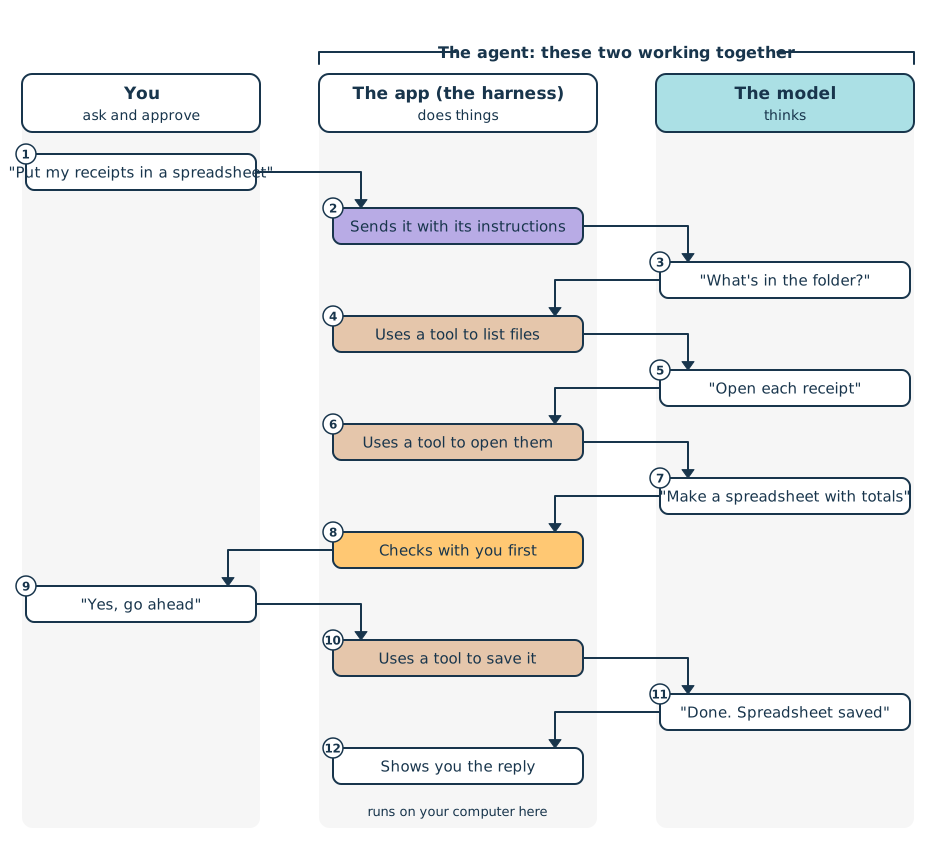
The app sits in the middle of every step. The model decides what should happen next, and the app carries it out, checking with you before it saves the spreadsheet.
The Parts
Whichever AI tool you use, the same handful of parts is working together:
- The model does the thinking. It reads what it’s given and writes a reply, or asks for something to be done. GPT, Claude, Gemini, and Grok are all families of models.
- The harness is the app around the model. It decides what the model gets to see, carries out the actions the model asks for, and checks with you when it should. The ChatGPT and Claude apps are harnesses, and you’ll learn more about them in Models and Harnesses.
- Tools are the single actions a harness can take for the model, like reading a file, searching the web, opening a website, or sending an email. The model can ask for a tool, but only the harness can use one.
- The agent is the model and the harness working together on a task over many steps. When your assistant goes off and works through your receipts, that’s an agent.
- Skills are written instructions for a particular kind of job, a bit like recipes. They help the agent do that job the same way every time.
- The computer it runs on is where all of this happens. Sometimes that’s your own computer, and sometimes it’s a computer in the cloud that belongs to the company. You’ll see why that matters in Where Is Your Agent Working?
In short, the model does the thinking, the harness carries out the actions, skills provide the instructions, and the work happens on a computer somewhere, which isn’t always yours.
Can you tell the parts apart?
Ready to Go Beyond the Chatbot?
Chatting with an AI is one thing. Having a coding agent build something for you is another. Our live agentic coding courses show you how, with tips and tricks from an experienced instructor along the way. Pick the edition for the tool you use: Claude Code or Codex.
No AI experience needed. You’ll want to be comfortable with the terminal and basic git.
Next: Models and Harnesses
