
Locked learning resources

Join us and get access to thousands of tutorials and a community of expert Pythonistas.

Unlock This Lesson

Locked learning resources

This lesson is for members only. Join us and get access to thousands of tutorials and a community of expert Pythonistas.

Unlock This Lesson

When the Result Is Wrong: Four Questions

Coming back after a break? Take a five-minute warm-up on Sections 1 to 4 before you start.

When an agent’s answer or finished work comes out wrong, these four questions help you find the cause:

  1. What was asked? Was your request clear, and did any instructions the agent followed, like a skill, say the right thing? Agents sometimes do a great job of solving a slightly different problem from the one you meant.
  2. What was it given? Were the files, data, and web pages it worked from the right ones? Check the dates, and look for anything out of date or cut off.
  3. What did it do? Did a tool fail partway while the agent carried on without telling you? Many apps let you open the list of steps an agent took, so you can scroll back through them and look.
  4. Where did it run? Did it work on your own computer or on its own computer in the cloud, and was it signed in to the accounts it needed? A file it saved in the cloud won’t be on your computer.

Each question points at a different part of the system from The Parts of an AI System:
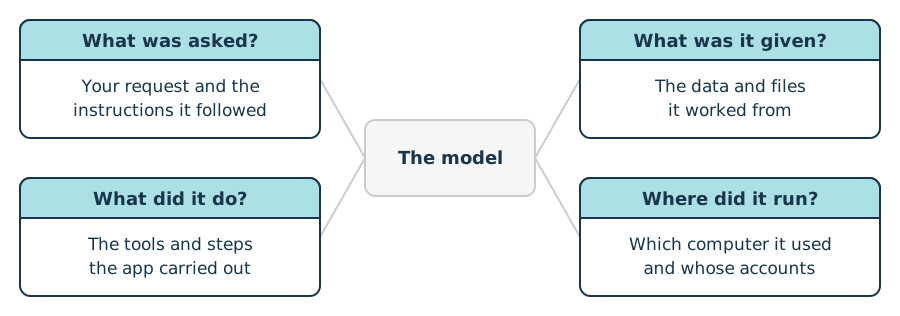
Four cards with a question in each header, two on the left and two on the right, joined by gray lines to a muted box labeled The model in the center.
Where Each Question Looks

Locked learning resources

Join us and get access to thousands of tutorials and a community of expert Pythonistas.

Unlock This Lesson

Already a member? Sign-In

Locked learning resources

The full lesson is for members only. Join us and get access to thousands of tutorials and a community of expert Pythonistas.

Unlock This Lesson

Already a member? Sign-In

00:00 When the Result Is Wrong: Four Questions.

00:04 When an agent’s answer or finished work comes out wrong, you want to find the cause. Four questions help. What was asked? What was it given? What did it do?

00:15 And where did it run? The first question is what was asked. Was your request clear? And did any instructions the agent followed, like a skill, say the right thing?

00:26 Agents sometimes do a great job of solving a slightly different problem from the one you meant. The second question is what it was given. Were the files, data, and web pages it worked from the right ones?

00:38 Check the dates. And look for anything that’s out of date, or cut off partway. The third question is what it did. Did a tool fail partway through, while the agent carried on without telling you?

00:50 Many apps let you open the list of steps an agent took. You can scroll back through them and look. The fourth question is where it ran. Did it work on your own computer, or on its own computer in the cloud?

01:03 And was it signed in to the accounts it needed? A file it saved in the cloud won’t be on your computer.

01:09 Each question points at a different part of the system. The first looks at your request, and the instructions the agent followed. The second looks at the data and files it worked from.

01:20 The third looks at the tools and steps the app carried out. And the fourth looks at which computer it used, and whose accounts.

01:28 Notice what’s left in the middle.

01:31 None of the four questions is about the model itself. A smarter model, working from the same request, files, tools, and computer, can easily make the same mistake.

01:41 That’s why switching models fixes only one kind of problem. If all four check out, the model’s reasoning may be the cause. Then a stronger model, or clearer instructions, may help.

01:53 So when a result is wrong, start with the parts around the model. Ask what was asked, what it was given, what it did, and where it ran. Below this video, you can try the four questions on a few cases.

02:05 For each one, pick the question you’d check first.

Become a Member to join the conversation.
