
Locked learning resources

Join us and get access to thousands of tutorials and a community of expert Pythonistas.

Unlock This Lesson

Locked learning resources

This lesson is for members only. Join us and get access to thousands of tutorials and a community of expert Pythonistas.

Unlock This Lesson

Subagents

Some agents split a big job between subagents. A subagent is another copy of the model doing its own part of the job, a bit like a helper the main agent brings in. When an app says it’s “starting several agents” or “researching in parallel,” each of those agents is a subagent. Some research modes in chat apps work this way, and so do many agents that take on long tasks.

What a Subagent Knows

Each subagent starts with an empty context. It doesn’t see your conversation or the files the main agent has already read, so it knows only what the main agent writes in the instructions it hands over. The subagent reads whatever it needs, does its part, and sends a short summary back:
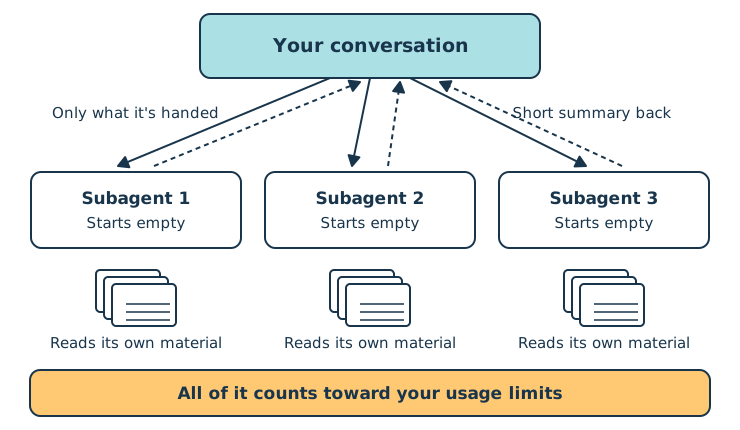
A box labeled Your conversation with arrows out to three boxes labeled Subagent 1, 2, and 3, each above a stack of pages, and a yellow bar along the bottom
Subagents Work Side by Side

Only that summary lands in your conversation. Everything the subagent read along the way stays in its own context, so your conversation stays shorter, and a shorter conversation uses less with every message and gets you better answers.

Locked learning resources

Join us and get access to thousands of tutorials and a community of expert Pythonistas.

Unlock This Lesson

Already a member? Sign-In

Locked learning resources

The full lesson is for members only. Join us and get access to thousands of tutorials and a community of expert Pythonistas.

Unlock This Lesson

Already a member? Sign-In

00:00 Subagents. Some agents split a big job between subagents.

00:06 A subagent is another copy of the model, doing its own part of the job. It’s a bit like a helper the main agent brings in. When an app says it’s starting several agents, or researching in parallel, each of those agents is a subagent.

00:20 Some chat apps have research modes that work this way. So do many agents that take on long tasks.

00:27 Each subagent starts with an empty context. It doesn’t see your conversation, or the files the main agent has already read. It knows only what the main agent writes in the instructions it hands over.

00:39 The subagent reads whatever it needs and does its part. Then it sends a short summary back.

00:46 Only that summary lands in your conversation. Everything the subagent read along the way stays in its own context. So your conversation stays shorter. And a shorter conversation uses less with every message, and gets you better answers.

01:00 Subagents do best on jobs that split into separate pieces. Comparing three vendors is one. Researching several questions at once is another. They can work side by side, so the whole job can finish sooner.

01:16 Each subagent reads its own material, and all of that counts toward your usage limit. Three subagents reading three vendors’ long proposals do about the same reading the main agent would have done.

01:27 There’s also extra writing for the instructions and the summaries. What you save is room in your main conversation, which keeps every later message lighter.

01:37 Starting fresh also means a subagent can miss things. Say that at the start, you asked for British spelling. Later, the agent hands one section of your draft to a subagent for editing.

01:47 The subagent uses British spelling only if the agent’s instructions mention it. So when an agent uses subagents, check that the results took your earlier instructions into account.

01:58 Starting fresh can also help you. A subagent that never saw your conversation reads a draft the way a newcomer would. It can’t fill gaps from memory. You can get that view yourself.

02:10 Open a new chat, and paste only your draft. Ask the assistant to read it as someone new to the topic. Ask it to point out where it got stuck, which words it didn’t know, and what it would still need to ask.

02:21 That works well for instructions, a client email, or anything you’ll hand to someone who wasn’t part of the discussion.

02:28 Below this video, there’s a usage simulator. It puts together the main things that use up your limit. Try handing a job to subagents, uploading a big file, turning thinking on, and starting a new chat.

02:40 The challenges ask you to finish a task while using as little as you can.

Become a Member to join the conversation.