Learning Python can be genuinely hard, and it’s normal to struggle with fundamental concepts. Research has shown that note-taking is invaluable when learning new things. This guide will help you get the most out of your learning efforts by showing you how to take better notes as you walk through an existing tutorial and keep handwritten notes on the side:

In this guide, you’ll begin by briefly learning about the benefits of note-taking. Then, you’ll follow along with an existing Real Python tutorial as you perform note-taking steps to help make the information in the tutorial really stick. To help you stay organized as you practice, download the Python Note-Taking Worksheet below. It outlines the process you’ll learn here and provides a repeatable framework you can use with future tutorials:
Get Your PDF: Click here to download your free Python Note-Taking Worksheet that outlines that note-taking process.
Take the Quiz: Test your knowledge with our interactive “How to Use Note-Taking to Learn Python” quiz. You’ll receive a score upon completion to help you track your learning progress:

Interactive Quiz
How to Use Note-Taking to Learn PythonTest your understanding of note-taking techniques that help you learn Python more effectively and retain what you study.
What Is Python Note-Taking?
In the context of learning, note-taking is the process of recording information from a source while you’re consuming it. A traditional example is a student jotting down key concepts during a lecture. Another example is typing out lines of code or unfamiliar words while watching a video course, listening to a presentation, or reading a learning resource.
In this guide, Python note-taking refers to taking notes specific to learning Python.
People take notes for a variety of reasons. Usually, the intent is to return to the notes at a later time to remind the note-taker of the information covered during the learning session.
In addition to the value of having a physical set of notes to refer back to, studies have found that the act of taking notes alone improves a student’s ability to recall information on a topic.
This guide focuses on handwritten note-taking—that is, using a writing utensil and paper. Several studies suggest that this form of note-taking is especially effective for understanding a topic and remembering it later. If taking notes by hand isn’t viable for you, don’t worry! The concepts presented here should be applicable to other forms of note-taking as well.
Prerequisites
Since this guide focuses on taking notes while learning Python programming, you’ll start by referencing the Real Python tutorial Python for Loops: The Pythonic Way. This resource is a strong choice because it clearly explains a fundamental programming concept that you’ll use throughout your Python journey.
Once you have the resource open in your browser, set aside a few pieces of paper and have a pen or pencil ready. Alternatively, you can take notes on a tablet with a stylus or another writing tool.
Generally, taking notes by hand has a stronger impact on learning than other methods, such as typing into a text document. For more information on the effectiveness of taking notes by hand versus typing, see this article from the Harvard Graduate School of Education.
Step 1: Write Down Major Concepts
With your note-taking tools ready, start by skimming the learning resource. Usually, you want to look at the major headings to see what topics the material covers. For Real Python content, you can instead just look at the table of contents at the top of the page, since this lists the main sections.
The major headings for your example resource are as follows:
- Getting Started with the Python
forLoop - Traversing Built-In Collections in Python
- Using Advanced
forLoop Syntax - Exploring Pythonic Looping Techniques
- Understanding Common Pitfalls in
forLoops - Using
forLoops vs Comprehensions - Using
async forLoops for Asynchronous Iteration
The list above doesn’t include subheadings like “Sequences: Lists, Tuples, Strings, and Ranges” under “Traversing Built-In Collections in Python”. For now, stick to top-level headings.
Now, for each major section, take one sheet of paper and write the heading or a shortened version of it at the top. Take a look at this example:
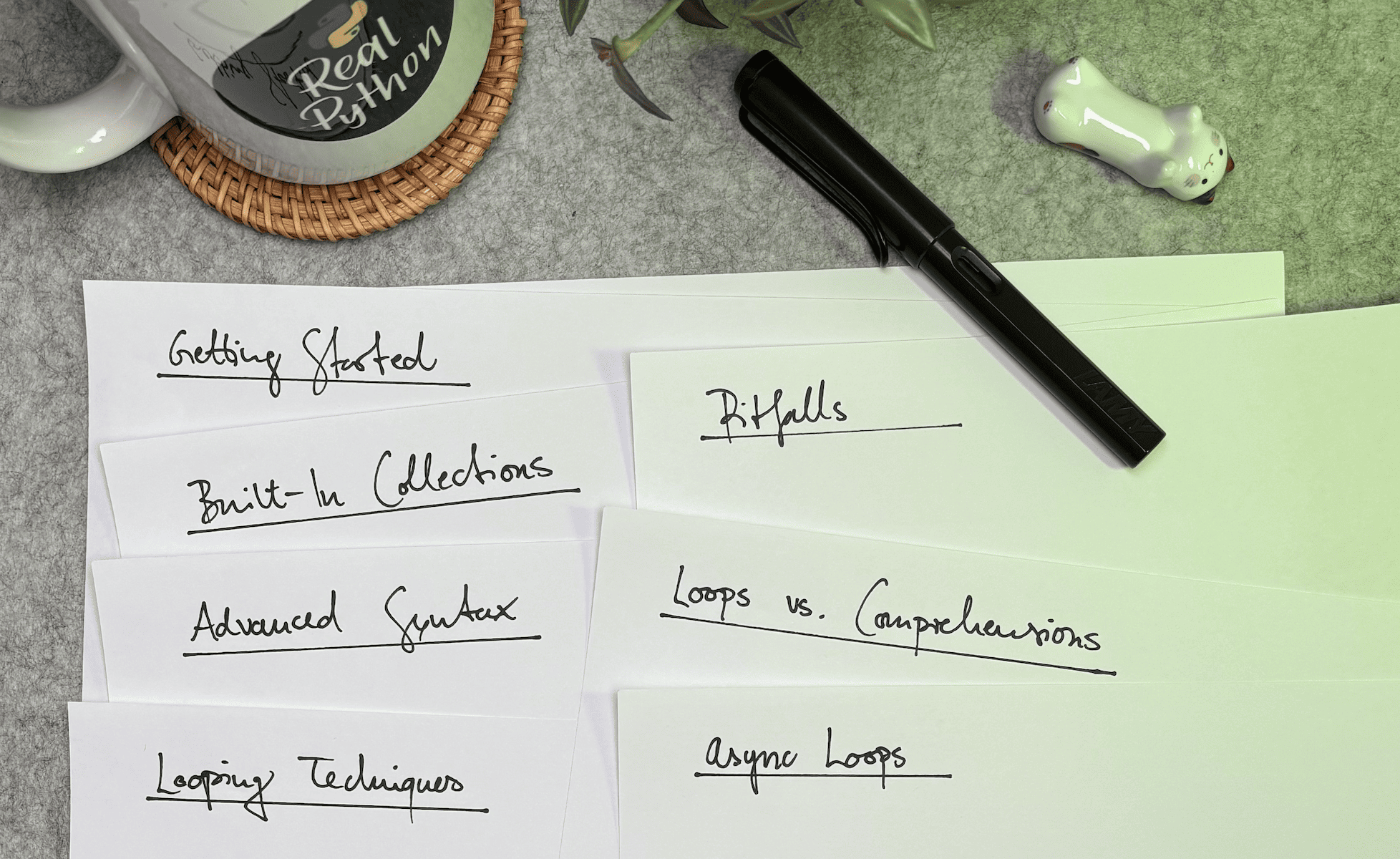
Notice that there’s a separate sheet of paper for each heading. You might be thinking that this won’t be enough space for some sections and far too much for others. That’s intentional. Limiting yourself to one sheet per topic helps you clearly separate ideas and keep related information together.
Writing down the major concepts to be covered is straightforward when you’re reading reference material, since you can simply skim the headings. For an in-person session or video-based content, keep an eye out for a slide labeled something like “Overview”. Speakers typically use this slide to outline the key topics they plan to cover in the lesson.
Step 2: Write Down Unfamiliar Words and Phrases
Start by reading through the first section, Getting Started with the Python for Loop. During this initial read-through, every time you see a word or phrase you don’t recognize, write it down on your sheet of paper. In this example, there are four terms that newcomers to Python may not be familiar with: control flow, iterate, data collection, and iterable. Write these terms down vertically:

As you read the section, try to extract definitions for any terms you don’t recognize yet. Many of these terms won’t be explicitly defined, so you’ll have to look for implicit definitions. For example, the author frequently uses the word “iterate” without explicitly defining it. However, in the paragraph after the syntax example, the author writes:
In this syntax,
variableis the loop variable. In each iteration, this variable takes the value of the current item initerable, which represents the data collection you need to iterate over.
Then, in the example that follows, you see a variable called colors where the previous example used iterable, which the author also defines as the thing you need to iterate over. In the example’s output, you see that each item in the colors list is printed, which corresponds to the print(color) line.
From all of this context, you might conclude that to iterate means to do something repeatedly. Go ahead and add that definition to your notes. It might look something like this:
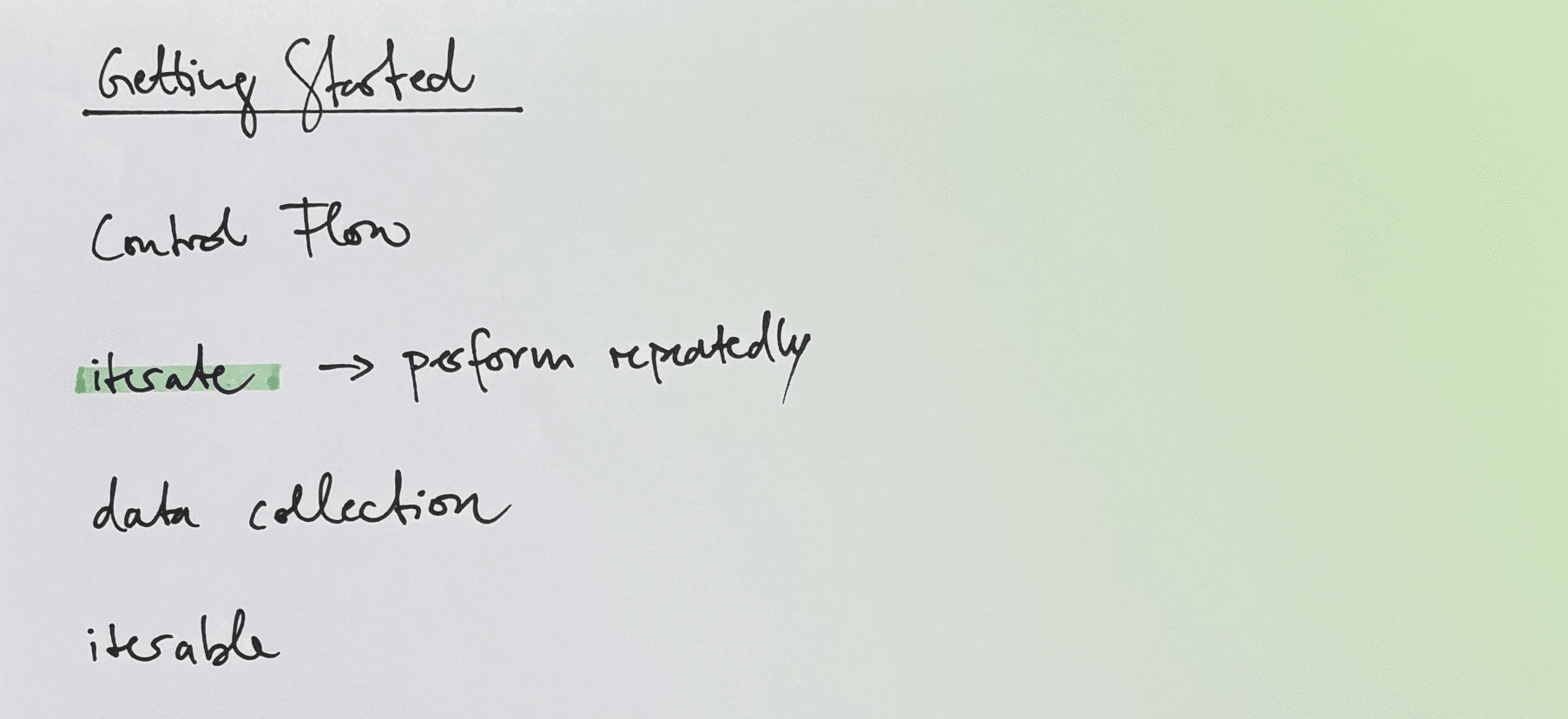
You might also come across explicit definitions as you review the terms you’ve written down. For example, the author specifically defines what an iterable is near the end of the section:
In Python, an iterable is an object—often a data collection—that can be iterated over. Common examples of iterables in Python include lists, tuples, strings, dictionaries, and sets, which are all built-in data types.
Now that you know what “iterate” means, these two sentences and the given examples clarify the definition of “iterable.” Iterables are objects that can be iterated over—that is, things that you can perform an operation on, or with, repeatedly. Now you can fill in that part of your notes:
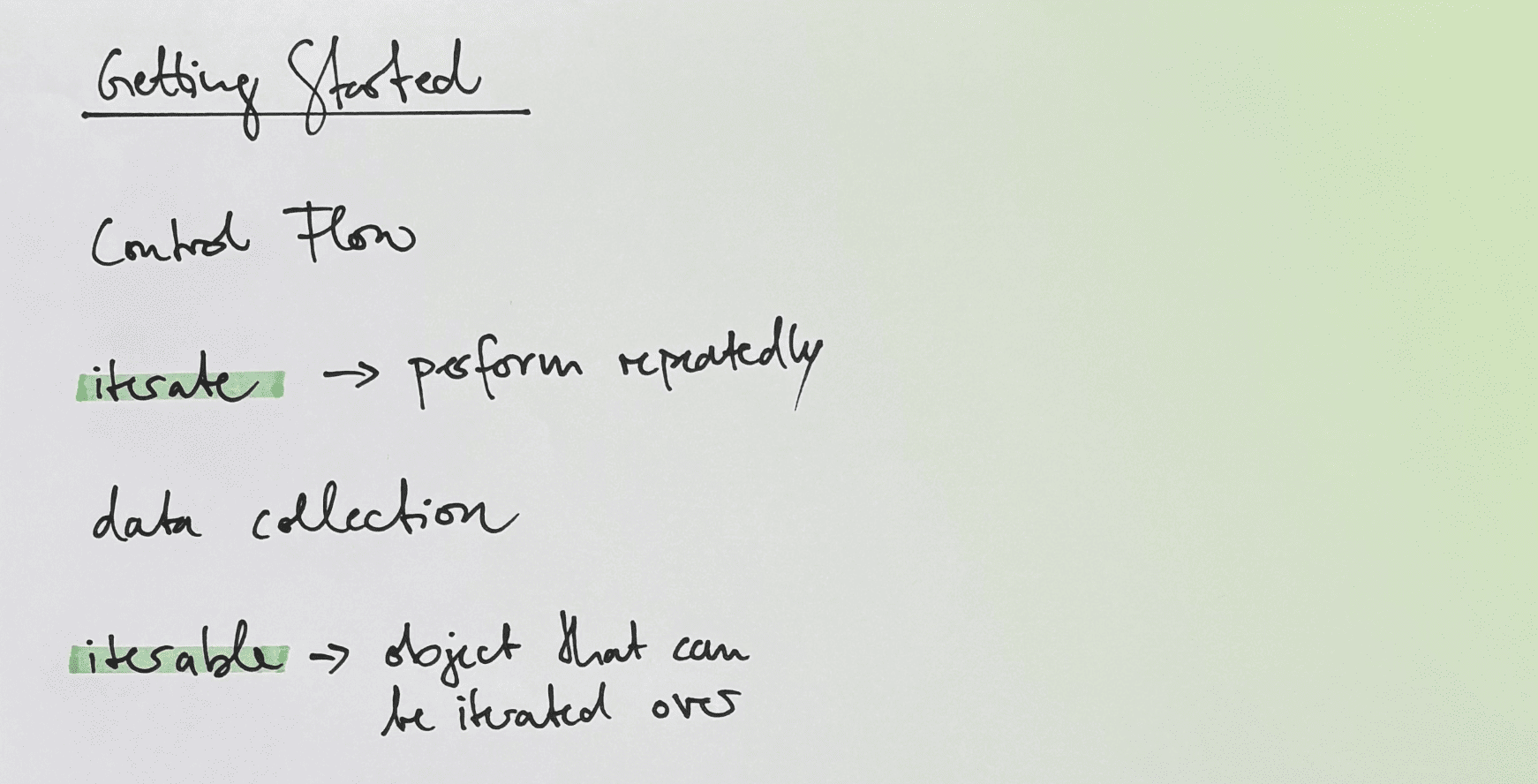
With these two definitions understood and jotted down, you might also start to get a sense of what a “data collection” is, another one of the terms you may not have understood in the beginning. Consider how often iterate, iterable, and data collection appear together in the section. First, there’s the author’s definition of a for loop:
forloops are mostly used to iterate a known number of times, which is common when you’re processing data collections with a specific number of data items.
Then, there’s this sentence about when you would mainly use for loops:
In Python, you’ll generally use
forloops when you need to iterate over the items in a data collection.
There are at least two other times in this section where the terms are used together. From this, you might deduce that a data collection can also be iterated over. Does that mean a data collection is an iterable object? It certainly seems that way, but notice that the author doesn’t use the terms interchangeably. In fact, take another look at the author’s explicit definition of what an iterable is:
Common examples of iterables in Python include lists, tuples, strings, dictionaries, and sets, which are all built-in data types. You can also have custom classes that support iteration.
Notice that lists, tuples, and so on, are used as examples of iterables and are called data collections elsewhere. However, “custom classes” are also defined as iterable. From this, you can deduce that while all data collections are iterables, not all iterables are data collections. In fact, it seems like a data collection is just an object that contains other objects—usually multiple—in a structured form. You can now write that definition down:
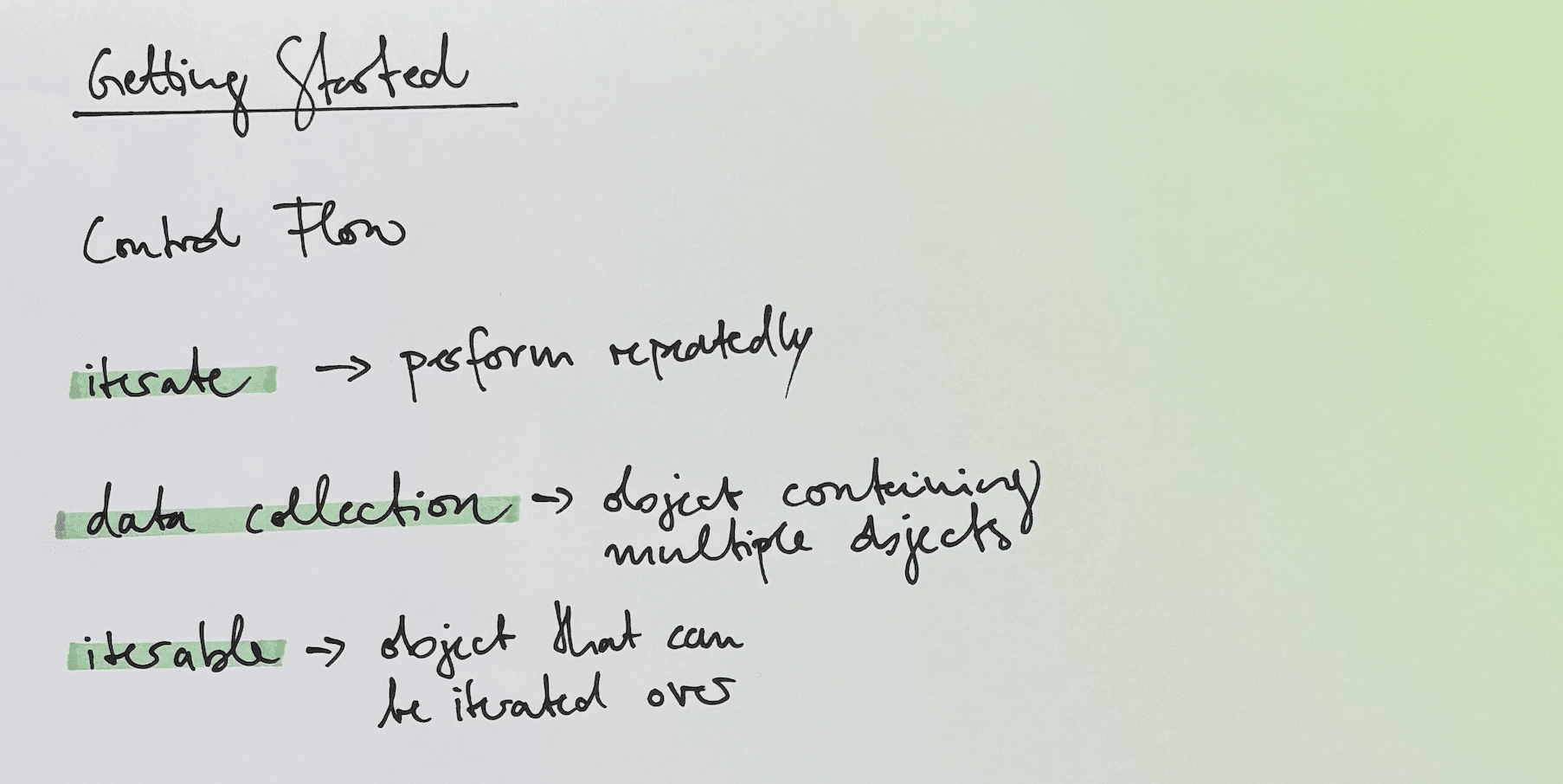
You’re now at the end of the section and notice that you’re still missing a definition for “control flow.” Sometimes, a learning resource won’t define one of its terms, either explicitly or implicitly.
In this case, to fully understand the content of the tutorial, you may have to go look up the term. In such cases, you can enter the term into a search engine and see what comes up, or for a precise definition, use the Real Python Reference area. For example, when you search for control flow, you’ll get this definition:
In programming, control flow refers to the order in which individual statements are executed or evaluated within a program.
This definition, along with what you’ve learned so far, may help you come up with a quick sentence for its definition to jot down in your notes. You might come up with something like this:
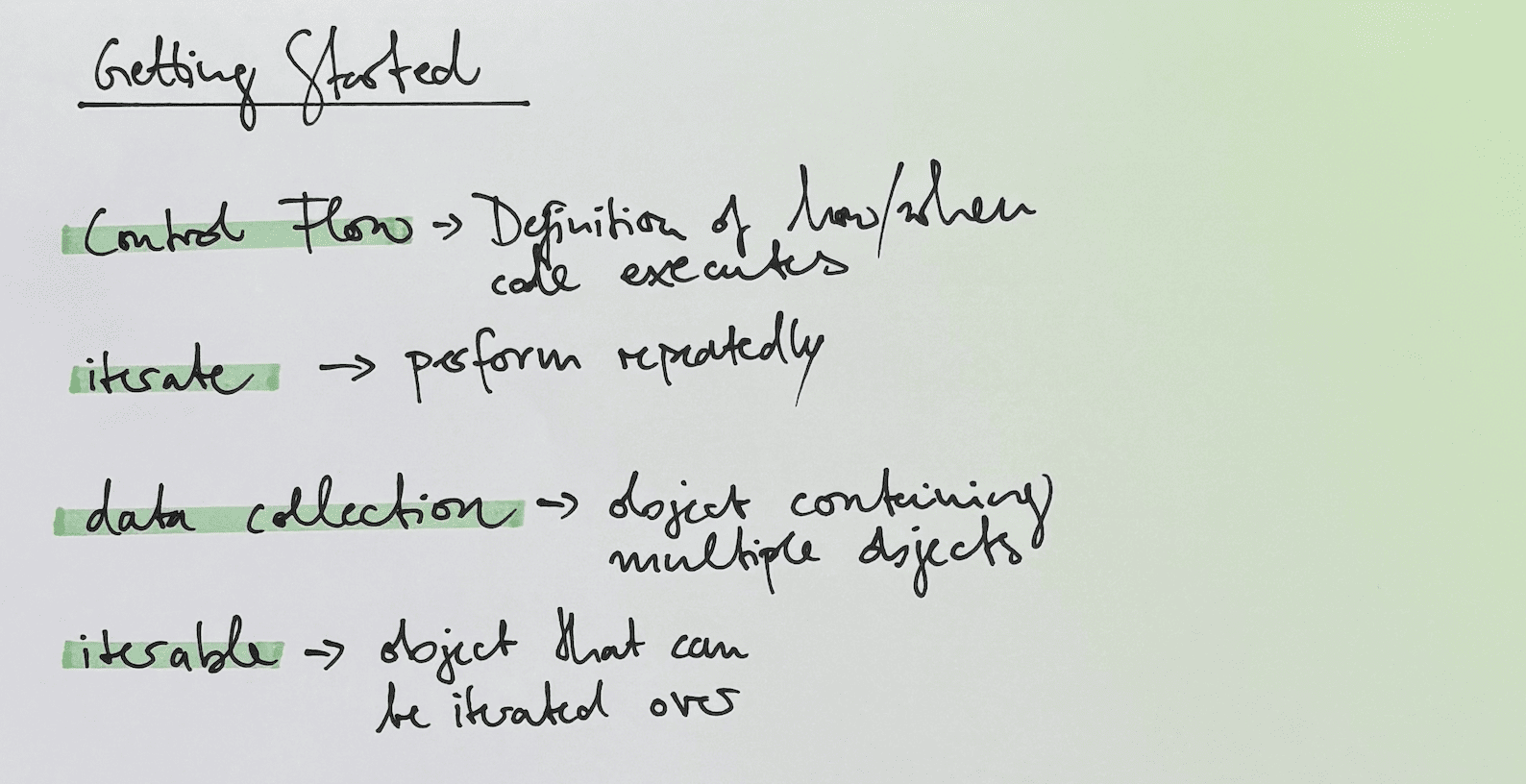
In the image above, the definition for control flow has been added, completing the definitions for the unfamiliar terms in the section.
Step 3: Summarize What You’ve Learned
Now that you’ve read the section and taken notes on the terms you didn’t recognize at first, it’s time to format that information in an easily digestible way. While the one-line definitions you wrote down earlier aren’t too hard to understand, something a little more visual could tie all the concepts together more neatly.
Consider what you’ve learned so far: a for loop iterates over an iterable. This means it does something repeatedly to an object that supports being iterated over or used multiple times. You also learned that objects that hold multiple values, like lists and tuples, are called data collections, which are also considered iterables.
To capture all this new information succinctly, write out the for loop code from the colors example:
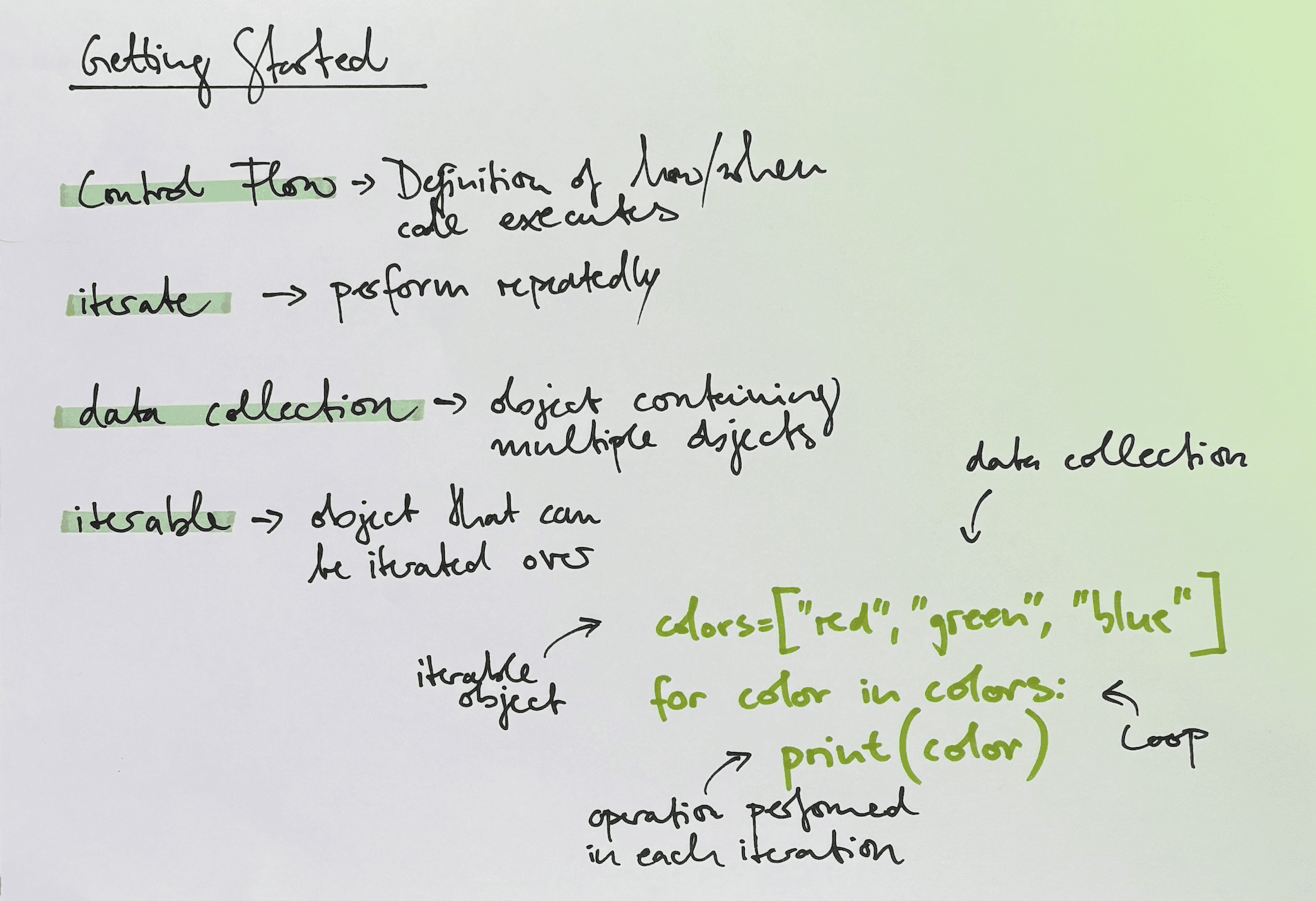
In the example above, the different portions of the tutorial’s example code are labeled with the new terms introduced in this section. The labels use a different pen color than the actual code. You don’t have to do this, but it helps keep things readable.
Altogether, your notes on the first section might look something like this:
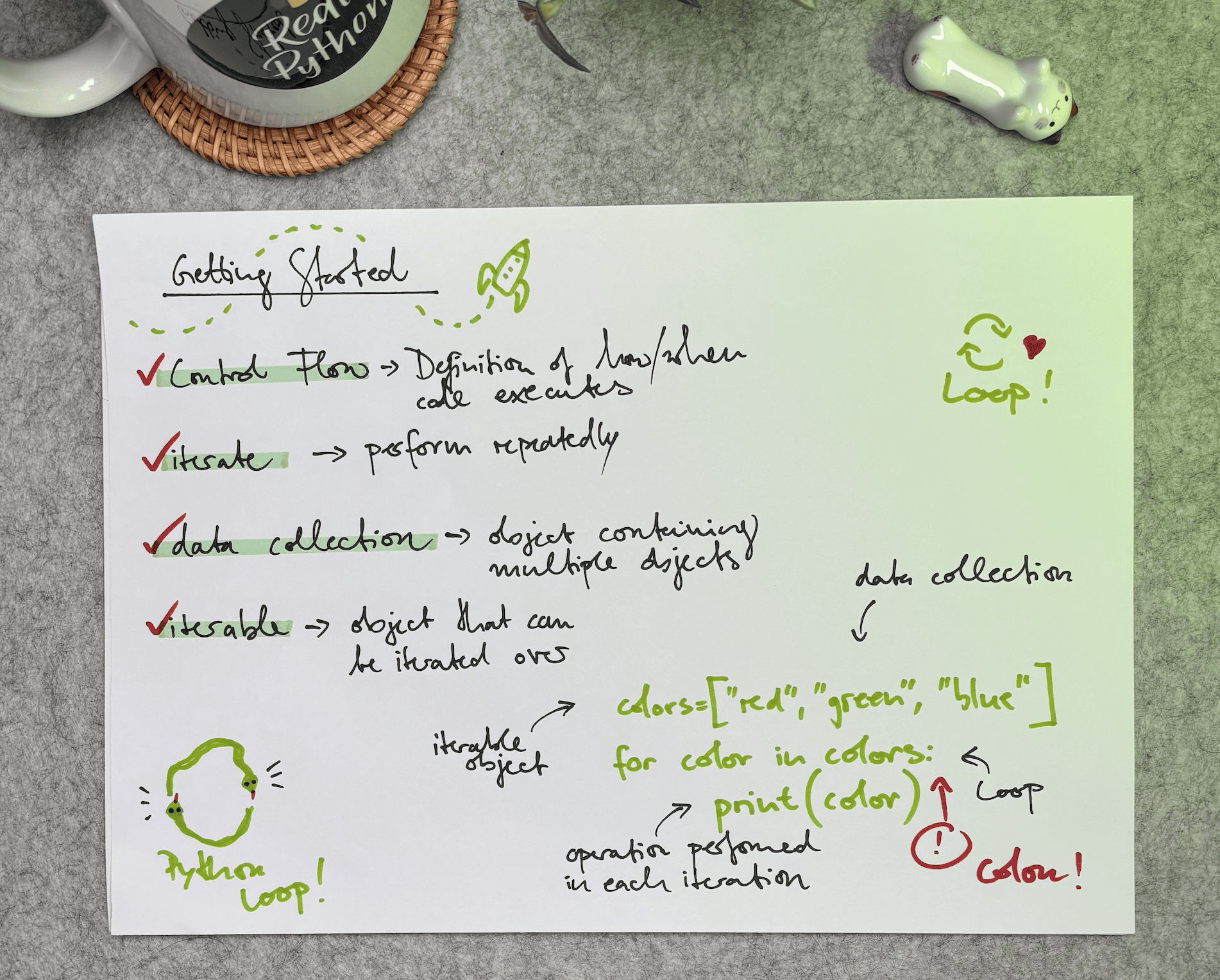
In this example, the major concept (“Getting Started”) serves as the title of the sheet, with definitions of new terms listed below. The notes end with labeled code examples that illustrate the concepts covered in this section.
This is something you can come back to and review in just a few moments. It’s especially helpful when you want to revisit concepts you’ve already learned, refresh your memory before moving on, or get back up to speed after an extended learning hiatus.
Step 4: Repeat the Process for the Remaining Sections
After completing the three main note-taking steps for the first section of the tutorial, you probably have a strong sense of what that section was trying to teach you. Now, all you need to do is repeat the process for the remaining sections. Here’s one possible way your notes on the Advanced for Loop Syntax section might look:
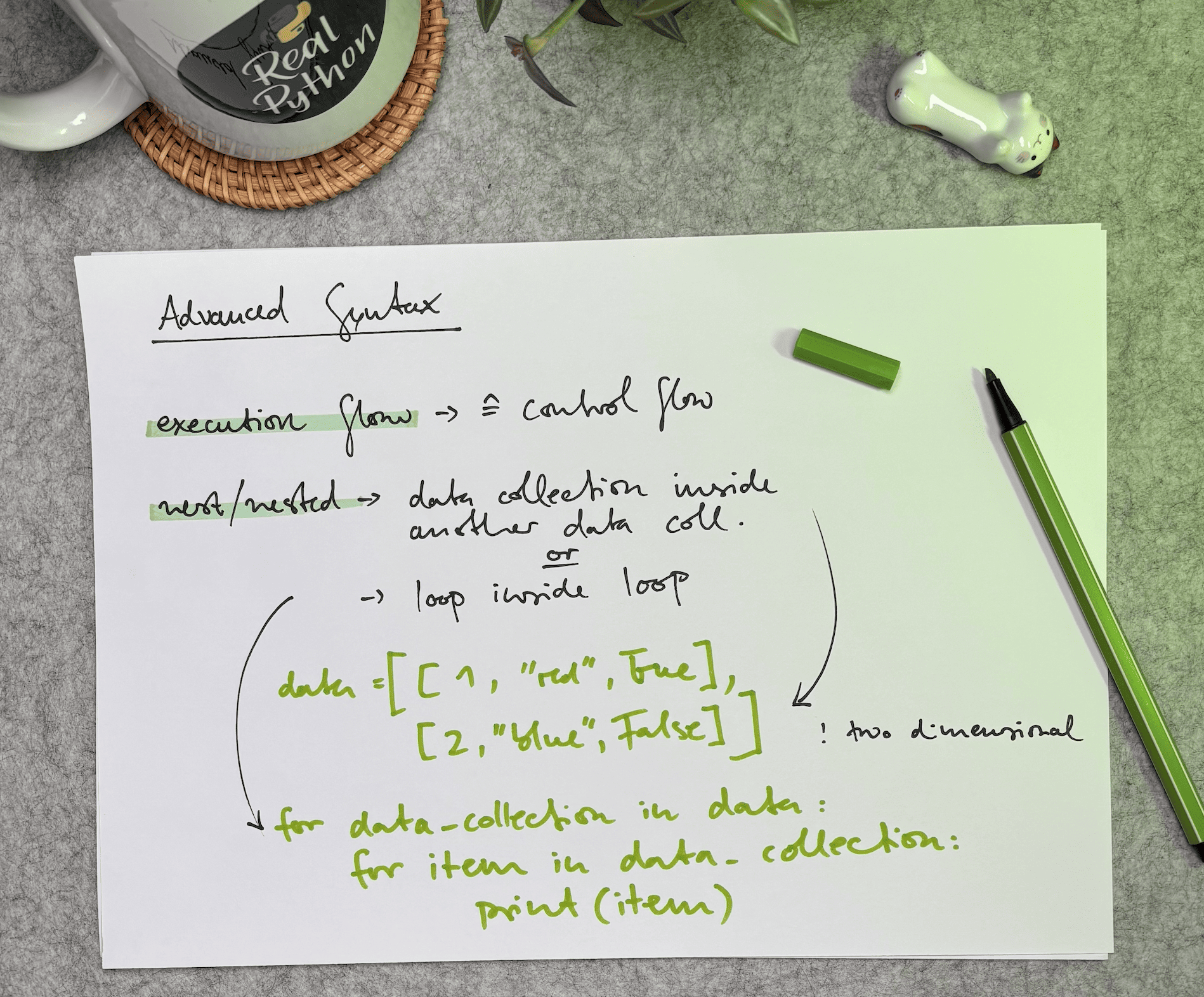
Just like with the first section, these notes include a major concept at the top, definitions of unfamiliar terms, and a visual summary of the concepts covered in the section. If you’ve already taken notes for this section and they don’t look like this example, that’s okay! Note-taking is personal, and the only right way to do it is the way that provides you with the most value.
Notice there are only two unfamiliar terms on this sheet, whereas in the first sheet of notes, there were four unfamiliar terms. It’s totally normal for notes on later parts of a learning resource or presentation to have fewer terms that need defining.
Introductory sections are supposed to briefly present the concepts to be covered, and by the time you get to the end of a resource or presentation, there shouldn’t be many completely foreign concepts introduced to the learner. You may even have notes with no unfamiliar terms and just a drawing of the newly presented information.
Next Steps
Now that you’ve learned a structured approach to note-taking, the best way to reinforce it is to practice. Start by choosing another Python tutorial and applying the same process: look for the major concepts, write down unfamiliar terms, define them in your own words, and summarize what you’ve learned with labeled examples.
A great next resource is The Python return Statement: Usage and Best Practices. It covers a foundational concept that appears in almost every Python program.
As you continue developing your technical skills, consider refining your note-taking skills as well. Strong note-taking can improve comprehension across courses, books, and video lessons—not just programming tutorials. For broader strategies on organizing and reviewing your notes, check out this comprehensive Note-Taking Guide.
The goal isn’t to create perfect notes. It’s to actively engage with what you’re learning so the material truly sticks. Choose your next resource, grab your notebook, and start practicing.
Get Your PDF: Click here to download your free Python Note-Taking Worksheet that outlines that note-taking process.
Take the Quiz: Test your knowledge with our interactive “How to Use Note-Taking to Learn Python” quiz. You’ll receive a score upon completion to help you track your learning progress:
Interactive Quiz
How to Use Note-Taking to Learn PythonTest your understanding of note-taking techniques that help you learn Python more effectively and retain what you study.
Frequently Asked Questions
Now that you have some experience with note-taking for learning Python, you can use the questions and answers below to check your understanding and recap what you’ve learned.
These FAQs are related to the most important concepts you’ve covered in this tutorial. Click the Show/Hide toggle beside each question to reveal the answer.
Research suggests that writing by hand improves comprehension and long-term retention compared to typing. Handwriting forces you to process and condense information rather than transcribing it verbatim.
Start with the major section headings to map out key topics. Then, as you read each section, write down any unfamiliar words or phrases along with their definitions, and finish by summarizing the concepts with labeled code examples.
Look for explicit definitions in the text first. If a term isn’t directly defined, gather context from how the author uses it and piece together an implicit definition. If neither approach works, search for the term in a reference like the Real Python glossary.
Keep notes concise. Limit each major topic to a single sheet of paper, write brief one-line definitions for new terms, and use labeled code examples to tie concepts together visually. The goal is to create a quick reference you can review in moments.
Research shows that the act of taking notes alone improves recall, even if you never revisit the notes. Combining note-taking with active reading and summarization helps you engage more deeply with the material and retain it longer.