Claude Code Hooks Cheat Sheet
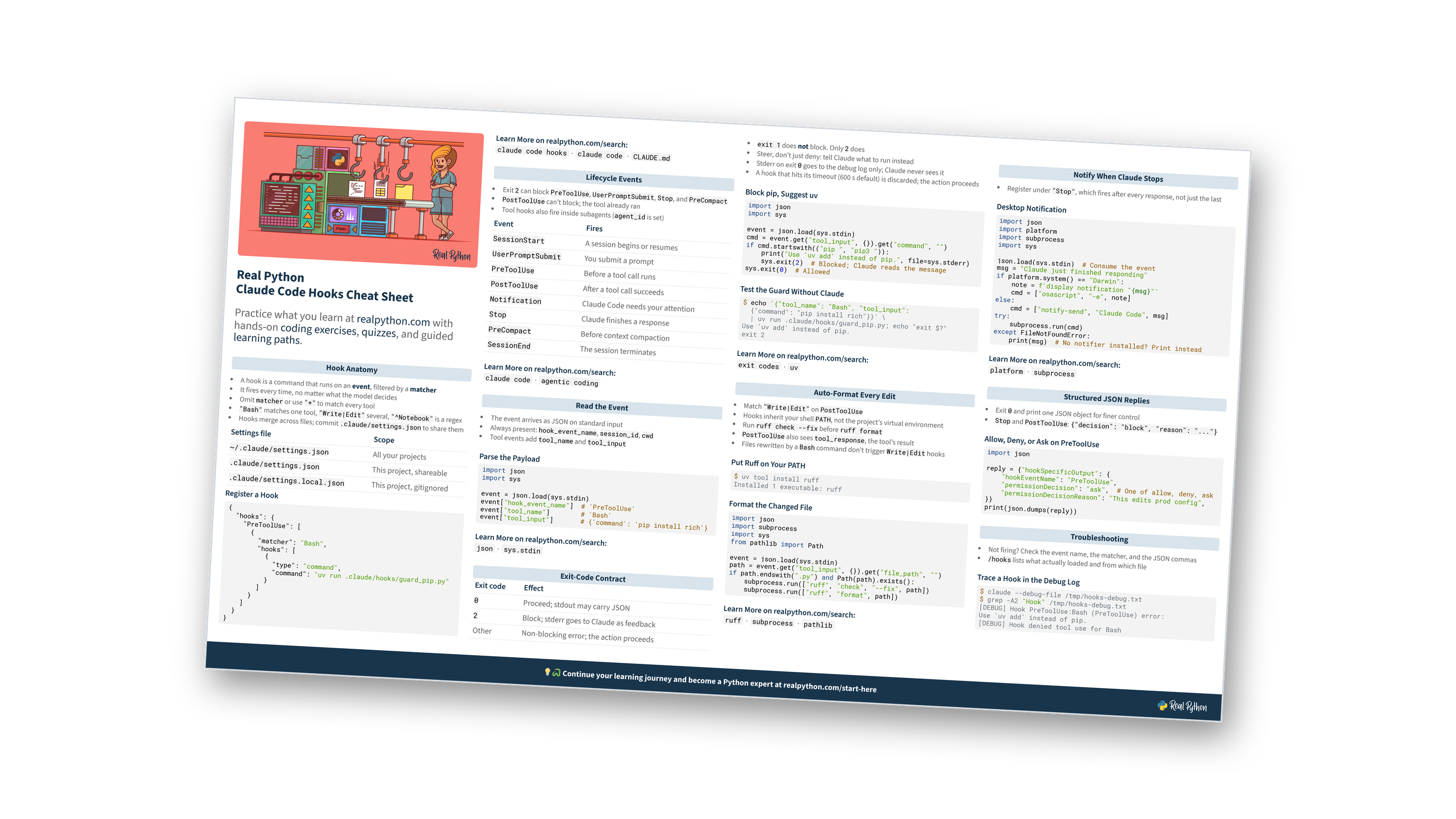
This page is a condensed reference for Claude Code hooks: the settings files they live in, the lifecycle events you can hook into, matchers, the JSON payload your script reads, the exit-code contract that blocks or steers Claude, and ready-to-use Python hooks that auto-format edits, guard commands, and notify you when Claude stops. For the full walkthrough, read the full tutorial, How to Automate Your Workflow With Claude Code Hooks. You can also download the information as a printable cheat sheet:
Free Bonus: Claude Code Hooks Cheat Sheet
Get a Claude Code Hooks Cheat Sheet (PDF) with the settings layout, lifecycle events, exit-code contract, and copy-paste hook scripts on one page:
Practice what you learn with hands-on coding exercises, quizzes, and guided learning paths. Not sure where to begin? Start here.
New to Claude Code hooks?
Hook Anatomy
- A hook is a command that runs on an event, filtered by a matcher
- It fires every time, no matter what the model decides
- Omit
matcheror use"*"to match every tool "Bash"matches one tool,"Write|Edit"several,"^Notebook"is a regex- Hooks merge across files; commit
.claude/settings.jsonto share them
| Settings file | Scope |
|---|---|
~/.claude/settings.json |
All your projects |
.claude/settings.json |
This project, shareable |
.claude/settings.local.json |
This project, gitignored |
Register a Hook
{
  "hooks": {
    "PreToolUse": [
      {
        "matcher": "Bash",
        "hooks": [
          {
            "type": "command",
            "command": "uv run .claude/hooks/guard_pip.py"
          }
        ]
      }
    ]
  }
}
Using more than one settings file?
Lifecycle Events
- Exit
2can blockPreToolUse,UserPromptSubmit,Stop, andPreCompact PostToolUsecan’t block; the tool already ran- Tool hooks also fire inside subagents (
agent_idis set)
| Event | Fires |
|---|---|
SessionStart |
A session begins or resumes |
UserPromptSubmit |
You submit a prompt |
PreToolUse |
Before a tool call runs |
PostToolUse |
After a tool call succeeds |
Notification |
Claude Code needs your attention |
Stop |
Claude finishes a response |
PreCompact |
Before context compaction |
SessionEnd |
The session terminates |
Know when each event fires?
Read the Event
- The event arrives as JSON on standard input
- Always present:
hook_event_name,session_id,cwd - Tool events add
tool_nameandtool_input
Parse the Payload
import json
import sys

event = json.load(sys.stdin)
event["hook_event_name"]  # 'PreToolUse'
event["tool_name"]        # 'Bash'
event["tool_input"]       # {'command': 'pip install rich'}
Want to go deeper on reading stdin?
Exit-Code Contract
exit 1does not block. Only2does- Steer, don’t just deny: tell Claude what to run instead
- Stderr on exit
0goes to the debug log only; Claude never sees it - A hook that hits its timeout (600 s default) is discarded; the action proceeds
| Exit code | Effect |
|---|---|
0 |
Proceed; stdout may carry JSON |
2 |
Block; stderr goes to Claude as feedback |
| Other | Non-blocking error; the action proceeds |
Block pip, Suggest uv
import json
import sys

event = json.load(sys.stdin)
cmd = event.get("tool_input", {}).get("command", "")
if cmd.startswith(("pip ", "pip3 ")):
    print("Use 'uv add' instead of pip.", file=sys.stderr)
    sys.exit(2)  # Blocked; Claude reads the message
sys.exit(0)  # Allowed
Test the Guard Without Claude
$ echo '{"tool_name": "Bash", "tool_input":
  {"command": "pip install rich"}}' \
  | uv run .claude/hooks/guard_pip.py; echo "exit $?"
Use 'uv add' instead of pip.
exit 2
Think you’ve got the contract down?
Free Bonus: Download the Claude Code Hooks Cheat Sheet PDF and keep the events, matchers, and exit codes at hand.
Auto-Format Every Edit
- Match
"Write|Edit"onPostToolUse - Hooks inherit your shell
PATH, not the project’s virtual environment - Run
ruff check --fixbeforeruff format PostToolUsealso seestool_response, the tool’s result- Files rewritten by a
Bashcommand don’t triggerWrite|Edithooks
Put Ruff on Your PATH
$ uv tool install ruff
Installed 1 executable: ruff
Format the Changed File
import json
import subprocess
import sys
from pathlib import Path

event = json.load(sys.stdin)
path = event.get("tool_input", {}).get("file_path", "")
if path.endswith(".py") and Path(path).exists():
    subprocess.run(["ruff", "check", "--fix", path])
    subprocess.run(["ruff", "format", path])
Formatter not running?
Notify When Claude Stops
- Register under
"Stop", which fires after every response, not just the last
Desktop Notification
import json
import platform
import subprocess
import sys

json.load(sys.stdin)  # Consume the event
msg = "Claude just finished responding"
if platform.system() == "Darwin":
    note = f'display notification "{msg}"'
    cmd = ["osascript", "-e", note]
else:
    cmd = ["notify-send", "Claude Code", msg]
try:
    subprocess.run(cmd)
except FileNotFoundError:
    print(msg)  # No notifier installed? Print instead
Want to go deeper on subprocess?
Structured JSON Replies
- Exit
0and print one JSON object for finer control StopandPostToolUse:{"decision": "block", "reason": "..."}
Allow, Deny, or Ask on PreToolUse
import json

reply = {"hookSpecificOutput": {
    "hookEventName": "PreToolUse",
    "permissionDecision": "ask",  # One of allow, deny, ask
    "permissionDecisionReason": "This edits prod config",
}}
print(json.dumps(reply))
Exit code or JSON?
Troubleshooting
- Not firing? Check the event name, the matcher, and the JSON commas
/hookslists what actually loaded and from which file
Trace a Hook in the Debug Log
$ claude --debug-file /tmp/hooks-debug.txt
$ grep -A2 "Hook" /tmp/hooks-debug.txt
[DEBUG] Hook PreToolUse:Bash (PreToolUse) error:
Use 'uv add' instead of pip.
[DEBUG] Hook denied tool use for Bash
Hook not firing?
Ready to go beyond the cheat sheet?
For the rest of Claude Code beyond hooks, see the Claude Code Cheat Sheet.
You can download this information as a printable cheat sheet:
Free Bonus: Claude Code Hooks Cheat Sheet
Get a Claude Code Hooks Cheat Sheet (PDF) with the settings layout, lifecycle events, exit-code contract, and copy-paste hook scripts on one page:
