The fastest way to use the Claude API in Python is to install anthropic, set your API key, and call client.messages.create(). You’ll have a working response in under a minute:
Claude is Anthropic’s large language model, accessible via a clean REST API with an official Python SDK. Unlike heavier AI frameworks that require you to wire up multiple components before you see any output, the anthropic package gets you to a working response in a handful of lines.
In the following steps, you’ll install the anthropic SDK, call Claude from Python, shape Claude’s behavior with a system prompt, and then return structured JSON output using a schema or Pydantic.
Note: Claude’s responses are non-deterministic, so the same prompt produces different output each time, which is expected for a large language model. Also, API calls cost money based on the number of tokens processed. Keep an eye on your usage in the Claude Console as you follow along.
Each step builds on the last, and the final script is short enough to read in one sitting but complete enough to extend into a real application of your own.
Get Your Code: Click here to download the free sample code that shows you how to use the Claude API in Python.
Take the Quiz: Test your knowledge with our interactive “How to Use the Claude API in Python” quiz. You’ll receive a score upon completion to help you track your learning progress:

Interactive Quiz
How to Use the Claude API in PythonTest your understanding of using the Claude API in Python. Send prompts, set system instructions, and return structured JSON with a schema.
Prerequisites
Before diving in, make sure you have the following in place:
-
Python knowledge: You should be comfortable with Python basics, like defining functions, running scripts from the terminal, and working with virtual environments. If virtual environments are new to you, Python Virtual Environments: A Primer has you covered before you continue.
-
Python 3.9 or higher: The
anthropicSDK requires Python 3.9 as a minimum. If you’re not sure which version you have, runpython --versionin your terminal. If you need to install or upgrade, follow the steps in the guide on installing Python. -
An Anthropic account: You’ll need an Anthropic account to generate an API key in the Claude Console. Step 1 will show you how to find and secure your key once you’re in.
Don’t worry if you’ve never worked with an API before. This tutorial will walk you through authentication and help you make your first request from scratch.
Step 1: Set Up the Claude API in Python
Before you can call Claude from Python, you need an API key and the anthropic package installed. By the end of this step, you’ll have both, and Claude will be responding to your first prompt.
Get Your API Key and Install anthropic
Log in to the Claude Console or create a new account. If you’re starting fresh, you can begin using the API after adding $5 of credits.
Then navigate to the API Keys section. Click Create Key, give it a descriptive name like real-python-tutorial, and copy it immediately. You won’t see it again after you close the dialog.
Note: Never paste your API key directly into your code. Instead, store it as an environment variable. The anthropic SDK automatically reads it from ANTHROPIC_API_KEY at runtime, so you never need to reference it explicitly in your scripts.
Storing your key as an environment variable means it never touches your source code or version control history. The exact command depends on your operating system:
With your API key stored safely, you’re ready to install the SDK. Create a fresh virtual environment and activate it before installing anything. This isolation prevents the anthropic package from conflicting with your system-level tools.
Send Your First Prompt
With the environment set up and your API key saved, create a file called basic_claude_call.py to send your first prompt to Claude:
basic_claude_call.py
import anthropic

client = anthropic.Anthropic()

response = client.messages.create(
    model="claude-sonnet-4-6",
    max_tokens=1024,
    messages=[
        {"role": "user", "content": "What is the Zen of Python?"}
    ],
)

print(response.content[0].text)
anthropic.Anthropic() creates a client that reads ANTHROPIC_API_KEY from your environment automatically, so there’s no need to pass the key explicitly. The client.messages.create() method then sends the request to Claude, and response.content[0].text extracts the text from the response object.
Run the script to confirm everything is wired up correctly. If Claude responds, your API key is valid and your environment is ready for the next step:
(venv) $ python basic_claude_call.py

The Zen of Python is a collection of 19 guiding principles for writing
computer programs in Python.
You can see it by typing `import this` in a Python interpreter.
Here it is:

Beautiful is better than ugly.
...
Namespaces are one honking great idea -- let's do more of those!
Your setup is verified, which means your account and API key are ready to go. Here’s what each parameter to client.messages.create() controls:
| Parameter | What it controls |
|---|---|
model |
Which Claude model to use. claude-sonnet-4-6 is a good default, capable and cost-efficient. Note: Model names can change in the future. |
max_tokens |
The maximum number of tokens Claude can generate in its response. This is a hard ceiling, not a target. Set it high enough for the response you expect. |
messages |
A list of conversation turns. Each entry is a dict with a "role" ("user" or "assistant") and "content". For a single prompt, one "user" entry is all you need. |
client.messages.create() returns a Message object. The actual text lives at response.content[0].text. The content attribute is a list because Claude can return multiple content blocks, but for plain-text responses, the first block is always the one you want.
Step 2: Control Claude’s Behavior With a System Prompt
The previous script sends a prompt and gets a response, but Claude’s behavior is unconstrained, so it’ll answer anything in any style. In this step, you’ll build a Python-only coding assistant that politely declines questions about anything else.
Explore the system Parameter
The system parameter lets you define Claude’s role, tone, and constraints once before any user input arrives. Claude reads it before processing any messages, so it shapes every response in the conversation. The system prompt defines the persona Claude adopts, the format it uses, and the topics it accepts or refuses. You set it once, and it holds for the entire call.
This is different from the messages list. A common mistake is trying to pass a system prompt as a message with {"role": "system", "content": "..."}. That raises an error because "system" isn’t a valid role in the messages list.
Here’s where each piece goes:
system |
user / assistant |
|
|---|---|---|
| Where it goes | Top-level parameter on client.messages.create() |
Inside the messages list as {"role": "...", "content": "..."} |
| Purpose | Shapes Claude’s behavior before the conversation starts | The back-and-forth of the actual conversation |
| Example | system="You are a Python assistant." |
{"role": "user", "content": "How do I reverse a list?"} |
In short, system is set once before the conversation begins, while user and assistant messages alternate inside the messages list as the dialogue unfolds.
Build and Test a Python Coding Assistant
For the next example, you’ll create a new file called coding_assistant.py. This will serve as the entry point for the assistant logic you’re about to implement:
coding_assistant.py
import anthropic

client = anthropic.Anthropic()

system_prompt = """
You are a Python coding assistant. You only answer questions about Python.
If the user asks about any other programming language or unrelated topic,
politely explain that you can only help with Python questions.
"""

user_input = input("Ask me anything about Python: ")

response = client.messages.create(
    model="claude-sonnet-4-6",
    max_tokens=1024,
    system=system_prompt,
    messages=[
        {"role": "user", "content": user_input}
    ],
)

print(f"\n{response.content[0].text}")
Run the script and ask it a Python-related question to verify it works:
(venv) $ python coding_assistant.py

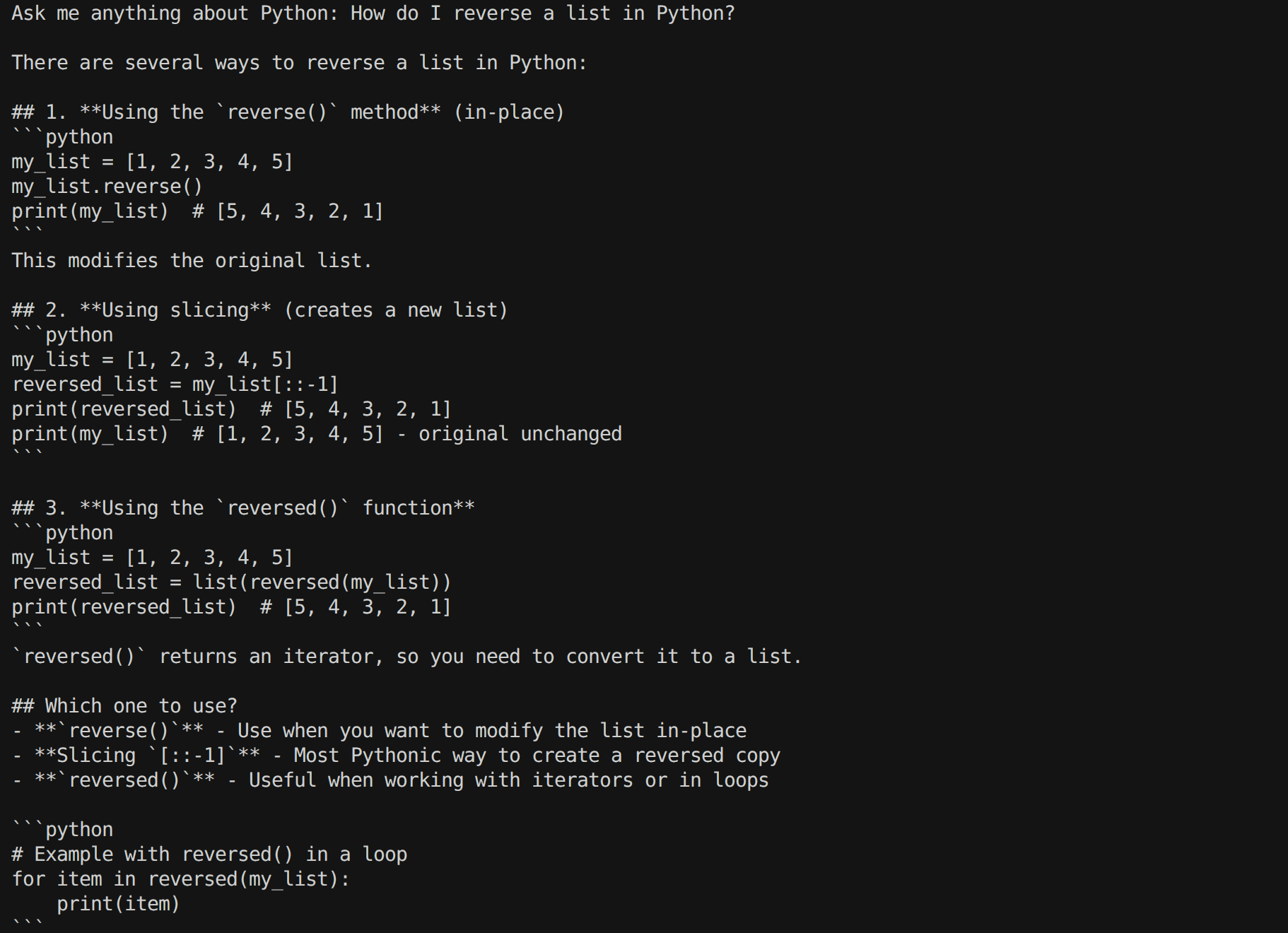
Ask me anything about Python: How do I reverse a list in Python?

There are several ways to reverse a list in Python:

1. Using the `reverse()` method (in-place)
This modifies the original list directly.

2. Using slicing (creates a new list)

3. Using the `reversed()` function

Which should you use?
- .reverse() - when you want to modify the list in-place
- [::-1] - most Pythonic way to get a reversed copy
- reversed() - when you want to iterate over reversed elements without
creating a new list immediately
Run the program once more and try a JavaScript-related query. You should see the assistant decline to answer, enforcing the Python-only scope:
(venv) $ python coding_assistant.py

Ask me anything about Python: How do I reverse a string in JavaScript?

I appreciate your question, but I'm specifically designed to help with
Python programming questions only. I can't assist with JavaScript.

However, if you'd like to know how to **reverse a string in Python**,
I'd be happy to help!

If you have any Python-related questions, feel free to ask!
The script and model are the same for both runs—you only changed what you asked in the prompt. The Python-only boundary comes from the system parameter, not from if statements in your code. Claude doesn’t need conditional logic to enforce this. The instruction alone is enough.
Claude gives the system parameter the highest priority, which makes it much harder for user messages to override the system instructions. However, no prompt-based guardrail is absolute. For production applications, combine system prompts with server-side validation to enforce hard constraints.
This makes it reliable for building constrained tools: customer support bots that stay on topic, code reviewers that only comment on style, assistants scoped to a specific domain. Define the constraint in system, and it holds for every user turn.
Step 3: Return Structured JSON Output With a Schema
The previous two steps return plain text. That’s fine for reading in a terminal, but fragile if you need to pass Claude’s output to another function, store it in a database, or render it in a UI.
Consider asking Claude to describe a Python function. A free-form response might look like this:
The function is called add_numbers. It takes two integers and returns
their sum.
Here's the code: def add_numbers(a, b): return a + b
Reliably extracting function_name, code, and explanation from that string is surprisingly hard because Claude might reorder the sentences, use different phrasing, or add extra context.
The solution is to tell Claude exactly what shape the response should take, using a schema that Claude is required to follow.
In this step, you’ll build structured_output.py using two approaches: a handwritten JSON schema for full control, and a Pydantic version that reuses the same overall structure with a few focused edits.
Approach 1: Handwritten JSON Schema
Start by creating a new file called structured_output.py. You’ll use it to define the logic for producing structured data:
structured_output.py
import anthropic
import json

client = anthropic.Anthropic()

response = client.messages.create(
    model="claude-sonnet-4-6",
    max_tokens=1024,
    system="You are a Python coding assistant.",
    messages=[
        {
            "role": "user",
            "content": "Write a Python function that adds two numbers.",
        }
    ],
    output_config={
        "format": {
            "type": "json_schema",
            "schema": {
                "type": "object",
                "properties": {
                    "function_name": {"type": "string"},
                    "code": {"type": "string"},
                    "explanation": {"type": "string"},
                },
                "required": ["function_name", "code", "explanation"],
                "additionalProperties": False,
            },
        }
    },
)

result = json.loads(response.content[0].text)

print("--- Approach 1: Handwritten JSON schema ---")
print(f"Function: {result['function_name']}")
print(f"\nCode:\n{result['code']}")
print(f"\nExplanation: {result['explanation']}")
The output_config parameter pins the response to a schema. The "json_schema" format takes a standard JSON Schema object describing the fields you expect back. Setting "additionalProperties": False tells Claude not to include any fields outside the ones you declared, keeping the response predictable.
Run the script to see the structured output in action:
(venv) $ python structured_output.py

--- Approach 1: Handwritten JSON schema ---
Function: add_numbers

Code:
def add_numbers(a, b):
    return a + b

Explanation: This function takes two parameters, a and b, and returns
their sum using the + operator. It works with any numeric types including
integers, floats, and complex numbers.
Claude returns a JSON string, and json.loads() turns it into a dict that you can access by key. The schema is defined inline, so no extra dependencies are required.
Approach 2: Pydantic Shortcut
If you’d rather skip manual schema writing and get type-checked Python objects back automatically, the SDK’s client.messages.parse() method accepts a Pydantic BaseModel subclass directly.
The pydantic package is probably already installed as a transitive dependency of anthropic. If it isn’t, then you can install it with the command below:
(venv) $ python -m pip install pydantic
With pydantic installed, you can define the output structure as a typed Python class.
Replace the contents of structured_output.py with the code below, which is nearly identical to the Approach 1 script with a few localized changes:
structured_output.py
 1import anthropic
 2from pydantic import BaseModel
 3
 4
 5class FunctionDescription(BaseModel):
 6    function_name: str
 7    code: str
 8    explanation: str
 9
10
11client = anthropic.Anthropic()
12
13response = client.messages.parse(
14    model="claude-sonnet-4-6",
15    max_tokens=1024,
16    system="You are a Python coding assistant.",
17    messages=[
18        {
19            "role": "user",
20            "content": "Write a Python function that adds two numbers.",
21        }
22    ],
23    output_format=FunctionDescription,
24)
25
26result = response.parsed_output
27
28print("--- Approach 2: Pydantic + client.messages.parse() ---")
29print(f"Function: {result.function_name}")
30print(f"\nCode:\n{result.code}")
31print(f"\nExplanation: {result.explanation}")
The differences from the handwritten JSON schema are isolated to the following lines:
- Line 2: Import
BaseModelfrom Pydantic instead of importingjson. - Lines 5–8: Define a
FunctionDescriptionmodel with the same three fields your JSON schema required, instead of embedding the schema insideoutput_config. - Lines 13 and 23: Call
client.messages.parse()and passoutput_format=FunctionDescriptioninstead of callingclient.messages.create()with anoutput_configdict. - Line 26: Assign
result = response.parsed_outputinstead of usingjson.loads(response.content[0].text).
With those changes in place, run the updated script. The output should be similar to Approach 1’s, confirming that both methods produce the same structured data. The difference is entirely in how your code receives and works with it:
(venv) $ python structured_output.py

--- Approach 2: Pydantic + client.messages.parse() ---
Function: add_numbers

Code:
def add_numbers(a, b):
    return a + b

Explanation: This function takes two parameters, a and b, and returns
their sum using the + operator. It works with any numeric types that
support addition, including integers, floats, and complex numbers.
The result is now a FunctionDescription instance rather than a plain dict. You get attribute access, type hints, and automatic validation. If Claude’s response doesn’t match the schema, Pydantic raises an error before your downstream code ever sees it.
The table below provides a breakdown of where each component should be placed. You can use it as a reference to ensure everything is assembled correctly and consistently:
| Handwritten schema | Pydantic + client.messages.parse() |
|
|---|---|---|
| Dependencies | None beyond anthropic |
Requires pydantic |
| Schema definition | JSON Schema dict inline |
Python class with type annotations |
| Response type | dict via json.loads() |
Validated Pydantic model instance |
| Validation | Server-side via constrained decoding, with manual checks needed for max_tokens truncation |
Server-side + client-side Pydantic validation |
| Best for | Simple scripts, no extra dependencies, fine-grained schema control | Production code, type safety, cleaner attribute access |
For a quick script or a one-off task, the handwritten schema is perfectly sufficient. For anything that runs in production or feeds into typed code, client.messages.parse() with Pydantic is the better choice.
To go further with this library before extending the pattern in your own code, Real Python’s video course on Pydantic data validation walks through models, validators, and type coercion in step-by-step lessons.
Troubleshooting and Next Steps
Starting from an empty project, you’ve built a working Claude integration in Python. You can authenticate with the API, send prompts with client.messages.create(), shape Claude’s behavior with a system prompt, and request schema-validated JSON with output_config or client.messages.parse().
Before you move on, here’s what to watch out for as your scripts grow more complex.
Common Errors
AuthenticationError means Claude couldn’t validate your API key. The most common cause is the ANTHROPIC_API_KEY environment variable not being set in the current terminal session.
RateLimitError means you’ve sent too many requests in a short window. Anthropic enforces per-minute and per-day limits on requests and tokens, with the exact ceilings depending on your usage tier. If you hit this error during development, wait a few seconds before retrying, and consider adding exponential backoff for production code.
A malformed messages structure raises a BadRequestError. Each entry needs "role" and "content" keys, and "role" must be "user" or "assistant". The "system" role is passed as a top-level parameter, as covered in Step 2.
Security Reminders
Never hardcode your API key in source code or commit it to version control. Even in a private repository, a leaked key can be discovered and abused. Use environment variables in development, and a secrets manager in production. Rotate keys immediately if you suspect they’ve been exposed.
Cost Awareness
Every API call is billed by token, with input and output counted together. Keep an eye on your usage in the Claude Console, especially while experimenting. Set max_tokens to a realistic ceiling for the response you need, and prefer shorter, focused prompts during development.
Next Steps
The three steps here give you a working foundation, but Claude’s API has more to offer. Depending on what you’re building, these topics are the most likely places to go from here:
- Streaming responses with
stream=True: Instead of waiting for the full response, stream tokens to the terminal or a UI as they arrive. This is essential for chat interfaces where latency matters. - Structured output with
tool_use: Claude’s tool use feature lets you define a schema as a tool and get validated parameters back in a structured call object, independent of the response text. It uses a different mental model fromoutput_configand is more powerful for agentic workflows. - Multi-turn conversations with message history: Build a stateful assistant by accumulating
userandassistantturns in themessageslist across calls, giving Claude memory of the conversation so far.
To keep building on what you’ve started here, Real Python’s learning path on LLM application development brings together tutorials and video courses on building production AI applications in Python.
Get Your Code: Click here to download the free sample code that shows you how to use the Claude API in Python.
Frequently Asked Questions
Now that you have some experience with the Claude API in Python, you can use the questions and answers below to check your understanding and recap what you’ve learned.
These FAQs are related to the most important concepts you’ve covered in this tutorial. Click the Show/Hide toggle beside each question to reveal the answer.
Install the anthropic package, set your ANTHROPIC_API_KEY environment variable, and call client.messages.create() with a model name and a list of messages. The SDK reads the key automatically, so you don’t need to pass it explicitly in your script.
No, the Claude API is paid and billed by token for both input and output. New Anthropic accounts can start with a small starter credit, and you can track spending in the Claude Console.
Sign in to the Claude Console, open the API Keys section, and click Create Key. Copy the key right away because you won’t see it again, and store it as the ANTHROPIC_API_KEY environment variable instead of pasting it into your code.
A system prompt is passed as the top-level system parameter on client.messages.create() and shapes Claude’s role, tone, and constraints across the conversation. User messages live inside the messages list with the "user" role and represent the actual back-and-forth dialogue.
Pass an output_config with a JSON schema to client.messages.create(), or use client.messages.parse() with a Pydantic BaseModel to receive a typed Python object. Both approaches force Claude to return data that matches the shape you specified, which eliminates fragile string parsing.
Take the Quiz: Test your knowledge with our interactive “How to Use the Claude API in Python” quiz. You’ll receive a score upon completion to help you track your learning progress:
Interactive Quiz
How to Use the Claude API in PythonTest your understanding of using the Claude API in Python. Send prompts, set system instructions, and return structured JSON with a schema.