Tutorial hell is an unfortunate reality for many newcomers to Python, and learning how to get out of it starts with understanding why it’s so easy to fall into. When you’re a beginner, finishing tutorials is addictive! They make learning Python approachable by giving you a clear problem, showing you the steps to solve it, and letting you know when you’re finished. This structure is incredibly useful and fun when you’re just starting out.
After a while, that rush begins to fade as you notice something frustrating: you can follow tutorials successfully but still feel lost when you open a blank editor and no one tells you what comes next.
Instead of sitting with this discomfort, you start yet another tutorial, and the cycle known as tutorial hell begins. You keep learning new concepts, but you never practice making the decisions programmers have to make on their own.
The problem isn’t the tutorials. Even a great tutorial can tell you exactly what to build and why, but it can’t give you the experience of working that out yourself: building something, hitting a wall, and figuring out what was missing.
In this guide, you’ll learn which skills tutorials leave out and explore practical ways to develop them on your own.
By the end of this guide, you’ll understand that:
- Tutorials deliberately narrow a problem so you can focus on one topic, which is why they’re useful and also why they can’t be your only practice.
- Following a tutorial rarely lets you practice specifying the real problem, making tradeoffs, identifying knowledge gaps, or knowing when you’re done.
- Analyzing a tutorial you’ve completed and writing your own tutorials let you practice those skills in a low-stakes setting.
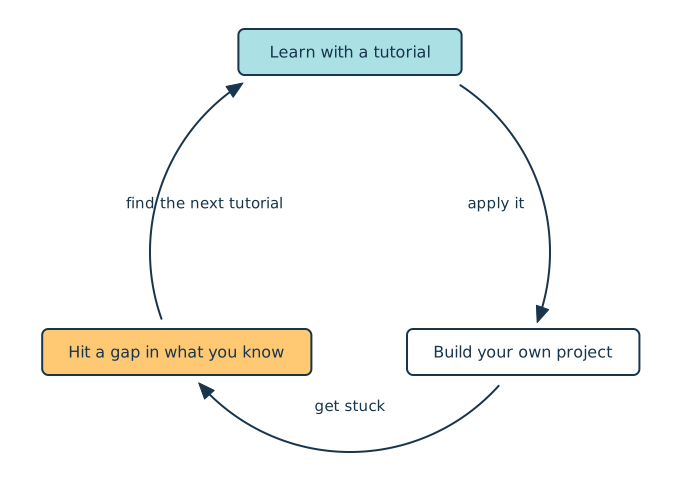
- Your own projects expose gaps that send you back to tutorials, and that learning cycle continues throughout your career.
Experienced programmers move around this cycle constantly. The goal isn’t to leave tutorials behind but to keep moving instead of getting stuck at the first step:
To work through the exercises in this guide, download the Tutorial-to-Project Worksheet, which includes a completed example, by clicking the link below:
Get Your Worksheet: Click here to download a free Tutorial-to-Project Worksheet, with a completed example, that helps you turn the tutorials you’ve finished into projects of your own.
Take the Quiz: Test your knowledge with our interactive “How to Get Out of Tutorial Hell” quiz. You’ll receive a score upon completion to help you track your learning progress:
Interactive Quiz
How to Get Out of Tutorial HellTest how well you can turn Python tutorials into practical projects by specifying problems, weighing tradeoffs, and knowing when you're done.
Prerequisites
This guide is for you if you’ve completed a few Python tutorials and feel comfortable with the basics, such as variables, functions, and loops, but still feel stuck when you open a blank editor. There’s no code to run and nothing to install.
One section uses a NumPy tutorial as a worked example, but you don’t need to know NumPy to follow along. Having a recent tutorial of your own in mind will help you get the most out of the exercises.
Python for Beginners Live Course: Want help crossing from tutorials to projects of your own? In Real Python’s Python for Beginners live course, you build programs from your own ideas with an instructor and a small cohort, with feedback whenever you get stuck. Join the waitlist to hear about the next dates.
Skills You Need Beyond Tutorials
The problem with getting stuck in tutorial hell is that tutorials aren’t meant to develop your general programming skills. Tutorials are most useful for teaching one specific topic, and they necessarily limit the scope of the problems you solve so you can focus on the skill you’re learning.
However, to get better at tackling complex and ambiguous problems, you need to develop several general skills:
- Specifying the real problem to be solved
- Making tradeoffs
- Identifying gaps in your knowledge
- Knowing when you’re done
To illustrate these skills, consider a hypothetical situation. Suppose you’re working on a to-do web application that lets users list their tasks for the day and check them off as they complete them. Several users ask to upload a text file containing a list of to-do items and have the application automatically parse it into items in the web app.
Since the users requesting this new feature likely don’t know much about programming, you have to make all the decisions about how to implement it. Consider how the general skills listed above apply to this hypothetical situation.
Specifying the Real Problem
In a tutorial, the problem you’re trying to solve is static and clearly defined. In commercial software development, requirements are rarely so clear, so you need to develop your ability to figure out the real problem you’re trying to solve.
In the hypothetical example, users are asking for a way to upload text files into your web application and have each line appear as a to-do item instead of typing out the items. Before you build that, it’s worth asking why they want it. Where do their task lists come from in the first place? A few users might say they keep a running list in a notes app, while others export tasks from a spreadsheet their team shares.
Those answers change the problem. Text files are one source, but the real problem is that the application only accepts to-do items typed into its web user interface (UI). What users need is a way to import items from wherever they already keep them. If you take the request at face value and build a component that only handles text files, you might be caught off guard when the spreadsheet users ask for their own upload feature.
Recognizing that the underlying problem is about accepting many kinds of input isn’t a leap most beginners make on their own. It’s the kind of connection that tends to click for people who’ve already been burned by a feature that was built too narrowly. One possible fix is an abstraction layer between user input and the web UI, though whether it’s worth building is a tradeoff you’ll weigh in the next section.
In this example, an abstraction layer could be a single piece of code that turns any input, whether it’s typed into the app or read from a text file or spreadsheet, into the same list of to-do items. The rest of the app then works with that list and doesn’t need to know where the items came from.
A tutorial can absolutely tell you to build that abstraction layer, directly or by pointing you toward further reading on the pattern. But telling you isn’t the same as discovering it yourself: building the naive version first, watching it strain under the next feature request, and only then working out why the abstraction would have helped. That discovery is what a tutorial can’t hand you, no matter how good its guidance is.
Making Tradeoffs
Now that you’ve identified the real problem—the app’s limited handling of user input—you have to start thinking of a solution. In Python, there are many ways to solve a problem, each with its own benefits and drawbacks. For example, extending your to-do app’s user input handling could involve a complete refactor of the code, or it could just mean adding a component for handling file uploads. Both approaches have pros and cons:
- The refactoring approach may take a lot of time and testing, but if you do it right, extending the input handling capabilities of your app will be straightforward in the future.
- Adding a single component will be much quicker than refactoring but may leave you with little reusable code to save you time on the next user request.
You need to decide which of these strengths matter most in your context.
If you prioritize system extensibility, meaning the ability to easily add new features, the refactoring approach is likely best for you. If you prioritize time to market, meaning how quickly you can get features to customers, the single-component approach can look more appealing—though skipping the abstraction now often costs you time when a similar request comes in later.
The single-component approach makes the most sense when you’re fairly confident there won’t be a “next time,” such as when you’re building a small, personal tool you don’t expect to extend much further.
The ability to weigh tradeoffs and make the best decisions for a given context is one of the most important skills you can have as a developer. The to-do app example is simple, but in commercial software, these decisions can have significant financial implications.
Good tutorials don’t shy away from tradeoffs—plenty of them walk you through several approaches and explain exactly why the author picked one over the others. But even then, the author has already made and explained the tradeoff for you. You get to read the reasoning, but you don’t get to sit with the ambiguity, weigh the options yourself, and commit to one, which is a different kind of practice entirely.
Identifying Gaps in Your Knowledge
Identifying gaps in your knowledge is sometimes described as “knowing what you don’t know.” When you encounter a programming problem, you may have a general sense of how to solve it without yet knowing all the approaches, tools, or tradeoffs available to you.
In the text file upload example, one possible approach is to handle the file entirely in the user’s browser. The part of your app that runs on the user’s own computer opens the file, pulls out each line, and sends only the resulting to-do items to your server. Depending on the file formats you plan to support, this can save you from storing the file at all, though your app still needs to check the items it receives.
Another option is to upload the whole file to your backend, the part of your app that runs on a server you control and stores everyone’s data. Once a user’s file lands there, you have new questions to answer: Is the file what it claims to be? Could it be harmful? Where should you store it, and for how long? Those questions only help if you already know to ask them.
If you’re new to this, those aren’t obvious follow-up questions so much as issues you stumble into: you ship the upload feature, get burned when someone uploads something malformed or oversized, and only then start asking what you should have validated in the first place.
As you think through these questions, you may realize that file uploads are an extremely common feature on the web. It would be unusual for every development team to implement all of this functionality from scratch, so there are probably existing browser APIs, framework features, libraries, or cloud services that can handle parts of the problem for you.
That realization exposes a gap in your knowledge. You understand the problem well enough to recognize that solutions probably already exist. You just don’t yet know what those solutions are.
Tutorials often give you less practice with this kind of uncertainty because they deliberately narrow the problem. A tutorial may tell you which library to install or which API to call so that you can focus on learning a particular concept. That guidance is useful, but it takes away your opportunity to think about what you don’t know.
Developing a sense of when your current solution space is incomplete is an important part of becoming a stronger programmer. Over time, this skill helps you build simpler and safer solutions that are easier to maintain and better suited to your context.
Knowing When You’re Done
Finally, knowing when a problem is sufficiently solved is another skill that tutorials often give you little opportunity to practice. In software development, this is commonly expressed through concepts such as acceptance criteria: concrete conditions that describe what a solution must do before you can consider the work complete.
The word “sufficiently” is emphasized because in real software projects, you never have unlimited time to account for every possible behavior, edge case, or improvement. Technically complete solutions may exist, but implementing them may not be worth the time and complexity.
For example, since you plan to accept text files uploaded by users, you have no way to enforce how those files are structured before they land in your hands. You may assume each line in a file indicates a single to-do item. But nothing stops a user from separating their items with commas instead and uploading a single-line file with four comma-separated items—only to be confused when your app shows it as one giant to-do item.
You could spend days trying to anticipate every format a user might submit. You could write increasingly complex parsing logic to recognize commas, semicolons, bullet points, numbered lists, and other patterns. But every additional case means time spent implementing, testing, and maintaining it. Eventually, the added complexity is no longer worth the time.
Instead, you need to define the solution’s acceptance criteria and work toward them. For example, suppose your acceptance criterion is “a user uploads a text file and each line is parsed and rendered in the web UI as a single to-do item.”
This requirement doesn’t support every way a user might format a text file, but it gives you a clear and useful target. You can implement it, test it, and confidently say when the feature satisfies its intended scope. Support for other formats can always become a future improvement if users actually need it.
Learning to draw this boundary is important because solutions to programming problems can almost always be improved further. There’s usually another edge case to handle or optimization to make. Without a clear stopping condition, a small feature can expand into a project that never ends.
With tutorials, the author has already determined what the finished project should do and where the exercise ends. When the tutorial is over, you’re done, so you never get to practice setting these clear stopping points.
Ways to Practice These Skills on Your Own
Now that you know which skills you miss out on when working through tutorials, consider some ways to practice them on your own. You can analyze the last tutorial you completed, write your own tutorial, start a new project, or join an existing one.
Analyze the Last Tutorial You Completed
Look back at the last tutorial you completed and see if you can identify all the general skills the author used to create it. Consider these questions:
- How was the problem specified in the tutorial?
- What tradeoffs does the tutorial’s solution make?
- Besides the main tutorial topic, what does the solution implement that you didn’t know about before?
- How does the author decide when the solution is done?
Part 1 of the Tutorial-to-Project Worksheet lists these questions with space for your notes, and its last page shows them answered for the example tutorial below.
Take the Real Python tutorial Using NumPy reshape() to Change the Shape of an Array as an example. This tutorial teaches you how to use NumPy’s reshape() method. The author specifies the problem in this sentence:
Sometimes you need to reorganize the values in a NumPy array into a different layout.
That’s the problem that the tutorial sets out to solve—changing the layout of the data in a NumPy array. Since the problem is already specified for you, you can practice specifying a problem by coming up with possible reasons why you’d want to reshape a NumPy array.
For example, a mathematical operation you plan to perform on the array might require a certain shape, or you might need to flatten data from an image file you’ve read into an array. There are lots of problems that can boil down to “the NumPy array needs to be reshaped.”
Next, try to identify the tradeoffs the author made in the tutorial. One tradeoff worth digging into is the tutorial’s choice to show you the wrong result first.
Before it walks you through the correct triptych—a single image showing the red, green, and blue channels side by side—the tutorial has you produce a stretched, interleaved image by using the wrong order argument. That detour costs an extra code block, a screenshot, and a bit of cropping, so why not just show the correct call from the start?
Working out the author’s reasoning here is a good exercise: it’s a tradeoff that’s actually present in the tutorial, and it’s tied directly to the concept being taught rather than to something incidental like project setup. See if you can articulate why showing the “wrong” result first might make the concept stick better than jumping straight to the right answer would.
Now try to identify which gaps in your knowledge would have prevented you from completing this tutorial yourself. You can assume that you knew nothing about reshape() before reading the article, but did the tutorial introduce anything else that was new to you? For example, the author has you build an array of normally distributed floating-point numbers:
You call
rng.normal()to get a normal distribution with a mean temperature of 18 degrees Celsius and a standard deviation of 1 degree Celsius.
Before this tutorial, did you know what “normal distribution” meant? It’s a statistical concept rather than a Python one, which shows how blind spots can come from outside programming.
Spotting new terms after the fact is a start, but the skill you’re really after is noticing a gap before someone fills it for you. To practice that, change the project slightly.
Suppose you wanted the sample temperatures to climb during the day and drop at night, the way real temperatures do. Could you build that with what you know right now? If not, try to name exactly what’s missing. “I don’t know NumPy” is too vague to act on, but “How do I generate random numbers that follow a daily pattern?” is a question you can research.
Try the same thing with the tutorial you picked: change one requirement, and write down the specific question you’d need to answer to make it work.
Finally, how does the author decide when you’re done? In this tutorial, the author works through many examples in which they take a NumPy array, reshape it, do something with the reshaped array, and then move on to another example.
Here, each example is done once you’ve finished the “do something with the reshaped array” step. For example, one of the sections in the tutorial involves splitting a color image into its individual red, green, and blue channels, each displayed as a grayscale image. Once you can see each channel rendered separately, you’re done with that example.
Can you think of other examples the author could have added to the tutorial and define what would count as done for each one?
Write Your Own Tutorials
Writing about a new concept is a useful way to reinforce your understanding of it. Taking that one step further and writing your own tutorial gives you a chance to practice many of the skills that are easy to miss when you only follow tutorials written by someone else.
Research backs this up. In How People Learn II (2018), the National Academies’ chapter on knowledge and reasoning describes developing explanations, including teaching what you’ve learned to others, as a way to deepen your understanding of new material. That’s especially true when you focus on explaining the “why” behind a concept.
For a closer look at the evidence, see Learning-by-Teaching Without Audience Presence or Interaction, a review of studies on whether explaining material to an audience that isn’t there, much like writing a tutorial, helps you learn it. The findings are promising but mixed, so treat writing tutorials as one useful exercise rather than a guaranteed shortcut.
Try writing as if you’re teaching the concept to a new coworker or another contributor who’s never used it before. To explain something clearly, you have to make decisions about the problem, the solution, and what your reader needs to know along the way—all the skills you miss out on when following tutorials.
For example:
- Define a problem worth solving. Instead of starting with a ready-made exercise, you have to think of a realistic problem that the concept can address. This gives you practice deciding what the actual problem is and what belongs within its scope.
- Make and explain implementation tradeoffs. As you learned earlier, there are often several ways to solve the same problem. Choose one, but also explain why you chose it and what alternatives you considered. This helps you practice weighing tradeoffs.
- Identify knowledge gaps and assumptions. What does your reader need to understand before they can follow the tutorial? What can you reasonably assume they already know? Thinking through these questions will help you recognize when a problem’s solution space includes unfamiliar concepts.
- Decide what “done” looks like. What should the reader be able to accomplish by the end of the tutorial? If you’re building an example project, which features are necessary to demonstrate the concept, and which ones should be left out to avoid distracting the reader?
You don’t have to treat these tutorials as polished publications. They mainly serve as learning exercises for yourself. The act of explaining a concept may expose places where your understanding is still vague, and the finished tutorial can become a useful reference when you need to revisit the topic later.
If you do choose to publish your tutorials, they can have an additional benefit. Over time, they can form a body of work that demonstrates your knowledge, experience, and communication style. That can be useful when talking with potential employers, collaborators, or clients. This isn’t the main goal of writing your own tutorials, just an added benefit.
Find Projects or Create Your Own
There’s no way around it: to get out of tutorial hell and become a better developer, you need to work on challenging projects. There are two ways to work on non-trivial programming projects:
- Start your own project
- Work on someone else’s project
To start your own project, think of problems you want to solve. The smallest version of this is adding one feature to a tutorial project you’ve already finished. For example, if you’ve built a to-do app by following a tutorial like this Django one, you could add the text file import from earlier in this guide:
- Input: A text file with one task per line
- Output: A new to-do item for each line
- First task: Read the file and print each line in the terminal before you touch the web app at all
- Done: Uploading a three-line file creates three to-do items
Once a change like that feels manageable, you can take on bigger project ideas, such as simplified social media platforms or online store catalogs.
Working on someone else’s project can mean contributing to an open-source project or even finding your first programming job. If you’d rather start with open source, a small, clearly described issue in a tool you already use is a good first step. Part 3 of the worksheet walks you through these decisions.
No matter what kind of project you work on or whose it is, you’ll practice skills that tutorials give you little chance to develop. As you work, keep asking yourself whether your code addresses the problem you set out to solve. If it doesn’t, have you drifted from the problem, or do you need to redefine it because it was unclear from the start?
You should also keep track of the tradeoffs you make and be able to explain your reasons for making them. There may be times when you’re deep into a project and realize that a tradeoff you made last week prevents you from finishing a feature you wanted to write today.
Such experiences are common in every programmer’s career, and they teach you how to make better tradeoffs in the future. If you’re working on a project that isn’t your own, you’ll likely be working under constraints that guide the kinds of tradeoffs you’ll make.
As you work through a project, you’ll also encounter many gaps in your own knowledge. This is inevitable for everyone who builds software in any meaningful capacity. At these times, you may find yourself reaching for a tutorial again, though hopefully without getting sucked back into tutorial hell!
Finally, working on your own or someone else’s project gives you the opportunity to think about what constitutes a finished feature or bug fix. If you’re working on your own project, you get to decide when you’ve officially solved the problem you set out to address.
You also get to decide whether it’s worth building on your project to solve new problems or whether it’s time to move on to another project. If you’re working on an open-source project or something for an employer, what counts as done may already be spelled out for you, or it may be ambiguous. In either case, you’ll get to practice working toward a specific goal.
Next Steps to Get Out of Tutorial Hell for Good
In this guide, you learned that getting stuck in tutorial hell isn’t about tutorials being bad—it’s about never moving past the first step of the learning cycle. Tutorials teach you a skill, and your own projects are where you discover why that skill actually matters. You also picked up some practical ways to move on to the next step. It’s time to put those tips into practice!
First, revisit the last tutorial you completed and go through the steps listed above. Specify the problem the tutorial sets out to solve, consider the tradeoffs the author made, identify which gaps in your knowledge would have stopped you from finishing it alone, and examine how the author defined “done” in the tutorial’s context.
Can’t remember the last tutorial you completed? Python Learning Roadmap: How to Create Your Own Plan will help you map out where you are and pick a tutorial worth revisiting.
Next, experiment with writing your own tutorials while paying attention to the skills you’re using: specifying the problem, considering tradeoffs, figuring out what’s missing from your own knowledge, and defining a good stopping point. Remember, you don’t necessarily need your tutorials to go viral and reach millions of people. This is mainly an exercise for your own benefit!
Finally, don’t be afraid to start your own projects or try to join existing ones. You’ll feel a little awkward when you first try these things, but that’s to be expected! Keep working on developing your programming skills and never get trapped in tutorial hell again!
Get Your Worksheet: Click here to download a free Tutorial-to-Project Worksheet, with a completed example, that helps you turn the tutorials you’ve finished into projects of your own.
Frequently Asked Questions
Now that you know how to escape tutorial hell, you can use the questions and answers below to check your understanding and recap what you’ve learned.
These FAQs are related to the most important concepts you’ve covered in this guide. Click the Show/Hide toggle beside each question to reveal the answer.
Tutorial hell is the cycle of finishing one guided tutorial after another while still feeling lost when you try to build something on your own. Each tutorial feels productive, but none of them gives you practice making the decisions that a real project requires.
Yes! Tutorials are a great way to learn a specific topic because they narrow the scope so you can focus on a single concept. The trouble starts only when you never apply what you’ve learned.
Start by analyzing the last tutorial you completed, and then try writing a tutorial of your own. From there, work on your own project or someone else’s, making your own decisions along the way.
Yes. Your projects will continue to expose gaps in your knowledge, and a focused tutorial is often the quickest way to fill them. Moving back and forth between tutorials and projects is a healthy learning cycle that continues throughout your career.
Take the Quiz: Test your knowledge with our interactive “How to Get Out of Tutorial Hell” quiz. You’ll receive a score upon completion to help you track your learning progress:
Interactive Quiz
How to Get Out of Tutorial HellTest how well you can turn Python tutorials into practical projects by specifying problems, weighing tradeoffs, and knowing when you're done.