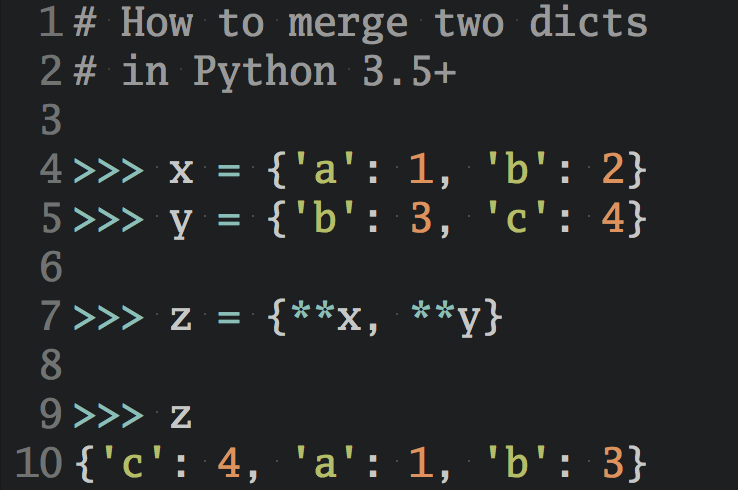
Meta recently released its new personal AI agent, Muse. However, behind this name isn’t just “one thing”. Meta also uses the Muse name for an upcoming pocket gadget and for the AI models that programmers use to build apps.
By the end of this tutorial, you’ll understand which Muse is which and whether it’s worth trying. No coding experience required.
To see which part of Muse fits your needs, find your situation in the table below:
| Your situation | Recommendation |
|---|---|
| Want an assistant that answers questions and handles errands like shopping or booking travel | The Muse app |
| Want a pocket-sized Muse device | Wait for Muse Charm, or build your own with Muse Gadgets if you enjoy DIY projects |
| Want to see how people build their own apps with the same AI | The Muse models, together with Python |
You may also come across older products called Muse, such as a meditation headband. They have nothing to do with Meta.
New to AI and Programming? Start With a Free Learning Plan.
Answer a few quick questions about where you're starting from and what you'd like to do with AI. You'll get a free, personal plan that takes you step by step from your first line of code to building with AI. All you need is a free Real Python account.
Get My Free Learning Plan »Take the Quiz: Test your knowledge with our interactive “What Is Meta Muse? A Plain-English Guide to Meta's New AI” quiz. You’ll receive a score upon completion to help you track your learning progress:
Interactive Quiz
What Is Meta Muse? A Plain-English Guide to Meta's New AICheck what you know about Meta Muse, from its AI agent app and plans to your privacy settings and where Python fits in.
What Is Meta Muse Exactly?
Meta uses the Muse name for four related offerings, each aimed at a different audience:
- Muse: A personal AI agent app for everyone
- Muse Charm: An announced gadget for talking to Muse
- Muse Gadgets: A free toolkit for building your own Muse device
- Muse models: AI models such as Muse Spark and Muse Glimmer for programmers
When people say “Meta Muse,” they usually mean the app. It runs on Muse Spark, Meta’s most capable AI model. You can think of the model as the brain and the app as the body that lets it do things for you.
Next, you’ll see what the app can do for you.
What the Muse App Can Do for You
Meta introduced Muse on September 8, 2026 as an agent that “proactively helps with people’s goals and suggests ideas.”
The key word is agent. A regular chatbot like ChatGPT answers your questions. An agent can also take actions on your behalf. With Muse, that means sending emails, booking travel, and shopping through services such as Instacart.
What’s the difference between a chatbot and an agent?
Meta calls the connected services connectors. Companies submit them through the Muse Connector Platform, and Meta checks each one for “functional, security, and legal requirements” before it shows up in Muse.
Note: Once you connect your email, calendar, or payment details, Muse can act in your name, and AI agents still make mistakes, like messaging the wrong person or ordering the wrong item. Content that Muse reads, such as an email or web page, can also try to trick it into doing something you didn’t ask for. Connect only the accounts you need, start with low-stakes errands, and check what Muse is about to send or buy before it goes ahead.
What Muse Costs and Where You Can Use It
Muse is free up to a usage limit. For heavier use, Meta offers two paid plans:
| Plan | Price per month | Weekly allowance |
|---|---|---|
| Free | $0 | A limited amount that refreshes |
| Power | $20 | 500M Muse tokens |
| Maximum | $100 | 3B Muse tokens |
Muse tokens are Meta’s unit for measuring how much you use Muse. The Maximum plan gives you six times the weekly allowance of the Power plan. If you reach the free plan’s limit, you can wait until your allowance refreshes, so start with the free plan and upgrade only if you keep running out.
Note: For now, Muse is available only in the US and Canada. Meta hasn’t said when it’ll reach other countries.
Once you know what Muse costs, the next question is what using it means for your privacy.
What Happens to Your Conversations
Before you give an AI agent access to your email and shopping accounts, it’s fair to ask what Meta does with your conversations. According to Meta, here’s how the Muse app handles them:
- Your Muse conversations aren’t shared with Meta’s ads systems.
- Meta may use your conversations to train its AI models, but you can opt out.
That second point means model training is on unless you turn it off. According to Meta’s Muse privacy page, you’ll find the toggle in the app’s settings under Data controls. Opting out also covers your earlier chats.
So far, you’ve looked at Muse on your phone or computer. Meta also wants Muse in your pocket.
What Muse Charm and Muse Gadgets Are
Muse Charm is a gadget that Meta announced at its Connect event on September 23, 2026. Press reports describe a small device with a two-inch screen and 5G that lets you talk to Muse without pulling out your phone.
In its Connect recap, Meta promised “more to share later this year,” and it plans to ship Muse Charm in December, according to Decrypt. Muse Charm hasn’t shipped yet, and Meta hasn’t announced a price.
Note: Some reports, such as Dezeen’s, describe a small camera, but Meta hasn’t confirmed any specs yet. Treat what you read as early reports until it does.
If you enjoy DIY projects, then Muse Gadgets lets you build your own Muse hardware while you wait. On October 2, 2026, Meta released a free toolkit for small boards such as an ESP32 or a Raspberry Pi. You buy the board, install the toolkit, and pair it with Muse through the phone app, so it’s a weekend project rather than a ready-made gadget.
The Muse Gadgets project page on GitHub, a site where programmers share code, includes pictures of the boards and screens you can use:
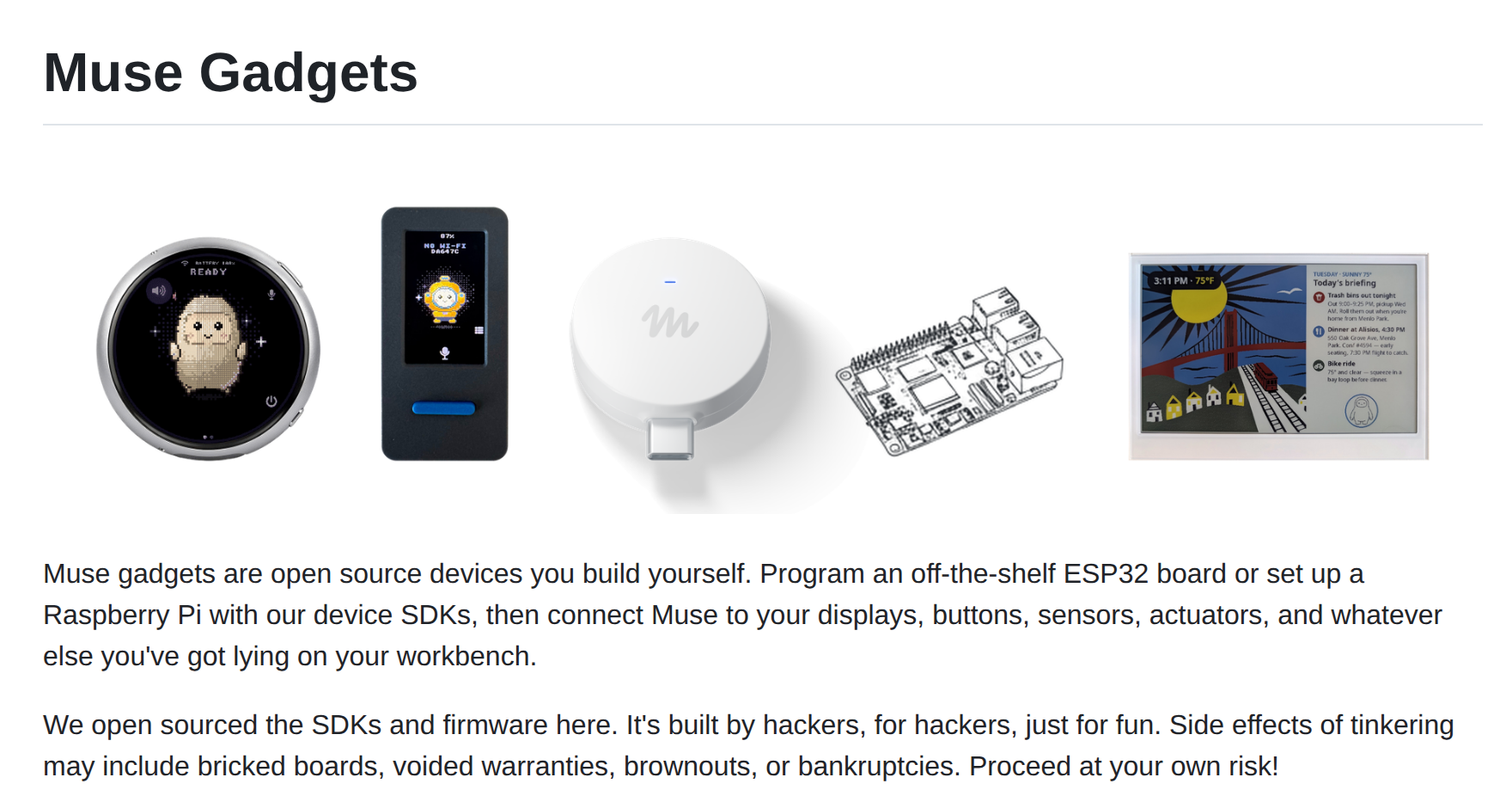
Part of the toolkit is written in Python, so it’s a fun project if you’ve already tinkered with a Raspberry Pi. Keep in mind that Meta calls it a project “built by hackers, for hackers,” and on a Raspberry Pi or other Linux computer, Muse gets the same access as the account you install it for.
Whichever device you use, the same AI model does the thinking. Next, you’ll see how that model stacks up.
How Muse Spark Compares to Other AI Models
Muse Spark is a large language model (LLM), the same kind of AI that powers chatbots like ChatGPT and Claude. It’s capable, but it isn’t the top model right now. The independent Artificial Analysis leaderboard tests AI models on coding, hard science questions, and real-world work tasks. As of October 5, 2026, Muse Spark 1.3 had the seventh-highest-scoring model family there, with a score of 48 against the leader’s 58.
The Artificial Analysis intelligence chart shows where Muse Spark 1.3 lands among the top models:
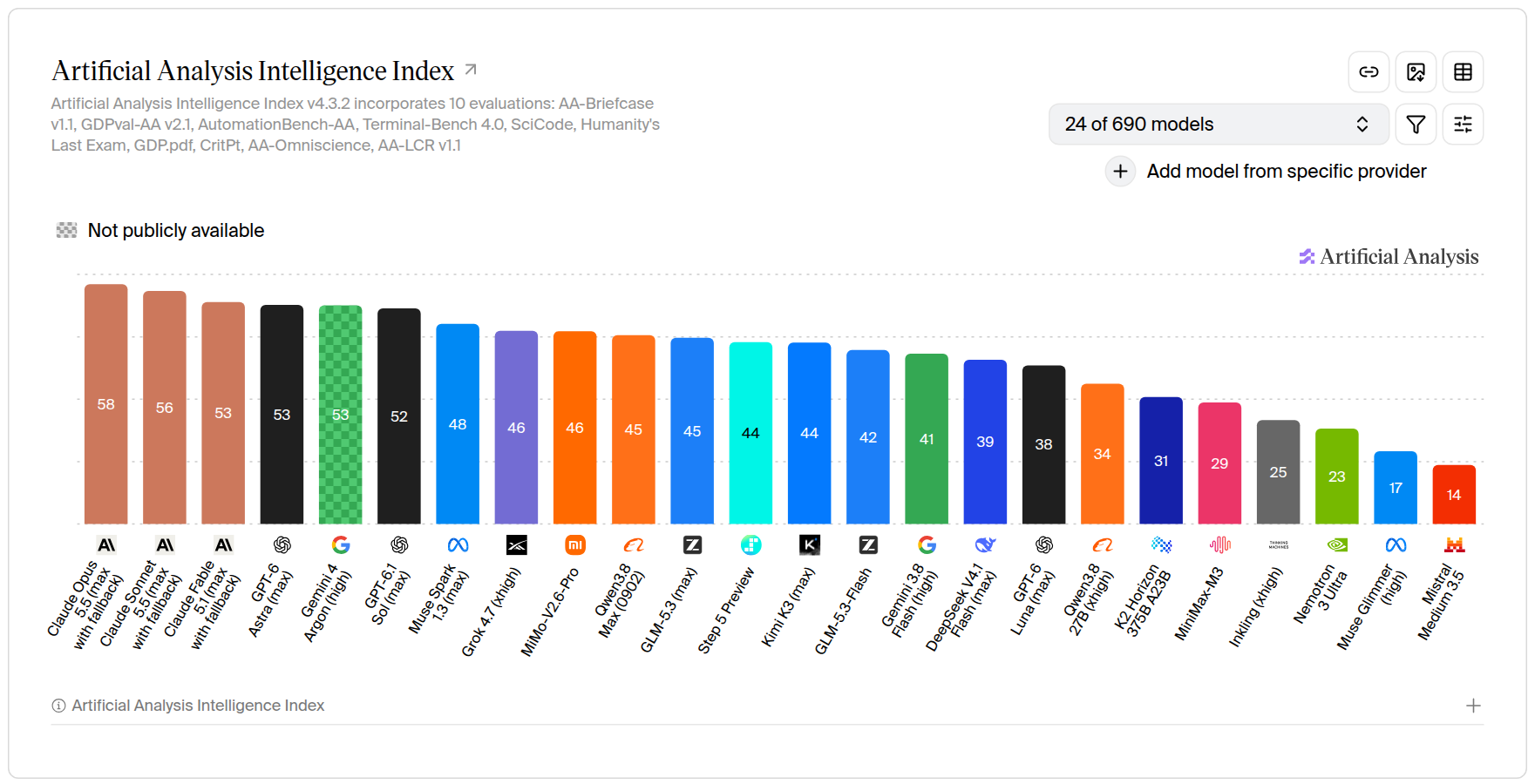
In everyday use, that gap matters less than whether Muse connects to the apps and services you already use. If you live in WhatsApp or shop on Instacart, then Muse may feel more useful than a higher-scoring chatbot that can’t reach those services. Whichever one you pick, clear and specific requests get better answers, which is the idea behind prompt engineering.
Where Python Fits In
Behind the app, Meta offers its Muse models to programmers, who can build them into their own apps and pay a small fee each time they use them. Muse Spark is one of these models. Another, Muse Glimmer, is free to download and run on your own computer, though you’ll need a high-end gaming PC to do it.
Programmers often talk to these models with Python. The short program below asks Muse Spark a question through OpenRouter, a service that lets you use many AI models through one account. You don’t need to run the program or follow every line. Just look for the model’s name, the question, and the line that prints the answer:
from openai import OpenAI

client = OpenAI(
    base_url="https://openrouter.ai/api/v1",
    api_key="<your-openrouter-key>",
)

response = client.responses.create(
    model="meta/muse-spark-1.3",
    input="Suggest a name for a golden retriever puppy.",
)
print(response.output_text)
It’s like typing a question into the Muse app, minus the app’s extras. This program only gets a text answer back. It can’t send emails or shop because those connectors live in the app.
Note: Meta doesn’t mention any link between the Muse app’s paid plans and the Muse models. If you use both, expect to pay for each one separately.
If you’d like to understand that code, then the beginner-friendly tutorial below is a good place to start:
Tutorial
How to Use Python: Your First Steps
Learn how to use Python—install it, run code, and work with data types, functions, classes, and loops. Explore essential tools and build a solid foundation.
From there, the Python Basics learning path takes you through the fundamentals one step at a time.
Go From Using AI to Building With It
Tell us what you'd like to build and how much time you have. We'll put together a free, step-by-step learning plan for you, whether you're writing your first line of Python or your first AI app. All you need is a free Real Python account.
Create My Free Learning Plan »Conclusion
When people ask what Meta Muse is, they usually mean Meta’s personal AI agent app, which can send emails, book travel, and shop for you. It’s free to try in the US and Canada, with paid plans for heavier use. Muse Charm is an announced gadget that Meta plans to ship in December, and the Muse models are the building blocks that programmers use in their own apps.
Knowing which Muse is which helps you cut through the headlines and decide whether Meta’s agent is worth your time and your data.
In this tutorial, you’ve learned how to:
- Tell apart the Muse app, Muse Charm, Muse Gadgets, and the Muse models
- Decide whether the free plan or a paid plan fits how you’d use Muse
- Protect your privacy by opting out of model training
- Use Muse’s agent features with care
- Compare Muse Spark with other AI models
- Recognize how programmers use the Muse models with Python
Can you tell the four Muses apart?
If Muse sounds useful, then try one small, low-stakes errand on the free plan. First, check the model training setting and which accounts you’ve connected. If the Python example sparked your curiosity, then you can also use ChatGPT to learn Python at your own pace. Have you tried Muse yet, or are you waiting for Muse Charm? Share your experience in the comments below.
Frequently Asked Questions
Now that you know the basics of Meta Muse, you can use the questions and answers below to check your understanding and recap what you’ve learned.
These FAQs are related to the most important concepts you’ve covered in this tutorial. Click the Show/Hide toggle beside each question to reveal the answer.
Meta Muse is Meta’s personal AI agent, launched on September 8, 2026. Besides answering questions, it can take actions for you, such as sending emails, booking travel, and shopping through connected services like Instacart.
Yes, up to a usage limit that refreshes over time. If you need more, the Power plan costs $20 a month and the Maximum plan costs $100 a month.
Yes, in Canada. As of October 2026, the Muse app is available only in the US and Canada.
It can, unless you opt out under Data controls in the app’s settings. Meta says it doesn’t share your Muse conversations with its ads systems, but model training is on by default.
Muse can send messages and make purchases in your name, but AI agents still make mistakes. Connect only the accounts you need, start with low-stakes errands, and check what Muse is about to send or buy before it goes ahead.
Muse is the app that you chat with, and Muse Spark is the AI model that powers it. Programmers can also use Muse Spark in their own apps with Python, but you don’t need to code to use the Muse app.
Take the Quiz: Test your knowledge with our interactive “What Is Meta Muse? A Plain-English Guide to Meta's New AI” quiz. You’ll receive a score upon completion to help you track your learning progress:
Interactive Quiz
What Is Meta Muse? A Plain-English Guide to Meta's New AICheck what you know about Meta Muse, from its AI agent app and plans to your privacy settings and where Python fits in.