With Claude Code skills, you can turn a docstring convention you keep re-explaining into instructions that Claude follows on its own. After working through this guide, you can write consistent Python docstrings with a reusable Claude Code skill.
You’ll start with a single Markdown file in one project, add reference files that load only when needed, add a Python helper that finds undocumented code, and then move the skill to your personal folder so it works in all your local projects:
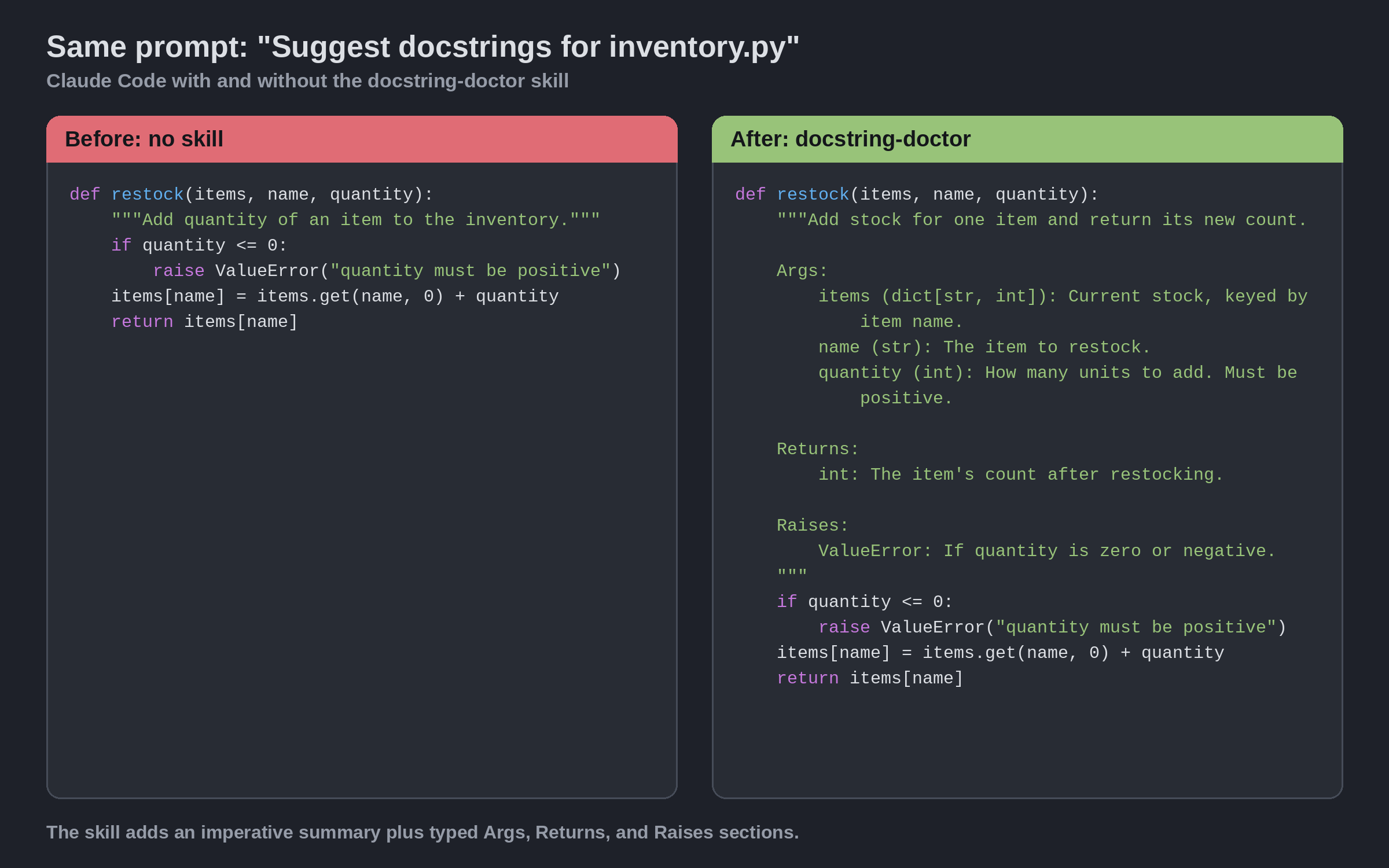
The skill you’ll build is called Docstring Doctor. Without it, Claude writes whatever docstring seems reasonable in the moment. With it, every docstring opens with an imperative summary and documents parameters, return values, and exceptions in your project’s style.
A skill is a folder containing instructions in a SKILL.md file, optionally with scripts and reference files alongside it. Claude can load the instructions on its own when your request fits the skill’s description, and you can also invoke a skill by name. The Agent Skills specification defines the format, and Claude Code adds a few features of its own.
Free Bonus: Claude Code Cheat Sheet
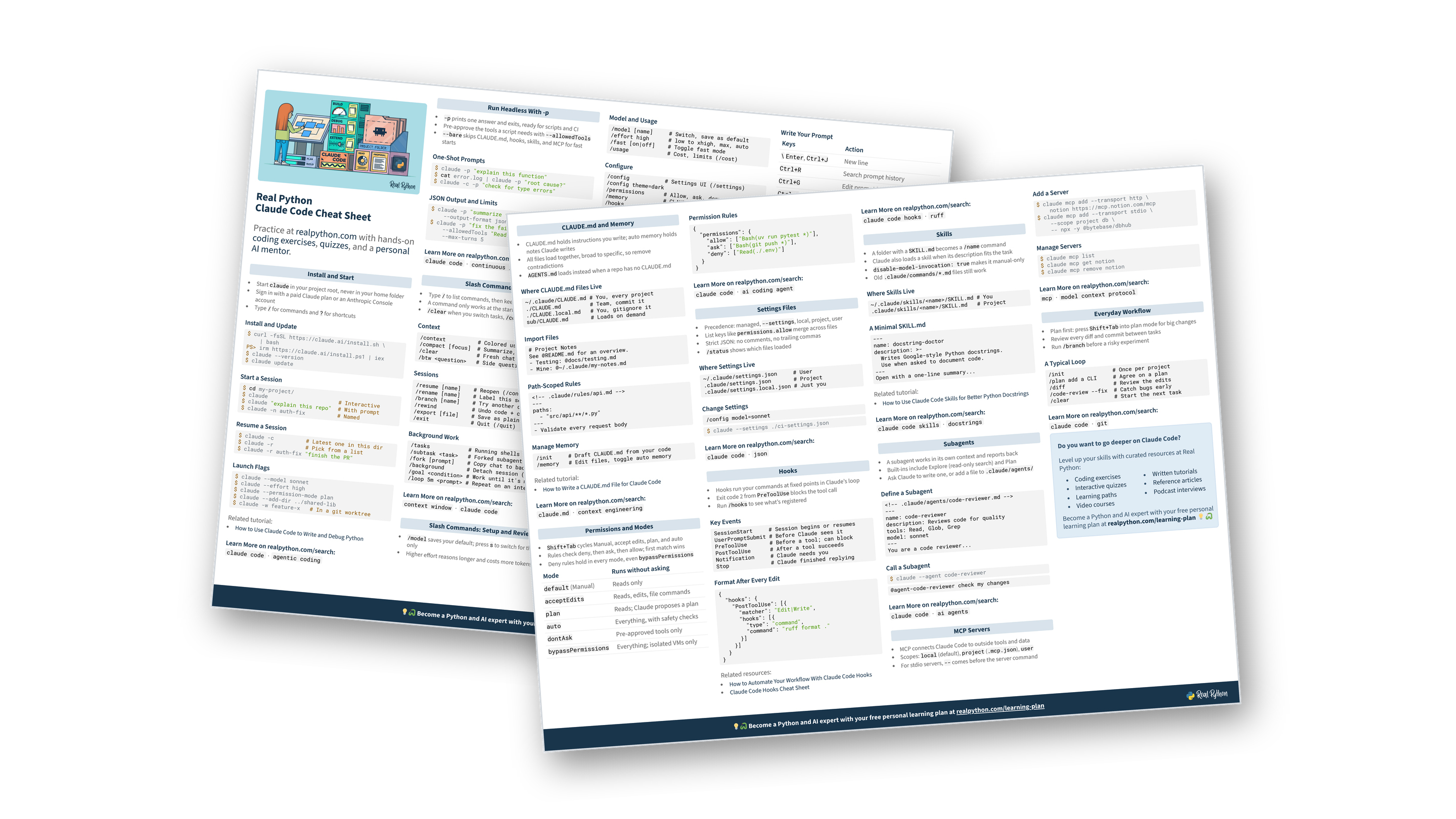
Get a Claude Code Cheat Sheet (PDF) with slash commands, shortcuts, CLI flags, CLAUDE.md, permissions, hooks, skills, subagents, and MCP on two printable pages:
Prerequisites
You’ll need Claude Code installed and signed in, plus Python 3.12 or later for the helper in Step 3. The examples were checked with Claude Code 2.1.273 and Python 3.14.6. The helper uses only the standard library, so there’s nothing to install.
The commands work in Bash on Linux and WSL (Windows Subsystem for Linux), and in zsh or Bash on macOS. If python3 isn’t the command that starts your Python, substitute your own.
You’ll edit Markdown files and run a short script, so familiarity with terminal commands and writing docstrings helps. If you’re new to Claude Code, How to Use Claude Code to Write and Debug Python walks you through your first sessions.
Claude Code Live Course: If you’d rather learn Claude Code hands-on with an instructor, Real Python’s Claude Code live course guides you through building a complete Python project with it, reusable skills included.
Start with a scratch project named skills-demo and change into it:
$ mkdir skills-demo
$ cd skills-demo
Then save a small module with a few missing docstrings as inventory.py:
inventory.py
"""Track stock counts for a small warehouse."""

def restock(items, name, quantity):
    if quantity <= 0:
        raise ValueError("quantity must be positive")
    items[name] = items.get(name, 0) + quantity
    return items[name]

def low_stock(items, threshold=5):
    """Return the names of items at or below the threshold."""
    return [name for name, count in items.items() if count <= threshold]

class Warehouse:
    def __init__(self, location):
        self.location = location
        self.items = {}

    def receive(self, name, quantity):
        return restock(self.items, name, quantity)
The module and low_stock() have docstrings, while restock(), the Warehouse class, and its two methods don’t. That gives the skill something to work on.
Step 1: Create Claude Code Skills Inside Your Project
Before you build anything, record what Claude does on its own. Launch Claude Code from the project folder:
$ claude
At the prompt, ask for docstrings without letting Claude change the file, so you can repeat the same request later:
Suggest docstrings for inventory.py without editing the file.
Answers vary from run to run, but you’ll typically get a short summary line for each function, with no fixed structure and often no mention of the ValueError that restock() raises. Note the shape of the answer, then end the session with /exit, because you’re about to create a skills folder that didn’t exist when the session started. Alternatively, keep the session open and run /reload-skills once the folder exists.
Create the skill’s folder inside the project:
$ mkdir -p .claude/skills/docstring-doctor
The .claude/ folder belongs to this project, and each skill gets its own folder inside .claude/skills/. The name field sets the /docstring-doctor command. The specification requires it to match the folder name, so use docstring-doctor for both.
Save the following as .claude/skills/docstring-doctor/SKILL.md:
.claude/skills/docstring-doctor/SKILL.md
---
name: docstring-doctor
description: >-
  Writes and fixes Python docstrings in Google style with Args, Returns,
  and Raises sections. Use when the user asks to document, add docstrings
  to, or improve docstrings in a Python function, class, or module.
---

When adding or rewriting a docstring:

1. Open with a one-line summary in the imperative mood, ending with a
   period. Write "Return the total.", not "Returns the total."
2. Add `Args:`, `Returns:`, and `Raises:` sections in Google style. Leave
   out any section that doesn't apply.
3. Name the type of every parameter and return value. Skip `self` and
   `cls`.
4. Keep the code unchanged. Only add or replace docstrings.
5. Show the updated code, not a description of the changes.
The block between the --- markers is the skill’s frontmatter, written in YAML. The specification requires name and description, while Claude Code treats every field as optional, so include both for portability.
The description matters more than any other line in the file. At startup, only the name and description of every skill load, and Claude uses that text to decide when to read the rest. Anthropic’s best practices say to write it in the third person, state what the skill does and when to use it, and include the words a user would naturally say. The body stays short because Claude already knows what a docstring is. It only needs your rules.
Start Claude Code again with claude and repeat the request:
Suggest docstrings for inventory.py without editing the file.
This time, the request matches the description, so Claude should load the skill and answer in the new shape. For restock(), you should see something close to this:
def restock(items, name, quantity):
    """Add stock for one item and return its new count.

    Args:
        items (dict[str, int]): Current stock, keyed by item name.
        name (str): The item to restock.
        quantity (int): How many units to add. Must be positive.

    Returns:
        int: The item's count after restocking.

    Raises:
        ValueError: If quantity is zero or negative.
    """
    if quantity <= 0:
        raise ValueError("quantity must be positive")
    items[name] = items.get(name, 0) + quantity
    return items[name]
The same prompt now produces an imperative summary, typed parameters, and a Raises: section, while the function body stays untouched. The other definitions follow the same layout. If your first answer already looked similar, check two things: the transcript shows that Claude loaded docstring-doctor, and every docstring follows all five rules. The skill makes your rules reusable, but Claude is still a language model, so review what it writes.
If nothing changed, type /docstring-doctor to invoke the skill directly, and run /skills to confirm that it loaded.
You now have a working project skill. Next, you’ll teach it more than one style without stuffing every style guide into the file.
Step 2: Add Reference Files With Progressive Disclosure
Your skill hard-codes Google style, but the next project you document may use NumPy or Sphinx conventions. Pasting all three style guides into SKILL.md would load all three into Claude’s context window every time the skill runs, even though each request needs only one. Keep SKILL.md as the router instead, and put each style in its own reference file.
Leave Claude Code running. Open a second terminal in skills-demo for the shell commands in this step, and use your editor for the files. Create a references/ folder inside the skill:
$ mkdir .claude/skills/docstring-doctor/references
The specification suggests references/ for documentation that Claude reads and assets/ for templates and data. Each reference file here is a short guide with one complete example. Save this one as references/google.md:
.claude/skills/docstring-doctor/references/google.md
# Google Style

Sections use a heading followed by an indented block. Names come first,
then the type in parentheses, then a description.

    def restock(items, name, quantity):
        """Add stock for one item and return its new count.

        Args:
            items (dict[str, int]): Current stock, keyed by item name.
            name (str): The item to restock.
            quantity (int): How many units to add. Must be positive.

        Returns:
            int: The item's count after restocking.

        Raises:
            ValueError: If quantity is zero or negative.
        """

Rules:

- Sections, in this order: `Args:`, then `Returns:` (or `Yields:` for
  generators), then `Raises:`.
- Indent section contents by four spaces.
- Describe class attributes in an `Attributes:` section of the class
  docstring, not in `__init__`.
- Google's guide accepts descriptive ("Adds stock.") or imperative
  ("Add stock.") summaries as long as a file is consistent. This skill
  always uses the imperative mood, following PEP 257.
The last rule shows why a skill is worth writing at all. It encodes your team’s decisions, including choices that Google’s style guide leaves open.
Create references/numpy.md and references/sphinx.md in the same shape, each with the restock() example and the section rules for that style. You can copy both files from the collapsible blocks below:
.claude/skills/docstring-doctor/references/numpy.md
# NumPy Style

Sections use a heading underlined with hyphens. Each parameter gets its
own line in the form `name : type`, with the description indented below.

    def restock(items, name, quantity):
        """Add stock for one item and return its new count.

        Parameters
        ----------
        items : dict[str, int]
            Current stock, keyed by item name.
        name : str
            The item to restock.
        quantity : int
            How many units to add. Must be positive.

        Returns
        -------
        int
            The item's count after restocking.

        Raises
        ------
        ValueError
            If quantity is zero or negative.
        """

Rules:

- Sections, in this order: `Parameters`, then `Returns` (or `Yields`
  for generators), then `Raises`.
- Underline each section heading with hyphens of the same length.
- Put one space on each side of the colon in `name : type`.
- Describe class attributes in an `Attributes` section of the class
  docstring, not in `__init__`.
.claude/skills/docstring-doctor/references/sphinx.md
# Sphinx Style

Sphinx style uses reStructuredText field lists. Each field starts with a
colon, and types get their own `:type:` and `:rtype:` fields.

    def restock(items, name, quantity):
        """Add stock for one item and return its new count.

        :param items: Current stock, keyed by item name.
        :type items: dict[str, int]
        :param name: The item to restock.
        :type name: str
        :param quantity: How many units to add. Must be positive.
        :type quantity: int
        :returns: The item's count after restocking.
        :rtype: int
        :raises ValueError: If quantity is zero or negative.
        """

Rules:

- Fields, in this order: `:param:` and `:type:` pairs, `:returns:`,
  `:rtype:`, then `:raises:`.
- Put each field on its own line with no blank lines between fields.
- Name the exception class directly after `:raises`.
- Describe class attributes with `:ivar name:` fields in the class
  docstring, not in `__init__`.
Now replace SKILL.md so it points Claude to the right reference file. Update the description to name all three styles, make the second rule style-neutral, and append a section that tells Claude how to choose:
.claude/skills/docstring-doctor/SKILL.md
---
name: docstring-doctor
description: >-
  Writes and fixes Python docstrings in Google, NumPy, or Sphinx style
  with argument, return, and exception sections. Use when the user asks
  to document, add docstrings to, or improve docstrings in a Python
  function, class, or module.
---

When adding or rewriting a docstring:

1. Open with a one-line summary in the imperative mood, ending with a
   period. Write "Return the total.", not "Returns the total."
2. Document every parameter, the return value, and every exception that
   callers should expect. Leave out any section that doesn't apply.
3. Name the type of every parameter and return value. Skip `self` and
   `cls`.
4. Keep the code unchanged. Only add or replace docstrings.
5. Show the updated code, not a description of the changes.

## Choose the style

Pick the docstring style in this order:

1. The style the user names.
2. The style of existing docstrings in the same file or package.
3. Google style.

Then read exactly one of these files before writing:

- Google style: [references/google.md](references/google.md)
- NumPy style: [references/numpy.md](references/numpy.md)
- Sphinx style: [references/sphinx.md](references/sphinx.md)
This layout is progressive disclosure, and the specification describes it in three stages. Skill metadata loads at startup for every skill. The SKILL.md body loads when the skill activates. Reference files and scripts load only when the task needs them. Telling Claude to read exactly one reference file keeps the other two out of the conversation.
The best practices add two rules: keep SKILL.md under 500 lines, and link every reference file directly from it, because Claude may only skim files that other files reference.
Edits to skill files take effect during a session, but instructions that Claude has already loaded stay in the conversation. Back in Claude Code, run /clear to start a fresh conversation, then ask for a different style:
Suggest docstrings for inventory.py in NumPy style. Don't edit the file.
In the transcript, Claude should read references/numpy.md and no other reference file, and the docstrings should switch to a Parameters heading underlined with hyphens. Run /clear again and ask for Sphinx style, and you’ll get :param: and :rtype: fields instead. The style switch works, and SKILL.md stays short.
Step 3: Add a Python Helper and Make the Skill Personal
So far, Claude reads the whole module and decides what’s undocumented. That works for one file, but it’s slow, costs tokens, and gets unreliable for a package that doesn’t fit in the conversation. Finding definitions without docstrings is a deterministic job, and deterministic jobs belong in code.
You don’t need to understand tree walking to use the helper. What matters to the skill is its contract: paths go in, and one line per missing docstring comes out. Create a scripts/ folder next to references/, and save the following as scripts/find_undocumented.py:
.claude/skills/docstring-doctor/scripts/find_undocumented.py
"""Report modules, functions, classes, and methods without docstrings."""

import ast
import sys
from pathlib import Path

DEFINITIONS = (ast.FunctionDef, ast.AsyncFunctionDef, ast.ClassDef)

def find_undocumented(tree, module_name):
    """Yield (line, kind, name) for each definition without a docstring."""
    if ast.get_docstring(tree) is None:
        yield 1, "module", module_name

    def visit(parent, prefix, in_class):
        """Yield undocumented definitions below parent."""
        for node in ast.iter_child_nodes(parent):
            if isinstance(node, ast.expr):
                continue
            if not isinstance(node, DEFINITIONS):
                yield from visit(node, prefix, in_class)
                continue
            name = prefix + node.name
            if isinstance(node, ast.ClassDef):
                kind = "class"
            elif in_class:
                kind = "method"
            else:
                kind = "function"
            if ast.get_docstring(node) is None:
                yield node.lineno, kind, name
            yield from visit(node, name + ".", kind == "class")

    yield from visit(tree, "", False)
If you’re curious, the ast module parses the source without running it. The inner visit() function walks the statements, skipping expressions because they can’t contain definitions, and ast.get_docstring() checks each definition it finds. The module itself counts, and so does every method, including .__init__().
Below that function, add the command-line part of the script:
.claude/skills/docstring-doctor/scripts/find_undocumented.py
# ...

def python_files(paths, on_error):
    """Yield the .py files behind each path, skipping hidden folders."""
    for path in map(Path, paths):
        if path.is_file():
            yield path
        elif path.is_dir():
            for root, dirs, files in path.walk(on_error=on_error):
                dirs[:] = sorted(d for d in dirs if not d.startswith("."))
                for name in sorted(files):
                    if name.endswith(".py"):
                        yield root / name
        else:
            on_error(f"{path}: not found")

def main(paths):
    """Print every undocumented definition and return an exit status."""
    total = 0
    skipped = []

    def skip(problem):
        """Report a path that couldn't be scanned."""
        print(f"skipped: {problem}")
        skipped.append(problem)

    for path in python_files(paths, skip):
        try:
            tree = ast.parse(path.read_bytes(), str(path))
        except (OSError, SyntaxError, ValueError) as error:
            skip(f"{path}: {error}")
            continue
        for line, kind, name in find_undocumented(tree, path.stem):
            print(f"{path}:{line}: {kind} {name}")
            total += 1
    print(f"{total} undocumented, {len(skipped)} skipped")
    return 1 if total or skipped else 0

if __name__ == "__main__":
    if len(sys.argv) < 2:
        sys.exit("Usage: find_undocumented.py <file or folder> ...")
    sys.exit(main(sys.argv[1:]))
The script accepts files or folders, and the dirs filter prevents Path.walk() from descending into hidden subfolders like .venv and .claude. Reading bytes lets Python honor encoding declarations. A path that can’t be found, read, or parsed gets a one-line message instead of a traceback, because Anthropic’s guide asks scripts to handle errors rather than leave Claude to interpret a crash. The exit status is 1 whenever there’s something to report.
Run the script on the sample module from your project root:
$ python3 .claude/skills/docstring-doctor/scripts/find_undocumented.py \
    inventory.py
inventory.py:3: function restock
inventory.py:13: class Warehouse
inventory.py:14: method Warehouse.__init__
inventory.py:18: method Warehouse.receive
4 undocumented, 0 skipped
The four undocumented definitions show up with line numbers. Now extend the last sentence of the description in SKILL.md so it also covers finding missing docstrings:
.claude/skills/docstring-doctor/SKILL.md
---
name: docstring-doctor
description: >-
  Writes and fixes Python docstrings in Google, NumPy, or Sphinx style
  with argument, return, and exception sections. Use when the user asks
  to document, add docstrings to, find missing docstrings in, or improve
  docstrings in a Python function, class, module, or package.
---
Then append a section so the skill runs the script before writing anything:
.claude/skills/docstring-doctor/SKILL.md
## Find what's missing

Follow these steps whenever you document code:

1. Run the bundled script with Python 3.12 or later on the files or
   folders the user named:
   `python3 "${CLAUDE_SKILL_DIR}/scripts/find_undocumented.py"` followed
   by the paths. It prints one line per module, function, class, or
   method without a docstring, then a summary line such as
   `4 undocumented, 0 skipped`.
2. Write docstrings for the objects it lists. Rewrite existing
   docstrings only when the user asks you to.
3. If you edited files, run the script again and repeat step 2 until it
   reports `0 undocumented`. Report the final summary line, and name
   anything it skipped.
${CLAUDE_SKILL_DIR} is a string substitution that expands to the skill’s own folder, so the path keeps working after you move the skill. The numbered steps form the feedback loop that Anthropic’s guide recommends for quality-critical work: run a check, fix what it reports, and check again. Suggestion-only requests like the earlier ones skip the second run.
Back in Claude Code, run /clear so the updated instructions load. This time, let Claude edit the file, and ask it to bring the existing docstrings in line, too:
Document inventory.py in Google style and update its existing docstrings.
Claude should ask for permission to run the script, document the four listed definitions, rewrite the low_stock() docstring, and report 0 undocumented, 0 skipped on the second run. To skip the prompt, you can pre-approve the command with the allowed-tools field, which grants permission for the turn that invokes the skill.
The count only proves that every definition has a docstring, so read through inventory.py and confirm that only docstrings changed. In a real project, check git diff and run your tests, too.
The skill is finished, and nothing in it mentions this project, so it belongs in your personal folder. Skills that describe one repository’s commands or conventions belong in that project instead, so teammates get them. Exit Claude Code and move the whole folder, guarding against an existing copy:
$ mkdir -p ~/.claude/skills
$ if [ -e ~/.claude/skills/docstring-doctor ]; then
    echo 'A personal docstring-doctor skill already exists.'
  else
    mv .claude/skills/docstring-doctor ~/.claude/skills/
  fi
If you see the message, rename or move your existing copy, then run the commands again.
Start Claude Code in any other Python project and ask it to document a module. The references and script travel with SKILL.md, and /docstring-doctor works without a .claude/skills/ folder in that project. If two skills share a name, the personal one wins over a project copy, and an enterprise skill wins over both, so avoid keeping different versions at two levels.
Note: The same pattern scales from one skill to a whole toolkit. In Real Python’s Claude Code live course, you turn a feature workflow into a skill and build skills for committing code and updating docs.
Next Steps and Troubleshooting
You now have a reusable skill that writes docstrings according to your conventions in any project. It combines instructions in SKILL.md, reference files that load on demand, and a helper script that finds the gaps.
To refine it, point the helper at a larger package, or filter out dunder methods if your team exempts them. Try a few real prompts, including some where the skill shouldn’t activate, and adjust the description until it triggers when you expect.
The same shape suits other jobs. CSV-to-report skills, release notes writers, and project scaffolders all start with one SKILL.md, then grow references and scripts as needed.
When something goes wrong, match the symptom to the part you’ve built:
| Symptom | What to Check |
|---|---|
| Claude doesn’t use the skill. | Add the words you’d naturally say to description, or invoke /docstring-doctor directly. |
| The command doesn’t appear. | Run /skills in Claude Code. In your shell, run claude plugin validate .claude/skills (or ~/.claude/skills for personal skills), and start claude --debug to see frontmatter parse errors. |
| Claude ignores the requested style. | Confirm that the reference file exists and SKILL.md links to it, then run /clear and try again. |
| Python can’t find the script. | Move the complete skill folder, including scripts/. |
| The helper lists files you didn’t write. | Pass your package folder instead of the project root. |
| Another project uses older instructions. | Look for a personal skill that shadows the project copy. |
| The skill uses too much context. | Shorten SKILL.md and move detail into references/. |
Skills are shareable folders. Commit a team skill to the repository’s .claude/skills/ folder, or publish a personal one in a Git repository with a README and a license.
You can find examples in Anthropic’s skills repository and discover community skills on skills.sh. Before installing one, read its SKILL.md, its reference files, and every bundled script. Look for shell commands, network requests, access to credentials, and instructions that change files or permissions. Anthropic’s engineering post recommends trusted sources and an audit before use.
For skills, slash commands, settings, and the rest of Claude Code at a glance, keep the Claude Code Cheat Sheet handy.
Docstring Doctor puts a single skill to work. If you want to go deeper with Claude Code and see what skills can do across a complete workflow for planning, building, debugging, and shipping Python code, Real Python’s Claude Code live course is the ideal next step. Because it’s live, you can ask the instructor questions as you go.
Free Bonus: Claude Code Cheat Sheet
Get a Claude Code Cheat Sheet (PDF) with slash commands, shortcuts, CLI flags, CLAUDE.md, permissions, hooks, skills, subagents, and MCP on two printable pages:
Frequently Asked Questions
Now that you’ve built your own skill, you can use the questions and answers below to check your understanding and recap what you’ve learned.
These FAQs are related to the most important concepts you’ve covered in this tutorial. Click the Show/Hide toggle beside each question to reveal the answer.
Usually. Claude can load a skill on its own when your request fits the skill’s description, and you can always type /docstring-doctor to run it yourself. To make a skill run only when you invoke it, add disable-model-invocation: true to its frontmatter. That field isn’t part of the Agent Skills specification, so support for it depends on the tool.
Mostly. The frontmatter uses only fields from the Agent Skills specification, so other tools that support skills can read the folder. The ${CLAUDE_SKILL_DIR} path in the body is Claude Code syntax, though, so replace it with the other tool’s equivalent and test the copy there.
No. Cloud sessions don’t read ~/.claude/skills/ on your computer. To use the skill there, commit it to the repository’s .claude/skills/ folder or enable it for your claude.ai account.
Use CLAUDE.md for facts that Claude should always know about a project, and a skill for a procedure that you run on demand, especially one with reference files or scripts. The two work well together, and Real Python’s Claude Code live course uses both: a CLAUDE.md file for project conventions and skills for repeatable workflows.
A skill gives Claude instructions that it applies when they’re relevant, while a hook fires automatically every time a matching event happens. Use a hook for rules you want enforced automatically, like formatting each file after Claude edits it, and a skill for work that needs Claude’s judgment.