In this tutorial, you’ll write CLAUDE.md files for Claude Code that capture your Python workflow, project commands, and coding rules. You’ll create a global file for personal defaults, a project-level file for repository guidance, and one for local notes that shouldn’t be committed to version control.
To make these ideas concrete, you’ll work through a realistic example: steering Claude Code away from incorrect suggestions for AWS Bedrock global cross-region inference. You’ll turn that recurring correction into CLAUDE.md guidance and learn how to apply the same pattern to your project-specific rules, commands, and preferences that matter in your own codebase:
A good CLAUDE.md file doesn’t document everything about your project. Instead, it records commands, constraints, and workflow preferences that Claude Code can’t easily infer from the repository. The aim is to prevent repeated corrections. You’re not trying to teach Claude Code every detail of Python or your codebase.
You can always use the /init command as a starting point, but recent research found that unnecessarily large and redundant context files often hurt agent performance and recommended keeping them minimal. This means the auto-generated CLAUDE.md should usually be trimmed as it tends to repeat what Claude Code can already discover from the repo and can waste tokens without gain.
With that in mind, you can now build your CLAUDE.md files: first your global defaults, then the project-specific rules, and finally any local notes you may have. Before you start writing, review the prerequisites below to prepare your environment to follow along.
Get Your Cheat Sheet: Click here to download a free PDF summarizing the patterns, pitfalls, and prompts for writing CLAUDE.md files that steer Claude Code through your Python projects.
Take the Quiz: Test your knowledge with our interactive “How to Write a CLAUDE.md File for Claude Code” quiz. You’ll receive a score upon completion to help you track your learning progress:

Interactive Quiz
How to Write a CLAUDE.md File for Claude CodePractice writing CLAUDE.md files for Claude Code across global, project, and local layers that capture your Python commands and conventions.
Prerequisites
To follow along, you’ll need Claude Code installed and configured, a text editor for creating Markdown files, plus a Python project or script that you can safely modify. You should also be familiar with how that project handles dependencies, tests, and any linting or formatting it uses.
A concrete Python project or script makes this tutorial more useful. If you don’t already have one, then you can download the sample script below before continuing:
Get Your Code: Click here to download the free sample code you’ll use to follow along as you write CLAUDE.md rules that steer Claude Code toward correct AWS Bedrock cross-region inference.
The example Python script uses AWS Bedrock with boto3, which requires Python 3.10 or higher. It also relies on configured AWS CLI credentials to generate output. That said, you don’t have to run the script to follow along. It’s enough to read the prompt and Claude’s responses. Set up AWS only if you want to run it and play with it yourself.
Later on in the tutorial, you’ll see a Bedrock-specific mistake made by Claude regarding the proper way to enable global cross-region inference for AWS Bedrock models. It’s a mistake where the code produced still works but isn’t entirely correct or what you intended. This type of error generalizes to any quirks or project-specific conventions in your own Python project or repo.
Step 1: Audit Claude Code’s Mistakes
Start by observing where Claude actually needs guidance. Don’t write CLAUDE.md from a long list of your favorite Python rules, as that’s mostly unnecessary context. Run Claude Code on a small task in your project and watch for the repeated mistakes it makes.
A short audit can often give you better instructions than a long checklist of rules or directives you think Claude Code needs. Try using this workflow before creating any instruction file for Claude Code:
- Temporarily move existing global and project-level
CLAUDE.mdandCLAUDE.local.mdfiles out of the way. You can rename them or move them out of their respective directories so Claude Code doesn’t pick them up. You can verify Claude Code hasn’t loaded them with the/memorycommand. - Ask Claude Code to make a small change to your project.
- Record each correction you have to give.
- Sort each correction into global, project-level, or local guidance.
Look for knowledge that Claude Code can’t readily and reliably infer from reading your codebase. Build commands, test commands, environment variables, and team conventions are good starting points. Standard Python advice—apart from preferred defaults Claude may not follow—usually isn’t necessary because Anthropic models are already proficient at writing Python code, and such advice generally wastes tokens in a CLAUDE.md file.
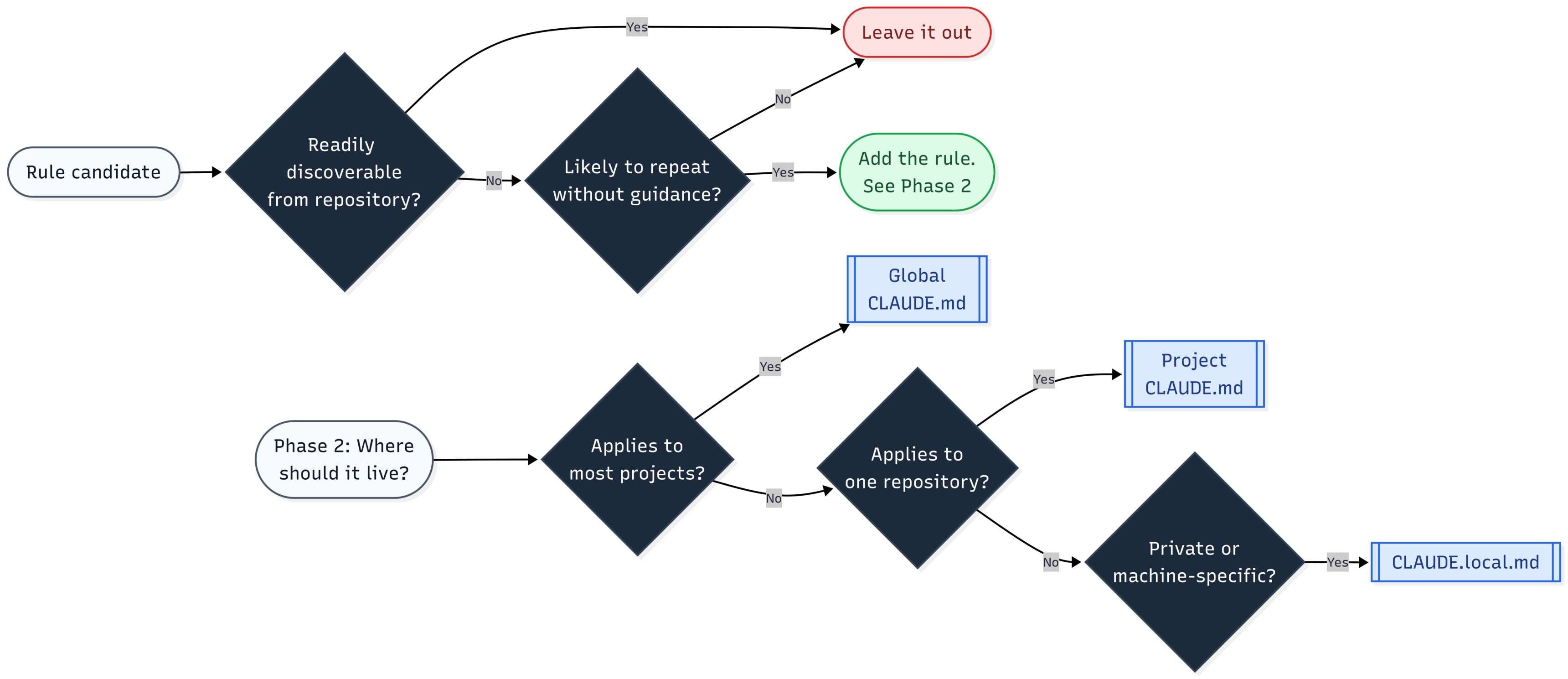
Note: What does readily mean in this context? If Claude has to read numerous source code files to figure out how to run the project or understand a particular repo convention, this is typically not considered to be “readily” discoverable and could warrant a line in CLAUDE.md.
It can still be beneficial to add your preferred Python defaults to CLAUDE.md, but they should only be a small part of it.
When auditing, note the correction, the scope, and the instruction you want Claude Code to follow. For example, you might notice the following corrections in a typical Python repo:
| Repeated Correction | Better Instruction | Scope |
|---|---|---|
Claude Code installed packages imperatively with pip install |
Add project dependencies with uv add; use uv pip install only for ad hoc env installs |
Global or project |
| Claude Code skipped the test command | Run uv run pytest before finishing a task |
Project |
Claude Code added print() debugging |
Use the configured logger | Project |
| Claude Code edited or created unrelated files | Touch only files needed for the task | Global |
| Claude Code opened broad files too early | Use rg to find relevant files before opening source files |
Global |
While doing this exercise, use the following flowchart to decide when and where to add a rule:
Take a look at how Claude does on a task to add configurable global cross-region inference on AWS Bedrock without CLAUDE.md. You can read over the following section, or download the available sample Python script and try it out yourself:
Get Your Code: Click here to download the free sample code you’ll use to follow along as you write CLAUDE.md rules that steer Claude Code toward correct AWS Bedrock cross-region inference.
The proper way to enable global cross-region inference with AWS Bedrock is to add a global. prefix to the Bedrock model ID. Here’s how Sonnet 4.6 performs on the task without guidance in CLAUDE.md:
The script works technically, but the change isn’t what you asked for. The generated code gets the region associated with your Bedrock client and prefixes your model ID with that region identifier:
bedrock_example.py
# ...

USE_CROSS_REGION_INFERENCE = False

_GEO_PREFIXES = {
    "us": "us.",
    "eu": "eu.",
    "ap": "ap.",
}

# ...

_BASE_MODEL_ID = "amazon.nova-premier-v1:0"

def _resolve_model_id(base_model_id: str) -> str:
    if not USE_CROSS_REGION_INFERENCE:
        return base_model_id
    region: str = bedrock_client.meta.region_name or ""
    geo = region.split("-")[0]
    prefix = _GEO_PREFIXES.get(geo, "us.")
    return f"{prefix}{base_model_id}"

MODEL_ID = _resolve_model_id(_BASE_MODEL_ID)

# ...
This is both a pre-training data issue and a preference issue that can’t be inferred: a perfect candidate for an instruction file. The next steps show how a few targeted rules prevent mistakes like this one.
Step 2: Create Your Global CLAUDE.md File
Your global CLAUDE.md contains instructions that apply across most or all of your projects. It should focus on personal workflow, communication preferences, and coding defaults.
Before adding a rule here, ask yourself whether you want Claude Code to follow it in nearly every project. If the answer depends on a specific repository, framework, test, or command, then save that rule for the project-level CLAUDE.md instead.
No. That guidance is specific to the project that uses AWS Bedrock and should therefore live in a project-level CLAUDE.md file.
Create ~/.claude/CLAUDE.md on your local machine and use the following as a starting point for your global CLAUDE.md:
~/.claude/CLAUDE.md
# Global Claude Code Instructions

## Working Style

- State assumptions before editing.
- If the task is ambiguous, ask one clarifying question.
- Turn each task into verifiable goals before coding.
- Prefer the smallest change that solves the problem.
- Touch only files needed for the requested change.
- Do not refactor unrelated code unless asked.
- Before finishing, verify with the narrowest relevant test.

## Context and Tool Use

- Narrow reads with deterministic CLI tools.
- Use `rg -n <pattern> <path>` for exact matches.
- Read only relevant symbols or line ranges.
- Review edits with `git diff -- <path>`.
- Prefer syntax-aware tools for bulk edits.
- Use `ast-grep` for structural rewrites.
- Use `fastmod` for safe string replacements.

## Python Defaults

- Use `uv` for dependency and environment commands.
- Use `logging` instead of `print()` for application code.
- Add type hints to public functions and return values.
- All exception paths should be handled explicitly.
- Ask before adding runtime dependencies.

## Code Quality

- Keep functions focused and small (< 50 lines if possible).
- Match the existing project style before introducing a new pattern.
- Remove imports, variables, or functions made unused by your own changes.
- Avoid speculative abstractions for single-use code.

## Communication

- Be concise.
- Call out trade-offs when multiple reasonable approaches exist.
- Push back if a safer or smaller approach would meet the goal.
All lines are either for a specific preference of yours that Claude Code wouldn’t know off the bat, or for areas where it doesn’t always behave optimally, such as verbosity of generated solutions. As the Claude family of models continues to improve, you can expect the need for certain instructions to be reduced or go away entirely.
The Context and Tool Use and Python Defaults sections are conditional. If you don’t use ast-grep or fastmod, then drop those lines. Same for any Python defaults that don’t match the tools you actually have installed or use on a regular basis.
Keep your global file short enough to review quickly. That way, you can iterate fast when something isn’t working. There’s no maximum line limit on a CLAUDE.md file, but if you’re always having to scroll through your file to change things, or worse, you have trouble finding specific sections of instructions, that may be a sign you should shorten your CLAUDE.md.
Remember that Claude Code treats CLAUDE.md as context, not enforced configuration. Concrete, targeted instructions reduce instruction conflicts and produce better output from Claude.
Copy the above Markdown into ~/.claude/CLAUDE.md as a starting point, then adjust it to your preferences and installed tools.
Step 3: Write Project-Level CLAUDE.md Files for Your Python Project
Your project-level CLAUDE.md contains instructions that apply to one repository. In most cases, you should commit this file to version control so teammates and future Claude Code sessions get the same targeted guidance.
A project-level file should answer the questions that a developer would ask before making a change to the repo. Focus on commands, setup requirements, architectural boundaries, project-specific patterns, and, in general, what a developer couldn’t easily infer from the code.
You can include items like:
- Commands to install, test, lint, and format
- How to run a single test
- Environment setup that needs explanation
- Architecture constraints
- Project-specific patterns, defaults, or standards that aren’t documented
- Non-obvious patterns to avoid
- Anything a developer can’t reasonably infer from the code
And exclude things like:
- Long codebase summaries
- Standard Python conventions
- File-by-file directory descriptions
- Documentation dumps
- Anything Claude Code can infer by reading the repository
These are not hard rules. Claude may already reach for uv naturally or be able to easily read your pyproject.toml and infer uv over pip. This is why you did the audit step—it shows you what’s actually necessary!
You saw in Step 1 that Claude didn’t correctly implement global cross-region inference and instead set up geographic cross-region inference. If you wanted the global. prefix to be the repo or script default, which is the correct way to enable global cross-region inference, then you would add the following instruction in your CLAUDE.md:
project_folder/CLAUDE.md
# Bedrock Project Instructions

## Bedrock Models
- Prefix all Bedrock model IDs with `global.` for cross-region inference.
That’s one targeted rule, fixing the mistake you saw in Step 1:
For one script, manually correcting the prefix to global. isn’t a huge deal, but if you had multiple Bedrock model IDs floating around your project, it would become annoying to have to go in and change prefixes whenever Claude added a new one. With a rule in CLAUDE.md, Claude always knows you want global cross-region inference enabled by default. Here’s the improved change from Sonnet 4.6:
bedrock_example.py
# ...

USE_GLOBAL_INFERENCE = True

_BASE_MODEL_ID = "amazon.nova-premier-v1:0"
MODEL_ID = f"global.{_BASE_MODEL_ID}" if USE_GLOBAL_INFERENCE else _BASE_MODEL_ID

# ...
The change is only two lines of code and achieves exactly what you asked for. These small quality-of-life improvements stack and multiply as your project becomes larger.
The project-level file above isn’t as easily copied as the global file since it’s specific to one repo. Use the guidelines above to write one tailored to your project’s commands, conventions, and quirks.
You may already be familiar with AGENTS.md, which is an open format for giving coding agents repository instructions, while CLAUDE.md is the instruction file specific to Claude Code. If your repo already has an AGENTS.md, you can create a short CLAUDE.md that imports AGENTS.md with @AGENTS.md and then add any Claude-specific guidance you see fit. This would look like the following:
project_folder/CLAUDE.md
# Project Instructions

@AGENTS.md

- Use plan mode for complex issues.
- Never directly edit migration files.
The import syntax may make your CLAUDE.md look cleaner, but Claude Code loads everything into context, so a large, imported AGENTS.md still has the same cost as a large CLAUDE.md.
After you create the project-level file, run /memory in Claude Code and confirm that it lists the expected CLAUDE.md files. You’ll add local notes next, then verify the full set of loaded files.
Step 4: Add Local Notes and Claude Code’s Memory
There are times when you need local notes that don’t belong in version control. Use CLAUDE.local.md for machine-specific settings, personal preferences, local test data, or local URLs.
For the sample Bedrock script, you could create a CLAUDE.local.md with the following:
project_folder/CLAUDE.local.md
# Local Project Instructions

While testing output, `print()` the `converse` response to `stdout`.
Then add it to your project’s .gitignore:
.gitignore
CLAUDE.local.md
You’ll notice the instruction in CLAUDE.local.md directly contradicts your global rule of preferring logging over print(). This is part of the point of having CLAUDE.local.md. It lets you adjust Claude’s behavior if you have specific preferences for the repo you’re working in and don’t want those preferences shared with other developers or leaked across other projects.
Note: Having conflicting rules from multiple CLAUDE.md files could introduce ambiguous behavior from Claude. Be conscious of possible conflicts between files so you can troubleshoot if problems arise later.
Worktrees are separate working directories checked out from the same repository. For local notes that you want to reuse across multiple worktrees, you can keep private Markdown files under ~/.claude/ and import them in your project’s CLAUDE.local.md with @~/.claude/your-notes.md.
Lastly, to confirm all of your CLAUDE.md files are correctly loaded into Claude Code’s context, run the /memory slash command. You should see a screen similar to the one below:
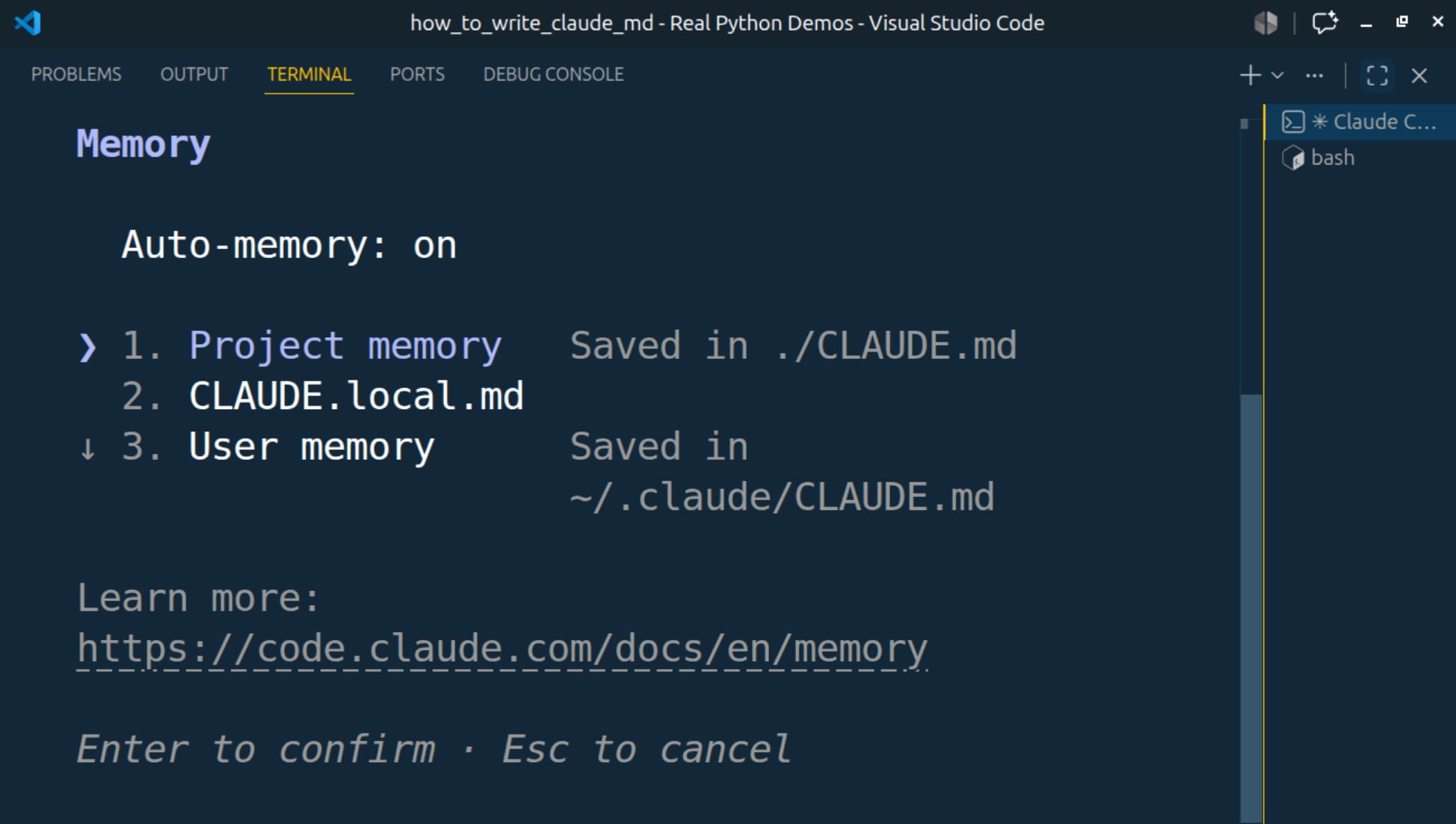
You can see that the global, project-level, and local CLAUDE.md are all loaded into context. The /memory output may also show auto memory entries if auto memory is enabled. Auto memory is one of Claude Code’s two complementary memory systems. CLAUDE.md files contain instructions that you write and maintain, while auto memory contains notes that Claude writes for itself based on your corrections and repeated preferences.
If you don’t see one of your files, check the filename and location first. For this tutorial, you should expect to see your global ~/.claude/CLAUDE.md, your project-level CLAUDE.md, and your optional CLAUDE.local.md.
Those three are the files you set up in this tutorial, but they aren’t the only files Claude Code merges. It reads them from the broadest scope down to the most specific:
- An enterprise managed file your organization can set, which you can’t switch off
- Your user file, the global
~/.claude/CLAUDE.mdyou created here - Your project file
- Your local file
- Any
CLAUDE.mdinside a subdirectory, which loads on demand when Claude Code reads a file in it
All of them are concatenated into a single context rather than one overriding another, so it helps to see what actually reaches Claude. Toggle the files below to watch the assembled context, its rough token cost, and where a contradiction lands:
That last line in the widget is the part worth remembering. A contradiction like the print() versus logging one isn’t settled by a rule engine, so Claude may follow either instruction. The later, more specific file is usually weighted more heavily, but that’s a tendency, not a guarantee.
That’s fine when the override is deliberate and narrowly scoped, which is exactly what your CLAUDE.local.md line is doing. It only bites you when two files disagree by accident. When you don’t actually want an override, don’t count on load order to pick a winner—remove the contradiction so every layer points the same way.
Note: In a large monorepo, keep the root file focused on shared commands and constraints. For instructions that only apply to certain files or subdirectories, check out .claude/rules/ after your basic setup works.
If /memory shows the expected files, Claude Code has the context available for the current task. If a file isn’t listed, then Claude Code doesn’t have it as context.
Troubleshooting
Even the most well-written CLAUDE.md file won’t behave like a strict configuration file. Claude Code reads your instructions as context and tries to follow them, but vague or conflicting guidance can still lead to inconsistent results.
Use these checks when your instructions don’t seem to work, or Claude Code’s behavior appears to be regressing:
-
Claude Code ignores or inconsistently follows rules: Shorten the file, remove conflicts, and rewrite vague preferences as concrete instructions. For example, use “Run
uv run pytestbefore finishing” instead of “Make sure everything works.” Keep your instructions as targeted as possible while ensuring there are no conflicting instructions between your variousCLAUDE.mdfiles loaded into context. -
Your
CLAUDE.mdkeeps getting too long: The golden rule is to remove anything that doesn’t prevent a concrete mistake. Broad instructions don’t make good instructions. If you have domain-specific workflows or tasks, then try moving those into skills. For rules that only apply to specific file paths, use.claude/rules/. When importing files with@pathsyntax, note that this does not reduce context because Claude Code still loads the whole file. -
Claude Code doesn’t seem to load your file: Run
/memoryto check the files loaded into context. If any of yourCLAUDE.mdfiles aren’t listed, confirm that it lives in a supported location such as./CLAUDE.md,./.claude/CLAUDE.md,./CLAUDE.local.md, or~/.claude/CLAUDE.md.
These are only the most common issues developers run into with CLAUDE.md files. Share your own experiences in the comments!
Next Steps
You now have three layers of explicit guidance for Claude Code. Your global CLAUDE.md captures personal workflow defaults, your project-level, version-controlled CLAUDE.md records repository-specific commands and constraints, and your CLAUDE.local.md keeps private machine-specific notes out of version control.
Commit your project-level CLAUDE.md so you can track changes over time, and so teammates can contribute better instructions as the project evolves. You already added CLAUDE.local.md to .gitignore back in Step 4. That one should always stay untracked.
Remember that CLAUDE.md isn’t meant to be a static file. Revisit it regularly to prune rules that no longer prevent real problems, and to adjust or add wording based on repeated mistakes and past experience.
The main maintenance habit is to keep each rule tied to a specific correction. When Claude Code repeats a mistake, add or revise one targeted instruction. When a rule stops preventing mistakes, get rid of it.
For domain-specific workflows that shouldn’t load every session, such as PDF processing, check out Agent Skills and Anthropic’s skill creator.
For CLAUDE.md locations, settings, and the rest of Claude Code at a glance, keep the Claude Code Cheat Sheet handy.
Now that you have your CLAUDE.md files set up, keep going with the Getting Started with Claude Code course. For a structured path through AI-assisted development, Real Python’s Python Coding With AI learning path brings together related tutorials and video courses so you can keep building on what you set up here. Let us know what you put in your CLAUDE.md in the comments!
Get Your Cheat Sheet: Click here to download a free PDF summarizing the patterns, pitfalls, and prompts for writing CLAUDE.md files that steer Claude Code through your Python projects.
Frequently Asked Questions
Now that you have some experience with CLAUDE.md files in Claude Code, you can use the questions and answers below to check your understanding and recap what you’ve learned.
These FAQs are related to the most important concepts you’ve covered in this tutorial. Click the Show/Hide toggle beside each question to reveal the answer.
A CLAUDE.md file gives Claude Code persistent context about your workflow, project commands, and coding preferences. Claude Code loads it automatically when you start a session, so you don’t have to repeat the same corrections each time.
Global instructions go in ~/.claude/CLAUDE.md, while project-specific instructions belong in a CLAUDE.md at the root of your repository. Claude Code also recognizes ./.claude/CLAUDE.md and ./CLAUDE.local.md for additional scopes.
A project’s CLAUDE.md is checked into version control and shared with your team, while CLAUDE.local.md holds personal or machine-specific notes that stay out of the repo. Use CLAUDE.local.md when your preferences would conflict with shared team rules.
Yes, commit your project-level CLAUDE.md so teammates and future sessions get the same guidance. Keep CLAUDE.local.md in .gitignore because it holds personal notes that shouldn’t be shared.
Run the /memory slash command inside Claude Code to see every loaded instruction file. If a file doesn’t appear, confirm the filename and that it lives in a supported location such as ./CLAUDE.md or ~/.claude/CLAUDE.md.
AGENTS.md is an open format that many coding agents read, while CLAUDE.md is specific to Claude Code. If your repo already has an AGENTS.md, you can import it from CLAUDE.md with @AGENTS.md and add Claude-specific guidance on top.
Take the Quiz: Test your knowledge with our interactive “How to Write a CLAUDE.md File for Claude Code” quiz. You’ll receive a score upon completion to help you track your learning progress:
Interactive Quiz
How to Write a CLAUDE.md File for Claude CodePractice writing CLAUDE.md files for Claude Code across global, project, and local layers that capture your Python commands and conventions.