Sometimes your code needs to pass along a signal, like “no argument was passed” or “the stream has ended,” in the same place where it normally receives data. Any ordinary value you pick for that job, even None, might also show up as real data. That’s why, in Python, you’ve probably written or seen something like _MISSING = object() to create a sentinel value that your code treats as a signal rather than as data.
That idiom works, but its default representation clutters function signatures, provides no useful information to static type checkers, and fails identity checks after copying. Other approaches have limitations, too. To address all of these drawbacks at once, Python 3.15 adds a built-in sentinel type.
By the end of this tutorial, you’ll understand that:
- Python 3.15 adds
sentinelto the built-ins through PEP 661, so you don’t need to import the type. - A sentinel prints its own name, so it reads clearly in function signatures,
help(), andinspect.signature(). - Sentinels keep their identity through
copy(),deepcopy(), and apickleround trip. - A sentinel works as a type hint, following the precedent set by
None. Noneremains the recommended default unlessNoneis legitimate data in your code, in which case you should use a sentinel.
To start, you’ll look at what a sentinel is and the existing options for creating one. Then you’ll meet Python 3.15’s sentinel built-in and work through the issues it solves.
Note: The code examples in this tutorial were tested with Python 3.14 and 3.15.0rc2.
Get Your Code: Click here to download the free sample code you’ll use to create sentinel values with Python 3.15’s new sentinel built-in and retire the unreadable object() idiom.
Take the Quiz: Test your knowledge with our interactive “Python 3.15 Preview: Sentinel Values” quiz. You’ll receive a score upon completion to help you track your learning progress:

Interactive Quiz
Python 3.15 Preview: Sentinel ValuesTest your grasp of Python 3.15's new sentinel built-in, from readable signatures and type hints to safe copying, pickling, and when to use one.
Understand Sentinel Values in Python
Before you learn about the new built-in sentinel type, you’ll look at the problem it addresses in earlier Python versions. In this section, you’ll learn what a sentinel value is, recognize the ones you’ve been using for years without naming them, and see where existing approaches fall short. This context explains why Python adds sentinel to its built-in types.
Know What a Sentinel Value Is
A sentinel value is a value that an algorithm treats as a signal rather than as data. It marks a condition such as “terminating the iteration,” “shutting down the worker thread,” or “nothing was passed.” A sentinel is a marker that your code branches on, and it doesn’t carry any information about the data you’re processing.
Python uses sentinel values in many situations. For example, when you search a string and the target substring isn’t there, you get -1 back:
>>> "Hello, World!".find("z")
-1
In this example, -1 tells you that the substring isn’t there. In other words, your code should read it as a signal rather than as an index pointing to the target substring.
Note: The example above shows that a sentinel can be an ordinary value that you’ve given a special meaning. The drawback is that the value can collide with your data. For example, -1 collides with negative indices. You’ll learn more about this in the section Explore Some Limitations of Sentinels in Python.
A sentinel can also be a unique object that you create for this purpose, ensuring that nothing else can ever equal it.
The essential idea is that a sentinel value should stay distinct from every legitimate value your data can take. This way, a loop over your data can check each value and branch when it encounters the sentinel:
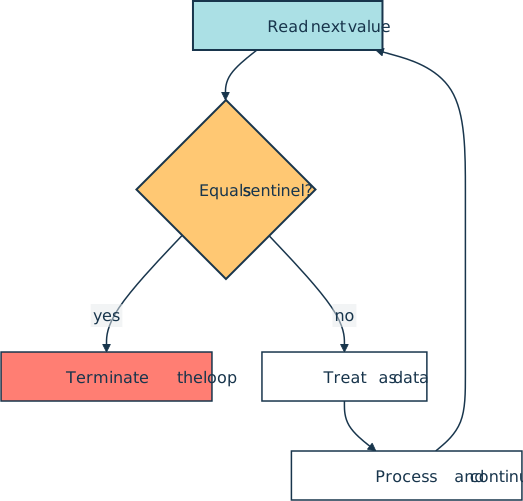
Now that you know what a sentinel value is, you can start spotting the ones that Python has been handing you all along.
Spot the Sentinels Python Already Uses
You’ve probably been using sentinels since your early Python programs. Using None as the default value for optional arguments is a common example. It typically means “no value was passed.” In a data context, it may mean “no data.”
In the standard library, you’ll also find a variety of sentinels. Here are four modules and some of their sentinel values:
>>> import configparser
>>> configparser._UNSET
<object object at 0x7f6d134cc6f0>

>>> import inspect
>>> inspect.Parameter.empty
<class 'inspect._empty'>

>>> import typing
>>> typing.NoDefault
typing.NoDefault

>>> import unittest.mock
>>> unittest.mock.DEFAULT
sentinel.DEFAULT
Each of these four modules uses a different approach to sentinels:
configparseruses a bareobjectinstance.inspectuses a class directly, without ever instantiating it.typinguses an instance of its own dedicated type,NoDefaultType.unittest.mockuses an instance of a purpose-built_SentinelObjectclass.
As you can see, the standard library hasn’t settled on one approach. Every module follows its own path.
In practice, you’ll find three common strategies, each with its own trade-offs:
- An instance of
objectgives you a unique object at the cost of a generic.__repr__()that provides no insight into the sentinel’s meaning. - A custom class lets you write a readable
.__repr__()and gives your sentinels a type you can use in a type hint, at the cost of several special methods to preserve their identity through copying and pickling. - A single-valued
Enumuses Python’s enumeration machinery for uniqueness and pickling. Its.__repr__()shows the class name, the member name, and the member’s value, even though only the name matters.
All these approaches work to some extent, but each falls short in a different way. Using an instance of object is arguably the most common option because it’s the simplest way to get a unique object. Still, it has important drawbacks that you’ll explore in the next section.
Explore Some Limitations of Sentinels in Python
PEP 661, which introduces the new sentinel built-in type in Python 3.15, names three drawbacks of the object() idiom:
- An uninformative
repr()that makes function signatures overly long and hard to read - No distinct type, which makes it impossible to write a clear type signature for a function that takes the sentinel as a default
- Broken behavior after copying, because copying creates a separate instance, and comparisons using the
isoperator start failing
Here’s a REPL session that captures all three:
>>> _MISSING = object()
>>> _MISSING
<object object at 0x7f3006bf05d0>

>>> type(_MISSING)
<class 'object'>

>>> from copy import deepcopy
>>> deepcopy(_MISSING) is _MISSING
False

>>> import pickle
>>> pickle.loads(pickle.dumps(_MISSING)) is _MISSING
False
The memory address in the first output is what leaks into signatures and help() pages. Sphinx strips the address out when it renders a signature, but the <object object> that remains tells your readers just as little.
Calling type() shows the second drawback. The most specific type you can name for _MISSING is object, which every other Python object shares, so a type hint built on it can’t distinguish your sentinel from other objects.
The two False results are the tricky part. Neither the deep copy nor the pickle round trip preserves identity. Each returns a new object instead of the original.
Those three drawbacks apply to the object() idiom, where you deliberately create a unique marker. A different problem shows up when you repurpose a specific value instead. For example, using None, a number, or a string as a sentinel could eventually lead to a clash with real data.
The results of a missing dictionary lookup and a failed substring search can both be mistaken for legitimate data:
>>> grades = {"Jane": 90, "John": None}
>>> grades.get("John") is grades.get("Linda")
True

>>> "Pythonista!".find("z")
-1
>>> "Pythonista!"["Pythonista!".find("z")]
'!'
In the first example, a key with the value None is indistinguishable from a key that isn’t in the dictionary. This happens because the .get() method returns None by default if the target key is missing.
In the second example, -1 is a valid index, so indexing with a failed search returns the last character in the string instead of raising an error.
A dedicated class lets you customize .__repr__() and gives you a type, but its instances don’t retain their identity through a deepcopy() or pickle round trip:
>>> class _MissingType:
...     def __repr__(self):
...         return "MISSING"
...

>>> MISSING = _MissingType()
>>> MISSING
MISSING

>>> from copy import deepcopy
>>> deepcopy(MISSING) is MISSING
False
To build a class whose sentinels overcome all these limitations, you’ll need seven dunder methods. You can implement them in a _MissingType class:
missing.py
class _MissingType:
    def __init__(self, name):
        self._name = name

    def __repr__(self):
        return self._name

    def __copy__(self):
        return self

    def __deepcopy__(self, memo):
        return self

    def __reduce__(self):
        return self._name

    def __eq__(self, other):
        return self is other

    def __hash__(self):
        return id(self)
Here’s a quick breakdown of what each method does:
.__init__()stores the name, which doubles as therepr()output and the lookup key for pickling..__repr__()returns the sentinel’s own name instead of a memory address..__copy__()makescopy.copy()return the same object instead of a new one..__deepcopy__()makescopy.deepcopy()return the same object instead of a new one..__reduce__()tellspickleto look up this name as a module global when unpickling, rather than reconstruct a new instance..__eq__()makes equality fall back to identity, so the sentinel compares equal only to itself..__hash__()restores hashability. Defining.__eq__()makes Python drop the class’s inherited.__hash__(), so you have to redefine it explicitly.
You can create a custom class for sentinels, but implementing it correctly takes considerable work.
Finally, you can use a single-valued Enum. Enumerations survive copying and pickling, but their .__repr__() is verbose and exposes unnecessary information:
>>> import enum

>>> class MissingType(enum.Enum):
...     MISSING = "MISSING"
...

>>> MissingType.MISSING
<MissingType.MISSING: 'MISSING'>
That repr() displays the class name, the member name, and the value, even though the value exists only because Enum requires one.
Meet Python 3.15’s Built-in sentinel Type
Up to this point, you’ve seen several ways to create a sentinel, each with its own trade-offs. If you use a different approach in each part of your project, then you could end up with four incompatible sentinel objects, as Python’s own standard library does.
PEP 661 aims to reduce that fragmentation with a single built-in type that provides a readable repr(), a dedicated type for type hints, and safe deepcopy() and pickle behavior at once.
The PEP lists three jobs that sentinel values commonly do:
- Default argument values, for when the caller doesn’t provide an argument
- Return values, for when something isn’t found or isn’t available
- Missing data, for when a database would use
NULLor a spreadsheet would show “N/A”
Those three roles often show up in existing codebases, which is why Python has accumulated so many different ways to handle them.
From here on, you’ll need Python 3.15 or later to follow along. If you have uv installed on your system, then you can run the following command:
$ uv run --python 3.15 python
Alternatively, the How to Install Python on Your System guide covers official installers and other options, and you can also use pyenv.
The result of PEP 661 is a new sentinel built-in type:
Python 3.15
>>> sentinel
<class 'sentinel'>
There’s no module to import because sentinel already lives in the built-in namespace. You’re now ready to create your first sentinel value.
Create a Sentinel Value
You can create a sentinel value by instantiating sentinel with a name as an argument. Optionally, you can provide a repr string to display instead of that name.
Here’s the signature of sentinel():
sentinel(name, /, *, repr=None)
The two parameters serve different purposes, and the slash and asterisk specify how you can pass the arguments:
nameis required, positional-only, and must be astr. It does double duty as the defaultrepr()and as the name thatpicklelooks up during unpickling.repris optional and keyword-only. It defaults toNone, in which case the sentinel displays itsname.
By convention, you assign the sentinel to a variable whose name matches the string you passed:
>>> MISSING = sentinel("MISSING")
>>> MISSING
MISSING
Cool! You’ve created your first sentinel. It prints as its own name, with no address and no angle brackets. If you give the variable and the sentinel different names, then you’ll read one name in your code and another in the output.
If the bare name might be unclear in context, then you can use the repr argument to change the displayed value:
>>> UNSET = sentinel("UNSET", repr="<unset>")
>>> UNSET
<unset>
Because repr is a keyword-only argument, passing it positionally fails. Similarly, because name is a positional-only argument, passing it as a keyword also fails:
>>> sentinel("UNSET", "<unset>")
Traceback (most recent call last):
    ...
TypeError: sentinel() takes exactly 1 positional argument (2 given)

>>> sentinel(name="UNSET")
Traceback (most recent call last):
    ...
TypeError: sentinel() takes exactly 1 positional argument (0 given)
In these examples, both errors point to the same rule. You pass the name first, as a positional argument, and supply repr by keyword.
With the sentinel() constructor covered, you can turn to how the resulting objects behave.
Explore How sentinel Instances Behave
A sentinel instance is truthy, hashable, and equal only to itself. You can use it as a dict key or a set member and compare it for identity with the is operator:
>>> MISSING = sentinel("MISSING")

>>> bool(MISSING)
True

>>> hash(MISSING)
8739378476836

>>> config = {MISSING: "unset", "timeout": 30}
>>> config[MISSING]
'unset'

>>> MISSING in {MISSING, 1, 2}
True

>>> MISSING == sentinel("MISSING")
False
Each example shows a different behavior. The sentinel is truthy, so a bare if MISSING: check is always true. That’s why you should check sentinels with is rather than with a Boolean test.
The hash() call succeeds, which is what lets the sentinel serve as a dict key and as a set member in the two examples that follow. That hash value derives from the object’s identity, so your number will differ from the one above and will change on every REPL run.
Consider the final comparison carefully. Every call to sentinel() builds a brand-new object, so two sentinels that share a name are two different objects:
>>> sentinel("STOP") is sentinel("STOP")
False
You should create your sentinels once, at the module level, and refer to them everywhere. That’s why most examples in this tutorial assign the sentinel to a variable whose name follows the naming convention for constants in Python.
Note: PEP 661 rejected a per-module registry for sentinels that would have made the two calls in the example above return the same object. Such a registry would have been too implicit and surprising.
All sentinel values share a common type, which has a practical consequence:
>>> A = sentinel("A")
>>> B = sentinel("B")

>>> type(A) is type(B)
True

>>> isinstance(A, sentinel)
True
>>> isinstance(B, sentinel)
True

>>> A is B
False
Both objects are instances of the same sentinel class, so an isinstance() check passes for every sentinel you’ll ever create and can’t help you distinguish the one you’re looking for. That leaves the identity check (is) as the correct way to compare them.
The shared class doesn’t get in the way of type hints, though. In a hint, you use the sentinel instance itself rather than its class, and because each instance is unique, the hint refers to that one sentinel only. You’ll see this in action in Type Hint a Sentinel Value.
Both copy() and deepcopy() preserve identity. Pickling does too, as long as the object is importable:
>>> from copy import copy, deepcopy

>>> MISSING = sentinel("MISSING")

>>> copy(MISSING) is MISSING
True

>>> deepcopy(MISSING) is MISSING
True
In each case, you get the original object instead of a new one, so the identity check still passes after copying. You’ll see what a lost identity can do to real data in Keep Identity Through copy and pickle.
Note: This behavior may remind you of the singleton pattern. The sentinel type isn’t a singleton type, though, because every call to sentinel() creates a new object. Each sentinel offers a narrower guarantee: once you’ve bound it at the module level, copying and pickling return that same object.
Pickling is where the convention of matching name to the variable matters most. A sentinel is pickleable when pickle can find it by module and name. At the module level, that means the variable name, and at class scope, it means the qualified name.
Note: This rule isn’t specific to the new built-in. The custom _MissingType class from earlier follows it too. You have to create its sentinels in the same module where the class lives, or pickle won’t find them.
Suppose you have the following module, which defines several sentinels:
config.py
UNSET = sentinel("UNSET")
INHERIT = sentinel("INHERITED")  # Name doesn't match the variable

class Config:
    AUTO = sentinel("Config.AUTO")
    # Some code here...
    NO_LIMIT = sentinel("NO_LIMIT")  # Forgot the qualified name
This module has four sentinels, two of which have names that don’t match their variables. The first mismatch is a typo, and the second is a missing qualified name. Both will break pickling.
Now you can try to pickle each of those four sentinels and check which of them pickle can find:
>>> import pickle
>>> from config import Config, INHERIT, UNSET

>>> pickle.loads(pickle.dumps(UNSET)) is UNSET
True
>>> pickle.loads(pickle.dumps(Config.AUTO)) is Config.AUTO
True

>>> pickle.dumps(INHERIT)
AttributeError: module 'config' has no attribute 'INHERITED'.
⮑ Did you mean '.INHERIT' instead of '.INHERITED'?

During handling of the above exception, another exception occurred:

Traceback (most recent call last):
    ...
_pickle.PicklingError: Can't pickle INHERITED: it's not found as
⮑ config.INHERITED

>>> pickle.dumps(Config.NO_LIMIT)
AttributeError: module 'config' has no attribute 'NO_LIMIT'.
⮑ Did you mean '.Config.NO_LIMIT' instead of '.NO_LIMIT'?

During handling of the above exception, another exception occurred:

Traceback (most recent call last):
    ...
_pickle.PicklingError: Can't pickle NO_LIMIT: it's not found as
⮑ config.NO_LIMIT
At the module level, the name has to match the variable name. At class scope, the name has to be the qualified name, which is why sentinel("Config.AUTO") works but sentinel("NO_LIMIT") doesn’t.
Finally, a sentinel that stays local to a function can’t be pickled because pickle looks up its name in the module, where a local variable isn’t available. Creating a sentinel inside a function is fine, as long as you bind the result to a module global or class attribute whose name matches.
Put the New sentinel Built-in to Work
Now that you know how sentinel instances behave, you can explore how they overcome the limitations of the current approaches. In the next three sections, you’ll work through the drawbacks of the object() idiom identified in PEP 661. Then you’ll tackle the data collision problem.
Each example below pairs a marker you’d use in Python 3.14 and earlier with Python 3.15’s sentinel. The logic stays the same in each pair, so you can focus on what the sentinel changes.
To follow along, run each Python 3.14 and earlier example in a Python 3.14 REPL and each Python 3.15 example in a Python 3.15 REPL. Because Python imports a module only once per session, start a new REPL every time you change a file so that the import picks up your changes.
Get a Readable Signature
Suppose your Python app keeps its database settings in a TOML file:
settings.toml
[db]
host = "localhost"
timeout = 30
Once tomllib has parsed that file into nested dictionaries, you want a get_setting() function that reads a dotted path like "db.timeout" in one call. If the path doesn’t exist, callers who don’t pass a default value should get a KeyError exception, and callers who do pass one should get it back:
settings.py | Python 3.14 and earlier
_NO_DEFAULT = object()

def get_setting(config, path, default=_NO_DEFAULT):
    current = config
    for part in path.split("."):
        try:
            current = current[part]
        except (KeyError, TypeError):
            if default is _NO_DEFAULT:
                raise KeyError(path) from None
            return default
    return current
To try it out, load settings.toml with tomllib and look up a few paths:
>>> import tomllib
>>> from settings import get_setting

>>> with open("settings.toml", mode="rb") as file:
...     config = tomllib.load(file)
...

>>> config
{'db': {'host': 'localhost', 'timeout': 30}}

>>> get_setting(config, "db.timeout")
30
>>> get_setting(config, "db.port", default=5432)
5432
>>> get_setting(config, "db.port")
Traceback (most recent call last):
    ...
KeyError: 'db.port'
An existing path returns its value. A missing path returns the default when you pass one, and raises KeyError when you don’t.
The code works, but a problem appears when someone inspects the function’s signature with help() or inspect to learn how to call it:
>>> from settings import get_setting

>>> help(get_setting)
Help on function get_setting in module settings:

get_setting(config, path, default=<object object at 0x7fbb570bc6d0>)

>>> import inspect
>>> inspect.signature(get_setting)
<Signature (config, path, default=<object object at 0x7fbb570bc6d0>)>
In both examples, the output doesn’t tell a clear story about what default would hold or mean. The memory address is meaningless to your users, and it changes on every REPL run.
In Python 3.15, you just update the sentinel definition:
settings.py | Python 3.15
NO_DEFAULT = sentinel("NO_DEFAULT")

def get_setting(config, path, default=NO_DEFAULT):
    current = config
    for part in path.split("."):
        try:
            current = current[part]
        except (KeyError, TypeError):
            if default is NO_DEFAULT:
                raise KeyError(path) from None
            return default
    return current
You remove the leading underscore from the sentinel’s name because it’s no longer a hidden internal detail. Now, the name is part of the function’s documentation and should be readable and meaningful.
Both help() and inspect.signature() now display the sentinel’s name:
>>> from settings import get_setting

>>> help(get_setting)
Help on function get_setting in module settings:

get_setting(config, path, default=NO_DEFAULT)

>>> import inspect
>>> inspect.signature(get_setting)
<Signature (config, path, default=NO_DEFAULT)>
Great! Both tools now print NO_DEFAULT instead of an unreadable repr() that includes a memory address. Your users can see what omitting default means. Next, you’ll give the type checker useful information about that default, too.
Type Hint a Sentinel Value
Now that you have a readable signature, you can continue improving settings.py by adding type hints to get_setting(). The sentinel default is the first thing that gets in the way.
Your settings file holds strings and numbers, so get_setting() returns a str or an int. The default parameter is the problem. An object() sentinel has the type object, the broadest type hint you can give. This hint accepts any object and gives a static type checker no useful information about the intended values:
settings.py | Python 3.14 and earlier
_NO_DEFAULT = object()

def get_setting(
    config: dict[str, object],
    path: str,
    default: object = _NO_DEFAULT,
) -> str | int:
    ...
Reading the hints back at runtime shows that default is annotated as object, the base of every Python type:
>>> import typing
>>> from settings import get_setting

>>> hints = typing.get_type_hints(get_setting)

>>> hints["default"]
<class 'object'>
As you can see, the hint doesn’t tell a static type checker that default can be a str, an int, or the sentinel.
Using str | int | object doesn’t help, either. A union that already includes object accepts exactly the same values as object on its own, so a static type checker treats the two hints identically, even though it keeps displaying the longer one.
An instance of sentinel supports the union operator (|) in a type hint:
settings.py | Python 3.15
NO_DEFAULT = sentinel("NO_DEFAULT")

def get_setting(
    config: dict[str, object],
    path: str,
    default: str | int | NO_DEFAULT = NO_DEFAULT,
) -> str | int:
    ...
Now, the type hint includes a specific object that Python can build and resolve:
>>> import typing
>>> from settings import get_setting

>>> hints = typing.get_type_hints(get_setting)

>>> hints["default"]
str | int | NO_DEFAULT
In this example, the type hint records that default should be a string, an integer, or NO_DEFAULT, rather than any object at all. Reading it back with typing.get_type_hints() confirms the recorded hint. Enforcing this constraint is a static type checker’s job.
Note: PEP 661 specifies that a static type checker should treat a sentinel as a type with a single member and narrow unions with is and is not. Type checkers are adding support for sentinel gradually, so it’s worth checking your favorite tool’s release notes.
You can now use your sentinel in a type hint without relying on the overly broad object. Next, you’ll make sure it keeps its identity through copy and pickle.
Keep Identity Through copy and pickle
Say that you’re building a staff directory for your company, where every employee maintains their own profile page. To keep edits small and avoid overwriting unchanged data, the edit form sends back only the fields that the employee edited.
A field that arrives as None means the employee deliberately cleared it, for example, by deleting a bio they no longer want to share publicly. A field that doesn’t arrive means the employee left it unchanged. Because None already carries real meaning, you need a separate marker for the untouched fields. You can use a sentinel for that.
Here’s an implementation that uses an object() sentinel to mark missing fields:
profiles.py | Python 3.14 and earlier
_MISSING = object()

def parse_patch(form):
    fields = ("name", "bio", "email")
    return {field: form.get(field, _MISSING) for field in fields}

def apply_patch(profile, patch):
    updated = dict(profile)
    for field, value in patch.items():
        if value is not _MISSING:
            updated[field] = value
    return updated
This code works. Applying the patch updates the supplied fields and preserves the rest:
>>> from profiles import apply_patch, parse_patch

>>> profile = {
...     "name": "J. Doe",
...     "bio": "Data scientist",
...     "email": "jane@example.com",
... }
>>> patch = parse_patch({"name": "jane", "bio": None})

>>> apply_patch(profile, patch)
{'name': 'jane', 'bio': None, 'email': 'jane@example.com'}
Jane updated her name and cleared her bio but left her email address unchanged, so email keeps its stored value. However, if you deep-copy patch for further computation, then the sentinel in the copy is a new object(), and the identity check fails:
>>> from copy import deepcopy
>>> from profiles import _MISSING, apply_patch, parse_patch

>>> patch = parse_patch({"name": "jane", "bio": None})

>>> deepcopy(patch)["email"] is _MISSING
False

>>> apply_patch(profile, deepcopy(patch))
{'name': 'jane', 'bio': None, 'email': <object object at 0x7ff6ae834480>}
Because the copied sentinel isn’t _MISSING, apply_patch() treats it as a real value and writes it into email. Jane’s email address is replaced with a meaningless object, and nothing warns you about it.
If you pickle the patch, then you’ll run into the same problem:
>>> import pickle
>>> from profiles import _MISSING, parse_patch

>>> patch = parse_patch({"name": "jane", "bio": None})

>>> pickle.loads(pickle.dumps(patch))["email"] is _MISSING
False
Again, the sentinel in the unpickled copy is different from _MISSING, and a corrupted email address can end up in your database without a warning or error.
A sentinel instance will survive both trips:
profiles.py | Python 3.15
MISSING = sentinel("MISSING")

def parse_patch(form):
    fields = ("name", "bio", "email")
    return {field: form.get(field, MISSING) for field in fields}

def apply_patch(profile, patch):
    updated = dict(profile)
    for field, value in patch.items():
        if value is not MISSING:
            updated[field] = value
    return updated
The sentinel now retains its identity through copying and pickling, so both identity checks pass, and applying a copied patch leaves the email address untouched:
>>> import pickle
>>> from copy import deepcopy
>>> from profiles import MISSING, apply_patch, parse_patch

>>> profile = {
...     "name": "J. Doe",
...     "bio": "Data scientist",
...     "email": "jane@example.com",
... }
>>> patch = parse_patch({"name": "jane", "bio": None})

>>> deepcopy(patch)["email"] is MISSING
True

>>> pickle.loads(pickle.dumps(patch))["email"] is MISSING
True

>>> apply_patch(profile, deepcopy(patch))
{'name': 'jane', 'bio': None, 'email': 'jane@example.com'}
Because the sentinel keeps its identity, you don’t risk silently corrupting your data.
Stop a Loop Without Collisions
To see how a sentinel can collide with real data, say that you have a producer thread that hands you one word at a time for individual processing. You don’t have control over the words that come in, so any string you pick as the stream terminator, or sentinel, can also arrive as real data.
Suppose you and the producer agree on the string "done" as the sentinel. The producer sends its words one by one and then appends the sentinel to close the stream. When you read words from another thread, you can’t tell on your own when the producer has finished, so you need that explicit end marker. To keep the example short, a generator stands in for the producer thread:
>>> STOP = "done"

>>> def producer():
...     words = ["ready", "done", "pending"]  # Simulate produced words
...     for word in words:
...         yield word
...     yield STOP
...

>>> words_stream = producer()

>>> for word in words_stream:
...     if word == STOP:
...         break
...     print(f"Processing '{word}'...")
...
Processing 'ready'...
In this example, you get to process only the first word. The loop stops at the second word, "done", even though that word is legitimate data. Your sentinel collides with a value you need to process.
Because the new sentinel type returns a unique object, you can use it to mark the end of a stream without worrying about data collisions. Note that producer() looks up STOP when it runs, not when you define it. So if you rebind STOP to a sentinel and create a new stream, the stream ends with the sentinel instead of the string:
>>> STOP = sentinel("STOP")

>>> words_stream = producer()

>>> for word in words_stream:
...     if word is STOP:
...         break
...     print(f"Processing '{word}'...")
...
Processing 'ready'...
Processing 'done'...
Processing 'pending'...
Now, "done" flows through as ordinary data, and the loop ends only when the actual sentinel arrives. The comparison changed too. You need to check a string sentinel with the equality operator (==) because equal strings aren’t guaranteed to be the same object. A sentinel instance is unique, so is is the right check, as you saw earlier.
Switch the terminator between the two sentinel definitions and watch where the consumer loop stops:
The string terminator costs you two of the three words, while the sentinel lets every one of them through.
Decide When to Use a sentinel Instance
Up to this point, you’ve seen how sentinel overcomes the limitations of the existing approaches. Does that mean you need to use it everywhere? You can decide by checking what your code needs:
- Start with
Nonewhen you just need to mark a missing optional argument. - Choose a
sentinelinstance whenNoneis legitimate data and you need a separate marker that can’t collide with it. - Replace your
object()markers withsentinelwhen they appear in a public signature or travel throughcopyorpickle. Otherwise, they keep working fine. - Reach for the backport on Python 3.14 and earlier, where
typing_extensionsgives you the same behavior ahead of 3.15.
The following table summarizes the five approaches you’ve seen in this tutorial:
| Feature | None |
object |
Custom class | Enum |
sentinel |
|---|---|---|---|---|---|
Readable repr() |
Yes | No | Yes | No | Yes |
| Distinct type | Yes | No | Yes | Yes | Yes |
Survives copy and pickle |
Yes | No | Yes | Yes | Yes |
| Safe from data collisions | No | Yes | Yes | Yes | Yes |
The table shows that only sentinel and a custom class tick every box. However, the custom class earns its checkmarks only after you implement seven dunder methods, making sentinel the simplest complete option.
Conclusion
You’ve learned why Python needed a standard way to create sentinels and what the new built-in sentinel gives you. Of all the sentinel approaches in use, the object() idiom is probably the most popular. However, it prints an address instead of a name, provides no useful information in type hints, and silently loses its identity during copy and pickle operations.
Sentinel values built from ordinary data like None can collide with legitimate data, while a custom class requires implementing several special methods by hand. Python 3.15’s sentinel solves all of these problems.
In this tutorial, you’ve learned how to:
- Create sentinel values with the built-in
sentineltype - Use a
sentinelas a default argument that reads clearly in the output ofhelp()andinspect.signature() - Keep a sentinel value’s identity through
copy(),deepcopy(), and apickleround trip - Use a
sentinelinstance in a union type hint alongside a data type - Recognize when
Noneis legitimate data and use asentinelin its place
A good place to start is your own codebase. Look for object() markers that appear in public signatures or travel through copy or pickle. Those are the ones that gain the most from switching to sentinel.
Get Your Code: Click here to download the free sample code you’ll use to create sentinel values with Python 3.15’s new sentinel built-in and retire the unreadable object() idiom.
Frequently Asked Questions
Now that you have some experience with sentinel values in Python, you can use the questions and answers below to check your understanding and recap what you’ve learned.
These FAQs are related to the most important concepts you’ve covered in this tutorial. Click the Show/Hide toggle beside each question to reveal the answer.
A sentinel value is a value that your code treats as a signal rather than as data. It marks a condition such as “no argument was passed,” “nothing was found,” or “a loop should stop.” What matters is that it stays distinct from every legitimate value your data can take.
You can call the sentinel built-in with a string that names the marker, then assign the result to a variable with that same name. You don’t need an import because sentinel lives in the built-in namespace. An optional repr keyword argument lets you display something other than the name.
The sentinel built-in fixes the drawbacks of using object() as a marker. It prints a readable name instead of a memory address, gives you a name you can use in a type hint, and keeps its identity through copy(), deepcopy(), and a pickle round trip. Because every sentinel is a unique object, no real data can equal one by accident.
None is still the right default for most optional parameters. Use a sentinel when None is legitimate data and you need a separate marker for “nothing was passed.” If you already use an object() marker, switching to a sentinel pays off when the marker appears in a public signature or travels through copy or pickle. The guide on using null in Python covers None and its common uses in more depth.
Yes. A sentinel supports the | operator, so you can use its bare name in a union alongside real types, following the precedent set by None years ago. The sentinel stands for a type whose only member is the sentinel object itself.
Take the Quiz: Test your knowledge with our interactive “Python 3.15 Preview: Sentinel Values” quiz. You’ll receive a score upon completion to help you track your learning progress:
Interactive Quiz
Python 3.15 Preview: Sentinel ValuesTest your grasp of Python 3.15's new sentinel built-in, from readable signatures and type hints to safe copying, pickling, and when to use one.