Say you have a Python project that works, and nobody is filing bug reports for it. However, every change, fix, or new feature takes longer than it should and requires working on multiple files. Also, you try to avoid touching certain files because small changes there break the whole project. That’s called technical debt, and you can pay it down when you refactor Python code with AI.
Refactoring improves the code’s structure without changing what it does. This way, the next change will cost less than it would have before refactoring.
An AI coding agent can help you pay down technical debt faster. It takes on the tedious parts, like reading every module in search of code smells and rewriting the code, while you stay in charge of what changes. The test suite confirms that each change keeps the code’s behavior, so you can review every step.
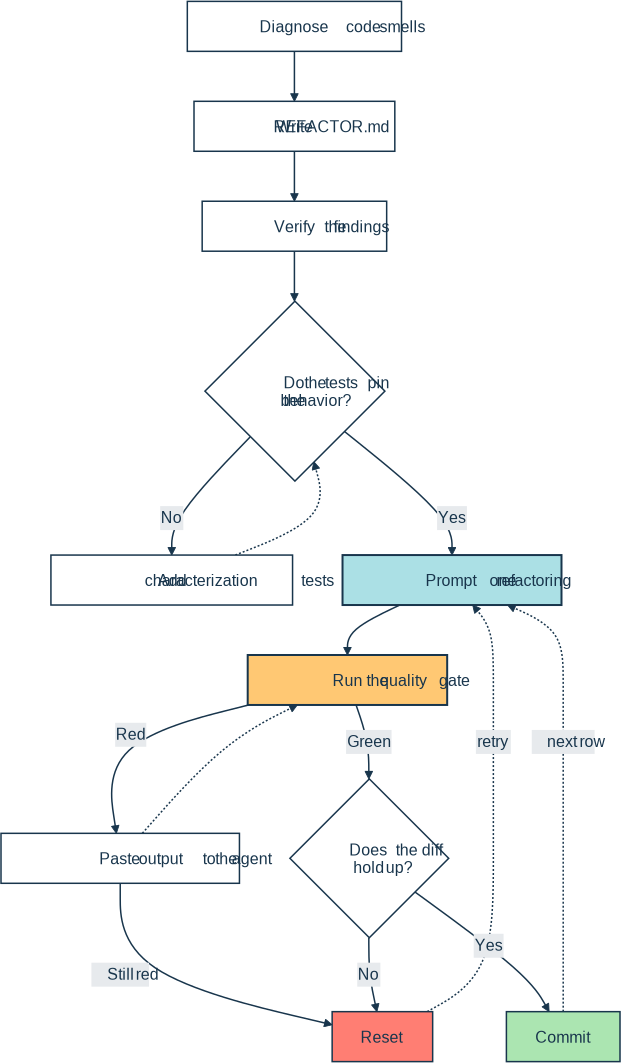
In this guide, you’ll refactor a command-line to-do app built with Typer. You’ll use an AI agent to diagnose the code, plan the refactorings, check that tests pin the current behavior, and apply one refactoring at a time, keeping only the changes that pass the tests, produce no new tool errors, and pass your review:
Before you start, make sure you have everything you need to follow along. Download the sample project you’ll use by clicking the link below:
Get Your Code: Click here to download the free sample code for the to-do app that you’ll refactor with an AI agent.
Take the Quiz: Test your knowledge with our interactive “How to Refactor Python Code With an AI Agent” quiz. You’ll receive a score upon completion to help you track your learning progress:

Interactive Quiz
How to Refactor Python Code With an AI AgentCheck how well you can refactor Python code with an AI agent, from a verified plan and characterization tests to a quality gate on every change.
Prerequisites
This tutorial assumes that you’re comfortable with Python and a few everyday developer tools. To get the most out of it, you should have the following in place:
- Python 3.10 or newer: You can use a newer version like 3.15, but nothing in the sample project needs it.
- Testing with
pytest: You should be familiar withpytest, which runs the sample project’s test suite. - Basic Git: You’ll use version control with Git as your safety net and commits as the unit of review in this tutorial.
- The
uvpackage manager: You’ll useuvto install the sample project and run its tools. If you don’t have it yet, follow the installation instructions. - A project-aware AI coding agent: This guide uses Claude Code to illustrate the workflow. The process works with any AI agent that can read your files and run commands.
- The sample project: You’ll refactor the to-do app from the sample project that you downloaded above.
The download includes two ZIP files. The ai-refactor-python-starter.zip file holds the starter project, which includes the app’s code, a test suite, an agent skill, and the development tools you’ll use throughout this tutorial.
The ai-refactor-python-final.zip file holds the finished project, which includes the refactoring plan, the tool settings, and the code after every refactoring. Use it to compare your results with the ones in this tutorial.
Note: To learn how the to-do app was built step by step, see the Build a Command-Line To-Do App With Python and Typer tutorial.
Ruff, Radon, mypy, and Coverage.py are part of the development tools. However, you don’t need any experience with them because you’ll walk through the few settings this workflow relies on.
AI Wrote It. Now What? Live Course: Want to get better at catching what an agent’s changes quietly broke? In Real Python’s AI Wrote It. Now What? live course, you practice reading failures, finding wrong answers that never crashed, and deciding when to fix code yourself. Join the waitlist to hear about the next dates.
Step 1: Set Up Your Project for AI-Assisted Refactoring
Before you start refactoring your codebase, you need to set up the target project so the agent can work in it. You also need to install dependencies and the tools. In this step, you’ll get the sample project, configure the code quality tools, put the project under version control, and review the rules that guide the agent.
Get the Sample Project
To get started, unzip ai-refactor-python-starter.zip into a working directory. You’ll get the following project structure:
ai-refactor-python-starter/
│
├── .claude/
│   │
│   └── skills/
│       │
│       └── refactor-plan/
│           │
│           ├── assets/
│           │   └── REFACTOR-template.md
│           │
│           ├── references/
│           │   └── code-smells.md
│           │
│           └── SKILL.md
│
├── rptodo/
│   ├── __init__.py
│   ├── __main__.py
│   ├── cli.py
│   ├── config.py
│   ├── database.py
│   └── rptodo.py
│
├── tests/
│   ├── __init__.py
│   ├── test_cli.py
│   ├── test_config.py
│   ├── test_database.py
│   └── test_rptodo.py
│
├── .gitignore
├── AGENTS.md
├── CLAUDE.md
├── pyproject.toml
└── uv.lock
The rptodo/ package is the to-do app exactly as published. The tests/ folder has one test file for each of the four modules that hold the app’s logic. Together, they pin down how the app behaves today, including a few bugs. The .claude/skills/refactor-plan/ folder holds an agent skill that you’ll use to look for code smells with the help of your agent.
Inside rptodo/, each module has one job:
cli.pydefines the Typer commands and prints their results.rptodo.pyholds theTodoerclass, which adds, completes, and removes to-dos.database.pyreads and writes the JSON database file.config.pycreatesconfig.ini, which stores the path to the database.__init__.pydefines the error codes and their messages.
For example, rptodo complete 1 runs set_done() in cli.py, which calls Todoer.set_done(). Todoer then reads and writes the to-dos through DatabaseHandler in database.py.
Go ahead and install the app, its dependencies, and development tools with uv:
$ cd ai-refactor-python-starter/
$ uv sync
The uv sync command creates a virtual environment and installs Typer along with the development tools, which you’ll configure in a moment.
Now, run the app with the --help option to make sure everything works correctly:
$ uv run rptodo --help

 Usage: rptodo [OPTIONS] COMMAND [ARGS]...

╭─ Options ─────────────────────────────────────────────────────────────────╮
│ --version             -v        Show the application's version and exit.  │
│ --install-completion            Install completion for the current shell. │
│ --show-completion               Show completion for the current shell, to │
│                                 copy it or customize the installation.    │
│ --help                          Show this message and exit.               │
╰───────────────────────────────────────────────────────────────────────────╯
╭─ Commands ────────────────────────────────────────────────────────────────╮
│ init      Initialize the to-do database.                                  │
│ add       Add a new to-do with a DESCRIPTION.                             │
│ list      List all to-dos.                                                │
│ complete  Complete a to-do by setting it as done using its TODO_ID.       │
│ remove    Remove a to-do using its TODO_ID.                               │
│ clear     Remove all to-dos.                                              │
╰───────────────────────────────────────────────────────────────────────────╯
Go ahead and take a quick look at how the app works. Start by running the init command to initialize the database:
$ uv run rptodo init
to-do database location? [/home/user/.user_todo.json]:
The to-do database is /home/user/.user_todo.json
Press Enter to accept the default location. From there, you can add, list, complete, and remove to-dos with the commands shown in the help output above.
Configure the Quality Tools
With the project in place, you can configure the tools to support the refactoring process. The tools are already installed, because they live in the dev dependency group in pyproject.toml.
Each tool checks a different part of the code. Ruff is a linter, which flags code patterns that tend to hide problems. mypy is a type checker, which catches values that don’t match their type hints. Coverage.py measures which lines and branches the tests run.
Now, add the following rules for Ruff, mypy, and Coverage.py to the end of pyproject.toml to tailor these tools to this workflow:
pyproject.toml
# ...

[tool.ruff.lint]
select = ["C901", "PLR", "SIM", "BLE", "F"]

[tool.ruff.lint.mccabe]
max-complexity = 5

[tool.ruff.lint.per-file-ignores]
"tests/*" = ["PLR2004"]

[tool.mypy]
packages = ["rptodo"]

[tool.coverage.run]
branch = true
source = ["rptodo"]
The Ruff rules focus on the code’s structure, starting with C901, which flags functions that are too complex. Their cyclomatic complexity, roughly one plus the number of branches like if, for, and except, counts the paths through a function, so a higher score means more cases to read and test.
The threshold drops from Ruff’s default of 10 to 5 because the app’s functions are small, and a lower bar surfaces the ones worth simplifying.
PLR catches long functions and magic values, SIM catches collapsible conditionals, BLE catches overly broad except clauses, and F catches unused names. The per-file ignore disables PLR2004 for files under tests/.
The mypy setting points the type checker at the rptodo package, so running mypy with no arguments checks the app’s code but not the tests.
The Coverage.py settings turn on branch coverage, which checks both sides of every if statement, and limit measurement to the rptodo package.
Radon doesn’t need any settings. It ranks functions by cyclomatic complexity, and the agent skill that you’ll use in Step 2 runs it for you.
Together, the test suite, Ruff, and mypy make up the project’s quality gate, the set of checks that every change must pass before you accept it. A change passes when the unchanged tests pass and Ruff and mypy report nothing new. In Step 4, you’ll also use Git to confirm that the tests are, in fact, unchanged. Coverage.py isn’t part of the gate. You’ll use it in Step 3 to confirm that the tests cover enough of the code.
Put the Project Under Version Control
Before you change anything else, put the project under version control by running the commands below:
$ git init -b main
$ git add .
$ git commit -m "To-Do project, initial setup"
$ git switch -c refactor
The last command creates a refactor branch and switches to it, so all the work in this tutorial stays off main. If things go wrong, main still holds the original code, and at the end, you can compare the two branches to see every change at once.
Review the Agent’s Refactoring Rules
The project already includes refactoring rules for the agent in the AGENTS.md file, so they apply to every prompt without being repeated:
AGENTS.md
## Refactoring rules

- Preserve behavior: same inputs, same outputs. The tests define
  what "same" means.
- Leave `tests/` untouched. The tests are the reference for every
  change. The one exception: when you move a function or class to
  another module, move its tests to the matching test file and change
  only the module they call.
- Report anything outside the current refactoring instead of
  fixing it.
- Apply one refactoring per turn. Then run the tests, Ruff, and mypy,
  and fix your change until the tests pass and the checks report
  nothing new. Stop when they do, so I can review the diff.
- If you can't make the checks pass without editing tests or changing
  behavior, stop and explain why.
- Use only the installed packages. Ask before adding any import,
  even from the standard library.
The file also lists the commands for the tests and checks. Claude Code reads AGENTS.md on its own only when the project has no CLAUDE.md. As soon as you add one, it reads CLAUDE.md instead.
To keep the rules loaded either way, the sample project includes a one-line CLAUDE.md that imports the other file with an @AGENTS.md directive.
Keep in mind that these rules are guidance, not enforcement. The agent usually follows them, but nothing stops it from breaking one. That’s why you’ll run the quality gate on every change instead of trusting the rules.
Step 2: Diagnose Code Smells and Write a Refactoring Plan
Before the agent edits a single line, you need to decide what to change. In this step, you’ll have the agent diagnose the to-do app with code quality tools and a careful read of the code. Then, you’ll verify every finding yourself before using the plan for the AI refactoring.
Prepare and Run the Diagnosis
A code smell is a pattern that works but makes code harder to change. Reading a whole codebase while checking it against a list of smells is tedious and error-prone work for any developer. However, agents are pretty good at it.
The sample project includes a skill that turns this diagnosis into a single command. It lives in .claude/skills/refactor-plan/. Expand the section below to read its instructions:
.claude/skills/refactor-plan/SKILL.md
---
name: refactor-plan
description: >-
  Diagnoses code smells in a Python project and writes a refactoring
  plan to REFACTOR.md. Use when asked to find code smells or plan a
  refactoring.
---

# Refactoring Plan

Find the code smells in this project and write a refactoring plan to
`REFACTOR.md` at the project root. A person will check every finding
against the code before any refactoring starts, so report only what you
can point to, with exact file paths and line numbers.

This is a read-only diagnosis. `REFACTOR.md` is the only file you create
or change, because the plan has to be reviewed before any code changes.

## 1. Run the Tools

Run these commands and note every issue they flag:

- `uv run ruff check`
- `uv run radon cc <package>/ -s -nb` (blocks ranked B or worse)
- `uv run mypy`

Tools measure structure but miss intent, so treat their output as a
starting point, not the full diagnosis.

## 2. Read the Code

Read every module in the package. Check each one against the tables in
[references/code-smells.md](references/code-smells.md). Also read
`tests/` to learn which behavior the tests pin down, but don't report
smells in the tests themselves.

For every candidate smell, record the file, the line range, the smell
name, and the refactoring from the tables.

Count repeats. If the same pattern appears in several places in one
file, report it once with the full line range and the number of
occurrences. If it appears in more than one file, add one row per file,
even when the smell is the same, so every row names exactly one file.

Plan one refactoring per row, small enough that its diff fits on one
screen. Rows can touch the same lines. Give line numbers from the code
as it is now, and say in the notes when a row builds on an earlier one.

## 3. Sort the Findings

Put every finding into exactly one group:

- **Refactor:** a smell that you can remove by restructuring the code,
  without adding features or changing what the app does for its users.
  If the fix requires editing tests or changing a public interface,
  such as a function signature, a CLI option, a message, or an exit
  code, list it anyway and name what has to change in the notes.
- **Bug:** code that behaves incorrectly. Describe how to trigger it.
  Don't fix bugs here, because fixing a bug changes behavior on
  purpose, which is outside a refactoring. If a test asserts the wrong
  behavior, name the test.

If a finding is both a smell and a bug, list it as a bug.

## 4. Write REFACTOR.md

Copy [assets/REFACTOR-template.md](assets/REFACTOR-template.md) to
`REFACTOR.md` at the project root and fill it in. Replace the example
row and placeholder text with your findings, and keep the section
headings and the note on line numbers as they are.

Order the refactor rows from the smallest change to the largest, so the
first pass is a quick check that the workflow works.

Keep table cells short: the Code Smell and Refactoring cells hold only
the names from the tables. Put evidence in the Notes list, numbered to
match the table rows.

## 5. Report

Finish with a short summary: how many refactorings you planned and how
many bugs you found. Then stop. Don't start refactoring.
Next to SKILL.md, the skill folder holds two supporting files:
assets/REFACTOR-template.mddefines the plan’s format.references/code-smells.mdholds the catalog of code smells that the agent checks the code against.
Together with SKILL.md, these files give the agent everything it needs: the steps to follow, the format to fill in, and the smells to look for.
Note: The sample project is set up for Claude Code. The AGENTS.md file makes the refactoring rules available to other agents too, but the skill lives in .claude/skills/, where only Claude Code finds it automatically. If you use a different agent, then either move the refactor-plan/ folder to the location where your agent looks for skills, or ask the agent to follow the instructions in .claude/skills/refactor-plan/SKILL.md.
The catalog below covers two kinds of smells:
- The smells people write
- The smells AI agents write
Here are the common smells from human-written code:
| Code Smell | Description | Refactoring |
|---|---|---|
| Nested conditionals | Several levels of nested if statements |
Replace with guard clauses (early returns or raises) |
| Long function | Validation, math, and formatting in one place | Extract function |
| Magic numbers | Unnamed literals inline | Replace with named constant |
| Dead code | Unreachable branches and functions that nothing calls | Remove dead code |
| Explanatory comments | A comment explaining the block below it | Extract function and rename |
| Repeated conditionals | The same if … elif chain in several places |
Replace with dispatch dictionary |
| Long parameter list | Six positional arguments | Introduce parameter object |
| Data clumps | The same values always passed together | Introduce parameter object |
| Duplicated code | The same logic in two places | Extract function |
| Primitive obsession | Strings and dictionaries where a type belongs | Replace primitive with object |
| Feature envy | Uses another object’s data more than its own | Move function |
| Unclear naming | Names that don’t say what they mean | Rename |
| Large class | One class with unrelated responsibilities | Extract class |
The table below lists the smells agents tend to introduce. Watch for them in older agent-generated code and in the code your agent produces during this workflow:
| Code Smell | Description | Refactoring |
|---|---|---|
| Copy-paste block | The same helper inlined three times | Extract function |
| Bloated procedure | One function that handles everything | Extract function |
| Basic-level verbosity | A loop where a comprehension belongs | Replace loop with pipeline |
| Speculative generality | A config flag that nothing ever sets | Remove dead code |
| Modular mirage | Many files with no shared cohesion | Move function |
| Over-defensive guards | An if x is not None check before every use |
Remove redundant guard |
Why does this second table matter? Because an agent’s code has its own signature, which differs from that of the code people write. The smells you hunt when you review its output aren’t the ones you started with.
Note: Most names in the Refactoring column of both tables come from the refactoring catalog by Martin Fowler, some in shortened form. A few, like Replace with dispatch dictionary and Remove redundant guard, are additions that fit Python code or agent-written code.
Start your agent in the project’s root folder so that it loads AGENTS.md and the skill. To run the diagnosis, ask your agent to find the code smells and plan a refactoring, or call the skill by name. In Claude Code, you can type /refactor-plan and press Enter. When the agent finishes, you’ll find the plan in REFACTOR.md, along with a short summary of the number of refactorings and bugs it found.
Verify the Diagnosis Findings
Agents aren’t deterministic, so the exact findings will vary from run to run. That’s one more reason why you need to verify the findings yourself. Expand the section below to see how the plan may look:
Refactoring Plan
Once earlier rows are applied, find the code by name. Line numbers in this table refer to the code before any refactoring:
| # | File | Lines | Code Smell | Refactoring |
|---|---|---|---|---|
| 1 | rptodo/config.py |
18-21 | Over-defensive guards | Remove redundant guard |
| 2 | rptodo/cli.py |
100-106 | Unclear naming | Rename |
| 3 | rptodo/config.py |
18, 36-44 | Unclear naming | Rename |
| 4 | rptodo/rptodo.py |
19 | Magic numbers | Replace with named constant |
| 5 | rptodo/cli.py |
62 | Magic numbers | Replace with named constant |
| 6 | rptodo/cli.py |
103-105 | Magic numbers | Replace with named constant |
| 7 | rptodo/cli.py |
36-194 | Nested conditionals | Replace with guard clauses |
| 8 | rptodo/cli.py |
24-192 | Copy-paste block | Extract function |
| 9 | rptodo/rptodo.py |
43-49, 56-62 | Duplicated code | Extract function |
| 10 | rptodo/cli.py |
131-172 | Nested conditionals | Replace with guard clauses |
| 11 | rptodo/cli.py |
160-165 | Feature envy | Move function |
| 12 | rptodo/cli.py |
81-109 | Long function | Extract function |
| 13 | rptodo/database.py |
15-19 | Modular mirage | Move function |
| 14 | rptodo/rptodo.py |
11, 24-28 | Primitive obsession | Replace primitive with object |
| 15 | rptodo/cli.py |
74, 101, 125, 153, 167 | Primitive obsession | Replace primitive with object |
Notes
init_app()checksdatabase_code != SUCCESS, returns it, and otherwise returnsSUCCESS, so both branches returndatabase_code. Replace lines 18-21 withreturn _create_database(db_path). Return values stay the same, andtests/test_config.pystill covers it.- The loop variable
id(line 100) shadows the built-inid(). Rename it to something liketodo_idorposition. It’s a local name, so output doesn’t change. _create_database()doesn’t create the database. It writes the[General] database = ...entry toconfig.ini. The database file is created later bydatabase.init_database()incli.init. Rename it to something like_write_config()and update the call on line 18. It’s private and no test calls it directly.- The default priority
2appears in two files: as theTodoer.add()default here (line 19) and as the CLI option default incli.py(row 5). Define aDEFAULT_PRIORITYconstant inrptodo.pyand use it as theTodoer.add()default. Values don’t change, so behavior stays the same. - The
--priorityoption repeats the default2and uses the unnamed boundsmin=1, max=3(line 62). UseDEFAULT_PRIORITYfrom row 4 as the default, and name the bounds as constants. Values don’t change, so behavior stays the same. Builds on row 4. - The column padding in
list_all()subtracts unexplained4(the width of"| ("plus")") and2(the width of"| "). Name these widths, or derive them from the format strings, so the padding math explains itself. Output must match character for character. - Seven
else:blocks follow a branch that already ends inraise typer.Exit(...): lines 36, 43, 51, 72, 123, 151, and 193.get_todoer()(40-56) is the clearest case, since its happy path sits insideelsebranches. Turn each failure branch into a guard clause and dedent the success path. Control flow and exit codes stay the same. - The pattern
typer.secho(<message>, fg=typer.colors.RED)followed byraise typer.Exit(1)repeats 9 times: lines 24-28, 31-35, 44-48, 52-56, 68-71, 118-122, 146-150, 164-165, and 188-192. Extract a helper such as_fail(message: str) -> NoReturn. Messages, colors, and exit code 1 stay the same. Do this after row 7, so the guards become one-liners. Builds on row 7. set_done()andremove()repeat the same steps: read the todos, return the read error, indextodo_list[todo_id - 1], and mapIndexErrortoID_ERROR. Extract a private helper that reads the list and resolves the index (the only difference is[]versus.pop()). Keep the current index arithmetic, including how it handles 0 and negative IDs (see Bugs), so behavior doesn’t change.tests/test_rptodo.py::test_set_doneand::test_removepin the results, including ID 0.remove()is the only function that ruff flags (C901, complexity 6 > 5). It defines a nested_remove()closure and nests the confirm prompt insideif force ... else. Move_removeto a module-level helper that takestodoerandtodo_id. Then use guard clauses: when not forced, look up the to-do, prompt, and on “no” echo “Operation canceled” and return early. Messages and exit codes stay the same. Builds on row 8.cli.remove()reaches intotodoer.get_todo_list()and indexes it withtodo_id - 1itself (lines 160-165), which repeats the lookup rule that belongs toTodoer. Move the lookup into aTodoer.get_todo()method (built on the helper from row 9) and call that from the CLI. The “Invalid TODO_ID” message and exit code 1 stay the same. Builds on rows 9 and 10.list_all()handles the empty-list check, the header layout, and per-row padding math in one function. Extract the header and row formatting (lines 91-108) into helpers such as_format_row(). Output must stay byte-for-byte the same, whichtests/test_cli.py::test_listchecks. Builds on rows 2 and 6.database.get_database_path()only parsesconfig.iniwithconfigparser, and its only caller passesconfig.CONFIG_FILE_PATH(cli.py:42).config.pyalready owns the[General]section format (line 38). Move the function toconfig.py. This changes a public interface:tests/test_database.py::test_get_database_pathcallsdatabase.get_database_path, so move that test totests/test_config.pyalong with the function. Only the module it calls changes, fromdatabasetoconfig, and the assertion stays the same.- A to-do is a
Dict[str, Any]with the string keys"Description","Priority", and"Done", typed inCurrentTodo.todo(line 11) and built inadd()(lines 24-28). Introduce aTodoTypedDictthat names the three keys and their types, and use it wherever the code handles to-dos. At runtime, aTodois still a plain dict, so the on-disk JSON stays identical and the tests intests/test_rptodo.pythat compare results to plain dicts keep passing.set_done()andremove()return{}on errors, so declare theTypedDictwithtotal=False. A dataclass would remove more of the smell, but it changes whatCurrentTodo.todoholds, so it would require editing those tests. - The CLI reads to-dos by key at lines 74, 125, 153, and 167. Type the CLI code that handles to-dos with the
Todofrom row 14 so that mypy checks the key names and value types. Line 101 unpackstodo.values(), so it depends on the key order in the JSON file. Reading the values by key there would change the output for files with a different key order, so leave it as is. Builds on row 14.
Bugs Found (Don’t Fix Here)
JSON_ERRORhas no message, so the CLI crashes withKeyError.ERRORSinrptodo/__init__.py:16-22has no entry forJSON_ERROR. When the database holds malformed JSON,read_todos()returnsJSON_ERROR(database.py:46), andset_done()/remove()pass it on (rptodo.py:44-45,57-58).ERRORS[error]incli.py:119or147then raises aKeyErrortraceback instead of a red message. To trigger: write{into the database file, then runrptodo complete 1orrptodo remove 1 --force.addoverwrites a malformed database and loses its contents.Todoer.add()only checks forDB_READ_ERROR(rptodo.py:30). OnJSON_ERRORit appends to the empty list and writes it back, which replaces whatever was in the file. To trigger: truncate a database that holds several to-dos (for example, drop the final]), then runrptodo add foo. The file then holds onlyfoo..tests/test_rptodo.py::test_add_wrong_json_formatasserts this behavior: an empty file returnsSUCCESSand ends up with one item.listreports an unreadable or malformed database as empty.Todoer.get_todo_list()(rptodo.py:36-39) dropsread.error. With a malformed database,rptodo listprints “There are no tasks in the to-do list yet” and exits 0, andrptodo remove 1(without--force) prints “Invalid TODO_ID”.- ID 0 and negative IDs act on to-dos counted from the end of the list.
todo_list[todo_id - 1](rptodo.py:47,rptodo.py:60,cli.py:162) turns ID 0 into index -1.rptodo complete 0marks the last to-do as done, andrptodo remove 0 --forcedeletes it, when both should fail with “to-do id error”. Negative IDs (for examplerptodo complete -- -1) also reach items counted from the end. initfails when the parent config directory doesn’t exist.CONFIG_DIR_PATH.mkdir(exist_ok=True)(config.py:26) has noparents=True. On a system without~/.config(or whereverXDG_CONFIG_HOMEpoints),rptodo initfails withCreating config file failed with "config directory error".initwipes an existing database.init_database()writes[]to the database file unconditionally (database.py:25), andcli.initcalls it without checking whether the file already exists (cli.py:29). Rerunninginitwith the same path silently deletes every to-do. To trigger: runrptodo init, add a to-do withrptodo add foo, then runrptodo initagain and accept the same path.rptodo listthen reports an empty list.- A config write failure is reported as a database error. When writing
config.inifails,_create_database()returnsDB_WRITE_ERROR(config.py:43), so the user seesCreating config file failed with "database write error".FILE_ERRORwould match what actually failed. To trigger: make the config file read-only aftertouch, for example by runningchmod 444on an existingconfig.ini, then runrptodo init. - A config file without a
[General]section crashes every command.get_database_path()(database.py:19) indexesconfig_parser["General"]["database"]without checking for it. Ifconfig.iniexists but is empty, whichinitleaves behind when the write inconfig.py:40-41fails after thetouchon line 30, thenrptodo list(and every command that callsget_todoer()) exits with aKeyErrortraceback instead of “Please, run rptodo init”.
The rest of this tutorial refers to rows by their number in this plan. If your plan orders them differently, then match each example to your plan by smell and location.
You must take this plan as a proposal, not a decision. Before changing any code, check each finding against the code yourself. Here’s what to do with each row in the table:
- Confirm each smell: Open the lines in each row and verify that the smell is present.
- Review each proposed fix: Read the row’s associated note and check that the proposed fix is correct. Otherwise, edit the note with your preference.
- Check the tool claims: If a row cites a tool, run the tool yourself.
- Set the bugs aside: Every bug in the plan comes with a trigger. Note them for later, but don’t fix them in this pass.
- Decide the scope: Delete any row you can’t confirm.
For example, the first row of the table reports over-defensive guards in init_app() in rptodo/config.py. Open the file and look at the function:
rptodo/config.py
# ...

def init_app(db_path: str) -> int:
    """Initialize the application."""
    config_code = _init_config_file()
    if config_code != SUCCESS:
        return config_code
    database_code = _create_database(db_path)
    if database_code != SUCCESS:
        return database_code
    return SUCCESS
In this example, the finding holds. Why? Because if database_code isn’t SUCCESS, the function returns it. Otherwise, it returns SUCCESS, which is the value of database_code at that point. Either way, the function returns database_code.
Note 1 proposes replacing the last four lines, from database_code = _create_database(db_path) onward, with a single return _create_database(db_path). That fix is correct: every return value stays the same, and the first guard, which still matters, stays in place.
Next, check the tool claims. For example, the note for row 10 says that Ruff flags remove() in rptodo/cli.py as too complex. Run Ruff yourself to confirm it:
$ uv run ruff check
C901 `remove` is too complex (6 > 5)
   --> rptodo/cli.py:131:5
...
You won’t act on the bugs section in this pass, but it still matters: it tells the agent what not to fix, and it gives you a list of bugs to fix later.
Commit the verified plan so that your working tree is clean:
$ git add REFACTOR.md
$ git commit -m "Add refactoring plan"
With the plan committed, you have a fixed checklist for the agent and a record of what you chose to leave alone.
Step 3: Check That Tests Pin the Current Behavior
Tests are fundamental to a successful refactoring. Without tests, you’d change code and hope it still works, with no way to prove it. Before the agent changes anything, find out how much of the target code your test suite covers:
$ uv run coverage run -m pytest
$ uv run coverage report --omit="rptodo/__main__.py"
Name                 Stmts   Miss Branch BrPart  Cover
------------------------------------------------------
rptodo/__init__.py       4      0      0      0   100%
rptodo/cli.py           95      0     28      0   100%
rptodo/config.py        33      2      4      0    95%
rptodo/database.py      36      0      0      0   100%
rptodo/rptodo.py        46      0      8      0   100%
------------------------------------------------------
TOTAL                  214      2     40      0    99%
The --omit option leaves out __main__.py, which only launches the app and has no tests of its own. Add -m to list the exact lines and branches that no test reaches. Here, the only gap is the error branch in config.py that handles a config file that can’t be created.
Cool! The numbers look great: almost every line runs under test. However, coverage only tells you what runs, not what the tests check, so it’s a starting point rather than a guarantee.
If you’re running this workflow on a different project and the coverage numbers are low, then use the following thresholds as a guide to decide what to do next:
| Coverage | What to Do |
|---|---|
| >= 85% | Check that the tests assert the behavior of the code in your plan, then refactor. |
| < 85% | Improve the suite first, then refactor. |
| No tests | Write a test suite to pin the behavior. |
As with many other things in programming, the right number depends on your project. However, eighty-five percent works well as the bar for starting a refactoring. It’s high enough to tell you that most of the code runs under test, and it’s reachable on real code. Treat it as a minimum, not as proof that refactoring is safe.
A covered line isn’t necessarily a pinned line. A test can run a line without asserting its result, or try only one input when the edge cases behave differently. So, before refactoring an area, open the tests that cover it and check that they assert the results, including error and edge cases like empty input, zero, negative or out-of-range IDs, and malformed files.
Where a case isn’t asserted, add a characterization test first. That’s a test that pins down what the code does today, right or wrong. Run the suite, and commit the new tests before you start refactoring. From then on, the committed tests are the fixed reference for the loop, so any change to them during refactoring shows up in the diff. For more on what coverage can and can’t tell you, see Martin Fowler’s TestCoverage.
Note: To learn how to write a good test suite with AI help, check out the Generating Python Tests With AI: A Suite You Can Trust tutorial.
Here’s how that check looks for row 9 of the sample plan, which merges the lookup code in set_done() and remove(). The plan’s Bugs section says that ID 0 acts on the last to-do, and note 9 says to keep that behavior. Open tests/test_rptodo.py and look at the cases for test_set_done():
tests/test_rptodo.py
# ...

@pytest.mark.parametrize(
    "todo_id, expected",
    [
        pytest.param(1, (test_todo1, SUCCESS)),
        pytest.param(3, (test_todo2, ID_ERROR)),
        # Pins current behavior: ID 0 acts on the last to-do.
        pytest.param(0, (test_todo1, SUCCESS)),
    ],
)
def test_set_done(mock_json_file, todo_id, expected):
    todoer = rptodo.Todoer(mock_json_file)
    assert todoer.set_done(todo_id) == expected
The first case checks a valid ID, and the second checks an out-of-range one. The third case is a characterization test. It expects ID 0 to succeed and mark the last to-do as done, even though that’s a bug.
If the agent writes the row 9 helper with a bounds check like 1 <= todo_id <= len(todo_list), then it fixes the bug by accident, and this case fails. test_remove() pins the same behavior for remove(). Without these cases, the gate would stay green, and the behavior change would slip through unnoticed.
With ninety-nine percent coverage and tests that assert the results of the code the plan touches, the sample project clears the bar.
Before you hand the code to the agent, record what the quality gate reports on the clean tree:
$ uv run pytest -q
.........................................................             [100%]
57 passed in 0.28s

$ uv run ruff check
C901 `remove` is too complex (6 > 5)
   --> rptodo/cli.py:131:5
...

$ uv run mypy
Success: no issues found in 6 source files
This output is your baseline: 57 passing tests, Ruff’s C901 on remove(), which row 10 of the plan addresses, and a clean mypy run. After every refactoring, you’ll compare the gate’s output against it.
Up to this point, you’ve diagnosed the code, turned the findings into a verified plan, and confirmed that the tests cover the code you’re about to change. Now you’re ready to run the refactoring.
Step 4: Refactor Python Code With Your AI Agent
Now you instruct the agent to work through REFACTOR.md one row at a time. Don’t hand the agent the whole plan at once, because it could make a mess, and the diff would be too large for you to review comfortably. Each pass follows the same steps: ask for one refactoring, run the quality gate, review the diff, and commit once you’re happy with the result.
Ask for One Refactoring
The prompt only needs to point at the row and its note, because the note describes the fix you reviewed in Step 2 and AGENTS.md covers the rules. Start with the first row, the over-defensive guard in init_app() that you verified in Step 2:
Apply refactoring #1 from REFACTOR.md, as described in note 1.
With this prompt, the agent reads row 1 and its note in REFACTOR.md, replaces the last four lines of init_app() with a single return, and runs the tests, Ruff, and mypy as AGENTS.md tells it to. Then, it stops so you can check its work.
Run the Quality Gate
Once the agent finishes the refactoring, run the quality gate. Start with git status --short tests/ to confirm that the tests are unchanged:
$ git status --short tests/

$ uv run pytest -q
.........................................................             [100%]
57 passed in 0.28s

$ uv run ruff check
C901 `remove` is too complex (6 > 5)
   --> rptodo/cli.py:131:5
...

$ uv run mypy
Success: no issues found in 6 source files
Compare this output with the baseline you recorded in Step 3. In this example, the two match line for line, so the first refactoring passes the gate.
Here’s what to look for in each check:
git status --short tests/: The output is empty, unless the row moves code and its tests to another module.pytest: The unchanged suite passes, with the same tests and the same expected values.ruffandmypy: Neither reports anything new compared with the baseline.
AGENTS.md tells the agent to run the tests, Ruff, and mypy and keep fixing its change until the tests pass and the checks report nothing new, so the gate is usually green by the time the agent stops. Run it yourself anyway. Note that green means nothing new, not no output: Ruff exits with an error here because of the C901 you accepted in the plan, and that’s expected until refactoring #10.
If a test fails or a check reports something new, don’t read the diff yet. Paste the output back to the agent, and run the gate again once it’s done. If the agent can’t get the gate green, or the diff grows too big to review, then reset to your last commit as described in Troubleshooting.
Review the Diff
Once the gate is green, read the diff. The checks protect the behavior that the tests assert, but they can’t tell you whether the agent stayed within the row at hand or changed something no test checks. That’s what your review is for. You can use git diff HEAD or Claude Code’s /diff command, which shows the uncommitted changes.
Here’s the output of git diff for the first row:
diff --git a/rptodo/config.py b/rptodo/config.py
index f2df96a..a945ca0 100644
--- a/rptodo/config.py
+++ b/rptodo/config.py
@@ -15,10 +15,7 @@ def init_app(db_path: str) -> int:
     config_code = _init_config_file()
     if config_code != SUCCESS:
         return config_code
-    database_code = _create_database(db_path)
-    if database_code != SUCCESS:
-        return database_code
-    return SUCCESS
+    return _create_database(db_path)


 def _init_config_file() -> int:
In this example, the first guard, which skips calling _create_database() when the config file can’t be set up, stays in place. The lines that returned database_code become a single return.
In this refactoring, the agent just does what it’s told to do. However, you must check each change against the plan and ask questions like: Did the agent apply the refactoring as planned? Does the function still return the expected value in every case? Did anything outside the plan change? Did the agent introduce any of the smells from the agent smells table in Step 2?
If the gate is green and every change in the diff holds up, then you can commit the refactoring:
$ git commit -am "Remove redundant guard in init_app()"
That’s it! You’ve completed one full pass of the refactoring loop, and the change has its own commit.
Complete the Plan
Now, run the same loop on your own for the remaining rows, and use the complete diff below as a checkpoint for your results. Once the rows it builds on are committed, each row stands on its own, so you can run each one in a fresh agent session. This will help you to efficiently manage the agent’s context window so that you get better results.
Expand the section below to see how the refactored code will look after you apply all the refactorings with the agent. It’s the output of git diff main refactor -- rptodo/ tests/, which compares the two branches you created in Step 1:
diff --git a/rptodo/cli.py b/rptodo/cli.py
index 8fbf11a..e906e84 100644
--- a/rptodo/cli.py
+++ b/rptodo/cli.py
@@ -1,13 +1,30 @@
 """This module provides the RP To-Do CLI."""

 from pathlib import Path
-from typing import List, Optional
+from typing import List, NoReturn, Optional

 import typer
 from rptodo import ERRORS, __app_name__, __version__, config, database, rptodo

 app = typer.Typer()

+MIN_PRIORITY = 1
+MAX_PRIORITY = 3
+CELL_PREFIX_WIDTH = len("| ")
+PRIORITY_CELL_PREFIX_WIDTH = len("| ()")
+COLUMNS = (
+    "ID.  ",
+    "| Priority  ",
+    "| Done  ",
+    "| Description  ",
+)
+HEADERS = "".join(COLUMNS)
+
+
+def _exit_with_error(message: str) -> NoReturn:
+    typer.secho(message, fg=typer.colors.RED)
+    raise typer.Exit(1)
+

 @app.command()
 def init(
@@ -21,60 +38,62 @@ def init(
     """Initialize the to-do database."""
     app_init_error = config.init_app(db_path)
     if app_init_error:
-        typer.secho(
-            f'Creating config file failed with "{ERRORS[app_init_error]}"',
-            fg=typer.colors.RED,
+        _exit_with_error(
+            f'Creating config file failed with "{ERRORS[app_init_error]}"'
         )
-        raise typer.Exit(1)
     db_init_error = database.init_database(Path(db_path))
     if db_init_error:
-        typer.secho(
-            f'Creating database failed with "{ERRORS[db_init_error]}"',
-            fg=typer.colors.RED,
+        _exit_with_error(
+            f'Creating database failed with "{ERRORS[db_init_error]}"'
         )
-        raise typer.Exit(1)
-    else:
-        typer.secho(f"The to-do database is {db_path}", fg=typer.colors.GREEN)
+    typer.secho(f"The to-do database is {db_path}", fg=typer.colors.GREEN)


 def get_todoer() -> rptodo.Todoer:
-    if config.CONFIG_FILE_PATH.exists():
-        db_path = database.get_database_path(config.CONFIG_FILE_PATH)
-    else:
-        typer.secho(
-            'Config file not found. Please, run "rptodo init"',
-            fg=typer.colors.RED,
-        )
-        raise typer.Exit(1)
-    if db_path.exists():
-        return rptodo.Todoer(db_path)
-    else:
-        typer.secho(
-            'Database not found. Please, run "rptodo init"',
-            fg=typer.colors.RED,
-        )
-        raise typer.Exit(1)
+    if not config.CONFIG_FILE_PATH.exists():
+        _exit_with_error('Config file not found. Please, run "rptodo init"')
+    db_path = config.get_database_path(config.CONFIG_FILE_PATH)
+    if not db_path.exists():
+        _exit_with_error('Database not found. Please, run "rptodo init"')
+    return rptodo.Todoer(db_path)


 @app.command()
 def add(
     description: List[str] = typer.Argument(...),
-    priority: int = typer.Option(2, "--priority", "-p", min=1, max=3),
+    priority: int = typer.Option(
+        rptodo.DEFAULT_PRIORITY,
+        "--priority",
+        "-p",
+        min=MIN_PRIORITY,
+        max=MAX_PRIORITY,
+    ),
 ) -> None:
     """Add a new to-do with a DESCRIPTION."""
     todoer = get_todoer()
     todo, error = todoer.add(description, priority)
     if error:
-        typer.secho(
-            f'Adding to-do failed with "{ERRORS[error]}"', fg=typer.colors.RED
-        )
-        raise typer.Exit(1)
-    else:
-        typer.secho(
-            f"""to-do: "{todo["Description"]}" was added """
-            f"""with priority: {priority}""",
-            fg=typer.colors.GREEN,
-        )
+        _exit_with_error(f'Adding to-do failed with "{ERRORS[error]}"')
+    typer.secho(
+        f"""to-do: "{todo["Description"]}" was added """
+        f"""with priority: {priority}""",
+        fg=typer.colors.GREEN,
+    )
+
+
+def _format_row(todo_id: int, todo: database.Todo) -> str:
+    desc, priority, done = todo.values()
+    id_padding = len(COLUMNS[0]) - len(str(todo_id))
+    priority_padding = (
+        len(COLUMNS[1]) - len(str(priority)) - PRIORITY_CELL_PREFIX_WIDTH
+    )
+    done_padding = len(COLUMNS[2]) - len(str(done)) - CELL_PREFIX_WIDTH
+    return (
+        f"{todo_id}{id_padding * ' '}"
+        f"| ({priority}){priority_padding * ' '}"
+        f"| {done}{done_padding * ' '}"
+        f"| {desc}"
+    )


 @app.command(name="list")
@@ -88,25 +107,11 @@ def list_all() -> None:
         )
         raise typer.Exit()
     typer.secho("\nto-do list:\n", fg=typer.colors.BLUE, bold=True)
-    columns = (
-        "ID.  ",
-        "| Priority  ",
-        "| Done  ",
-        "| Description  ",
-    )
-    headers = "".join(columns)
-    typer.secho(headers, fg=typer.colors.BLUE, bold=True)
-    typer.secho("-" * len(headers), fg=typer.colors.BLUE)
-    for id, todo in enumerate(todo_list, 1):
-        desc, priority, done = todo.values()
-        typer.secho(
-            f"{id}{(len(columns[0]) - len(str(id))) * ' '}"
-            f"| ({priority}){(len(columns[1]) - len(str(priority)) - 4) * ' '}"
-            f"| {done}{(len(columns[2]) - len(str(done)) - 2) * ' '}"
-            f"| {desc}",
-            fg=typer.colors.BLUE,
-        )
-    typer.secho("-" * len(headers) + "\n", fg=typer.colors.BLUE)
+    typer.secho(HEADERS, fg=typer.colors.BLUE, bold=True)
+    typer.secho("-" * len(HEADERS), fg=typer.colors.BLUE)
+    for todo_id, todo in enumerate(todo_list, 1):
+        typer.secho(_format_row(todo_id, todo), fg=typer.colors.BLUE)
+    typer.secho("-" * len(HEADERS) + "\n", fg=typer.colors.BLUE)


 @app.command(name="complete")
@@ -115,16 +120,25 @@ def set_done(todo_id: int = typer.Argument(...)) -> None:
     todoer = get_todoer()
     todo, error = todoer.set_done(todo_id)
     if error:
-        typer.secho(
-            f'Completing to-do # "{todo_id}" failed with "{ERRORS[error]}"',
-            fg=typer.colors.RED,
+        _exit_with_error(
+            f'Completing to-do # "{todo_id}" failed with "{ERRORS[error]}"'
         )
-        raise typer.Exit(1)
-    else:
-        typer.secho(
-            f"""to-do # {todo_id} "{todo["Description"]}" completed!""",
-            fg=typer.colors.GREEN,
+    typer.secho(
+        f"""to-do # {todo_id} "{todo["Description"]}" completed!""",
+        fg=typer.colors.GREEN,
+    )
+
+
+def _remove_todo(todoer: rptodo.Todoer, todo_id: int) -> None:
+    todo, error = todoer.remove(todo_id)
+    if error:
+        _exit_with_error(
+            f'Removing to-do # {todo_id} failed with "{ERRORS[error]}"'
         )
+    typer.secho(
+        f"""to-do # {todo_id}: '{todo["Description"]}' was removed""",
+        fg=typer.colors.GREEN,
+    )


 @app.command()
@@ -139,37 +153,17 @@ def remove(
 ) -> None:
     """Remove a to-do using its TODO_ID."""
     todoer = get_todoer()
-
-    def _remove():
-        todo, error = todoer.remove(todo_id)
+    if not force:
+        todo, error = todoer.get_todo(todo_id)
         if error:
-            typer.secho(
-                f'Removing to-do # {todo_id} failed with "{ERRORS[error]}"',
-                fg=typer.colors.RED,
-            )
-            raise typer.Exit(1)
-        else:
-            typer.secho(
-                f"""to-do # {todo_id}: '{todo["Description"]}' was removed""",
-                fg=typer.colors.GREEN,
-            )
-
-    if force:
-        _remove()
-    else:
-        todo_list = todoer.get_todo_list()
-        try:
-            todo = todo_list[todo_id - 1]
-        except IndexError:
-            typer.secho("Invalid TODO_ID", fg=typer.colors.RED)
-            raise typer.Exit(1)
+            _exit_with_error("Invalid TODO_ID")
         delete = typer.confirm(
             f"Delete to-do # {todo_id}: {todo['Description']}?"
         )
-        if delete:
-            _remove()
-        else:
+        if not delete:
             typer.echo("Operation canceled")
+            return
+    _remove_todo(todoer, todo_id)


 @app.command(name="clear")
@@ -185,13 +179,8 @@ def remove_all(
     if force:
         error = todoer.remove_all().error
         if error:
-            typer.secho(
-                f'Removing to-dos failed with "{ERRORS[error]}"',
-                fg=typer.colors.RED,
-            )
-            raise typer.Exit(1)
-        else:
-            typer.secho("All to-dos were removed", fg=typer.colors.GREEN)
+            _exit_with_error(f'Removing to-dos failed with "{ERRORS[error]}"')
+        typer.secho("All to-dos were removed", fg=typer.colors.GREEN)
     else:
         typer.echo("Operation canceled")

diff --git a/rptodo/config.py b/rptodo/config.py
index f2df96a..5db210c 100644
--- a/rptodo/config.py
+++ b/rptodo/config.py
@@ -15,10 +15,14 @@ def init_app(db_path: str) -> int:
     config_code = _init_config_file()
     if config_code != SUCCESS:
         return config_code
-    database_code = _create_database(db_path)
-    if database_code != SUCCESS:
-        return database_code
-    return SUCCESS
+    return _write_config(db_path)
+
+
+def get_database_path(config_file: Path) -> Path:
+    """Return the current path to the to-do database."""
+    config_parser = configparser.ConfigParser()
+    config_parser.read(config_file)
+    return Path(config_parser["General"]["database"])


 def _init_config_file() -> int:
@@ -33,7 +37,7 @@ def _init_config_file() -> int:
     return SUCCESS


-def _create_database(db_path: str) -> int:
+def _write_config(db_path: str) -> int:
     config_parser = configparser.ConfigParser()
     config_parser["General"] = {"database": db_path}
     try:
diff --git a/rptodo/database.py b/rptodo/database.py
index b703faf..5fb23f9 100644
--- a/rptodo/database.py
+++ b/rptodo/database.py
@@ -1,9 +1,8 @@
 """This module provides the RP To-Do database functionality."""

-import configparser
 import json
 from pathlib import Path
-from typing import Any, Dict, List, NamedTuple
+from typing import List, NamedTuple, TypedDict

 from rptodo import DB_READ_ERROR, DB_WRITE_ERROR, JSON_ERROR, SUCCESS

@@ -12,13 +11,6 @@ DEFAULT_DB_FILE_PATH = Path.home().joinpath(
 )


-def get_database_path(config_file: Path) -> Path:
-    """Return the current path to the to-do database."""
-    config_parser = configparser.ConfigParser()
-    config_parser.read(config_file)
-    return Path(config_parser["General"]["database"])
-
-
 def init_database(db_path: Path) -> int:
     """Create the to-do database."""
     try:
@@ -28,8 +20,14 @@ def init_database(db_path: Path) -> int:
         return DB_WRITE_ERROR


+class Todo(TypedDict, total=False):
+    Description: str
+    Priority: int
+    Done: bool
+
+
 class DBResponse(NamedTuple):
-    todo_list: List[Dict[str, Any]]
+    todo_list: List[Todo]
     error: int


@@ -47,7 +45,7 @@ class DatabaseHandler:
         except OSError:  # Catch file IO problems
             return DBResponse([], DB_READ_ERROR)

-    def write_todos(self, todo_list: List[Dict[str, Any]]) -> DBResponse:
+    def write_todos(self, todo_list: List[Todo]) -> DBResponse:
         try:
             with self._db_path.open("w") as db:
                 json.dump(todo_list, db, indent=4)
diff --git a/rptodo/rptodo.py b/rptodo/rptodo.py
index ec53186..a66670b 100644
--- a/rptodo/rptodo.py
+++ b/rptodo/rptodo.py
@@ -1,14 +1,16 @@
 """This module provides the RP To-Do model-controller."""

 from pathlib import Path
-from typing import Any, Dict, List, NamedTuple
+from typing import List, NamedTuple

-from rptodo import DB_READ_ERROR, ID_ERROR
-from rptodo.database import DatabaseHandler
+from rptodo import DB_READ_ERROR, ID_ERROR, SUCCESS
+from rptodo.database import DatabaseHandler, DBResponse, Todo
+
+DEFAULT_PRIORITY = 2


 class CurrentTodo(NamedTuple):
-    todo: Dict[str, Any]
+    todo: Todo
     error: int


@@ -16,12 +18,14 @@ class Todoer:
     def __init__(self, db_path: Path) -> None:
         self._db_handler = DatabaseHandler(db_path)

-    def add(self, description: List[str], priority: int = 2) -> CurrentTodo:
+    def add(
+        self, description: List[str], priority: int = DEFAULT_PRIORITY
+    ) -> CurrentTodo:
         """Add a new to-do to the database."""
         description_text = " ".join(description)
         if not description_text.endswith("."):
             description_text += "."
-        todo = {
+        todo: Todo = {
             "Description": description_text,
             "Priority": priority,
             "Done": False,
@@ -33,34 +37,46 @@ class Todoer:
         write = self._db_handler.write_todos(read.todo_list)
         return CurrentTodo(todo, write.error)

-    def get_todo_list(self) -> List[Dict[str, Any]]:
+    def get_todo_list(self) -> List[Todo]:
         """Return the current to-do list."""
         read = self._db_handler.read_todos()
         return read.todo_list

-    def set_done(self, todo_id: int) -> CurrentTodo:
-        """Set a to-do as done."""
+    def _read_todo_list(self, todo_id: int) -> DBResponse:
+        """Read the to-do list and check that todo_id points into it."""
         read = self._db_handler.read_todos()
         if read.error:
-            return CurrentTodo({}, read.error)
+            return read
         try:
-            todo = read.todo_list[todo_id - 1]
+            read.todo_list[todo_id - 1]
         except IndexError:
-            return CurrentTodo({}, ID_ERROR)
+            return DBResponse(read.todo_list, ID_ERROR)
+        return read
+
+    def get_todo(self, todo_id: int) -> CurrentTodo:
+        """Return a to-do using its id."""
+        todo_list, error = self._read_todo_list(todo_id)
+        if error:
+            return CurrentTodo({}, error)
+        return CurrentTodo(todo_list[todo_id - 1], SUCCESS)
+
+    def set_done(self, todo_id: int) -> CurrentTodo:
+        """Set a to-do as done."""
+        todo_list, error = self._read_todo_list(todo_id)
+        if error:
+            return CurrentTodo({}, error)
+        todo = todo_list[todo_id - 1]
         todo["Done"] = True
-        write = self._db_handler.write_todos(read.todo_list)
+        write = self._db_handler.write_todos(todo_list)
         return CurrentTodo(todo, write.error)

     def remove(self, todo_id: int) -> CurrentTodo:
         """Remove a to-do from the database using its id or index."""
-        read = self._db_handler.read_todos()
-        if read.error:
-            return CurrentTodo({}, read.error)
-        try:
-            todo = read.todo_list.pop(todo_id - 1)
-        except IndexError:
-            return CurrentTodo({}, ID_ERROR)
-        write = self._db_handler.write_todos(read.todo_list)
+        todo_list, error = self._read_todo_list(todo_id)
+        if error:
+            return CurrentTodo({}, error)
+        todo = todo_list.pop(todo_id - 1)
+        write = self._db_handler.write_todos(todo_list)
         return CurrentTodo(todo, write.error)

     def remove_all(self) -> CurrentTodo:
diff --git a/tests/test_config.py b/tests/test_config.py
index df2728f..bf53808 100644
--- a/tests/test_config.py
+++ b/tests/test_config.py
@@ -1,3 +1,5 @@
+from pathlib import Path
+
 from rptodo import SUCCESS, config


@@ -9,3 +11,9 @@ def test_init_app(tmp_path, monkeypatch):
     assert config.CONFIG_FILE_PATH.read_text() == (
         "[General]\ndatabase = todo.json\n\n"
     )
+
+
+def test_get_database_path(tmp_path):
+    config_file = tmp_path / "config.ini"
+    config_file.write_text("[General]\ndatabase = /data/todo.json\n")
+    assert config.get_database_path(config_file) == Path("/data/todo.json")
diff --git a/tests/test_database.py b/tests/test_database.py
index ca611ca..52f659e 100644
--- a/tests/test_database.py
+++ b/tests/test_database.py
@@ -1,5 +1,4 @@
 import json
-from pathlib import Path

 from rptodo import SUCCESS, database

@@ -12,12 +11,6 @@ def test_init_database(tmp_path):
     assert db_path.read_text() == "[]"


-def test_get_database_path(tmp_path):
-    config_file = tmp_path / "config.ini"
-    config_file.write_text("[General]\ndatabase = /data/todo.json\n")
-    assert database.get_database_path(config_file) == Path("/data/todo.json")
-
-
 def test_read_todos(tmp_path):
     db_path = tmp_path / "todo.json"
     db_path.write_text(json.dumps(TODO_LIST))
That’s the whole refactoring: every row of the plan applied in small commits, each one reviewed and backed by a green gate. The app passes the same test suite it passed before, with one test moved along with its function and no assertion changed, so every behavior the tests pin, bugs included, is preserved.
Now, the code is easier to read and change. If you’re happy with the result, then merge the refactor branch into main.
In the next section, you’ll learn how to handle the most common problems you could face while refactoring your code with an AI agent.
Troubleshooting
Even with the gate in place, three problems come up often. Each one has a quick way to catch it and a fix:
-
The agent edited your tests to make them pass: It’s the most dangerous problem, because everything looks green. Catch it with
git status --short tests/, which must show nothing unless the row moves code and its tests. Fix it withgit checkout HEAD -- tests/, which restores the committed tests, andgit clean -fd tests/, which deletes any new files the agent added there. Then, check thatAGENTS.mdstill tells the agent to leavetests/untouched. -
The diff got too big to read: This problem turns your review into scrolling, so you stop driving and start approving. Catch it with
git diff HEAD --stat, and treat any diff that doesn’t fit on one screen as too big. Fix it by resetting to the last green commit withgit reset --hard. Then, rungit clean -ndto list the new files the agent created, and if they’re all the agent’s, delete them withgit clean -fd. Retry the row as two smaller prompts. -
The agent improved the code instead of restructuring it: This problem shows up as added validation, type changes that no row asks for, or a “fixed” bug from
REFACTOR.md. Catch it when you check each change against the row’s note. Fix it by rejecting the change, noting the suggestion in the plan, and restating the “Report anything outside the current refactoring” rule, or by splitting the row if it keeps happening.
You can catch all three problems by sticking to the loop: one small row per prompt, a green quality gate, and a careful read of every diff before you commit. If something slips through anyway, the last green commit is always one git reset away.
Conclusion
You’ve refactored a working Python project with an AI agent, without changing what a single test checks and without losing track of a single change. The code’s behavior stayed the same, the planned smells are gone, and every commit is small, reviewed, and backed by a green quality gate.
In this guide, you’ve:
- Configured a project so an agent can work in it and tools can measure it
- Diagnosed code smells with an agent skill that runs the tools and reads the code for you
- Verified every finding in the agent’s plan, which separates refactorings from bugs
- Checked that characterization tests pin the current behavior before changing anything
- Driven the agent through one refactoring at a time, with a quality gate on every pass
That’s a great set of skills for you as a Python developer working with AI agents. The workflow scales down to a single function and up to a whole package. You decide what to change and in what order, the agent does the typing, and the quality gate and your review decide whether each change stays.
Next Steps
The workflow that you used in this tutorial combines four skills: refactoring, testing, code review, and AI-assisted coding. Each one is worth practicing on its own, and the following resources can help you go further:
- Learn more about code refactoring: Explore more techniques for simplifying Python code in Refactoring Python Applications for Simplicity.
- Build a stronger test suite: Write tests that catch behavior changes with pytest Tutorial: Effective Python Testing.
- Review what the agent writes: Spot problems in AI-generated code before you commit it with How to Review AI-Generated Python Code Efficiently.
- Practice more AI-assisted coding: Work through the Python Coding With AI learning path.
Finally, don’t forget the bugs that the diagnosis found. Fix each one in its own commit. Start by updating the characterization test that pins the bug so that it expects the correct behavior. Make sure it fails, and then fix the code.
Get Your Code: Click here to download the free sample code for the to-do app that you’ll refactor with an AI agent.
Frequently Asked Questions
Now that you have some experience refactoring Python code with an AI agent, you can use the questions and answers below to check your understanding and recap what you’ve learned.
These FAQs are related to the most important concepts you’ve covered in this guide. Click the Show/Hide toggle beside each question to reveal the answer.
Refactoring changes the structure of working code while keeping its behavior exactly the same. A bug fix changes behavior on purpose. When you find a bug during a refactoring, write it down and fix it later in its own commit, with tests that expect the correct behavior.
An agent can refactor safely when tests pin the current behavior before it changes anything. Give it one refactoring per prompt, and accept a change only when the test suite passes, Ruff and mypy report nothing new, nothing under tests/ has changed except tests that moved with their code, and you’ve read every change in the diff.
Characterization tests record what the code does today, including behavior that looks like a bug. They give you a fixed baseline, so any test that fails after a refactoring points to a behavior change that you need to review.
Radon ranks functions by cyclomatic complexity, Ruff flags structural problems such as overly complex functions and magic values, and mypy catches type errors that refactoring can introduce. These tools find hotspots quickly, but they miss smells like duplicated logic or primitive obsession. An AI agent can read the code for those, as long as you verify each finding before acting on it.
Take the Quiz: Test your knowledge with our interactive “How to Refactor Python Code With an AI Agent” quiz. You’ll receive a score upon completion to help you track your learning progress:
Interactive Quiz
How to Refactor Python Code With an AI AgentCheck how well you can refactor Python code with an AI agent, from a verified plan and characterization tests to a quality gate on every change.