An AGENTS.md file gives your AI coding agent the context it needs to write code that fits your project’s guidelines. It’s a plain Markdown file at your project root where you can pin your Python version, dependency manager, coding conventions, and constraints.
In this tutorial, you’ll build one of these files section by section and watch your agent go from sloppy output to clean, idiomatic code.
By the end of this tutorial, you’ll understand that:
- An
AGENTS.mdfile at your project root loads into the agent’s context window at the start of a session and stays there on every turn. - The file’s format is freeform Markdown with no required schema, and many coding agents read it.
- Pinning things like your dependency manager, coding style, and quality gates stops the agent from guessing.
- Constraints and ignore rules keep the agent away from files it shouldn’t touch.
- A good
AGENTS.mdfile helps your agent produce idiomatic code on the first try, with no re-prompting.
To follow along, you should be comfortable with Python and have used an AI coding assistant like Claude Code, Codex CLI, or Cursor before. If working with an agent is new to you, Real Python’s Getting Started With Claude Code video course covers the basics of the workflow.
Get Your Code: Click here to download the free sample code you’ll use to build an AGENTS.md file that steers your AI coding agent toward clean, idiomatic Python that fits your project.
Take the Quiz: Test your knowledge with our interactive “How to Write an AGENTS.md File for a Python Project” quiz. You’ll receive a score upon completion to help you track your learning progress:
Interactive Quiz
How to Write an AGENTS.md File for a Python ProjectCheck your understanding of how an AGENTS.md file gives your AI coding agent the project context it needs to write code that fits your project.
Running an AI Agent in Your Python Project
Before you can improve how an AI agent behaves, you need to see it misbehave. First, you’ll work with a small FastAPI project and ask the agent to add two endpoints to the API, with no AGENTS.md file in the repository to guide it. Then you’ll save the resulting code to compare against a second run.
You’ll start with a read-only REST API for a collection of cars, built with FastAPI. It loads its data from a cars.json file and exposes two endpoints: one to list every car and one to fetch a single car by its id.
The complete file holds ten cars. An engine_cc of 0 marks a fully electric car, like the Tesla. Expand the section below to see the whole file and get familiar with the data’s shape:
cars.json
[
  {
    "id": 1,
    "make": "Ford",
    "model": "Mustang",
    "year": 1969,
    "horsepower": 290,
    "engine_cc": 5752,
    "transmission": "Manual"
  },
  {
    "id": 2,
    "make": "Chevrolet",
    "model": "Corvette",
    "year": 2020,
    "horsepower": 490,
    "engine_cc": 6162,
    "transmission": "Automatic"
  },
  {
    "id": 3,
    "make": "Dodge",
    "model": "Charger",
    "year": 2023,
    "horsepower": 370,
    "engine_cc": 5654,
    "transmission": "Automatic"
  },
  {
    "id": 4,
    "make": "Tesla",
    "model": "Model S",
    "year": 2022,
    "horsepower": 670,
    "engine_cc": 0,
    "transmission": "Automatic"
  },
  {
    "id": 5,
    "make": "Jeep",
    "model": "Wrangler",
    "year": 2021,
    "horsepower": 285,
    "engine_cc": 3604,
    "transmission": "Automatic"
  },
  {
    "id": 6,
    "make": "Ford",
    "model": "F-150",
    "year": 2024,
    "horsepower": 400,
    "engine_cc": 3496,
    "transmission": "Automatic"
  },
  {
    "id": 7,
    "make": "Cadillac",
    "model": "Escalade",
    "year": 2023,
    "horsepower": 420,
    "engine_cc": 6162,
    "transmission": "Automatic"
  },
  {
    "id": 8,
    "make": "Chevrolet",
    "model": "Camaro",
    "year": 2018,
    "horsepower": 455,
    "engine_cc": 6162,
    "transmission": "Manual"
  },
  {
    "id": 9,
    "make": "GMC",
    "model": "Sierra",
    "year": 2022,
    "horsepower": 355,
    "engine_cc": 5328,
    "transmission": "Automatic"
  },
  {
    "id": 10,
    "make": "Chrysler",
    "model": "300",
    "year": 2019,
    "horsepower": 292,
    "engine_cc": 3604,
    "transmission": "Automatic"
  }
]
Each car is a flat record with a unique id and the fields make, model, year, horsepower, engine_cc, and transmission. That’s the entire data model your API will work with.
The application that serves this data is just as compact, as the following main.py file shows:
main.py
import json
from pathlib import Path

from fastapi import FastAPI, HTTPException

app = FastAPI()
cars: list[dict] = json.loads(Path("cars.json").read_text())

@app.get("/cars")
def list_cars() -> list[dict]:
    """Return a list of all cars."""
    return cars

@app.get("/cars/{car_id}")
def get_car(car_id: int) -> dict:
    """Return a single car by its id, or raise 404 if it doesn't exist."""
    for car in cars:
        if car["id"] == car_id:
            return car
    raise HTTPException(status_code=404, detail="Car not found")
This app loads the cars data from cars.json and defines the two endpoints you saw earlier: list_cars() and get_car().
To run the API yourself, initialize the project, install the dependencies with uv, and start the development server:
$ uv init
$ uv add "fastapi[standard]"
$ uv run fastapi dev main.py
With the server running on http://127.0.0.1:8000, you can try both endpoints from another terminal. Start by listing every car with a GET request to /cars, piping the response through python -m json.tool to pretty-print it:
$ curl -s http://127.0.0.1:8000/cars | python -m json.tool
[
    {
        "id": 1,
        "make": "Ford",
        "model": "Mustang",
        "year": 1969,
        "horsepower": 290,
        "engine_cc": 5752,
        "transmission": "Manual"
    },
    ...
]
The API returns the full contents of cars.json as a single JSON array, trimmed here to its first car. To fetch just one car, add its id to the path. For example, car 4 is the fully electric Tesla, with an engine_cc of 0:
$ curl -s http://127.0.0.1:8000/cars/4 | python -m json.tool
{
    "id": 4,
    "make": "Tesla",
    "model": "Model S",
    "year": 2022,
    "horsepower": 670,
    "engine_cc": 0,
    "transmission": "Automatic"
}
In both cases, curl sends an HTTP GET request and prints the JSON the API returns. The /cars route returns every record in the dataset, while /cars/{car_id} reads the id from the URL and returns only the matching car. Ask for an id that isn’t there, such as /cars/999, and get_car() raises an HTTPException that FastAPI turns into a 404 Not Found response.
With the project in place, say that you want to grow the API with two more endpoints. Here’s the task you’ll hand to your agent. It’s a deliberately ordinary request, the kind you’d type without thinking twice:
Base prompt
The FastAPI app in main.py only supports listing cars and getting one car
by id. Add the following endpoints to the API:
  - Create a new car
  - Delete an existing car
Now go ahead and run that prompt in your agent of choice with no AGENTS.md in the repository. The exact output varies between agents and even between runs. Expand the section below to see a sample response and a quick analysis of the issues it raises:
The agent reached for pip to reinstall FastAPI instead of using uv, then rewrote main.py:
main.py
import json
import os

from fastapi import FastAPI, HTTPException

app = FastAPI()

data_file = os.path.join(os.path.dirname(__file__), 'cars.json')
with open(data_file) as f:
    cars = json.load(f)

@app.get("/cars")
def list_cars() -> list[dict]:
    """Return a list of all cars."""
    return cars

@app.get("/cars/{car_id}")
def get_car(car_id: int) -> dict:
    """Return a single car by its id, or raise 404 if it doesn't exist."""
    for car in cars:
        if car["id"] == car_id:
            return car
    raise HTTPException(status_code=404, detail="Car not found")

@app.post("/cars")
def create_car(car: dict):
    car['id'] = len(cars) + 1
    cars.append(car)
    return {'message': 'Car created successfully', 'car': car}

@app.delete("/cars/{car_id}")
def delete_car(car_id: int):
    for i in range(len(cars)):
        if cars[i]['id'] == car_id:
            cars.pop(i)
            return {'message': 'Car deleted'}
    return {'error': 'Car not found'}
The endpoints technically work, but the code has changed in several ways:
- It swapped
pathlibforos.path: The starter code loadedcars.jsonwithPath(...).read_text(), but the agent rewrote that withos.pathand a bareopen(). - It skipped validation: The
create_car()function accepts a rawdict, so a client can post a car with missing fields, wrong types, or junk keys, and the API won’t complain. - It assigned IDs with
len(cars) + 1: Delete a car from the middle, add another, and you get a duplicateid. The project treatsidas a unique key. - It changed the response shape: The existing endpoints return cars directly, but the new ones wrap everything in a
{"message": ...}envelope, andcreate_car()returns a plain200 OKinstead of201 Created. That200 OKis just FastAPI’s default status code when you don’t set a specificstatus_codeon the@app.post()decorator. - It handled errors inconsistently: The
get_car()function raises anHTTPExceptionwith a404status code, butdelete_car()returns a200 OKwith an{"error": ...}body when the car is missing. - It skipped docstrings: The new
create_car()anddelete_car()functions arrive with no docstrings, even though the existing endpoints have them. - It skipped return-type hints and used single quotes: Those same functions carry no return annotations, and they write strings with single quotes instead of the preferred double quotes.
None of the flagged issues mean that the agent is broken or using a bad model. On the contrary, it made reasonable guesses given that you didn’t tell it anything about the project and its development guidelines. In the next section, you’ll meet the AGENTS.md file, which will help you close that context gap.
Meeting the AGENTS.md File
Curating the information the agent needs to produce high-quality code is its own discipline: context engineering. For a deeper look, Real Python’s Context Engineering for Python Codebases tutorial walks through the full practice.
In this tutorial, you’ll focus on a small part of context engineering: writing an AGENTS.md file that gives your agent the context it needs to write code that fits your project on the first try.
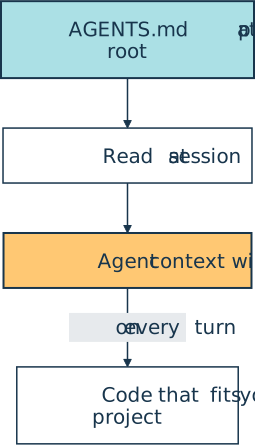
You’ll create this file in your project root. Your AI coding agent will read it at the start of a session and fold it into its context on every turn, as shown in the following diagram:
The format is deliberately minimal. It’s standard Markdown with no required fields, stewarded as an open standard by the Agentic AI Foundation and already read by more than twenty agents, including Codex, Cursor, and Copilot CLI.
Note: If you use Claude Code, you’ll see the CLAUDE.md file doing the same job as AGENTS.md. To have a single source of truth, your CLAUDE.md can import your shared instructions with a single @AGENTS.md line.
As a rule of thumb, keep your AGENTS.md file short and sharp. The agent follows your rules in a lean file, but a sprawling one buries them. Each of the next sections adds one focused block to a single file, which you’ll assemble in full before the second run.
Note: The sections that follow are a practical starting point, not an exhaustive list. Because AGENTS.md has no required schema, treat them as a menu: drop any block that doesn’t fit your project and add your own as your needs grow.
Even so, the default set in this tutorial covers the gaps that trip up most projects, so it’s a solid foundation to adapt from. With that in mind, you can start with the context your agent needs most.
Capturing the Project Domain
Now that you know what an AGENTS.md file is, the first thing your agent needs is a sense of what it’s working on. An agent that doesn’t understand the domain writes structurally fine code that’s wrong about the problem, like the len(cars) + 1 ID scheme that breaks the moment you delete a car.
You can watch that failure happen for yourself. Delete a car from the middle of the list, add a new one, and compare how each scheme assigns the next id:
That collision is exactly the kind of failure an AGENTS.md file exists to prevent.
Note: Most coding agents ship a slash command like /init that bootstraps an AGENTS.md file (or its equivalent) for you by scanning your codebase and documentation. In this tutorial, you’ll write the file by hand instead. Doing the work yourself builds intuition for what belongs in the file and why, which carries over no matter which agent you use later. In existing projects, you can start with the auto-generated file and edit it as needed.
You can create and open a fresh AGENTS.md at your project root and start with a short description of the app, the vocabulary it uses, and the invariants the agent must preserve:
AGENTS.md
## Project Domain

This is a REST API for browsing and managing a collection of cars.
Each car is a complete record with a unique, server-assigned `id`
and the fields `make`, `model`, `year`, `horsepower`, `engine_cc`,
and `transmission`.

The `engine_cc` field can be `0` for fully electric cars. Every
car you return or store must include all fields.
Those few sentences already rule out the worst bug from the first run. Once the agent knows that id is unique and server-assigned, it should stop trusting len(cars) + 1 and compute the next ID from the data that’s there.
Pinning Project Setup and Management
Next, you can pin how to run and build the project. This is the block that stops an agent from inventing a pip install command or committing straight to the main branch of your project’s Git repository. Because these facts rarely change, they form a stable prefix at the top of the file, which is exactly where you want your most important context.
Add a setup block that names your Python version, your dependency manager, the commands that matter, and your version-control conventions. The <!-- ... --> marker stands in for the block you already added above:
AGENTS.md
<!-- ... -->

## Project Setup and Management

- Python version: 3.14. Don't use newer syntax.
- Dependency management: `uv` and `pyproject.toml`. Never use `pip`
  or a `requirements.txt` file.
- Add a dependency with `uv add <package>`. Never use `uv pip`
  for dependencies.
- Run the app with `uv run fastapi dev main.py`.
- Branch from `main` as `feature/<name>` and use Conventional Commits.
- Stage changes for review. Don't commit to `main` or push without
  being asked.
If your project uses Poetry or pip, then name that here instead. The specific tool matters less than writing it down once so the agent stops guessing.
Note: You’ll keep adding blocks to this same file as you work through the remaining sections. By the end, they’ll combine into one file you can drop into your own project and adjust with minimal tweaks.
A consistent commit convention like Conventional Commits keeps the project’s history tidy. To learn more about the tooling, you can read about managing Python projects with uv and pinning settings in pyproject.toml.
Defining Coding Conventions
Coding conventions are the rules that feel obvious to you and invisible to the agent: which idioms you favor, how you format strings, what your docstrings look like. Writing them down is what turns tacit team knowledge into something the agent can act on.
Add a conventions block that captures your house style:
AGENTS.md
<!-- ... -->

## Coding Conventions

- Type-hint public functions and methods, including their return types.
- Use `pathlib` for path management. Don't use `os.path`.
- Prefer f-strings over `str.format()` or `%` formatting.
- Follow EAFP: handle exceptions rather than checking conditions up front.
- Write Google-style docstrings for every public function and method.
- Validate request bodies with Pydantic models.
- Embrace idiomatic Python like comprehensions, generators, and decorators.
These guidelines steer the agent toward the best practices you or your team already follow, including the choice of pathlib over os.path, EAFP over LBYL, and a consistent docstring style.
Note: To learn more about Python’s style conventions, check out the How to Write Beautiful Python Code With PEP 8 tutorial.
The rule to validate request bodies with Pydantic models is the one that closes the validation gap from the first run. This rule is specific to the type of project you’re working on. Finally, the last line actively encourages the agent to use idiomatic Python. Conventions shape the code the agent writes, but they don’t tell it how your project fits together.
Managing Project Structure
An AI agent that knows where things live can navigate your project deterministically instead of guessing. Add a project structure block to your AGENTS.md file to spell out the project layout, mark module boundaries, and tell the agent which files it may touch.
The cars API is intentionally flat, so its structure block is short:
AGENTS.md
<!-- ... -->

## Project Structure

- The project is flat: `main.py` holds the app and `cars.json` holds
  the data.
- The `main.py` file is the only module to edit when adding features.
- Put tests in `tests/test_main.py`.
- Don't create new packages or new files without being asked.
In a larger project, this is where you’d decide between a flat and a src/ layout. You can also mark the module and package structure, functions and classes, and the public API. Then separate the modules the agent can modify from the ones it must leave alone.
Note: To learn more about the project layout, check out the Python Application Layouts: A Reference tutorial.
This last idea is the principle of least privilege applied to AI agents: give them access to the files they need for the task, not the run of the whole project repository. Defining the layout up front keeps the agent’s edits inside safe boundaries. A map like this tells the agent where it can work, but not whether the code it produces will hold up.
Defining Code Quality Gates
Quality gates tell the agent when its code is done. Without them, the agent stops as soon as the code runs once. With them, “done” means passing a checklist the agent can run on its own.
Add a gates block that lists the exact commands that have to pass:
AGENTS.md
<!-- ... -->

## Quality Gates

A task is done only when all of these pass:

- `uv run ruff format` leaves the code unchanged.
- `uv run ruff check` reports no errors.
- `uv run mypy main.py` reports no errors.
- `uv run pytest` passes, with a test added for every new endpoint.
This block does a lot of the work. The starter project ships without any tests on purpose, so the rule that the agent must add a pytest test for every new endpoint and run the full suite turns testing into a real gate by the second run. Pairing ruff formatting and linting with a mypy type check means the style and typing rules from your conventions block get enforced by a machine, not left to chance.
Note: In a flat project like this one, pytest won’t find main.py on its own. Add a [tool.pytest.ini_options] table to your pyproject.toml with pythonpath = ["."], and uv run pytest will import main.py from your project root.
To learn more about static type checking, check out the Python Type Checking (Guide) tutorial.
These gates judge the code the agent produces, but they say nothing about the shortcuts it might take to get there. The next block rules those out.
Establishing Project Constraints
Constraints define the lines the agent must never cross, even when crossing one would make a test pass or finish a task faster. These are your hard, non-negotiable rules:
AGENTS.md
<!-- ... -->

## Constraints

- Ask before adding any external dependency.
- Preserve the signature and response shape of existing endpoints.
- Don't use blocking I/O inside `async` functions.
- Keep existing tests intact, and fix the code to make them pass.
- Declare a task done only after the gates pass and docstrings are
  updated.
Each line targets a specific way that agents cut corners. The rule against deleting tests heads off the classic move of “fixing” a failing suite by removing the failing test. The rule against changing existing signatures protects the two endpoints you already have, and it keeps new ones from drifting into the inconsistent response shapes you saw in the first run.
The rule against blocking I/O inside async functions keeps the event loop free, so one slow call can’t stall the whole API.
Note: To learn more about writing asynchronous code, check out the Python’s asyncio: A Hands-On Walkthrough tutorial.
Most of these rules tell the agent what to do, not what to avoid, and that’s deliberate. Phrase each constraint as an action where you can, and reserve a bare don’t for the rare rule with no clean positive form, like the blocking-I/O line above.
Constraints are short, blunt, and worth revisiting whenever an agent surprises you. With the boundaries set, the final block narrows what the agent reads in the first place.
Setting Ignore Rules
Every file the agent reads costs tokens and adds noise that can crowd out the rules that matter. Ignore rules keep the agent’s attention on the files that count.
You don’t have to list every path by hand. Most of what you want skipped already lives in your .gitignore, so point the agent there and keep an explicit list only for the extras:
AGENTS.md
<!-- ... -->

## Ignore

Treat everything in `.gitignore` as off-limits to read or edit. On top of
that, never open:

- Secrets and `.env` files
- Large data files unrelated to the current task
- Vendored or generated code
Pointing at .gitignore gives you a single source of truth that stays in sync automatically, so you’re not maintaining the same list of caches, virtual environments, and build artifacts in two places. The explicit list then covers the handful of files that aren’t in .gitignore but still aren’t worth the agent’s attention, like an .env file full of secrets or a multi-gigabyte dataset.
Putting Your AGENTS.md File to Work
You’ve now built every block of the file. Expand the section below to see your complete AGENTS.md file, stitched together:
AGENTS.md
## Project Domain

This is a REST API for browsing and managing a collection of cars.
Each car is a complete record with a unique, server-assigned `id`
and the fields `make`, `model`, `year`, `horsepower`, `engine_cc`,
and `transmission`.

The `engine_cc` field can be `0` for fully electric cars. Every
car you return or store must include all fields.

## Project Setup and Management

- Python version: 3.14. Don't use newer syntax.
- Dependency management: `uv` and `pyproject.toml`. Never use `pip`
  or a `requirements.txt` file.
- Add a dependency with `uv add <package>`. Never use `uv pip`
  for dependencies.
- Run the app with `uv run fastapi dev main.py`.
- Branch from `main` as `feature/<name>` and use Conventional Commits.
- Stage changes for review. Don't commit to `main` or push without
  being asked.

## Coding Conventions

- Type-hint public functions and methods, including their return types.
- Use `pathlib` for path management. Don't use `os.path`.
- Prefer f-strings over `str.format()` or `%` formatting.
- Follow EAFP: handle exceptions rather than checking conditions up front.
- Write Google-style docstrings for every public function and method.
- Validate request bodies with Pydantic models.
- Embrace idiomatic Python like comprehensions, generators, and decorators.

## Project Structure

- The project is flat: `main.py` holds the app and `cars.json` holds
  the data.
- The `main.py` file is the only module to edit when adding features.
- Put tests in `tests/test_main.py`.
- Don't create new packages or new files without being asked.

## Quality Gates

A task is done only when all of these pass:

- `uv run ruff format` leaves the code unchanged.
- `uv run ruff check` reports no errors.
- `uv run mypy main.py` reports no errors.
- `uv run pytest` passes, with a test added for every new endpoint.

## Constraints

- Ask before adding any external dependency.
- Preserve the signature and response shape of existing endpoints.
- Don't use blocking I/O inside `async` functions.
- Keep existing tests intact, and fix the code to make them pass.
- Declare a task done only after the gates pass and docstrings are
  updated.

## Ignore

Treat everything in `.gitignore` as off-limits to read or edit. On top of
that, never open:

- Secrets and `.env` files
- Large data files unrelated to the current task
- Vendored or generated code
Next, reset the project so you can rerun the same experiment with your new file in place. To make sure you don’t skip a step, follow these in order:
- Restore
main.pyto its starting point. - Drop your new
AGENTS.mdfile into the project root. - Start a fresh session so your AI agent reads the file from the top.
- Run the same prompt from before.
With the context in place, the agent will produce something far closer to what you’d write yourself.
Expand the section below to see a sample response and a quick comparison with the first run:
With your AGENTS.md in place, the agent produced this main.py:
main.py
import json
from pathlib import Path

from fastapi import FastAPI, HTTPException
from pydantic import BaseModel

app = FastAPI()
cars: list[dict] = json.loads(Path("cars.json").read_text())

class NewCar(BaseModel):
    make: str
    model: str
    year: int
    horsepower: int
    engine_cc: int
    transmission: str

@app.get("/cars")
def list_cars() -> list[dict]:
    """Return a list of all cars."""
    return cars

@app.get("/cars/{car_id}")
def get_car(car_id: int) -> dict:
    """Return a single car by its id, or raise 404 if it doesn't exist."""
    for car in cars:
        if car["id"] == car_id:
            return car
    raise HTTPException(status_code=404, detail="Car not found")

@app.post("/cars", status_code=201)
def create_car(new_car: NewCar) -> dict:
    """Add a new car and return it with a server-assigned id."""
    car = new_car.model_dump()
    car["id"] = max((existing["id"] for existing in cars), default=0) + 1
    cars.append(car)
    return car

@app.delete("/cars/{car_id}", status_code=204)
def delete_car(car_id: int) -> None:
    """Delete a car by its id, or raise 404 if it doesn't exist."""
    for index, car in enumerate(cars):
        if car["id"] == car_id:
            del cars[index]
            return
    raise HTTPException(status_code=404, detail="Car not found")
Every problem from the first run traces back to a block you wrote:
-
The domain block cleared the data bugs. Now that
idis documented as unique and server-assigned, the agent derives the next one withmax(...) + 1instead of thelen(cars) + 1scheme that broke the moment you deleted a car. -
The conventions block reshaped the code itself. The
create_car()endpoint now validates its body through aNewCarPydantic model instead of a rawdict, and the file I/O stays onpathlib. Both new functions also carry return-type hints, Google-style docstrings, and double-quoted strings. -
The constraints block locked down the API surface. The agent left
list_cars()andget_car()untouched and kept the new endpoints consistent with them:create_car()returns the car directly with a201 Createdinstead of a{"message": ...}envelope, anddelete_car()raises a404for a missing car, matchingget_car(), rather than the first run’s200 OKerror body. A successful delete returns204 No Content, since there’s nothing to send back.
Finally, because the quality gates demand a test for every new endpoint, the agent also wrote a tests/test_main.py and ran it before declaring the task done:
tests/test_main.py
from fastapi.testclient import TestClient

from main import app, cars

client = TestClient(app)

def test_create_car_assigns_unique_id():
    new_car = {
        "make": "Honda",
        "model": "Civic",
        "year": 2021,
        "horsepower": 158,
        "engine_cc": 1996,
        "transmission": "Manual",
    }
    response = client.post("/cars", json=new_car)

    assert response.status_code == 201
    assert response.json()["id"] not in {car["id"] for car in cars[:-1]}

def test_delete_missing_car_returns_404():
    response = client.delete("/cars/999")

    assert response.status_code == 404
Both tests pass before the agent finishes, and they lock in the behaviors the first run got wrong. A later change that reintroduces a duplicate id or the wrong status code would now fail the suite instead of slipping through.
You ran the same prompt both times. The only thing that changed was the context, and that was enough to produce a much-improved version of the code.
To see the new endpoints in action, start the app again:
$ uv run fastapi dev main.py
Then, create a new car with a POST request to /cars, sending its fields as a JSON payload:
$ curl -s -X POST http://127.0.0.1:8000/cars \
    -H "Content-Type: application/json" \
    -d '{
          "make": "Honda",
          "model": "Civic",
          "year": 2021,
          "horsepower": 158,
          "engine_cc": 1996,
          "transmission": "Manual"
        }' \
    | python -m json.tool
{
    "make": "Honda",
    "model": "Civic",
    "year": 2021,
    "horsepower": 158,
    "engine_cc": 1996,
    "transmission": "Manual",
    "id": 11
}
The API responds with 201 Created and echoes the new car back with a server-assigned id of 11, one past the highest existing id. Now remove that same car with a DELETE request, printing the status code since a successful delete sends back an empty body:
$ curl -s -o /dev/null -w "%{http_code}\n" \
    -X DELETE http://127.0.0.1:8000/cars/11
204
The 204 No Content status confirms the delete without returning anything. If you ask to delete a car that isn’t there, like /cars/999, then delete_car() raises the same 404 status that get_car() returns for a missing car.
Conclusion
Setting up a curated AGENTS.md file is an investment that pays off on every task. By writing down your domain, setup, conventions, structure, quality gates, constraints, and ignore rules once, you give your AI agent a clear picture of your project before it writes a single line of code. The same prompt that produced sloppy code now produces code that fits your project’s guidelines.
In this tutorial, you’ve learned how to:
- Capture your project domain and invariants so the agent respects them
- Pin your Python version, dependency manager, and run commands
- State coding conventions and map your project structure
- Turn your definition of done into machine-checkable quality gates
- Set constraints and ignore rules that keep the agent in bounds
Start with the file you built here, drop it into a FastAPI project of your own, and adjust the specifics to match. The next time you hand off a task, you’ll spend your time reviewing good code instead of rewriting bad code. If you want to keep going, Real Python’s Python Coding With AI learning path brings together tutorials and video courses on building software with AI agents.
Get Your Code: Click here to download the free sample code you’ll use to build an AGENTS.md file that steers your AI coding agent toward clean, idiomatic Python that fits your project.
Frequently Asked Questions
Now that you’ve written an AGENTS.md file for a Python project, you can use the questions and answers below to check your understanding and recap what you’ve learned.
These FAQs are related to the most important concepts you’ve covered in this tutorial. Click the Show/Hide toggle beside each question to reveal the answer.
An AGENTS.md file is a Markdown file at your project root that AI coding agents read automatically and load into their context window. It holds project context like your Python version, dependency manager, conventions, and constraints so the agent produces code that fits your project.
Put AGENTS.md in your project root, where agents look for it by default.
AGENTS.md is an open format that many agents read, while CLAUDE.md is specific to Claude Code. They do the same job, and a CLAUDE.md can pull in your shared instructions with a single @AGENTS.md import so you keep one source of truth.
A useful AGENTS.md covers your project domain, setup and run commands, coding conventions, project structure, quality gates, constraints, and ignore rules. Keeping each section short matters more than covering everything, since long files dilute individual rules.
Many do, including Codex, Cursor, and GitHub Copilot, with more than twenty agents reading the format. Claude Code uses CLAUDE.md, but it can import an AGENTS.md so you still get one shared file.
Take the Quiz: Test your knowledge with our interactive “How to Write an AGENTS.md File for a Python Project” quiz. You’ll receive a score upon completion to help you track your learning progress:
Interactive Quiz
How to Write an AGENTS.md File for a Python ProjectCheck your understanding of how an AGENTS.md file gives your AI coding agent the project context it needs to write code that fits your project.