Python supply chain security means protecting everything your project pulls in and runs, from PyPI packages to CI workflows and publishing credentials, so that a tampered release or stolen token can’t turn your own tools against you.
AI-assisted analysis makes it cheaper to turn a bug fix into a working exploit, so attacks now arrive within hours of a fix, and sometimes before it. For Python projects, that speed hits two weak spots. One is code that runs when you install a package or start Python. The other is keys that sit where that code can read them.
By the end of this tutorial, you’ll understand that:
- A supply chain attack reaches you through components you already trust, such as a dependency, its build pipeline, or the token that publishes it.
.pthfiles andsitecustomize.pyrun code during Python’s normal startup, even if you never import the package that installed them.- A dependency cooldown guards against malicious new releases, while audits flag known vulnerable versions that you then fix.
- Short-lived, narrowly scoped tokens limit how far one bad package can reach.
- AI coding agents can install hallucinated or booby-trapped packages, so make them ask first.
You’ll look at two incidents from October 2026, check your own environments without setting off a hidden hook, and pick up three habits that hold up at that speed. The commands assume a Linux or macOS shell and uv.
Further Reading: For secure-coding basics, keep the Python Security Checklist handy. If an agent writes your code, then check out How to Review AI-Generated Python Code Efficiently.
Free Bonus: Download the Python Supply Chain Security Cheat Sheet PDF and keep the essentials at hand.
What Is Python Supply Chain Security?
Every time you install a package, you trust code that strangers wrote, that their pipelines built, and that their tokens uploaded to PyPI. Supply chain security covers that whole path until the code runs in your virtual environment. If any link in that path is compromised, then the problem reaches your project no matter how clean your own code is.
In Python terms, the packages you list in pyproject.toml are your direct dependencies. The packages they pull in are transitive dependencies. Install requests, and you also get certifi, charset-normalizer, idna, and urllib3. Each one is another supplier you trust.
What’s new is the speed. Amazon’s threat intelligence team writes that AI-assisted analysis “makes it cheaper to turn a patch diff or advisory into a working exploit.” When a fix ships, attackers can study what changed and go after everyone who hasn’t updated yet.
Two Python risks stand out, and you’ll meet both again below:
- Code that runs at install and startup: A package’s build step can run code while you install it. After that,
.pthfiles andsitecustomize.py, which normally add import paths or set up an environment, run during thesitemodule’s setup at each normal Python start, so a tampered release doesn’t need you to import anything. - Keys that sit around: API keys, cloud credentials, and publishing tokens often live in environment variables, config files, and logs, where any code running as your user can read them.
Attacks Now Move at AI Speed
Two incidents from October 21, 2026, show what this looks like. PHP2Shell shows how little time a fix buys you, and LiteLLM shows how a tampered Python package can run code you never imported. The details are current as of October 22, 2026, and may still change.
PHP2Shell: Probed Before the Fix, Exploited Within Hours of It
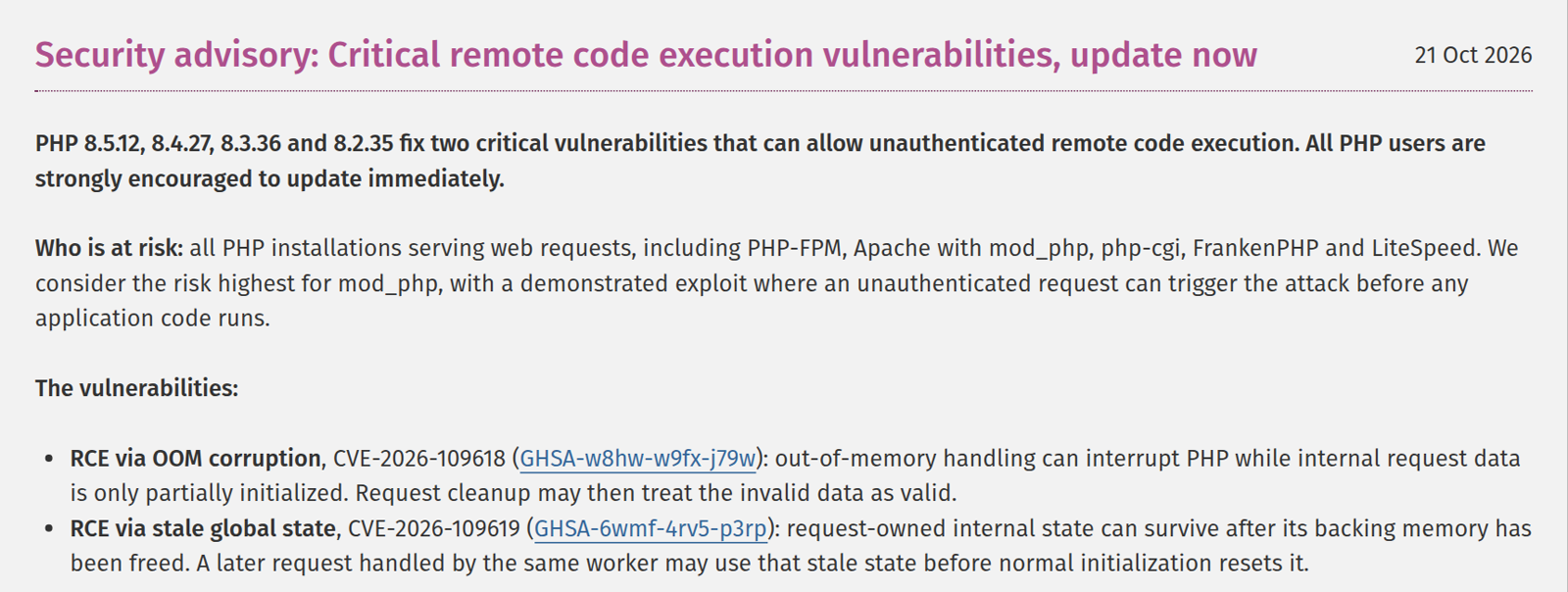
PHP2Shell is the name researchers gave to two PHP bugs that let an attacker run code on a web server without logging in. PHP rated both at 9.2 on the CVSS severity scale. Two teams found them independently with AI help. Calif worked as part of OpenAI’s Patch the Planet initiative and credits OpenAI’s GPT-5.6 Sol model, and Wiz used Gemini 4 Argon and GPT-5.6 Sol. Here’s PHP’s advisory from October 21:
Amazon’s honeypots, decoy servers that record attacks, caught attempts days before that release. For comparison, the chart below adds Rapid7’s Q3 2026 average of three days from disclosure to exploitation, among the 43 newly exploited high- and critical-severity vulnerabilities it tracked. Attackers often move before the fix is public or within hours of it. That leaves a seven-day patch policy far behind:
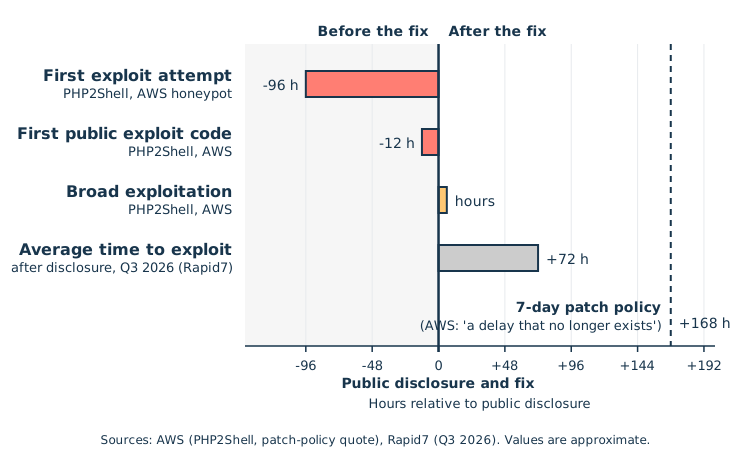
PHP isn’t Python, but the lesson carries over. When a fix and the first attacks land on the same day, the defenses that count are the ones already in place.
LiteLLM 1.107.0: Code That Runs on Every Python Start
LiteLLM is a popular Python library and proxy for calling many AI model providers through one API. It was hit twice this year. In March, versions 1.82.7 and 1.82.8 went out through a PyPI token exposed by an exploited Trivy dependency. On October 21, version 1.107.0 followed.
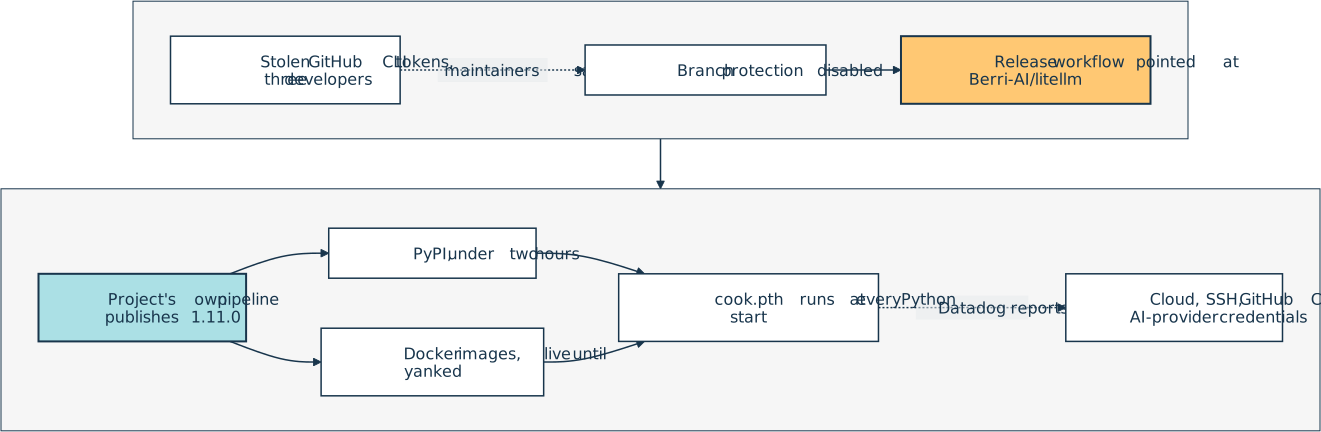
That release was on PyPI for under two hours. Infected Docker images tagged v1.107.0, latest, main-latest, and main-stable on GitHub Container Registry and Docker Hub stayed live until the maintainers yanked them later that day.
The payload’s cook.pth file holds a single line, import cook. During normal startup, Python’s site module runs import lines in .pth files, so the stealer ran whenever Python started in that environment, pip included, even if nothing imported litellm. A sitecustomize.py file launched a loader that checked for new code every hour. Datadog reports that the malware collected cloud, SSH, GitHub CLI, and AI provider credentials.
Here’s the top of the GitHub issue that tracked the incident:
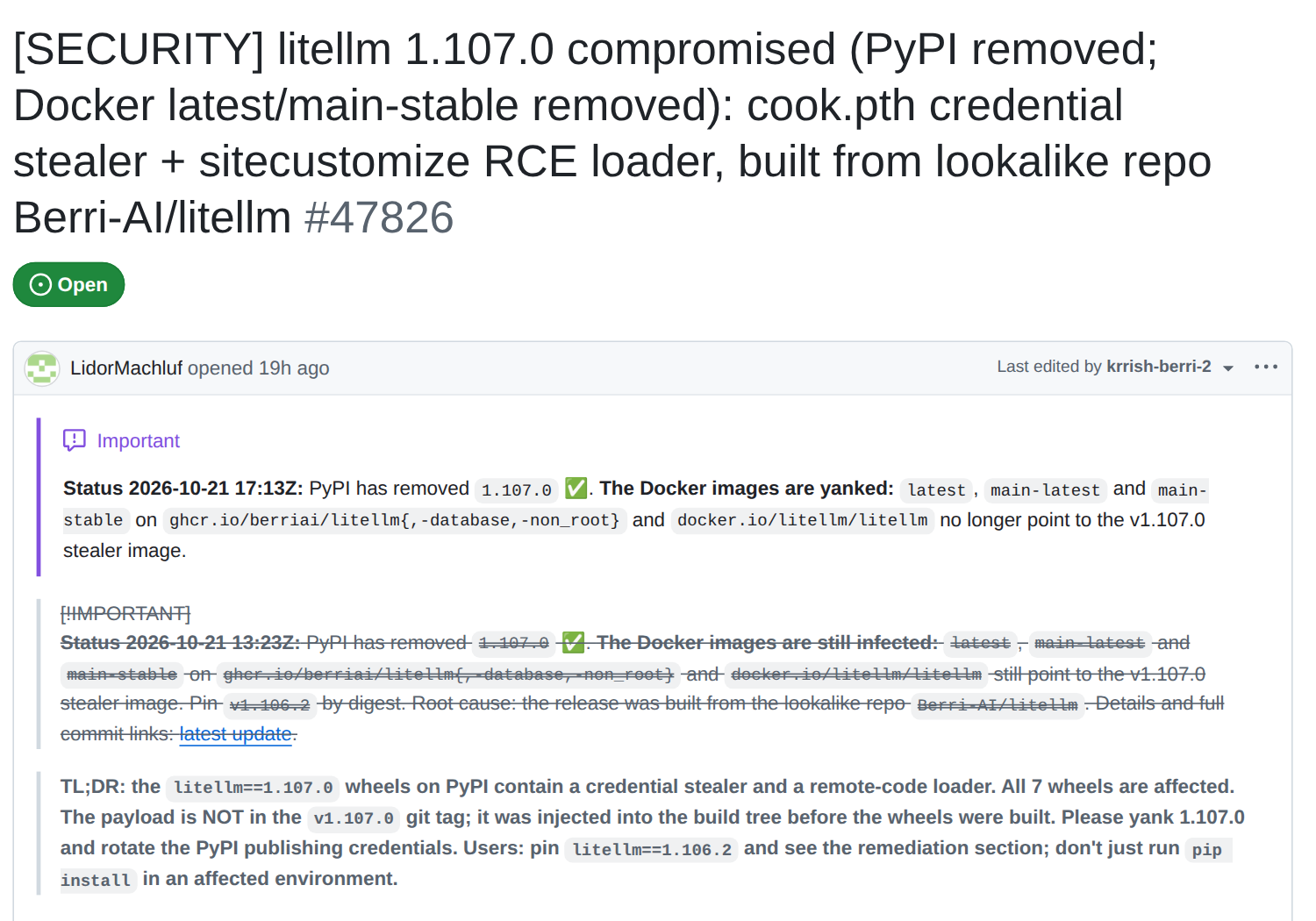
The maintainers say the attacker held stolen GitHub CLI tokens from three developers, including an organization owner. With those, the attacker disabled branch protection and pointed the release workflow at a lookalike repository, Berri-AI/litellm instead of BerriAI/litellm. The project’s own release pipeline then published 1.107.0, so a verified origin wasn’t proof of safety. Here’s the chain from stolen tokens to stolen credentials:
In their incident post, the maintainers say they’ve seen “specific situations in which Claude Code will embed a user’s GitHub CLI OAuth token into a response body,” which can end up in logs. They “believe” the attacker read such tokens from the logs of an internet-exposed LiteLLM deployment. That’s their unproven hypothesis, and no source says the attacker used AI.
LiteLLM wasn’t alone that week. Railway says a third party may have accessed customer environment variables in attacks “with the aim of compromising AI inference providers.” And Microsoft assesses that the group Storm-0940 used the agentic AI framework ARTEX in a supply chain campaign.
What to Check Now
None of these checks runs the Python interpreter you’re inspecting, so they can’t set off a hidden startup hook. The sample outputs come from a harmless simulation in a throwaway environment. On a clean system, you’ll see no output or only the legitimate files covered below.
Look for LiteLLM 1.107.0 from the shell. Don’t use pip show or uv’s package and project commands for this. pip starts the environment’s Python, and uv can too, which would run the very startup hooks you’re looking for. Search the file system instead:
$ sudo find / \( -name cook.pth -o -name 'litellm-1.107.0.dist-info' \) \
    2>/dev/null
/home/dev/project/.venv/lib/python3.14/site-packages/litellm-1.107.0.dist-info
/home/dev/project/.venv/lib/python3.14/site-packages/cook.pth
/home/dev/.cache/uv/archive-v0/I5JDCaFRfaWC7z_5/litellm-1.107.0.dist-info
/home/dev/.cache/uv/archive-v0/I5JDCaFRfaWC7z_5/litellm-1.107.0.data/purelib/cook.pth
Here’s what to look for:
- Interpretation: No output means nothing matched in the places
findcould read. You could still have been infected earlier, though. A nonzero exit status means some paths failed, so rerun without2>/dev/nulland check them. On macOS, grant Full Disk Access and expect/System/Volumes/Dataduplicates. - Alarm bells: Any hit. A hit in uv’s cache means the artifact was cached, whether from a download, a local wheel, or a build, so check installed copies too. The issue and Datadog also list traffic to
www.litellm.devand marker files such as/tmp/remote_code_loader.lockand/tmp/.pc_*. If those files are missing, you still can’t assume you’re clean.
For Docker, compare docker images --digests --no-trunc | grep -i litellm with the issue’s infected index digests, which start sha256:1bbcb1443bc9, sha256:c00f9d92c427, or sha256:7b00e91cd2fe. Self-built images show <none>, so search their files without running them:
$ cid=$(docker create demo-app-infected true)
$ docker export "$cid" | tar -t \
    | grep -E '(^|/)(cook\.pth|cook\.py|sitecustomize\.py)$'
app/.venv/lib/python3.14/site-packages/cook.pth
app/.venv/lib/python3.14/site-packages/cook.py
app/.venv/lib/python3.14/site-packages/sitecustomize.py
$ docker rm "$cid"
2aac0ba198d13c6d371ea1663f6b54ec2e06ee9d0c5e8ee20018428a5c769d2a
The trailing true gives docker create a command to record, so this also works for images that don’t define one, and the container never starts. A matching digest confirms an infection. If you only find a cook.pth file, then compare its hash with the one in the issue. docker export skips volumes, so check those separately.
If you find an affected system, isolate it and preserve evidence first. The issue’s remediation covers the cleanup, such as sudo lsof /tmp/remote_code_loader.lock to find the daemon to kill, rm -rf .venv, and uv cache clean litellm.
Rebuild from known-good images with litellm==1.106.2. That release is new enough that a three-day cooldown, which you’ll set up below, blocks it until October 24. To rebuild sooner, add exclude-newer-package = { litellm = false } to [tool.uv].
From a clean machine, rotate every credential the infected system could reach and watch for misuse, because removing the hooks isn’t enough to trust the infected host again.
Audit your startup hooks without running them. Any package can drop a .pth file or a sitecustomize.py into site-packages, and this script lists them:
pthscan.py
"""List startup hooks in a site-packages folder without running them."""

import sys
from pathlib import Path

if len(sys.argv) != 2 or not Path(sys.argv[1]).is_dir():
    sys.exit("Usage: python -I -S pthscan.py <site-packages folder>")

folder = Path(sys.argv[1])

for pth in sorted(folder.glob("*.pth")):
    text = pth.read_text(encoding="utf-8-sig", errors="replace")
    for num, line in enumerate(text.splitlines(), start=1):
        if line.startswith(("import ", "import\t")):
            print(f"{pth.name}:{num}: {line[:60]}")

for name in ("sitecustomize.py", "usercustomize.py"):
    if (folder / name).exists():
        print(f"{name}: present")
The script prints the first 60 characters of each .pth line that starts with import, since those are the lines Python executes. Python runs them even when the file starts with a byte order mark, so the script reads files as utf-8-sig, which strips the mark.
When you run the script, the -S flag skips the site module, so no hook runs, and -I ignores the script’s folder and any PYTHON* environment variables. These flags don’t make a compromised Python safe, though, so copy a suspect folder to a clean machine and scan it there with a trusted Python.
To try it on a clean machine with a trusted Python, run uv venv --python 3.14 next to pthscan.py. The new environment can reuse that interpreter and its standard library, which is why the machine must be clean. In .venv/lib/python3.14/site-packages, add an empty sitecustomize.py and a demo_hook.pth holding the import line below, then scan with stderr merged:
$ .venv/bin/python -I -S pthscan.py .venv/lib/python3.14/site-packages 2>&1
demo_hook.pth:1: import sys; sys.stderr.write("demo_hook ran\n")
sitecustomize.py: present
Perfect, both hooks show up, and no demo_hook ran line means they stayed idle. Here’s what to look for:
- Common legitimate examples (verify contents and provenance):
_virtualenv.pthfrom uv before 0.13, setuptools’distutils-precedence.pth, and coverage’s.pth. Ubuntu’s Python also ships an apportsitecustomize.pyin its standard library. - Alarm bells: The simulated LiteLLM environment’s
cook.pth:1: import cookandsitecustomize.py: present, an unexplainedsitecustomize.pyin a virtual environment, andexec,base64, orzlibin an unexplained.pthline. Find a hit’s package withgrep -lF <name> <venv>/lib/python3*/site-packages/*.dist-info/RECORD, which prints nothing for_virtualenv.pth.
A familiar filename can still hide malicious code, and a customization file on its own isn’t a sign of infection.
Scan every folder that find / -type d \( -name site-packages -o -name dist-packages \) 2>/dev/null lists. The scanner skips .start files, sitecustomize packages, .pyc files, and images.
Rotate keys that sat within reach. On Railway, rotate every stored variable and registry credential, and check your logs. For the GitHub CLI, check which tokens it holds:
$ gh auth status
github.com
  ✓ Logged in to github.com account your-username (GH_TOKEN)
  - Active account: true
  - Git operations protocol: https
  - Token: ghp_************************************
  - Token scopes: 'read:org', 'repo', 'write:packages'
Look at where each token comes from, which is the GH_TOKEN environment variable in this example, and whether its scopes are broader than you need. To revoke a token, open your GitHub settings. You’ll find gho_ tokens under Authorized OAuth Apps and ghp_ or github_pat_ tokens under Personal access tokens. Never share the output of gh auth status --show-token, because it prints the full token.
Common Pitfalls
The checks above deal with this week’s incidents. The habits below are the part that lasts, because none of them depends on knowing which package gets hit next. You can adopt them one at a time, starting with whichever gap you spotted during the checks.
Installing the Newest Release the Minute It Ships
In the March LiteLLM incident, PyPI estimated that 40 to 50 percent of LiteLLM installs weren’t pinned. The first fix is a lock file, which records the exact version and hash of every dependency, transitive ones included. Create it with uv lock, and install from it with uv sync --locked.
The second fix is a dependency cooldown, which skips releases younger than a set number of days. PyPI removed LiteLLM 1.107.0 in under two hours, so a three-day cooldown would have kept it out of your lock file. In uv, you set it in pyproject.toml. Here’s a demo project with PyPI’s suggested three days:
pyproject.toml
[project]
name = "demo"
version = "0.1.0"
requires-python = ">=3.12"
dependencies = ["requests==2.34.2"]

[tool.uv]
exclude-newer = "3 days"
With pip 26.2.2, which also carries this week’s certificate fix, the equivalent is uploaded-prior-to = P3D under [global] in pip.conf. Both rely on the index’s upload times, which PyPI provides.
A cooldown gives the index time to catch malicious releases, while audits flag known vulnerabilities. On October 22, 2026, this cooldown held certifi at 2026.10.18, which a critical advisory still flags, although that release already removed the bad certificates. The fix, 2026.10.19, also restores unaffected roots, and a fresh lock picks it up once the cooldown passes.
Install pip-audit with uv tool install --exclude-newer "3 days" pip-audit==2.10.1, because tool installs ignore your project’s cooldown. Then export the lock to the standard pylock.toml format, which pip-audit --locked reads:
$ uv lock
Using CPython 3.14.6
Resolved 6 packages in 4ms
$ uv export --quiet --format pylock.toml --no-emit-project -o pylock.toml
$ pip-audit --locked .
Found 1 known vulnerability in 1 package
Name    Version    ID              Fix Versions
------- ---------- --------------- ------------
certifi 2026.10.18 PYSEC-2026-4320 2026.10.19
For a fast path, add exclude-newer-package = { certifi = "1 day" } to [tool.uv]. The one-day window is shorter than the fix’s age, so only certifi skips the full cooldown. Then uv lock --upgrade-package certifi prints Updated certifi v2026.10.18 -> v2026.10.19, and after a re-export, the audit prints No known vulnerabilities found. The audit only checks the lock file, so run uv sync --locked to actually install the fix.
Remove the temporary override once the fix is older than your cooldown. An existing lock keeps its versions until you run uv lock --upgrade-package <name>. A clean audit only rules out known vulnerabilities, so it can’t tell you whether a package contains malware.
Letting Your AI Agent Install Packages Unchecked
Coding agents sometimes hallucinate package names. In a 2024 study, Spracklen et al. found that at least 5.2 percent of commercial models’ package suggestions and 21.7 percent of open-source ones named packages that didn’t exist. Attackers can register those names, which is called slopsquatting.
Unreviewed code can also reach PyPI and run. In a case Anthropic reported, a Claude model in a capture-the-flag-style evaluation believed the registry was simulated and published a booby-trapped package to the real PyPI. It was live for about an hour and ran on fifteen real systems, including a security company’s scanner.
Before you install an unfamiliar package, check its quality, and make your agent ask first. In Claude Code, ask permission rules like Bash(uv add *), listed under permissions.ask in .claude/settings.json, make the agent wait for your approval. The * matches any text, but other install commands, such as uv pip install, can slip past. Claude Code hooks add policy checks, but neither one isolates the agent.
A default sandbox can still read credential files and inherits environment secrets, so restrict its file system and network access and keep secrets out of its environment. Better yet, run the agent in a dedicated container or VM.
Keeping Long-Lived Tokens Where Code Can Read Them
Secrets in Railway’s environment variables and LiteLLM’s GitHub CLI tokens stayed usable until they were revoked or expired. Prefer narrowly scoped credentials with a short expiration, such as a fine-grained GitHub token limited to one repository. Set that expiration yourself, because GitHub allows fine-grained tokens with no expiration. For publishing, Trusted Publishing replaces PyPI API tokens with tokens that last fifteen minutes.
Trusted Publishing alone didn’t save LiteLLM, though, because whoever controls the workflow controls publishing. PyPI’s security model says to treat Trusted Publishers “as if they are API tokens.” To close that gap, name a dedicated GitHub environment in both your release workflow and your PyPI publisher settings. PyPI then rejects any publish that doesn’t run in that environment, even from an edited workflow.
Give that environment an independent required reviewer, prevent self-reviews, and turn off administrator bypass. Protect release branches, tags, and workflow files too, and keep the admin list short, because admins can change these protections.
Finally, keep tokens out of logs, including logged LLM traffic, and turn on secret scanning with GitHub’s built-in scanner or tools like Gitleaks and TruffleHog.
Conclusion
You’ve seen why attacks now move at AI speed, scanned an environment for hidden startup hooks, and learned that Python projects are most exposed through code that runs at install and startup and through keys that sit around.
You also learned to lock, cool down, and audit your dependencies, to make your agent ask before it installs, and to swap long-lived tokens for short-lived ones.
For more on lock files, head over to the pylock.toml tutorial.
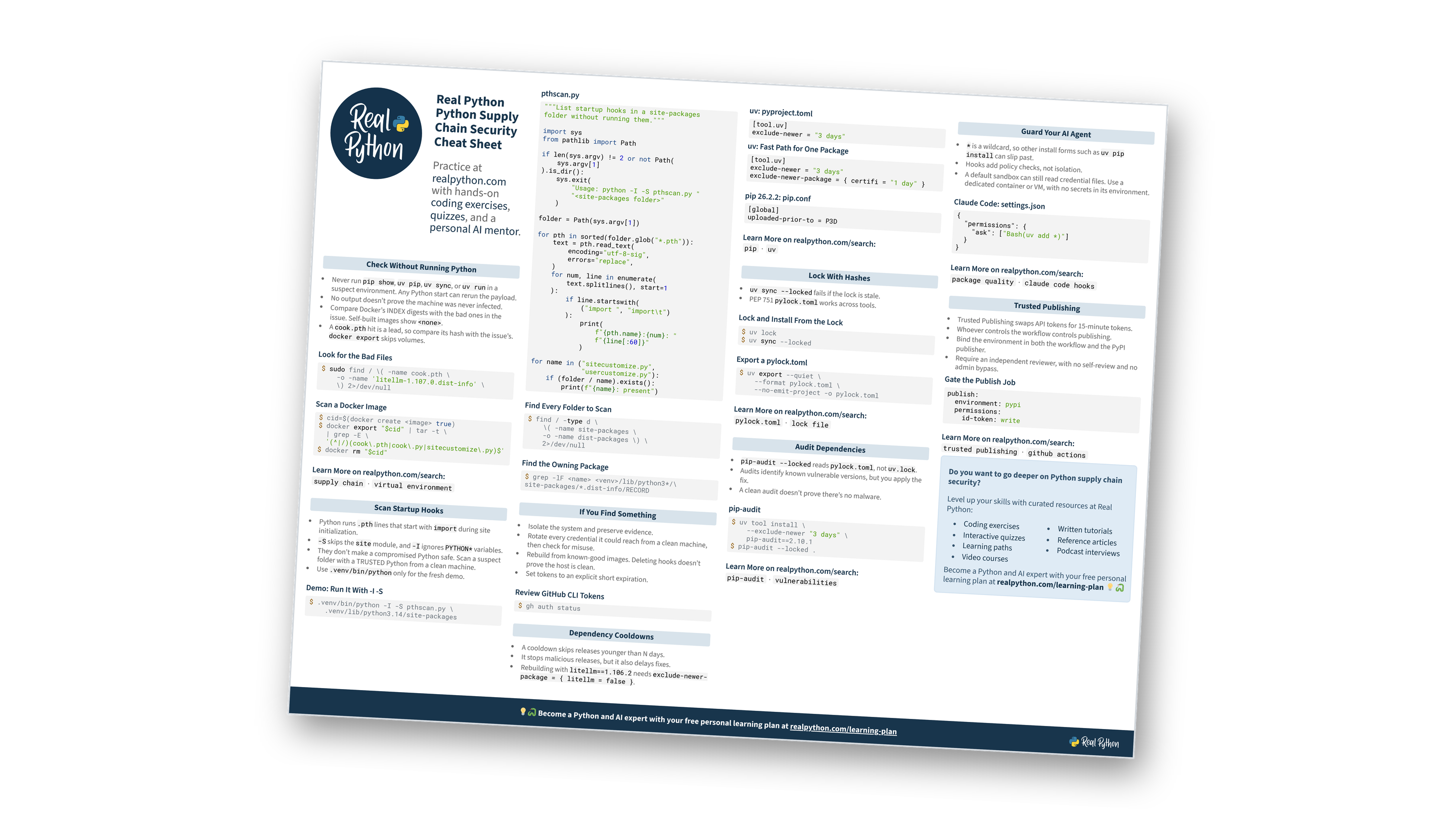
To keep cooldowns, hook audits, key rotation, and the lock and audit commands in one place, download the free cheat sheet:
Free Bonus: Python Supply Chain Security Cheat Sheet
Get a Python Supply Chain Security Cheat Sheet (PDF) and keep incident checks, cooldowns, lock and audit commands, and key rotation steps at hand:
Frequently Asked Questions
Now that you have some experience with supply chain attacks and defenses in Python, you can use the questions and answers below to check your understanding and recap what you’ve learned.
These FAQs are related to the most important concepts you’ve covered in this tutorial. Click the Show/Hide toggle beside each question to reveal the answer.
A supply chain attack reaches you through components you already trust, such as a dependency, its build pipeline, or the token that publishes it. Transitive dependencies count too, so installing requests also brings in certifi, charset-normalizer, idna, and urllib3.
During normal startup, Python’s site module runs import lines in .pth files and imports sitecustomize.py. A tampered package can ship either one, so its code runs even if you never import that package. Starting Python with -S turns this off.
A dependency cooldown skips releases younger than a set number of days, which gives the package index time to catch malicious ones. It doesn’t replace audits, which identify known vulnerable versions so that you can apply and verify the fixes. A clean audit can’t rule out malware, though.
Agents sometimes hallucinate package names, and attackers can register those names. Make your agent ask for approval before it installs anything, but other command forms can slip past wildcard rules. For real isolation, keep secrets out of the agent’s environment and run it in a dedicated container or VM.