pipeline
A pipeline, or CI/CD pipeline, is an automated sequence of stages that carries a code change from a fresh commit to a tested, deployable result, running the same steps the same way on every change. It is the machinery that makes continuous integration and continuous delivery actually happen.
Most pipelines are defined as code in a file that lives in the repository. A small one for a Python project might install the package, run the tests, then deploy:
stages: [build, test, deploy]

install:
  stage: build
  script: pip install -e .

pytest:
  stage: test
  script: pytest -q

ship:
  stage: deploy
  script: ./deploy.sh
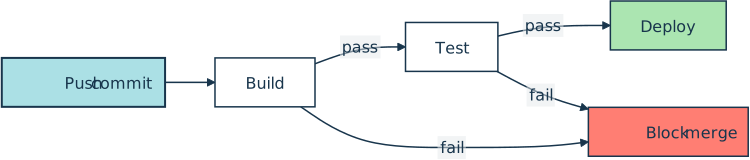
A push to the repository triggers the run, and the change reaches the deploy stage only if the build and test stages before it pass. Where the repository requires those checks to be green, a failure blocks the merge too:
How It Shows Up in Practice
A Python developer meets the pipeline as the set of checks that appear on a pull request. GitHub Actions, GitLab CI/CD, and Jenkins all run one on every push, and the green checkmark or red X next to a commit is the pipeline reporting back. When the repository marks those checks as required, a failing stage blocks the merge until someone fixes it.
Beyond build and test, real pipelines add stages for linting, type checks, security scans, and a smoke test against a freshly deployed instance. Teams watch how long a pipeline takes to finish, because a slow one stalls everyone waiting to merge behind it.
Anatomy of a Pipeline
A pipeline is built from jobs, which GitLab CI/CD and Jenkins group into stages. A job runs one unit of work, such as installing dependencies or running the test suite. A stage is a named step in the sequence, and the jobs inside a single stage run in parallel. GitHub Actions has no stages: a workflow’s jobs run in parallel by default, and you order them with the needs keyword.
Stages themselves run in order by default, and the pipeline usually stops at the first stage that fails, so a broken build never reaches the test or deploy stages. That fail-fast ordering is what lets a team treat a green pipeline as a signal that a change is safe to ship to a staging environment and on to production. Both defaults are overridable: GitLab’s needs keyword lets a job start early and ignore stage order, and a job marked allow_failure won’t stop the run.
Related Resources

Tutorial
Continuous Integration and Deployment for Python With GitHub Actions
With most software following agile methodologies, it's essential to have robust DevOps systems in place to manage, maintain, and automate common tasks with a continually changing codebase. By using GitHub Actions, you can automate your workflows efficiently, especially for Python projects.
For additional information on related topics, take a look at the following resources:
- Python Continuous Integration and Deployment Using GitHub Actions (Course)
- Deploying a Python Flask Example Application Using Heroku (Tutorial)
- Continuous Integration With Python: An Introduction (Tutorial)
- Build Robust Continuous Integration With Docker and Friends (Tutorial)
- Continuous Integration With Python (Course)
- GitHub Actions for Python (Quiz)
- Deploying a Flask Application Using Heroku (Course)
- Continuous Integration With Python: An Introduction (Quiz)
Have a question about this? Mentor AI can show you examples, compare related terms, and point you to tutorials.
Ask Mentor AI

By Martin Breuss • Updated Aug. 18, 2026
