blue-green deployment
Blue-green deployment is a release strategy that runs two identical production environments, one serving live traffic and one sitting idle, and ships a new version by deploying it to the idle environment and then switching all traffic over at once. Because the previous version stays running and untouched, rolling back is a matter of switching traffic the other way, which makes blue-green a common way to release with zero downtime.
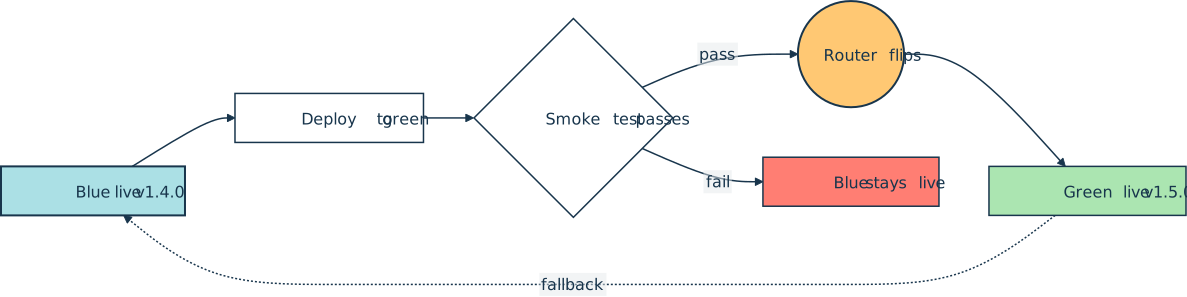
The two environments are labeled blue and green so a team can tell them apart, and they trade roles on every release. A router, load balancer, or DNS record sits in front and decides which one the public reaches. The cutover follows a fixed sequence. A new version is deployed to green and verified there, then the router flips so green becomes live and blue waits as an instant fallback:
How It Shows Up in Practice
A Python developer meets blue-green deployment as a property of the platform a service runs on rather than as anything in the application code. AWS Elastic Beanstalk exposes it as a Swap environment URLs action that swaps the CNAME records of two environments. On Kubernetes, teams point a Service at one of two Deployments and change the label selector to cut over. Reverse proxies like nginx and HAProxy do the same job by switching an upstream.
The cutover is usually gated by a smoke test run against the green environment while it is still private, then watched through the team’s observability stack afterward so a bad release can be caught in seconds. Until the switch, green behaves much like a staging environment that happens to be running production-grade infrastructure.
Common Pitfalls
The hard part of blue-green is usually the shared state behind the application, not the code itself. When both environments talk to one database, every schema change has to work against the old and the new code at once, so migrations are split into backward-compatible steps and applied before the cutover.
In-flight requests, sticky sessions, and cached DNS records that outlive their time-to-live can all strand users on the old environment after the switch.
Running two full-size environments also doubles the infrastructure bill for the overlap window, a cost some teams accept as the price of an instant rollback. Where a second full environment is too expensive, a canary or rolling deployment shifts traffic gradually across a single fleet instead.
Related Resources

Tutorial
Continuous Integration and Deployment for Python With GitHub Actions
With most software following agile methodologies, it's essential to have robust DevOps systems in place to manage, maintain, and automate common tasks with a continually changing codebase. By using GitHub Actions, you can automate your workflows efficiently, especially for Python projects.
For additional information on related topics, take a look at the following resources:
- Python Continuous Integration and Deployment Using GitHub Actions (Course)
- Build Robust Continuous Integration With Docker and Friends (Tutorial)
- Deploying a Python Flask Example Application Using Heroku (Tutorial)
- Python Web Applications: Deploy Your Script as a Flask App (Tutorial)
- Continuous Integration With Python: An Introduction (Tutorial)
- GitHub Actions for Python (Quiz)
- Deploying a Flask Application Using Heroku (Course)
- Deploy Your Python Script on the Web With Flask (Course)
- Python Web Applications: Deploy Your Script as a Flask App (Quiz)
- Continuous Integration With Python (Course)
- Continuous Integration With Python: An Introduction (Quiz)
Have a question about this? Mentor AI can show you examples, compare related terms, and point you to tutorials.
Ask Mentor AI

By Martin Breuss • Updated Aug. 9, 2026
