incident
An incident is an unplanned event that disrupts or degrades a service, or threatens to, and needs a response right now. A slow checkout page, a payments outage, or a spike in Python 500 errors all count as incidents once they cross the line from background noise into something a team has to act on.
Most incidents follow the same arc, from the moment something breaks to the moment service is healthy again:
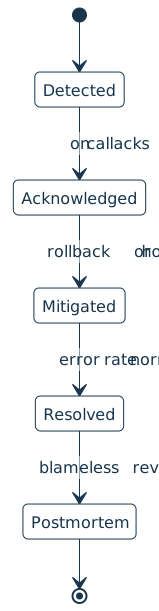
14:02  alert fires: checkout error rate 0.1% -> 9%
14:05  on-call acks, declares a SEV2, starts a call
14:14  bad deploy identified as the trigger
14:21  mitigated: rolled back to the previous release
14:30  error rate back to normal, incident resolved
next day  postmortem written, follow-up actions filed
The clock matters here, because how long a service stays broken is what users actually feel.
How It Shows Up in Practice
A Python developer first meets an incident as a page or a chat alert wired up from an observability stack such as Datadog, Grafana, or Sentry. The on-call engineer acknowledges it, judges how bad it is, and gives it a severity, often SEV1 for a full outage down to higher numbers for minor degradations.
A larger incident pulls in an incident commander to coordinate the response while others investigate, and the team reaches for a runbook if one exists for this failure. The first goal is to mitigate and stop the bleeding rather than find the root cause, often by rolling back the change or shipping a hotfix.
After the Incident
Teams that set reliability targets tie incidents to an error budget, the small amount of unreliability a service is allowed before new feature work pauses in favor of stability. A rough month of incidents burns through that budget.
Once service is restored, the work is not over. A blameless postmortem captures what happened, why it happened, and which follow-up actions will keep it from recurring, so the same outage does not catch the team twice.
Related Resources

Tutorial
Logging in Python
If you use Python's print() function to get information about the flow of your programs, logging is the natural next step. Create your first logs and curate them to grow with your projects.
For additional information on related topics, take a look at the following resources:
- Add Logging and Notification Messages to Flask Web Projects (Tutorial)
- How to Use Loguru for Simpler Python Logging (Tutorial)
- Logging Inside Python (Course)
- LBYL vs EAFP: Preventing or Handling Errors in Python (Tutorial)
- Logging in Python (Quiz)
- Using Loguru to Simplify Python Logging (Course)
- Python Logging With the Loguru Library (Quiz)
- Handling or Preventing Errors in Python: LBYL vs EAFP (Course)
Have a question about this? Mentor AI can show you examples, compare related terms, and point you to tutorials.
Ask Mentor AI

By Martin Breuss • Updated Aug. 20, 2026
