retrospective
A retrospective, often shortened to retro, is a recurring team meeting where the group looks back at how it has been working and agrees on a few concrete changes to try next. The focus is the process, not the product. A retro asks “how are we working together?” rather than “what did we ship?”
In Scrum this is the sprint retrospective, the event that closes each sprint. The Scrum Guide timeboxes it at up to three hours for a one-month sprint and frames its purpose as planning ways to increase quality and effectiveness.
How It Shows Up in Practice
A Python developer meets the retrospective as a facilitated meeting at the end of a sprint, held separately from the sprint review, the working session where the team and stakeholders inspect what was built and decide what to do next. Someone guides the team, often the Scrum master or a rotating facilitator, through what went well, what didn’t, and what to change.
The output that matters is a short list of action items, each with an owner, so the next sprint actually improves instead of repeating the same friction. That handoff from one sprint to the next is what turns the retrospective into a repeating loop:
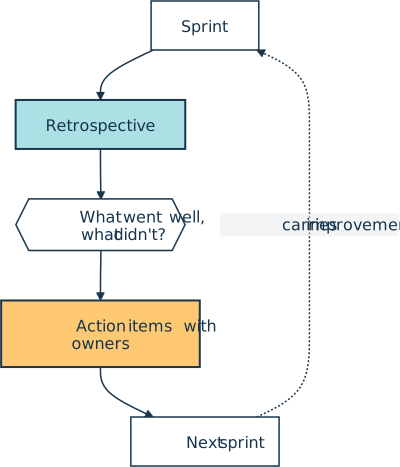
The Scrum Guide names the things a team inspects together: individuals, interactions, processes, tools, and its definition of done.
A healthy retro is blameless. The aim is to fix the system that allowed a problem, not to single out the person who hit it, which is the same instinct behind a blameless postmortem after an incident.
Common Formats
Teams rarely run a retro as open-ended venting, because a named format keeps it focused. Three common ones show up again and again:
- Start, Stop, Continue: Each person names one practice to start, one to stop, and one to keep.
- What went well, what didn’t, action items: This is the plainest version and a sensible default.
- Mad, Sad, Glad: People sort events by how they felt, which surfaces friction that a task-focused format can miss.
Whatever the format, the retrospective is the slower companion to the daily standup. The standup keeps a single day on track, while the retro adjusts how the whole team works from one agile cycle to the next.
Related Resources
Tutorial
How to Use GitHub Copilot Code Review in Pull Requests
Learn how to use GitHub Copilot code review on pull requests for AI-assisted feedback, one-click fixes, and project-specific custom instructions.
For additional information on related topics, take a look at the following resources:
- Testing Your Code With pytest (Course)
- Testing Your Code With Python's unittest (Course)
- Continuous Integration and Deployment for Python With GitHub Actions (Tutorial)
- Continuous Integration With Python: An Introduction (Tutorial)
- How to Use GitHub Copilot Code Review in Pull Requests (Quiz)
- Python Continuous Integration and Deployment Using GitHub Actions (Course)
- GitHub Actions for Python (Quiz)
- Continuous Integration With Python (Course)
- Continuous Integration With Python: An Introduction (Quiz)
Have a question about this? Mentor AI can show you examples, compare related terms, and point you to tutorials.
Ask Mentor AI

By Martin Breuss • Updated Sept. 7, 2026
