infrastructure as code (IaC)
Infrastructure as code, or IaC, is the practice of provisioning and managing computing infrastructure by writing machine-readable configuration files instead of clicking through a cloud console. The infrastructure in scope is broad and covers servers, networks, databases, DNS records, and container clusters. Those files live in version control next to the application code and are applied by a tool that calls the underlying cloud APIs.
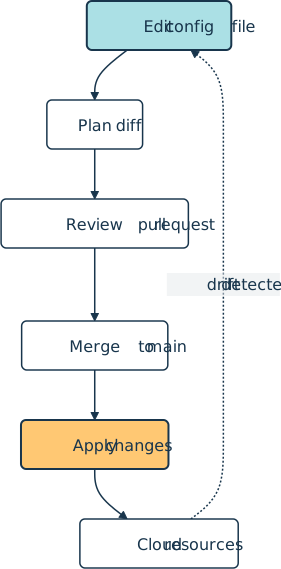
A typical IaC change moves through a short pipeline of edit, review, plan, merge, and apply:
How It Shows Up in Practice
For a Python developer joining a team that uses IaC, the most visible artifact is an infra/, terraform/, or pulumi/ directory next to the application source. Three tool families dominate practice.
Terraform and OpenTofu, its 2023 community fork, use HashiCorp’s domain-specific HCL syntax. Pulumi and the AWS Cloud Development Kit let teams declare the same resources directly in Python, TypeScript, Go, or C#. AWS CloudFormation, Azure Resource Manager templates authored in Bicep, and Google Cloud Infrastructure Manager are the cloud-provider-native equivalents. Which family a team picks is often documented in an architecture decision record.
A minimal Terraform file that declares an S3 bucket reads like a typed data structure:
terraform {
  required_providers {
    aws = {
      source  = "hashicorp/aws"
      version = "~> 6.0"
    }
  }
}

resource "aws_s3_bucket" "reports" {
  bucket = "acme-reports-prod"
  tags = {
    Environment = "prod"
    Owner       = "data-platform"
  }
}
The same resource expressed in Pulumi’s Python SDK reads like ordinary application code:
import pulumi
import pulumi_aws as aws

bucket = aws.s3.Bucket(
    "reports",
    bucket="acme-reports-prod",
    tags={
        "Environment": "prod",
        "Owner": "data-platform",
    },
)

pulumi.export("bucket_name", bucket.id)
The day-to-day loop is the same regardless of tool. Edit the file, run a plan or preview step that diffs the desired state against the running cloud account, open a pull request so a teammate can review the diff, then run apply or up from a CI job after merge.
Declarative vs. Imperative
IaC tools split along a long-running axis.
Declarative tools, such as Terraform, OpenTofu, CloudFormation, and Pulumi in its default mode, ask the author to describe the desired end state of the infrastructure. The tool diffs that state against reality and works out which API calls to make.
Imperative tools, such as Chef, classic shell scripts, and Ansible playbooks in their procedural style, describe the sequence of steps that take a system from where it is to where it should be.
The practical consequences show up in two places. Declarative runs are usually idempotent: re-running terraform apply on an unchanged file is a no-op, which matters when a CI job retries after a network blip.
Declarative tools also detect drift, the gap between the file and a resource that someone hand-edited in the console, which counts as a form of technical debt. They can then bring the resource back into line. Imperative tools leave both jobs to the operator.
Related Resources

Tutorial
Continuous Integration and Deployment for Python With GitHub Actions
With most software following agile methodologies, it's essential to have robust DevOps systems in place to manage, maintain, and automate common tasks with a continually changing codebase. By using GitHub Actions, you can automate your workflows efficiently, especially for Python projects.
For additional information on related topics, take a look at the following resources:
- Python Continuous Integration and Deployment Using GitHub Actions (Course)
- Continuous Integration With Python: An Introduction (Tutorial)
- Build Robust Continuous Integration With Docker and Friends (Tutorial)
- Securely Deploy a Django App With Gunicorn, Nginx, & HTTPS (Tutorial)
- Deploying a Python Flask Example Application Using Heroku (Tutorial)
- GitHub Actions for Python (Quiz)
- Continuous Integration With Python (Course)
- Continuous Integration With Python: An Introduction (Quiz)
- Deploy a Django App With Gunicorn and Nginx (Course)
- Deploying a Flask Application Using Heroku (Course)
Have a question about this? Mentor AI can show you examples, compare related terms, and point you to tutorials.
Ask Mentor AI

By Martin Breuss • Updated Aug. 8, 2026
