distributed tracing
Distributed tracing is an observability technique that follows a single request as it travels across the services, queues, and external systems that make up a distributed application, then stitches every step back together into one timeline. The result is a tree of timestamped spans that shows where the time went, which service called which, and where a request failed or slowed down.
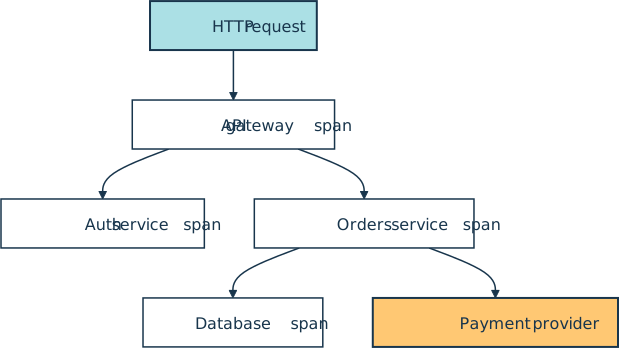
A trace ID is created at the edge of the system, propagated on every internal call as the traceparent HTTP header, and recorded with every span. A single trace might look like an HTTP request hitting an API gateway and fanning out to an auth service and an orders service. The orders service in turn touches a database and a payment provider, with each leg appearing as its own span under one shared trace ID, as the tree below shows:
How It Shows Up in Practice
A Python developer encounters distributed tracing in three places: in code that creates spans, in a backend that stores and displays them, and in the headers that travel between services. The vendor-neutral standard most teams use is OpenTelemetry, an open-source observability framework whose API acquires a tracer and wraps a block of work in a span:
from opentelemetry import trace

tracer = trace.get_tracer("checkout.api")

with tracer.start_as_current_span("place_order") as span:
    span.set_attribute("order.id", "ord_42")
    span.set_attribute("user.tier", "pro")
    # ... call the database, the payment provider, etc.
The SDK exports finished spans to a collector or directly to a tracing backend such as Jaeger, Grafana Tempo, Zipkin, Honeycomb, or a commercial APM such as Datadog, New Relic, or Dynatrace. The backend renders the trace as a waterfall diagram so developers can scan a slow request and see which leg held it up.
Between services, the trace is carried by the W3C Trace Context headers traceparent and tracestate. A traceparent value is a fixed-length, hyphen-separated string of the form version-trace-id-parent-id-trace-flags, and it can be parsed with the standard library alone:
header = "00-4bf92f3577b34da6a3ce929d0e0e4736-00f067aa0ba902b7-01"
version, trace_id, parent_span_id, flags = header.split("-")
sampled = bool(int(flags, 16) & 0x01)
print(f"trace_id={trace_id}")
print(f"parent_span_id={parent_span_id}")
print(f"sampled={sampled}")
trace_id=4bf92f3577b34da6a3ce929d0e0e4736
parent_span_id=00f067aa0ba902b7
sampled=True
The sampled flag matters because high-traffic services rarely keep every trace. Common strategies are head-based sampling, where the entry service flips a coin and the decision rides along in the flags, and tail-based sampling, where the collector buffers full traces and keeps the slow or failing ones.
Why Teams Use It
In a single-process application a stack trace and a log line are usually enough to find a bug. In a distributed system, the same request might cross five services owned by three teams, and no individual log file holds the whole story.
Distributed tracing reassembles that story automatically and answers the questions that come up most often during an incident: which downstream call timed out, whether a slow database query is consistent or only happens for one tenant, and how much of a user-visible latency budget each service is using.
Tracing also feeds back into design. Service-level objectives are often defined against trace data, such as the 95th percentile latency of the place_order span, and an error budget is burned by traces that finish with an error status. When a team writes a postmortem after an incident, the trace view is usually the first artifact the on-call engineer pastes into the document.
Related Resources

Tutorial
Logging in Python
If you use Python's print() function to get information about the flow of your programs, logging is the natural next step. Create your first logs and curate them to grow with your projects.
For additional information on related topics, take a look at the following resources:
- Python Microservices With gRPC (Tutorial)
- Python Timer Functions: Three Ways to Monitor Your Code (Tutorial)
- Python Logging: A Stroll Through the Source Code (Tutorial)
- Python Debugging With Pdb (Tutorial)
- Add Logging and Notification Messages to Flask Web Projects (Tutorial)
- Logging Inside Python (Course)
- Logging in Python (Quiz)
- Python Timer Functions (Course)
- Debugging in Python With pdb (Course)
- Python Debugging With Pdb (Quiz)
Have a question about this? Mentor AI can show you examples, compare related terms, and point you to tutorials.
Ask Mentor AI

By Martin Breuss • Updated Aug. 6, 2026
