standup
A standup is a short, recurring team meeting where each member quickly shares what they finished, what they plan to do next, and anything blocking their progress. The format keeps a team aligned on the work in flight without the overhead of a long status meeting. In Scrum the same event is the daily scrum, which the Scrum Guide times at fifteen minutes and holds at the same time and place every working day of the sprint.
The name comes from the original rule that everyone literally stands, so the discomfort of standing keeps the meeting short.
A standup often runs as a quick round where each person answers three questions, with the three answers feeding one shared outcome:
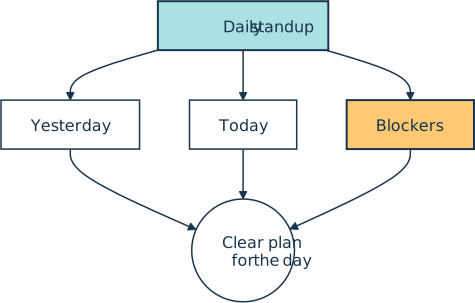
Written down, one developer’s turn might read:
Yesterday: finished the password reset endpoint and its tests
Today:     start on rate limiting for the login route
Blockers:  waiting on staging credentials from ops
How It Shows Up in Practice
A Python developer meets the standup as the first thing on the calendar most mornings, a fifteen-minute call or in-person huddle with the rest of the team. The point is coordination, not reporting up to a manager. The most useful line is the blocker, because that’s where a teammate can hand over credentials, review a pull request, or lift a dependency off someone’s plate.
The current Scrum Guide doesn’t prescribe the three-question script at all. It dropped the questions in its 2020 revision and leaves the structure and techniques to the developers. A team can run the meeting however it likes, as long as it stays focused on progress toward the sprint goal and leaves with an actionable plan for the next day of work. Many teams “walk the board” instead, stepping through the in-progress cards on a kanban board from right to left rather than going person by person, which keeps the focus on finishing work over individual activity.
Common Variations
Not every team meets in real time. Distributed and remote teams often run an async standup, where each person posts an update to a shared channel in Slack, Discord, or a dedicated bot, so people in different time zones aren’t forced onto a single call at an awkward hour.
Whatever the format, the standup is only one of several recurring agile rituals. It handles the daily pulse, while the longer look back at how the team is working belongs to the retrospective.
Related Resources
Tutorial
How to Use GitHub Copilot Code Review in Pull Requests
Learn how to use GitHub Copilot code review on pull requests for AI-assisted feedback, one-click fixes, and project-specific custom instructions.
For additional information on related topics, take a look at the following resources:
- Continuous Integration With Python: An Introduction (Tutorial)
- Python Continuous Integration and Deployment Using GitHub Actions (Course)
- How to Use GitHub Copilot Code Review in Pull Requests (Quiz)
- Continuous Integration With Python (Course)
- Continuous Integration With Python: An Introduction (Quiz)
Have a question about this? Mentor AI can show you examples, compare related terms, and point you to tutorials.
Ask Mentor AI

By Martin Breuss • Updated Sept. 4, 2026
