containerization
Containerization is the practice of packaging an application together with its dependencies, runtime, and configuration into a single isolated unit, called a container, that runs the same way on any machine with a compatible container runtime and a matching operating system and CPU architecture. Because the container carries everything the application needs, the identical artifact runs on a developer’s laptop, in staging, and in production without the classic “works on my machine” drift.
A container starts from a read-only image, a layered snapshot of a filesystem produced from a plain-text build recipe. For a Python service, that recipe pins the interpreter version, installs the dependencies, and copies in the code:
FROM python:3.14-slim
WORKDIR /app
COPY requirements.txt .
RUN python -m pip install -r requirements.txt
COPY . .
CMD ["python", "app.py"]
The file above is a Dockerfile, but the image it builds follows the vendor-neutral Open Container Initiative (OCI) format, so other tools work with the same artifact: Buildah builds it, and Podman runs it.
How It Shows Up in Practice
A Python developer meets containerization at several points in the workflow. A continuous integration pipeline builds the image on every commit and pushes it to a registry, and a platform such as Kubernetes or AWS ECS then schedules copies of that image across a fleet of machines.
Because the build recipe lives in a versioned file beside the code, the image is itself a piece of infrastructure as code, and the running containers stream their logs and metrics into the team’s observability stack. Packaging dependencies and configuration this way is also how teams put the build, release, and run separation of a twelve-factor app into practice.
An image is a stack of layers, and each layer records only the files that changed, so a later layer overrides an earlier one when their paths collide.
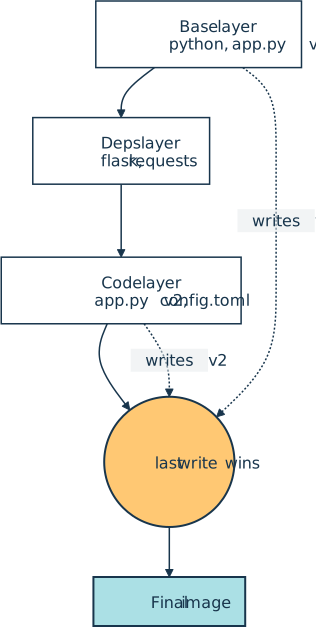
The final image is the union of every layer, with app.py resolving to the version from the last layer that wrote it.
Containers vs. Virtual Machines
Both containers and virtual machines isolate an application, but they draw the boundary at different levels. A virtual machine virtualizes hardware and ships a full guest operating system, so each instance carries its own kernel and weighs tens of gigabytes.
A container virtualizes the operating system instead. Containers on one host share that host’s kernel and run as isolated user-space processes, which is why an image is usually measured in tens of megabytes and starts in a fraction of a second.
That shared kernel is the tradeoff. Containers start fast and pack densely, but they isolate processes rather than the whole machine, so a team running untrusted code or mixing kernel versions still reaches for virtual machines. Running many containers across a cluster is its own discipline, container orchestration, which a Python developer usually meets through Kubernetes.
Related Resources
Tutorial
Run Python Versions in Docker: How to Try the Latest Python Release
In this tutorial, you'll learn how to run different Python versions in Docker. By following the examples, you'll see how you can play with the latest development version of Python, and how to use Dockerfiles to set up Python environments and package your own scripts.
For additional information on related topics, take a look at the following resources:
- Build Robust Continuous Integration With Docker and Friends (Tutorial)
- Continuous Integration and Deployment for Python With GitHub Actions (Tutorial)
- Python Continuous Integration and Deployment Using GitHub Actions (Course)
- Securely Deploy a Django App With Gunicorn, Nginx, & HTTPS (Tutorial)
- Python Web Applications: Deploy Your Script as a Flask App (Tutorial)
- GitHub Actions for Python (Quiz)
- Deploy a Django App With Gunicorn and Nginx (Course)
- Deploy Your Python Script on the Web With Flask (Course)
- Python Web Applications: Deploy Your Script as a Flask App (Quiz)
Have a question about this? Mentor AI can show you examples, compare related terms, and point you to tutorials.
Ask Mentor AI

By Martin Breuss • Updated Aug. 15, 2026
