observability
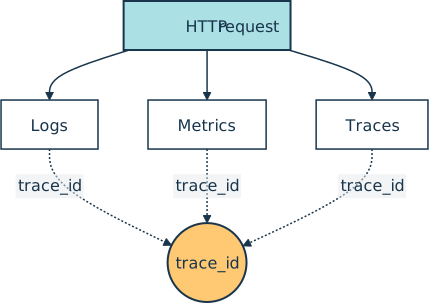
Observability is the practice of designing a software system so that an operator can answer arbitrary questions about its behavior from the outside, using only the signals the application emits, without shipping a new build to add instrumentation. Most teams organize those signals into three pillars (logs, metrics, and traces):
The word comes from control theory, where a system is “observable” if its internal state can be inferred from its outputs. A Python web service becomes observable when an on-call engineer can answer a question like “why did checkout slow down for users in Brazil between 14:00 and 14:10?” by querying existing dashboards and trace storage, instead of redeploying with extra print statements.
How It Shows Up in Practice
A Python developer touches observability in three places: code that emits signals, a backend that stores and visualizes them, and an SDK that ties the three pillars together. The OpenTelemetry project is the vendor-neutral standard for instrumentation.
Most teams pipe OpenTelemetry’s output into a backend such as Grafana, where Loki collects logs, Mimir stores metrics, and Tempo stores traces. Other common choices include Elastic, Datadog, Honeycomb, New Relic, and Splunk.
The cheapest first step needs no third-party library. A structured log line emitted from the standard library already carries enough context to be correlated with a trace later:
import json
import logging
import sys

logging.basicConfig(level=logging.INFO, stream=sys.stdout, format="%(message)s")
logger = logging.getLogger("checkout")

def log_event(event, **fields):
    record = {
        "level": "INFO",
        "service": "checkout",
        "event": event,
        **fields,
    }
    logger.info(json.dumps(record, sort_keys=True, indent=2))

log_event(
    "order_placed",
    order_id="ord_42",
    user_tier="pro",
    duration_ms=312,
    trace_id="4bf92f3577b34da6a3ce929d0e0e4736",
)
{
  "duration_ms": 312,
  "event": "order_placed",
  "level": "INFO",
  "order_id": "ord_42",
  "service": "checkout",
  "trace_id": "4bf92f3577b34da6a3ce929d0e0e4736",
  "user_tier": "pro"
}
A production stack layers three things on top of this log line. The Prometheus or OpenTelemetry SDK exposes a counter that increments per order_placed. The OpenTelemetry SDK emits a span around the surrounding HTTP handler. A shipper drops the log line into a searchable store like Loki or Elasticsearch. The trace_id field above is the seam that lets all three pillars be joined for one request.
The Three Pillars
Most observability tooling sorts signals into three categories with different shapes and costs:
- Logs are timestamped text or JSON records describing what happened. They are cheap to write and expensive to store at high volume. Best for arbitrary context that the team did not predict at deploy time.
- Metrics are pre-aggregated numbers such as counters, gauges, and histograms, sampled at fixed intervals. They are cheap to store and fast to query but cannot be sliced by labels the team did not plan for. Best for dashboards, service-level objectives (SLOs), and the error budgets derived from them.
- Traces are trees of timestamped spans that follow one request through every service it touched (the data distributed tracing consumes). Best for diagnosing where time went or which downstream dependency failed.
A fourth signal, profiles, is emerging alongside the three pillars. Continuous profiling records which lines of code consume CPU and memory at runtime, tied back to a trace by the same trace_id. OpenTelemetry’s profiles signal entered public alpha in 2026, and Grafana stores profiles in Pyroscope, next to Loki, Mimir, and Tempo.
Google’s Site Reliability Engineering book groups the same data along a second axis with the four golden signals that every user-facing service should track: latency, traffic, errors, and saturation. The line between monitoring and observability is fuzzy in practice, but teams generally use the word observability once answering an incident question requires combining at least two of the three pillars on the fly.
Related Resources

Tutorial
Logging in Python
If you use Python's print() function to get information about the flow of your programs, logging is the natural next step. Create your first logs and curate them to grow with your projects.
For additional information on related topics, take a look at the following resources:
- Python Logging: A Stroll Through the Source Code (Tutorial)
- How to Use Loguru for Simpler Python Logging (Tutorial)
- Add Logging and Notification Messages to Flask Web Projects (Tutorial)
- Python Timer Functions: Three Ways to Monitor Your Code (Tutorial)
- Logging Inside Python (Course)
- Logging in Python (Quiz)
- Using Loguru to Simplify Python Logging (Course)
- Python Logging With the Loguru Library (Quiz)
- Python Timer Functions (Course)
Have a question about this? Mentor AI can show you examples, compare related terms, and point you to tutorials.
Ask Mentor AI

By Martin Breuss • Updated Aug. 7, 2026
