scrum
Scrum is a lightweight framework for tackling complex work in short, repeating cycles called sprints, where a small team plans a slice of work, builds it, and reviews the result before starting the next slice. The name comes from rugby’s scrum, an image of a team moving down the field together that a 1986 paper applied to product development, later adapted for software by Jeff Sutherland and Ken Schwaber, who still maintain the Scrum Guide.
A sprint is the heartbeat of the framework, usually one or two weeks long and never more than a month. Each sprint is a fixed-length container for four events:
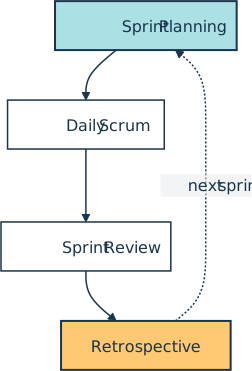
Sprint (2 weeks)
  Day 1       Sprint Planning        pick the sprint goal and the work to deliver
  Daily       Daily Scrum            15-minute check on progress toward the goal
  Last day    Sprint Review          inspect the increment with stakeholders and adapt the plan
  Last day    Sprint Retrospective   agree the changes that improve the next sprint
Three accountabilities split the work. The product owner decides what gets built and in what order, the developers build it, and the scrum master is accountable for establishing Scrum as the guide defines it and for the team’s effectiveness, coaching the team and getting blockers removed. Three artifacts hold the plan: the product backlog lists everything that might get built, the sprint backlog holds the sprint goal along with the items the developers forecast for this sprint and their plan for delivering them, and the increment is the working result, whose quality bar is the team’s definition of done. Each artifact also carries a commitment that keeps it honest: the product goal for the product backlog, the sprint goal for the sprint backlog, and the definition of done for the increment.
How It Shows Up in Practice
A Python developer usually meets Scrum as the cadence their team runs the calendar on, managed in a tool such as Jira, Azure Boards, or Linear. Work arrives as a user story in the backlog, the team sizes it in story points during planning, and the agreed stories become the sprint backlog the board tracks to done.
The most visible signal in daily life is the burndown chart, which plots the work remaining against the days left in the sprint. Over a two-week sprint that started with 20 committed points, it might track like this:
day  1: #################### 20 pts
day  2: ###################  19 pts
day  3: ################     16 pts
day  4: ##############       14 pts
day  5: ##############       14 pts
day  6: ##########           10 pts
day  7: ########              8 pts
day  8: #####                 5 pts
day  9: ###                   3 pts
day 10:                       0 pts
A line that flattens for a day or two, as on days 4 and 5 above, warns the team that the sprint goal is at risk while there is still time to act. That early warning is the kind of signal the daily scrum exists to surface.
Scrum vs. Kanban
Scrum and Kanban are both ways to run agile work, and teams routinely mix them up. Scrum slices time into fixed sprints, commits to a batch of work for each one, and assigns the three accountabilities above. Kanban keeps a single continuous flow with no required sprints and no prescribed roles, capping work in progress instead of committing to a sprint’s worth of it.
The practical tell is how each handles a shift in priorities. A Scrum team usually waits for the next sprint boundary to change direction, while a Kanban team simply reorders the cards waiting in its backlog. Whichever cadence a team picks, the point of working in small slices is the same: put a usable minimum viable product in front of users early, then improve it sprint by sprint.
Related Resources
Course
Test-Driven Development With pytest
In this hands-on course, you’ll see how to create Python unit tests, execute them, and find the bugs before your users do. You’ll learn about the tools available to write and execute tests, check your application’s performance, and even look for security issues.
For additional information on related topics, take a look at the following resources:
- pytest Tutorial: Effective Python Testing (Tutorial)
- Continuous Integration With Python: An Introduction (Tutorial)
- Continuous Integration With Python (Course)
- Continuous Integration and Deployment for Python With GitHub Actions (Tutorial)
- Testing Your Code With pytest (Course)
- Effective Testing with Pytest (Quiz)
- Continuous Integration With Python: An Introduction (Quiz)
- Python Continuous Integration and Deployment Using GitHub Actions (Course)
- GitHub Actions for Python (Quiz)
Have a question about this? Mentor AI can show you examples, compare related terms, and point you to tutorials.
Ask Mentor AI

By Martin Breuss • Updated Aug. 24, 2026
