service-level agreement (SLA)
A service-level agreement, or SLA, is a contract between a service provider and its customers that promises a certain level of service and spells out what happens if the provider falls short. Those consequences are what set an SLA apart from an internal service-level objective. Missing an SLA usually costs the provider money.
Google’s SRE book describes an SLA as “an explicit or implicit contract with your users that includes consequences” of meeting or missing the SLOs it contains. The promise rests on one or more SLOs, each measured by a service-level indicator.
The consequence is usually a service credit, scaled to how badly the target was missed:
Monthly uptime     Service credit
>= 99.99%          none
99.0% to 99.99%    10% of the monthly fee
95.0% to 99.0%     30% of the monthly fee
< 95.0%            100% of the monthly fee
How It Shows Up in Practice
A Python developer rarely writes an SLA but ships against one constantly. Every major cloud provider publishes uptime SLAs for its services, and a team building on top of them inherits those numbers as a ceiling on what it can promise its own customers.
Day to day, the SLA sets the stakes the dashboards watch. The observability data that tracks an SLO is the same data that proves whether the SLA held over a billing period.
The Internal Safety Buffer
A careful team never sets its internal SLO equal to its SLA. The SLA is the line that triggers refunds, so the SLO is pitched tighter, leaving room to spot trouble and react before a paying customer is affected:
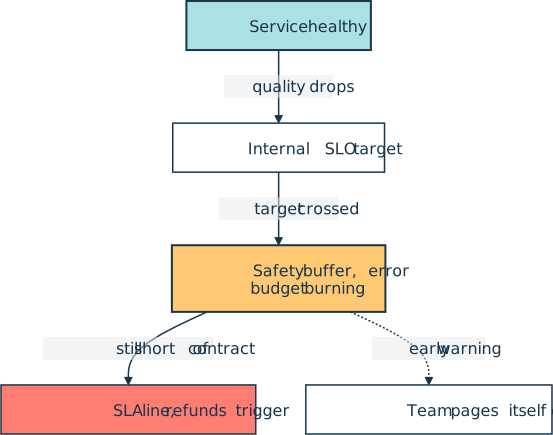
That gap is a deliberate safety margin. The team’s error budget, the rate at which the internal SLO is allowed to be missed, is the early-warning system inside that margin. When the budget is nearly spent, the service is brushing up against its own internal target while still safely short of the contractual SLA. By the time an SLA breach is genuinely in question, the team has usually been paging itself for a while.
Related Resources

Tutorial
Logging in Python
If you use Python's print() function to get information about the flow of your programs, logging is the natural next step. Create your first logs and curate them to grow with your projects.
For additional information on related topics, take a look at the following resources:
- Python Timer Functions: Three Ways to Monitor Your Code (Tutorial)
- Add Logging and Notification Messages to Flask Web Projects (Tutorial)
- Continuous Integration and Deployment for Python With GitHub Actions (Tutorial)
- Build Robust Continuous Integration With Docker and Friends (Tutorial)
- Using sleep() to Code a Python Uptime Bot (Course)
- Logging Inside Python (Course)
- Logging in Python (Quiz)
- Python Timer Functions (Course)
- Python Continuous Integration and Deployment Using GitHub Actions (Course)
- GitHub Actions for Python (Quiz)
Have a question about this? Mentor AI can show you examples, compare related terms, and point you to tutorials.
Ask Mentor AI

By Martin Breuss • Updated Sept. 6, 2026
