threat modeling
Threat modeling is a structured security exercise in which a team maps how a system works, asks what could go wrong, and decides what to do about each risk before code reaches production. Teams typically run a session during the design phase and revisit the model whenever the architecture changes, well before a release moves through the CI/CD pipeline.
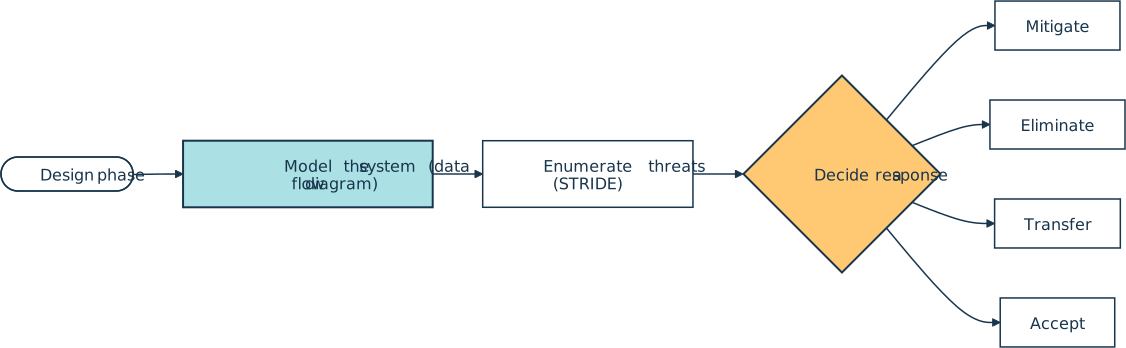
A working session usually produces three artifacts (a data flow diagram of the system, a ranked list of plausible threats, and a documented response for each threat from mitigate, eliminate, transfer, or accept):
How It Shows Up in Practice
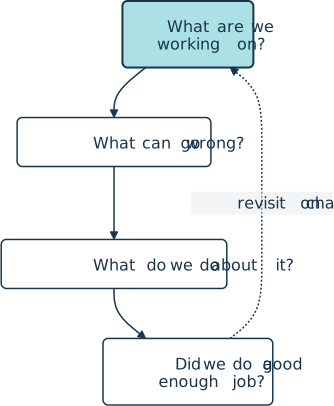
Threat modeling shows up as a meeting on the design calendar, a section in an architecture decision record, or a ticket attached to a new feature. OWASP frames the exercise around four questions popularized by Adam Shostack:
- What are we working on?
- What can go wrong?
- What are we going to do about it?
- Did we do a good enough job?
Engineers sketch a data flow diagram that names every process, data store, external actor, and trust boundary, then walk through each element and enumerate threats.
Most teams reach for a structured mnemonic to drive that enumeration. STRIDE is the most common one and stands for Spoofing, Tampering, Repudiation, Information disclosure, Denial of service, and Elevation of privilege. Each letter maps to a security property the system needs to preserve. Alternative frameworks include PASTA, LINDDUN, and attack trees. PASTA is a seven-step, risk-centric process, while LINDDUN focuses on privacy threats.
Tools span GUI editors and code-first frameworks. OWASP Threat Dragon and the Microsoft Threat Modeling Tool render diagrams in a canvas. OWASP pytm lets a Python team describe the model in code, then generates diagrams and threat reports from the command line:
from pytm import TM, Actor, Server, Datastore, Boundary, Dataflow

tm = TM("Checkout service")
internal = Boundary("Internal network")

user = Actor("Customer")
api = Server("Checkout API")
api.inBoundary = internal
db = Datastore("Orders DB")
db.inBoundary = internal

place_order = Dataflow(user, api, "Place order")
place_order.protocol = "HTTPS"
Dataflow(api, db, "Write order row")

if __name__ == "__main__":
    tm.process()
Running the script with the --dfd, --seq, or --report flags produces a data flow diagram, a sequence diagram, or a templated threat report that the team can attach to a design doc or pull request.
Why Teams Use It
Threat modeling lives on the shift-left side of secure SDLC practice. Catching an authentication gap on a whiteboard costs a few hours, but the same gap discovered after launch can drive an incident, a postmortem, and an emergency patch. A finished model also surfaces missing requirements like rate limits, audit logs, secret rotation, and input validation early enough to land in the original implementation rather than as follow-up tickets.
Related Resources
Tutorial
Preventing SQL Injection Attacks With Python
SQL injection attacks are one of the most common web application security risks. In this step-by-step tutorial, you'll learn how you can prevent Python SQL injection. You'll learn how to compose SQL queries with parameters, as well as how to safely execute those queries in your database.
For additional information on related topics, take a look at the following resources:
- Securely Deploy a Django App With Gunicorn, Nginx, & HTTPS (Tutorial)
- Pydantic: Simplifying Data Validation in Python (Tutorial)
- Create a Flask Application With Google Login (Tutorial)
- Exploring HTTPS and Cryptography in Python (Course)
- Deploy a Django App With Gunicorn and Nginx (Course)
- Using Pydantic to Simplify Python Data Validation (Course)
- Pydantic: Simplifying Data Validation in Python (Quiz)
- Using Google Login With Flask (Course)
Have a question about this? Mentor AI can show you examples, compare related terms, and point you to tutorials.
Ask Mentor AI

By Martin Breuss • Updated Aug. 7, 2026
