rolling deployment
Rolling deployment is a release strategy that updates a running service by replacing its instances with the new version a few at a time, so the rest of the fleet keeps serving traffic while each batch is swapped out. Because only a slice of the instances change at once, the rollout reaches the whole fleet with no scheduled downtime and without the duplicate hardware a blue-green deployment keeps on standby.
Each batch advances only after it passes a health check:
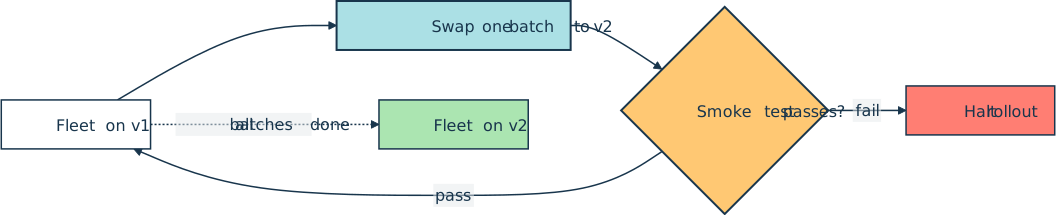
The rollout advances in waves, and a deploy channel or a kubectl rollout status command reports the fleet converging on the new version one batch at a time:
$ kubectl rollout status deployment/web
Waiting for deployment "web" rollout to finish: 2 out of 6 new replicas have been updated...
Waiting for deployment "web" rollout to finish: 4 out of 6 new replicas have been updated...
Waiting for deployment "web" rollout to finish: 5 of 6 updated replicas are available...
deployment "web" successfully rolled out
How It Shows Up in Practice
A Python developer usually meets rolling deployment as the default behavior of the platform a service runs on rather than as anything written into the application. Kubernetes ships it as the RollingUpdate strategy on a Deployment, where two knobs set the pace. maxUnavailable caps how many instances can be down at once, and maxSurge caps how many extra instances can run beyond the target count.
Both default to 25 percent. RollingUpdate is also the default value of a Deployment’s .spec.strategy.type, so changing the container image in the Pod template triggers a rolling update automatically. Managed platforms expose the same idea under their own names, such as the minimumHealthyPercent and maximumPercent settings on Amazon Elastic Container Service (Amazon ECS).
The router in front of the fleet sends traffic only to instances that report healthy, which is what keeps the swap invisible to users. Teams gate each wave behind a smoke test and watch the rollout through their observability stack, so a bad batch can halt the rollout before it reaches every instance.
Common Pitfalls
The mixed-version window is the catch. For most of the rollout, old and new instances serve live traffic side by side, so both versions have to stay compatible with the same database schema, message formats, and shared caches. A schema change usually has to ship as a backward-compatible step applied before the rollout, the same discipline a blue-green cutover demands.
Rollback is also slower than the one-step traffic switch of blue-green. Reverting means rolling the previous version back out wave by wave, so the fleet spends a second mixed-version window on the way back down. Where a release changes risky behavior and the team wants to judge it on real traffic before committing, a canary deployment exposes the new version to a small slice of users first, then ramps up only if the signals stay healthy.
Related Resources
Tutorial
Securely Deploy a Django App With Gunicorn, Nginx, & HTTPS
Ready to take your Django app beyond development? Learn how to securely deploy your Django web app in production over HTTPS with Gunicorn and Nginx. Along the way, you'll explore how HTTP headers can fortify your app's security.
For additional information on related topics, take a look at the following resources:
- Continuous Integration and Deployment for Python With GitHub Actions (Tutorial)
- Python Continuous Integration and Deployment Using GitHub Actions (Course)
- Deploying a Python Flask Example Application Using Heroku (Tutorial)
- Python Web Applications: Deploy Your Script as a Flask App (Tutorial)
- Build Robust Continuous Integration With Docker and Friends (Tutorial)
- Deploy a Django App With Gunicorn and Nginx (Course)
- GitHub Actions for Python (Quiz)
- Deploying a Flask Application Using Heroku (Course)
- Deploy Your Python Script on the Web With Flask (Course)
- Python Web Applications: Deploy Your Script as a Flask App (Quiz)
Have a question about this? Mentor AI can show you examples, compare related terms, and point you to tutorials.
Ask Mentor AI

By Martin Breuss • Updated Aug. 10, 2026
