feature flag
A feature flag, also called a feature toggle, is a switch in your code that turns a feature on or off at runtime, without shipping new code to change the decision. The same deployed build carries both the old path and the new one, and the flag chooses which path runs for a given request:
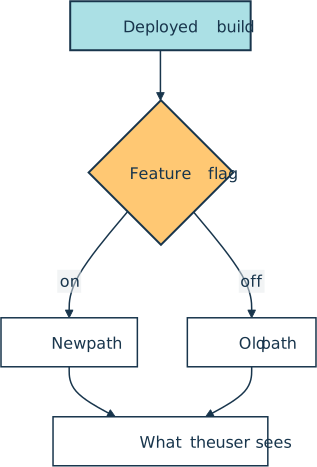
Flags let a team separate deploying code from releasing a feature. Deploying gets the code onto the servers, and releasing makes the feature visible to users. That split is what lets an unfinished feature ride to production safely while it stays switched off, and it is the foundation that makes continuous deployment practical.
Say you are shipping a new checkout flow that is not ready for everyone. You deploy it dark, behind a flag, then flip the flag when the time comes:
flags = {"new-checkout": False}

def checkout():
    if flags["new-checkout"]:
        return "new checkout flow"
    return "old checkout flow"

# Deployed but switched off: every user still gets the old path.
print(checkout())

# Flip the flag at runtime. No redeploy, and the new path turns on.
flags["new-checkout"] = True
print(checkout())
In a real system the flag value lives outside the code, in a config service or a tool like LaunchDarkly, so flipping it is a configuration change rather than a deploy.
How It Shows Up in Practice
A Python developer meets feature flags as a small if wrapped around new code in a pull request, paired with an entry in a flag dashboard that controls it in production. SDKs and hosted services such as LaunchDarkly, Flagsmith, Unleash, and Split resolve the flag for the current user on every request. Split is now sold as Harness Feature Management & Experimentation. OpenFeature, a CNCF incubating project, is a vendor-neutral alternative. It defines a standard flag-evaluation API with an official Python SDK (openfeature-sdk) that plugs into those same providers, so you can swap vendors without rewriting your call sites.
Flags come in a few flavors. A short-lived release flag hides an unfinished feature until it is done. An ops flag, often called a kill switch, lets on-call staff disable a misbehaving feature during an incident or shed non-critical load under stress, and no rollback is needed. An experiment flag sends users down different paths for an A/B test, and a permission flag opens a beta feature to a chosen group.
Because flags let unfinished work merge to the main branch and ship turned off, they pair naturally with trunk-based development. A flag can also drive a canary release, turning a feature on for a small slice of users before widening it to everyone.
Common Pitfalls
Every flag adds a branch in the code and a row in the dashboard, and both outlive the feature they gated. Stale flags pile up as a form of technical debt, cluttering the codebase with dead conditionals and clouding which paths are actually live.
The cure is to treat each flag as temporary inventory with a carrying cost. Many teams attach a removal task to every new release flag or give it an expiry date, then delete the flag and its losing branch once the new path becomes the permanent default.
Related Resources

Tutorial
Continuous Integration and Deployment for Python With GitHub Actions
With most software following agile methodologies, it's essential to have robust DevOps systems in place to manage, maintain, and automate common tasks with a continually changing codebase. By using GitHub Actions, you can automate your workflows efficiently, especially for Python projects.
For additional information on related topics, take a look at the following resources:
- Python Continuous Integration and Deployment Using GitHub Actions (Course)
- Continuous Integration With Python: An Introduction (Tutorial)
- Build Robust Continuous Integration With Docker and Friends (Tutorial)
- Deploying a Python Flask Example Application Using Heroku (Tutorial)
- GitHub Actions for Python (Quiz)
- Continuous Integration With Python (Course)
- Deploying a Flask Application Using Heroku (Course)
Have a question about this? Mentor AI can show you examples, compare related terms, and point you to tutorials.
Ask Mentor AI

By Martin Breuss • Updated Aug. 16, 2026
