spec-driven development (SDD)
Spec-driven development, or SDD, is a software development approach in which a structured, version-controlled specification, rather than the source code, is the primary artifact and source of truth. The specification states what a system should do in precise terms, capturing intended behavior, constraints, edge cases, and acceptance criteria before any implementation begins.
The specification then drives the work. A team derives a design and a list of concrete tasks from it, writes or generates the code to satisfy it, and revises the specification first whenever requirements change so that the implementation can be brought back into line. This inverts the common pattern in which code is written first and documentation, where it exists at all, trails behind and drifts out of date.
Approaches differ in how strictly the specification is held as the authority:
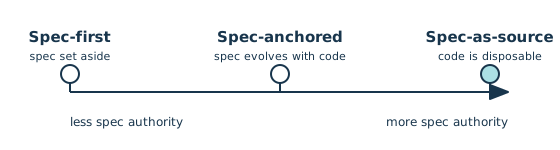
- Spec-first: The specification guides the initial build and is then set aside.
- Spec-anchored: The specification is retained and evolved alongside the code over time.
- Spec-as-source: The specification is the primary file, and the generated code is treated as a disposable build product that nobody edits by hand.
The idea draws on older practices such as requirements specifications, model-driven development, and contract-first design, along with the test-driven and behavior-driven families that also let a precise description guide the code. Interest in spec-driven development grew sharply around 2025, when AI coding agents made it practical to turn a detailed natural-language specification directly into a working implementation.
Related Resources
Course
Test-Driven Development With pytest
In this hands-on course, you’ll see how to create Python unit tests, execute them, and find the bugs before your users do. You’ll learn about the tools available to write and execute tests, check your application’s performance, and even look for security issues.
For additional information on related topics, take a look at the following resources:
- Documenting Python Code: A Complete Guide (Tutorial)
- Prompt Engineering: A Practical Example (Tutorial)
- GitHub Copilot: Fly With Python at the Speed of Thought (Tutorial)
- How to Use Google's Gemini CLI for AI Code Assistance (Tutorial)
- How to Use OpenCode for AI-Assisted Python Coding (Tutorial)
- Document Your Python Code and Projects With ChatGPT (Tutorial)
- Documenting Code in Python (Course)
- Documenting Python Code: A Complete Guide (Quiz)
- Practical Prompt Engineering (Quiz)
- Getting Started With Google Gemini CLI (Course)
- How to Use Google's Gemini CLI for AI Code Assistance (Quiz)
- Coding With OpenCode: AI-Assisted Python (Course)
- How to Use OpenCode for AI-Assisted Python Coding (Quiz)
Have a question about this? Mentor AI can show you examples, compare related terms, and point you to tutorials.
Ask Mentor AI

By Martin Breuss • Updated July 15, 2026
