NotebookLM
NotebookLM is a source-grounded research assistant from Google that answers questions only from the documents you upload, citing the passages behind its answers instead of drawing on open-web knowledge. Google renamed it Gemini Notebook in July 2026 and folded it into the Gemini family, though it still ships as a standalone product.
The grounding is the point. Because the model works from a fixed source set and links every answer back to it, a wrong answer is easy to catch, which makes it harder for a hallucination to slip past you. The same retrieval-augmented generation idea sits behind many internal documentation bots, and the flow through a notebook looks like this:
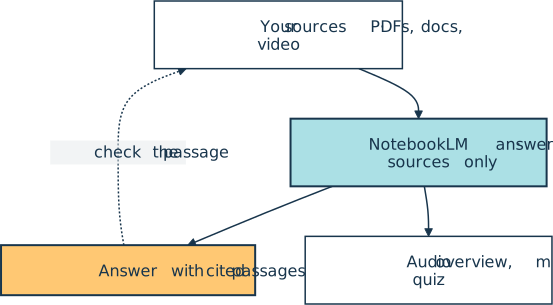
A notebook accepts PDFs, Google Docs, Slides, and Sheets, plus Word and PowerPoint files, Markdown, plain text, CSV, web pages, public YouTube videos with captions, audio recordings, and pasted text. Each source can run to 500,000 words. Beyond chat, the tool renders the set as Audio and Video Overviews, mind maps, flashcards, quizzes, infographics, slide decks, and reports.
For Python work, it suits documentation you’d rather query than reread. Drop a library’s docs, a PEP, and your team’s design notes into one notebook, then ask how they line up and follow the citations to check. Notebooks on the Pro and Ultra plans also get a secure cloud computer that writes and runs code against your sources, so you can analyze a CSV without leaving the page.
The name trips people up, but this isn’t a Jupyter notebook. The free plan allows 50 sources per notebook, and the paid Google AI Plus, Pro, and Ultra plans raise the usage limits from there. Gemini Notebook Enterprise, a separate Google Cloud offering, adds a REST API for creating notebooks, managing their sources, and generating audio overviews.
Official website: notebook.google.com
Related Resources

Tutorial
Build an LLM RAG Chatbot With LangChain
Large language models (LLMs) have taken the world by storm, demonstrating unprecedented capabilities in natural language tasks. In this step-by-step tutorial, you'll leverage LLMs to build your own retrieval-augmented generation (RAG) chatbot using synthetic data with LangChain and Neo4j.
For additional information on related topics, take a look at the following resources:
- Python MarkItDown: Convert Documents Into LLM-Ready Markdown (Tutorial)
- Connecting LLMs to Your Data With Python MCP Servers (Course)
- How to Use Google's Gemini CLI for AI Code Assistance (Tutorial)
- Getting Started With Google Gemini CLI (Course)
- Gemini CLI vs Claude Code: Which to Choose for Python Tasks (Tutorial)
- First Steps With LangChain (Course)
- Build an LLM RAG Chatbot With LangChain (Quiz)
- Converting Documents to Markdown With MarkItDown (Course)
- Python MarkItDown: Convert Documents Into LLM-Ready Markdown (Quiz)
- How to Use Google's Gemini CLI for AI Code Assistance (Quiz)
- Gemini CLI vs Claude Code: Which to Choose for Python Tasks (Quiz)
Have a question about this? Mentor AI can show you examples, compare related terms, and point you to tutorials.
Ask Mentor AI

By Martin Breuss • Updated Oct. 23, 2026