GitHub
GitHub is a cloud platform that hosts Git repositories and wraps them in collaboration tooling like pull requests, issue tracking, and continuous integration. Owned by Microsoft since 2018, it hosts much of the Python ecosystem, including the CPython source code and the PEPs that shape the language. The pull request is where most of that collaboration tooling comes together:
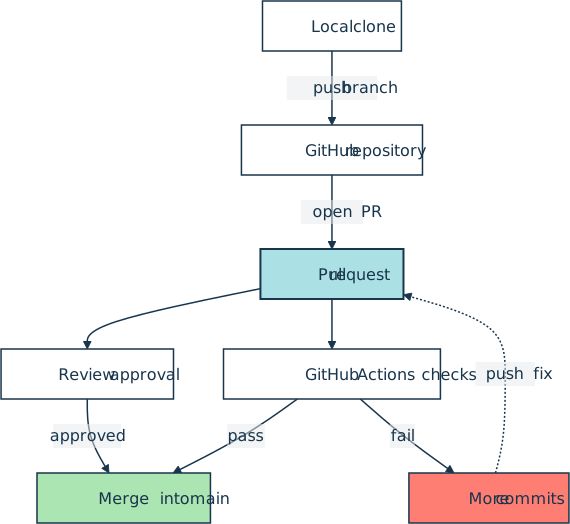
GitHub isn’t the only place to host a Git repository. GitLab and Bitbucket offer comparable pull request and continuous integration features, while Codeberg, Gitea, and Forgejo are community-governed or self-hosted alternatives.
Installation and Setup
The platform itself needs no installation. A free account at github.com covers unlimited public and private repositories, plus Actions minutes and Codespaces hours for personal use.
The official GitHub CLI, gh, handles the same workflows from a terminal:
The login flow stores a token in the system credential store and offers to register gh as a Git credential helper, which keeps pushes to private repositories from prompting for a password. Other install routes, including GitHub’s own apt and dnf repositories, are listed at cli.github.com.
Key Features
- Hosted Git remotes with unlimited public and private repositories on the free plan.
- Pull requests carrying inline review comments, required approvals, and status checks.
- Issues, labels, milestones, and Projects boards for planning work.
- GitHub Actions for running test suites and publishing packages on every push.
- GitHub Pages for serving project documentation straight out of a repository.
- REST and GraphQL APIs, plus the
ghCLI, for scripting the whole platform.
Usage
Publish a local Python project as a new repository:
$ gh repo create my-package --public --source=. --push
Open a pull request from the current branch, then watch its checks finish:
$ gh pr create --fill
$ gh pr checks --watch
Run the test suite on every push by committing a GitHub Actions workflow file:
.github/workflows/tests.yml
name: Tests
on: [push]
jobs:
  test:
    runs-on: ubuntu-latest
    steps:
      - uses: actions/checkout@v7
      - uses: actions/setup-python@v7
        with:
          python-version: "3.14"
      - run: python -m pip install pytest
      - run: python -m pytest
Triage open issues or check out a teammate’s branch without leaving the terminal:
$ gh issue list --assignee @me
$ gh pr checkout 42
Related Resources
Tutorial
How to Use GitHub
Learn how to use GitHub step by step to create a remote repository, push your local Python project, and collaborate with others using GitHub Issues.
For additional information on related topics, take a look at the following resources:
- Introduction to Git and GitHub for Python Developers (Tutorial)
- Introduction to Git and GitHub for Python (Course)
- Continuous Integration and Deployment for Python With GitHub Actions (Tutorial)
- Python Continuous Integration and Deployment Using GitHub Actions (Course)
- GitHub Copilot: Fly With Python at the Speed of Thought (Tutorial)
- How to Use GitHub (Quiz)
- Introduction to Git and GitHub for Python Developers (Quiz)
- GitHub Actions for Python (Quiz)
Have a question about this? Mentor AI can show you examples, compare related terms, and point you to tutorials.
Ask Mentor AI

By Martin Breuss • Updated Sept. 1, 2026
