Llama
Llama is a family of open-weight large language models from Meta, published as downloadable weights that run on local hardware or through a hosted provider. It competes with other open-weight families such as Google’s Gemma, Mistral AI’s models, Alibaba’s Qwen, and DeepSeek, as well as with closed models that are only available through a vendor’s API.
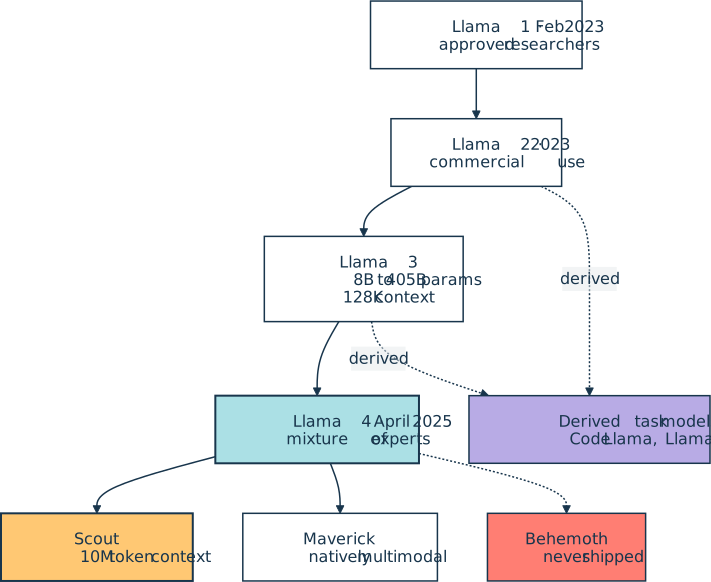
Meta released the first Llama in February 2023 for approved researchers, then opened Llama 2 to commercial use later that year. The Llama 3 line spanned 1 billion to 405 billion parameters and stretched the context window to 128,000 tokens.
Llama 4 followed in April 2025 with a mixture-of-experts architecture, shipping as Scout and Maverick. Both are natively multimodal, and Scout’s context window reaches 10 million tokens. A larger Behemoth model was previewed but never shipped. Four generations in, the Llama family tree looks like this:
In Python, Llama usually arrives through a runner rather than the raw checkpoint. A quantized copy runs locally under Ollama or LM Studio, and the llama-cpp-python bindings wrap the community llama.cpp runtime with an OpenAI-compatible interface. Hosted copies run on Amazon Bedrock, OpenRouter, and similar platforms.
Meta also publishes task-specific models derived from the base releases, including Code Llama for programming and Llama Guard for input and output safety classification. The open weights make any of them a starting point for fine-tuning on private data.
The Llama Community License permits commercial use, but it attaches an acceptable use policy and requires separate permission for companies above 700 million monthly active users. Those restrictions are why the Open Source Initiative and the Free Software Foundation both decline to call Llama open source.
Meta’s own hosted Llama API never left preview and shut down on July 6, 2026, so weights now come from Meta’s download form and Hugging Face. Meta’s consumer assistants have since moved to the proprietary Muse line.
Official website: dev.meta.ai/llama
Related Resources
Tutorial
How to Use Ollama to Run Large Language Models Locally
Learn how to use Ollama to run large language models locally. Install it, pull models, and start chatting from your terminal without needing API keys.
For additional information on related topics, take a look at the following resources:
- How to Integrate Local LLMs With Ollama and Python (Tutorial)
- How to Get Started With Ollama (Course)
- Hugging Face Transformers: Leverage Open-Source AI in Python (Tutorial)
- Build an LLM RAG Chatbot With LangChain (Tutorial)
- Pydantic AI: Build Type-Safe LLM Agents in Python (Tutorial)
- Connecting LLMs to Your Data With Python MCP Servers (Course)
- How to Use Ollama to Run Large Language Models Locally (Quiz)
- How to Integrate Local LLMs With Ollama and Python (Quiz)
- Hugging Face Transformers: Leverage Open-Source AI in Python (Quiz)
- First Steps With LangChain (Course)
- Build an LLM RAG Chatbot With LangChain (Quiz)
- Building Type-Safe LLM Agents With Pydantic AI (Course)
- Pydantic AI: Build Type-Safe LLM Agents in Python (Quiz)
Have a question about this? Mentor AI can show you examples, compare related terms, and point you to tutorials.
Ask Mentor AI

By Martin Breuss • Updated Oct. 18, 2026
