__slots__
In Python, __slots__ is a class attribute that names the only instance attributes a class’s objects can have, so Python stores them in a fixed, compact layout instead of a per-instance dictionary. You assign it a tuple or other iterable of attribute names in the class body.
By default, every instance keeps its attributes in its own __dict__, a dictionary that lets you add new names at any time. Declaring __slots__ removes that dictionary. Python instead creates a descriptor on the class for each listed name, and every instance reserves room for exactly those values:
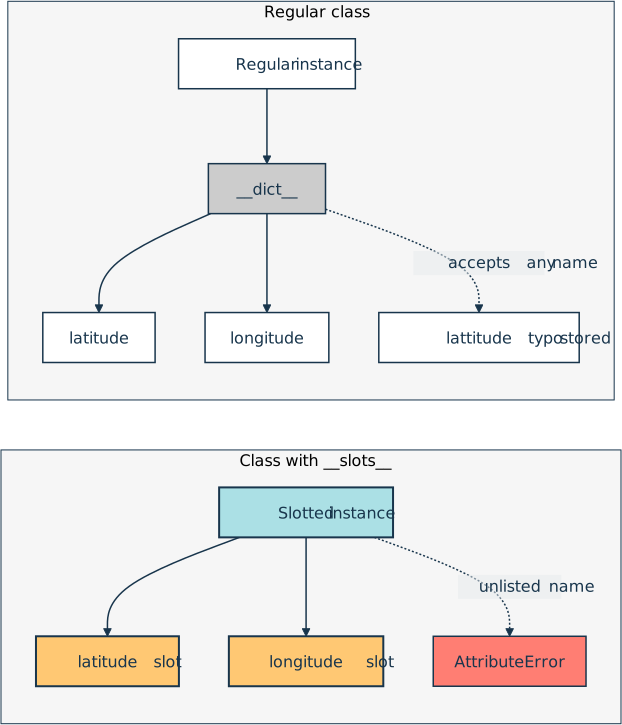
That trade has two visible effects. Instances use noticeably less memory, which adds up when you create millions of small objects, and attribute lookups can get faster too. Assigning to a name that isn’t listed raises an AttributeError, so misspelled attribute names fail loudly.
A few rules come with the feature. Slotted instances don’t support weak references unless you add "__weakref__" to the names, and a class attribute can’t supply a default value for a slot of the same name.
A subclass gets a __dict__ back unless it also defines __slots__, listing only the names it adds, if any. Since Python 3.10, the dataclasses module can generate the declaration for you with @dataclass(slots=True).
Example
Say you’re loading millions of GPS readings into memory, and you want each one to stay small and reject misspelled field names:
>>> class Reading:
...     __slots__ = ("latitude", "longitude")
...     def __init__(self, latitude, longitude):
...         self.latitude = latitude
...         self.longitude = longitude
...

>>> reading = Reading(52.52, 13.40)
>>> reading.latitude
52.52

>>> reading.lattitude = 48.85
Traceback (most recent call last):
  ...
AttributeError: 'Reading' object has no attribute 'lattitude' and no __dict__...

>>> hasattr(reading, "__dict__")
False
Because Reading declares __slots__, each instance holds .latitude and .longitude in fixed slots and carries no __dict__. On a regular class, the misspelled .lattitude would create a third attribute without any error. Here, Python rejects it, and the missing dictionary is where the memory savings come from.
Related Resources
Tutorial
Python Classes: The Power of Object-Oriented Programming
Learn how to define and use Python classes to implement object-oriented programming. Dive into attributes, methods, inheritance, and more.
For additional information on related topics, take a look at the following resources:
- Using Python's .__dict__ to Work With Attributes (Tutorial)
- Data Classes in Python (Guide) (Tutorial)
- Python Descriptors: An Introduction (Tutorial)
- Python's Magic Methods: Leverage Their Power in Your Classes (Tutorial)
- Working With Python's .__dict__ Attribute (Course)
- Class Concepts: Object-Oriented Programming in Python (Course)
- Inheritance and Internals: Object-Oriented Programming in Python (Course)
- Python Classes - The Power of Object-Oriented Programming (Quiz)
- Using Python's .__dict__ to Work With Attributes (Quiz)
- Using Data Classes in Python (Course)
- Data Classes in Python (Quiz)
- Python Descriptors (Course)
- Python Descriptors: An Introduction (Quiz)
- Python's Magic Methods in Classes (Course)
- Python's Magic Methods: Leverage Their Power in Your Classes (Quiz)
Have a question about this? Mentor AI can show you examples, compare related terms, and point you to tutorials.
Ask Mentor AI

By Martin Breuss • Updated Oct. 31, 2026