error budget
An error budget is the slice of unreliability a service is allowed to accumulate over a fixed window, calculated as 1 minus the service-level objective, or SLO, the team has agreed to meet. If a service promises 99.9 percent availability across a four-week window, the error budget is 0.1 percent of that window, which works out to about 40 minutes of downtime, or 1,000 failed requests for every million served.
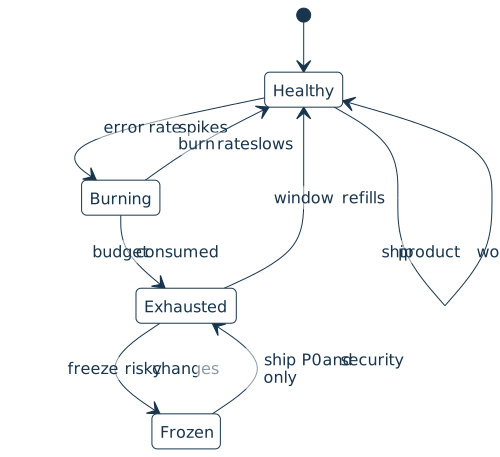
The budget exists so a team can answer a recurring question with a number instead of an argument: how much risk can we take this week? While the budget has room, product work continues. Once it is exhausted, the team pauses risky changes, focuses on reliability fixes, and waits for the rolling window to refill, which gives the budget a small set of states:
How It Shows Up in Practice
Most teams compute the error budget against a rolling 28-day or quarterly window and surface it on the same dashboard as the underlying service-level indicator, or SLI, and the SLO. Google Cloud Monitoring, Datadog, Grafana, Nobl9, and the open-source slo-generator all expose a “budget remaining” number and a “burn rate” that a Python service can also derive directly from raw request counts:
def error_budget(slo: float, total_requests: int, bad_requests: int) -> dict:
    allowed_failures = int(total_requests * (1 - slo))
    remaining = allowed_failures - bad_requests
    if allowed_failures == 0:
        spent_pct = 0.0
    else:
        spent_pct = bad_requests / allowed_failures
    return {
        "allowed": allowed_failures,
        "spent": bad_requests,
        "remaining": remaining,
        "spent_pct": round(spent_pct * 100, 2),
    }

print(error_budget(slo=0.999, total_requests=1_000_000, bad_requests=420))
{'allowed': 1000, 'spent': 420, 'remaining': 580, 'spent_pct': 42.0}
A team’s error budget policy turns that number into rules. A widely copied version from Google’s SRE workbook halts all changes and releases other than P0 issues and security fixes once the budget for a four-week window is fully consumed, and lifts the freeze when the budget returns to positive.
Other policies trigger an earlier response by alerting on burn rate, the speed at which the budget is being spent. A burn rate of 1 means the current error rate would consume the entire budget over exactly one window. The SRE workbook recommends paging when a burn rate of 14.4 is sustained for one hour, which corresponds to spending about 2 percent of a 30-day budget in that hour.
Why Teams Use It
The budget creates a shared language between product engineers, who are paid for velocity, and reliability engineers, who are paid for stability. Instead of arguing case by case about whether to ship a risky change, both sides look at the same number.
A healthy budget invites experimentation, canary releases, and infrastructure changes. A depleted budget invites a freeze, an architecture decision record on what went wrong, and renewed investment in tests and rollback paths.
A persistent surplus or persistent deficit is also a signal. A service that finishes every window with most of its budget untouched probably has an SLO that is too loose, and the team can renegotiate it upward and reinvest the slack into shipping faster. A service that burns through its budget every month either needs reliability work that pays down accumulated technical debt, or needs to renegotiate the SLO downward with stakeholders.
Related Resources

Tutorial
Logging in Python
If you use Python's print() function to get information about the flow of your programs, logging is the natural next step. Create your first logs and curate them to grow with your projects.
For additional information on related topics, take a look at the following resources:
- Python Logging: A Stroll Through the Source Code (Tutorial)
- How to Use Loguru for Simpler Python Logging (Tutorial)
- Continuous Integration and Deployment for Python With GitHub Actions (Tutorial)
- Python Timer Functions: Three Ways to Monitor Your Code (Tutorial)
- Logging Inside Python (Course)
- Logging in Python (Quiz)
- Using Loguru to Simplify Python Logging (Course)
- Python Logging With the Loguru Library (Quiz)
- Python Continuous Integration and Deployment Using GitHub Actions (Course)
- GitHub Actions for Python (Quiz)
- Python Timer Functions (Course)
Have a question about this? Mentor AI can show you examples, compare related terms, and point you to tutorials.
Ask Mentor AI

By Martin Breuss • Updated Aug. 6, 2026
