GPT4All
GPT4All is an open-source desktop application from Nomic AI that runs large language models (LLMs) locally on ordinary laptops and desktops, without a cloud service or an API key.
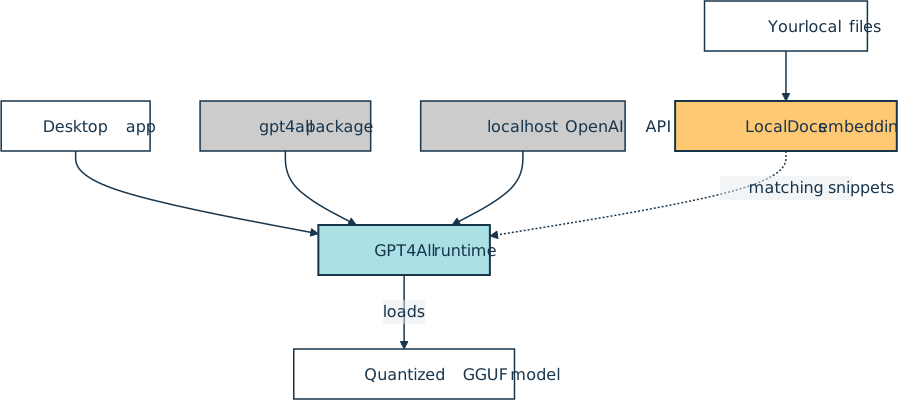
The app ships for Windows, macOS, and Ubuntu under an MIT license, and a built-in downloader pulls quantized GGUF models from families like Llama, Mistral, and Phi, or any compatible model on Hugging Face. Its LocalDocs feature indexes a folder of local files as embeddings and slips semantically similar snippets into each prompt, giving a fully offline take on retrieval-augmented generation (RAG).
Python developers can skip the interface and install the gpt4all package from PyPI instead. It exposes a GPT4All class that downloads a model on first use, a chat_session() context manager that applies the model’s chat template, and Embed4All for local embeddings. The desktop app can also serve an OpenAI-compatible endpoint on localhost, so existing clients work against it unchanged.
That leaves three ways into one model that never leaves the local machine:
GPT4All hasn’t shipped a desktop release since version 3.10.0 in February 2025, and the gpt4all package on PyPI has been at 2.8.2 since August 2024. Ollama and LM Studio now cover much of the same local-model ground.
Official website: nomic.ai
Related Resources
Tutorial
How to Use Ollama to Run Large Language Models Locally
Learn how to use Ollama to run large language models locally. Install it, pull models, and start chatting from your terminal without needing API keys.
For additional information on related topics, take a look at the following resources:
- How to Integrate Local LLMs With Ollama and Python (Tutorial)
- Hugging Face Transformers: Leverage Open-Source AI in Python (Tutorial)
- Build an LLM RAG Chatbot With LangChain (Tutorial)
- Embeddings and Vector Databases With ChromaDB (Tutorial)
- Vector Databases and Embeddings With ChromaDB (Course)
- How to Use Ollama to Run Large Language Models Locally (Quiz)
- How to Get Started With Ollama (Course)
- How to Integrate Local LLMs With Ollama and Python (Quiz)
- Hugging Face Transformers: Leverage Open-Source AI in Python (Quiz)
- First Steps With LangChain (Course)
- Build an LLM RAG Chatbot With LangChain (Quiz)
- Embeddings and Vector Databases With ChromaDB (Quiz)
Have a question about this? Mentor AI can show you examples, compare related terms, and point you to tutorials.
Ask Mentor AI

By Martin Breuss • Updated Oct. 16, 2026
