Agentic engineering is a disciplined approach to delegating bounded software tasks to AI coding agents while you retain control over intent, constraints, review, and release decisions. Coding agents can turn a vague request into working Python code in seconds. The hard part comes next: deciding whether you understand that code well enough to keep it.
By the end of this tutorial, you’ll understand that:
- Vibe coding asks whether a result looks plausible, while agentic engineering asks what evidence backs the change.
- Agentic engineering runs on two loops: a fast agent execution loop and a slower human acceptance loop.
- The Engineering Evidence Ladder names the evidence you’ve gathered and the evidence you still need.
- The RECAP method reviews a candidate diff by role, edges, contracts, assumptions, and proof.
- Automated checks produce repeatable evidence, but accepting the diff stays your decision.
Agentic engineering may sound novel, but it rests on practices you’re likely already using as a Python developer, like writing tests, adding type hints, refactoring for simplicity, and reviewing changes before merging them. What’s new is how you combine them into a workflow that produces evidence you can check before accepting an agent’s patch.
The resources linked above go deeper into the guardrails and concepts behind an agentic engineering workflow. You don’t need to read them first, but they’re useful next steps.
Get Your Cheat Sheet: Click here to download a free PDF cheat sheet of the Engineering Evidence Ladder, the RECAP review checklist, and the two loops that turn AI-generated Python into evidence-backed code.
Take the Quiz: Test your knowledge with our interactive “Agentic Engineering in Python: From Vibes to Evidence” quiz. You’ll receive a score upon completion to help you track your learning progress:
Interactive Quiz
Agentic Engineering in Python: From Vibes to EvidenceTest your understanding of agentic engineering in Python, from bounded tasks and review loops to the evidence that makes a diff safe to keep.
What Is Agentic Engineering?
Agentic engineering means handing an agent a bounded task and a condition that ends the run, then deciding for yourself whether the result earns a place in the codebase. You supply the goal, the boundaries, and the stopping condition.
The agent inspects the repository, plans the work, edits files, runs tools, observes the results, and iterates until it reaches that condition. For example, you might tell the agent that the task is complete only when the implementation passes the tests in tests/.
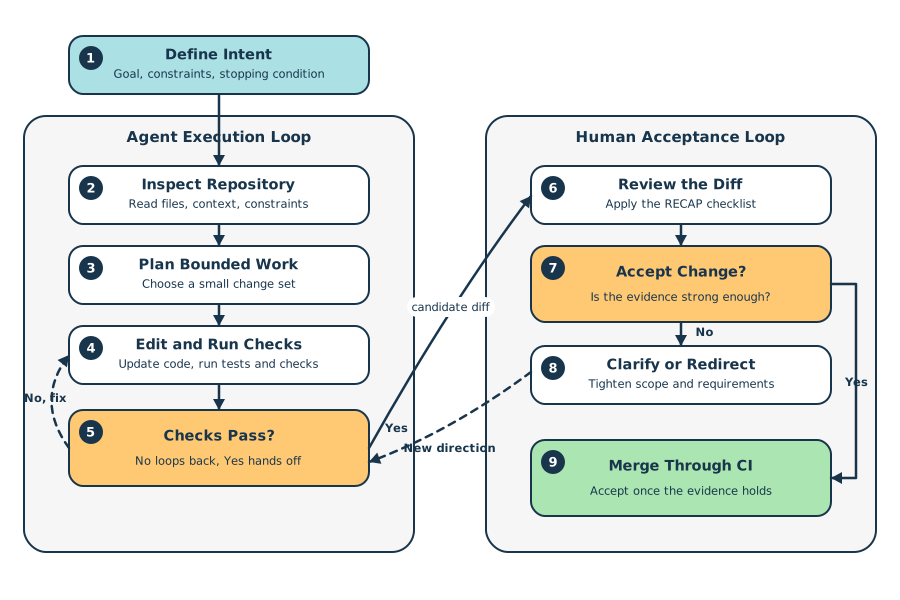
You can think of this workflow as two connected loops: the agent execution loop creates a candidate change, and the human acceptance loop decides whether that change belongs in the codebase:
As a quick example, your workflow might look like the following:
-
First, in your Define Intent step, you might start with a planning pass in Claude Code’s plan mode or OpenCode’s plan agent. Treating LLMs or agents as brainstorming tools can dramatically shorten the time it takes to define the intent for your feature or project. You also benefit from having the stored plan artifact for future auditing and review processes.
-
Next, with your intent as context, the agent begins its agent execution loop. First, it inspects the repo to see what files and directories are available. Then it performs any additional planning it deems necessary to accomplish the goal. Once done writing code, it runs the checks you’ve set up: linting, unit tests, and type checking, to name a few. If these don’t pass, it goes back to its planning phase and continues to iterate.
-
Finally, with a diff that has passed your automated checks, you enter the human acceptance loop and systematically check the changes by asking a standard set of questions about the code. If you don’t approve, you clarify your intent and the agent runs another execution loop, and then you repeat the same review cycle. When you do approve, the change has evidence to back it up and goes through continuous integration (CI).
You don’t need to stop for a full manual review after every agent action. Automated checks are what make the agent execution loop fast. Human review remains the acceptance step, and it happens at checkpoints that matter, like a completed diff. As agents take on bigger tasks and produce larger diffs, you’ll shift from reading every line of code to weighing the evidence behind the change: behavior, boundaries, tests, architecture fit, and risk.
The terminology around coding with AI is still changing quickly, but as of now, you’ll see several related terms in the space:
| Workflow | What It Is | Where It Fits |
|---|---|---|
| Vibe coding | You steer toward a working result without closely reviewing the generated code | Exploration, prototypes, personal scripts |
| AI-assisted programming | You use AI as a helper while staying closely in control | Everyday coding, refactoring, tests, documentation |
| Agentic engineering | You delegate bounded repository work to an agent and require evidence before acceptance | Shared codebases, production-bound work |
This separation of terms builds on Simon Willison’s framing of vibe coding. In his usage, working with an LLM stops being vibe coding once you’ve reviewed, tested, and understood the generated code well enough to explain it. Later in this tutorial, you’ll learn some practical agentic engineering guidelines for reaching that state and backing it with evidence.
While these terms aren’t part of a standard taxonomy, they serve as a practical map for this tutorial. Specifically, agentic engineering is the working term for the disciplined version of AI-assisted development: you delegate execution, but you keep ownership of intent, constraints, review, and release decisions. Still, the solid engineering habits of clear intent, tests, types, review, and small diffs apply.
Clear intent also requires a defined division of ownership in the development workflow:
- You own intent, architecture boundaries, scope, policy decisions, and final acceptance.
- The agent owns the execution of the delegated task within those boundaries.
- Automated checks provide repeatable evidence about behavior, types, and project conventions.
This shift can move some of your work to a higher level of abstraction. You may spend less time typing every line yourself and more time defining tasks, setting boundaries, reviewing diffs, and coordinating tool-driven feedback loops.
Operating at a higher level of abstraction doesn’t mean you trust the agent absolutely. It means giving the agent more capability inside a workflow that produces more evidence for you to review. That’s the goal of agentic engineering.
Why Vibe-Coded Python Breaks Down Near Production
Vibe coding has a mixed reputation because people often associate it with brittle, unreviewed code. It still has a place in your toolbox, though. It’s useful when you want to explore a new idea, test whether something is possible, or build a low-stakes prototype.
The problem is that vibe coding usually asks only one question: Can I get a plausible result quickly? Production-bound Python needs more evidence than that.
You should be asking a different set of questions:
- What exact behavior did you intend for the code?
- What inputs are allowed?
- What happens when data is missing, malformed, duplicated, or out of range?
- What side effects and permissions does the code require?
- How will failures be observed and debugged?
- What assumptions did the agent make without asking?
- What evidence will you use to accept the change?
These questions aren’t specific to AI-generated code. Human-written code can also be underspecified, undertested, or hard to maintain. AI just makes the gap between intent and implementation more visible because it can produce working code before you’ve written down the behavior it should satisfy. As AI coding agents improve, the exact questions may change, but the habit stays the same: define the evidence you’ll need before you accept the diff.
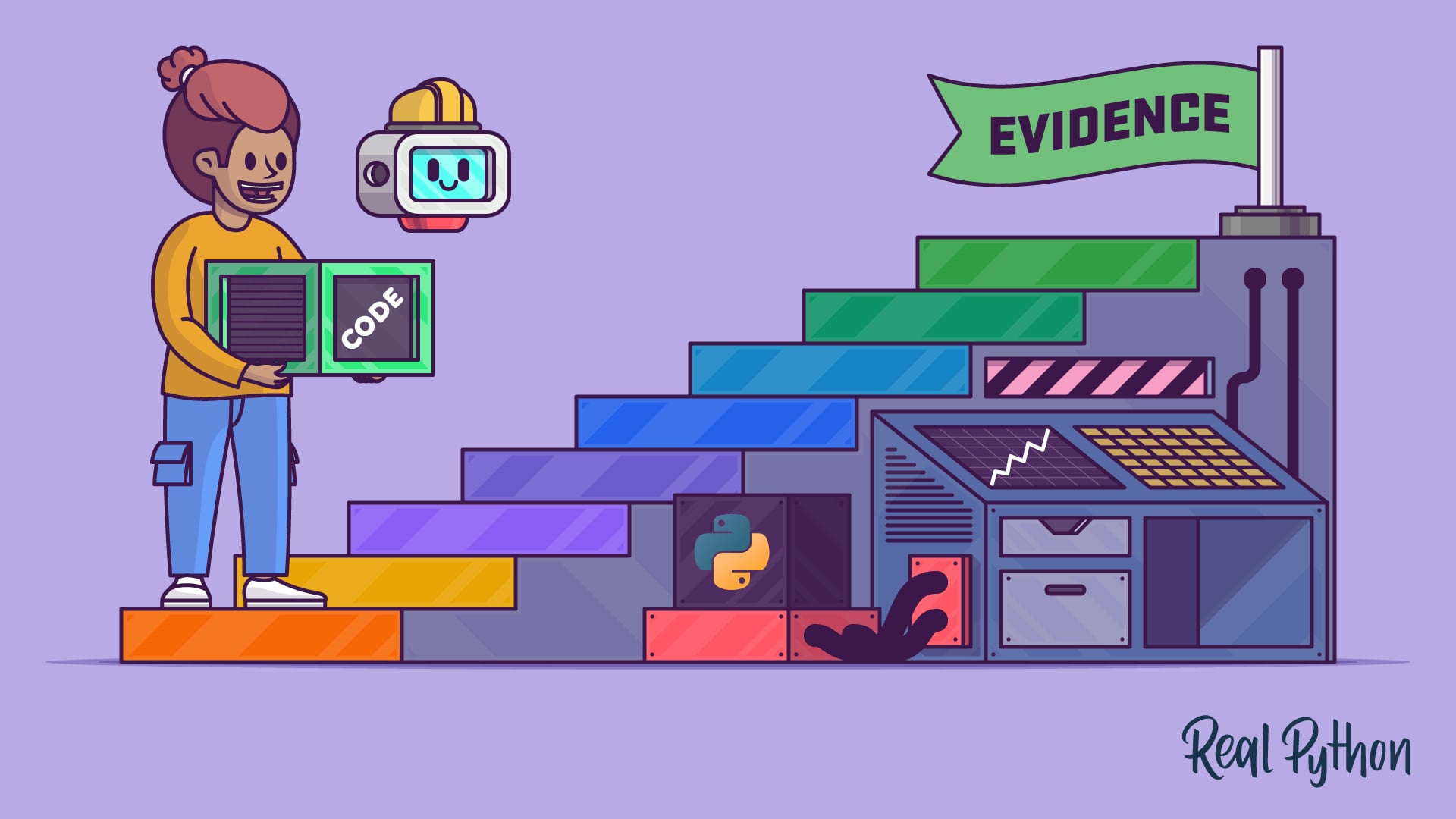
Instead of asking whether you can get a plausible result quickly, start asking what evidence you have for the code. The Engineering Evidence Ladder gives you a compact way to name the evidence you’ve gathered and the evidence you still need:
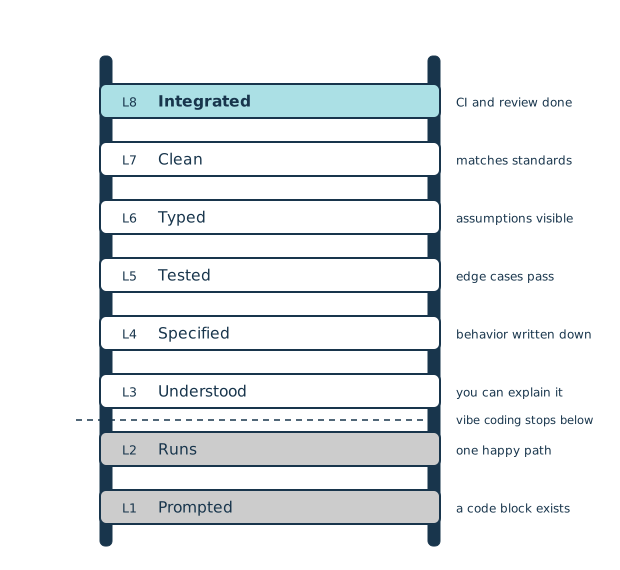
The graphic shows how the evidence for your code builds up level by level:
-
You prompted the agent to produce something, and now you have a block of code.
-
The code runs, and it generally works for your intended purpose, but may miss edge cases or not capture your business logic perfectly.
-
You can explain and understand the code, including its boundaries and scope.
-
You can specify what the code is doing and what it should be doing.
-
The code passes all tests and behaves correctly in both expected and edge cases.
-
All assumptions are visible to you and your tools. This means type hints and data models are present, and a type checker has been run. You and the agent can quickly see what’s going into a function and what’s coming out.
-
The code is clean and aligns with existing project standards—or, in a new project, with established best practices. This includes standardized code formatting, linting, small and single-focus functions, and any other conventions you want your project to follow.
-
Finally, the code is integrated into your project workflow. It has gone through
pre-commit, CI, and code review, and it includes any documented trade-offs and documentation updates.
You can use this ladder to keep one successful run from carrying too much weight. Vibe coding often stops near the bottom of the ladder, where the code exists and appears to work once. Agentic engineering keeps moving upward by making intent, behavior, assumptions, and review evidence more explicit. Fast output is useful, but it isn’t a substitute for evidence.
Note: The ladder isn’t proof that code is production-ready. A passing test can tell you that one behavior works, but it can’t prove that the business rule is correct or that the code is secure, observable, performant, deployable, or ready for every production environment. Production-ready code encompasses many things not covered in this tutorial.
Evidence-backed code doesn’t mean perfect code. It means code that you’ve made understandable enough to review and constrained enough to maintain, while still benefiting from the speed of AI coding agents.
What Agentic Engineering Can Look Like in Practice
As you saw earlier, this workflow has two connected loops: the agent execution loop, which is fast and tool-driven, and the slower, judgment-driven human acceptance loop.
To make that less abstract, imagine you maintain a small Python project with a command that imports customer rows from a CSV file. Each row includes a name, an email address, and a signup date. The current importer handles the happy path, but it doesn’t clearly define what should happen when a row has a missing email address, an invalid date, or a duplicate email address.
A vibe-coded approach might ask the agent to “fix the CSV importer” and accept the first patch that appears to work. An agentic engineering approach gives the agent a bounded task and tells it what evidence to produce:
- Update only the importer and its tests.
- Keep the existing command-line behavior unless a test requires a change.
- Reject rows with missing email addresses or invalid signup dates.
- Add tests for valid rows, missing email addresses, invalid dates, duplicate email addresses, and an empty file.
- Run
pytest,ruff, andmypy. - Ask before adding runtime dependencies or editing unrelated files.
These instructions don’t tell the agent exactly how to solve the problem. They tell the agent what done means. In the agent execution loop, the agent can inspect the importer, update the implementation, add tests, run checks, and iterate on failures until it has a candidate diff.
Once the agent produces a candidate diff, you need a repeatable way to interrogate it. The RECAP method gives you five questions to ask, in order:
| Focus | Review Question |
|---|---|
| Role | What’s this code responsible for? |
| Edges | What happens at the boundaries? |
| Contracts | What inputs, outputs, and errors are expected? |
| Assumptions | What did the agent decide without asking? |
| Proof | What evidence shows the code works? |
Before you read the walkthrough, try the review yourself on a real patch. Step through RECAP one letter at a time, decide whether each part is solid or worth flagging, and see how your call compares:
For the CSV importer example, applying the RECAP method looks like the following:
- Role: Does the changed code still only import rows, or did it also start handling unrelated command-line output, file discovery, or reporting?
- Edges: What happens with an empty file, a missing email address, an invalid date, duplicate email addresses, extra columns, or unusual Unicode text?
- Contracts: Does the importer skip invalid rows, collect them in an error report, or raise an exception?
- Assumptions: Did the agent silently decide how to handle duplicate email addresses, date formats, whitespace, or case sensitivity?
- Proof: What tests, type checks, lint checks, review notes, or CI results support the change?
That’s the difference between accepting a decent-looking change and accepting evidence-backed code. The agent can move quickly inside its loop, but you still own the final decision.
Common Pitfalls
A few things may trip you up as you work this approach into your daily development workflow.
-
Testing the implementation instead of the behavior: AI-generated tests often mirror the current implementation too closely. If a test only proves that the code does what it already does, it may miss the bug you actually care about. Write the behavior rule first, then make the test express that rule.
-
Letting the agent expand scope: Agents may add new runtime dependencies, edit unrelated files, or clean up code outside the requested task. Review the diff by file and reject unrelated changes. If the AI-generated patch grows well beyond the task, ask for a smaller change instead of trying to review everything at once.
-
Losing track of agent-generated code: In agentic engineering, it can be hard to tell which code came from which prompt, model, and task. That missing context makes later debugging and review harder. Keep an audit trail with focused commits or notes that record when a change was agent-generated, what you asked for, and which model produced the change. If the change later fails, you can revisit the right context to give it a closer review.
-
Giving the agent too much access: An agent that can edit files, run commands, and reach the network needs stronger boundaries than a chatbot that only suggests text. Use a sandbox or isolated workspace, deny access to sensitive files such as
.env, and require approval for network use, destructive commands, dependency changes, and releases.
This kind of boundary setting is an active security topic for agentic coding tools, covered in OWASP Top 10 for LLM Applications and Anthropic’s Claude Code security documentation. This area is rapidly changing, but following least-privilege principles and best practices will always be relevant.
There’s a common theme across these pitfalls: slow down at the acceptance point. Let the agent move quickly inside its task loop, but make the final decision with evidence that goes beyond the individual session. Passing checks and AI summaries are part of the review, not a replacement for it.
Conclusion
Vibe coding has its place. It’s useful for exploration, prototypes, and low-stakes experiments. But Python code that you plan to keep needs evidence. Agentic engineering gives you a workflow for creating that evidence without giving up the speed of AI coding agents.
You’ve seen how the agent execution loop and human acceptance loop work together, how the Engineering Evidence Ladder helps you name the evidence you have, and how RECAP can guide your final review. The tools will keep changing, but the core habit stays the same: delegate execution, keep ownership, and accept code only when you have enough evidence to understand, test, and review the diff.
Note: For wider context, Vivek Acharya’s paper on generative AI and software development practices traces a related path from chat-oriented programming and vibe coding to agentic programming. It uses agentic programming for a broader shift toward autonomous agents, while this tutorial uses agentic engineering for bounded delegation with human-owned intent, constraints, review, and release decisions.
For more hands-on practice with agentic coding tools, you can continue with Real Python’s Claude Code or Codex CLI courses. The Python Coding With AI learning path goes wider, covering how to choose an assistant and make it part of your daily workflow.
Get Your Cheat Sheet: Click here to download a free PDF cheat sheet of the Engineering Evidence Ladder, the RECAP review checklist, and the two loops that turn AI-generated Python into evidence-backed code.
Frequently Asked Questions
Now that you have some experience with agentic engineering in Python, you can use the questions and answers below to check your understanding and recap what you’ve learned.
These FAQs are related to the most important concepts you’ve covered in this tutorial. Click the Show/Hide toggle beside each question to reveal the answer.
Agentic engineering is a disciplined way of delegating bounded coding tasks to AI agents while you keep control over intent, constraints, review, and release decisions. The agent handles execution inside clear boundaries, but you decide whether the resulting diff has enough evidence to belong in your codebase.
With vibe coding, you steer toward a working result without closely reviewing the generated code, an approach that suits prototypes and personal scripts. Agentic engineering delegates similar work to an agent but requires tests, types, and review evidence before you accept the change, so it fits shared, production-bound projects.
Review at meaningful checkpoints rather than after every small agent action, and then apply the RECAP method once the agent produces a candidate diff. RECAP prompts you to check the code’s role, edges, contracts, assumptions, and proof, so you accept a patch because of its behavior and evidence rather than because it looks right.
The Engineering Evidence Ladder is an eight-level scale that names the evidence you’ve gathered for a piece of code, from a raw prompted block at the bottom to fully integrated code at the top. Each step upward adds explicit evidence such as understanding, tests, type checks, and project standards, so a single successful run doesn’t carry too much weight.
Vibe coding works well when you want to explore a new idea, test whether something is possible, or build a low-stakes prototype. It gets risky for code you plan to keep, since it usually asks only whether you can get a plausible result quickly rather than whether the code is correct and maintainable.
Take the Quiz: Test your knowledge with our interactive “Agentic Engineering in Python: From Vibes to Evidence” quiz. You’ll receive a score upon completion to help you track your learning progress:
Interactive Quiz
Agentic Engineering in Python: From Vibes to EvidenceTest your understanding of agentic engineering in Python, from bounded tasks and review loops to the evidence that makes a diff safe to keep.