When your test suite passes, you know the code matches your tests. However, if an AI agent wrote both, then all you know is that the agent agrees with itself. TDD with AI agents keeps you in control. First, you design the tests that define what the feature should do, and then the agent writes code to make those tests pass.
Test-driven development (TDD) is a cycle in which you write a failing test, make it pass, and then refactor. Working with an AI agent doesn’t change this cycle, but it changes who handles which part. You make the design decisions, and the agent does the drafting:
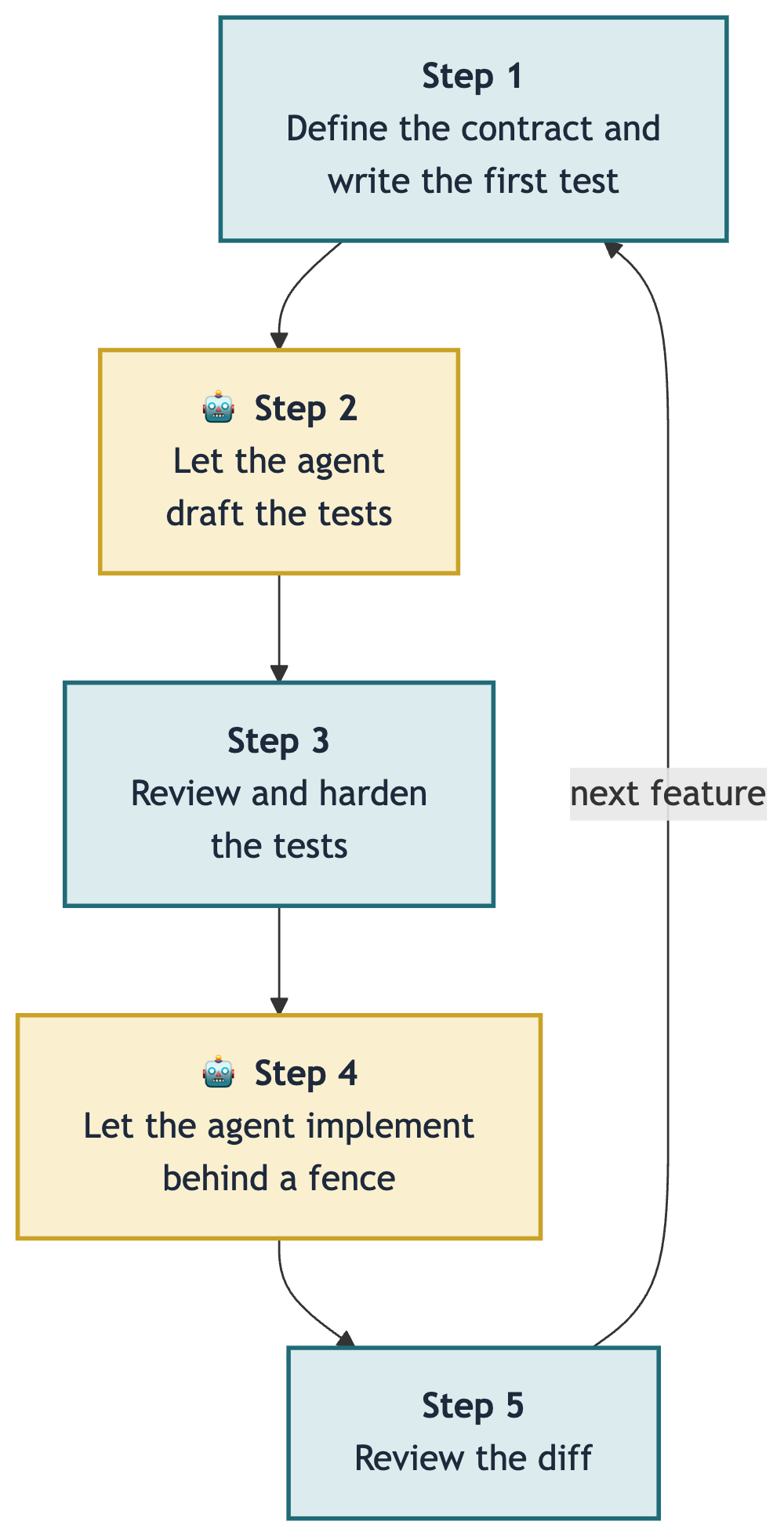
This loop is how you apply TDD when you let an AI agent write the implementation.
In this tutorial, you’ll practice this loop by building a small Python version comparator. Python has its own versioning rules, defined in the version specifiers specification, where 1.0.dev1 sorts before 1.0a1, which sorts before 1.0. While you’d typically use the packaging library in production, you’ll build your own here to work with a real contract worth testing.
Get Your Code: Click here to download the free sample code you’ll use to build a Python version comparator by designing the tests first and letting an AI agent write the implementation.
Take the Quiz: Test your knowledge with our interactive “TDD With AI Agents: Design the Tests First, Let the Agent Implement” quiz. You’ll receive a score upon completion to help you track your learning progress:
Interactive Quiz
TDD With AI Agents: Design the Tests First, Let the Agent ImplementCheck your grasp of TDD with AI agents in Python. Write the contract and tests first, then let a coding agent implement code that passes them.
Prerequisites
To follow along with this tutorial, you’ll need a few tools on your machine:
- Python 3.11 or newer along with
pytest - A coding agent that can read and write files in your project
The sample project imports nothing beyond Python’s standard library, so pytest is the only package that you’ll need to install. Create and activate a virtual environment first, and then install pytest into it.
You should be comfortable with pytest, including how to parametrize tests. Prior experience with test-driven development helps too, but it isn’t required. If you want some practice first, Real Python’s Test-Driven Development With pytest video course shows you how to write unit tests, run them, and catch bugs before your users do. This tutorial walks you through the cycle one step at a time.
The demo uses Claude Code, but the loop doesn’t depend on it. Other repository-aware agents like GitHub Copilot CLI, Antigravity CLI, and OpenCode can follow the same workflow. If you haven’t worked with one before, then Real Python’s AI coding agents guide explains how IDE, terminal, pull request, and cloud agents each fit into a Python workflow.
Building With AI Agents Live Course: Want to practice this workflow on a bigger project? In Real Python’s Building Python Projects With AI Agents live course, you build a real project with an agent writing every line while you write the specification, judge what comes back, and sharpen your testing judgment. Join the waitlist to hear about the next dates.
The Loop for TDD With AI Agents
Each turn of the loop has five steps. You handle three of them and let the agent handle two:
- Define the Contract and Write the First Test: You decide how the feature should behave externally and write the first test by hand.
- Let the Agent Draft the Tests: The agent reads your contract and your first test, then generates more test cases in the same style.
- Review and Harden the Tests: You check the generated tests against your contract and add any missing edge cases.
- Let the Agent Implement: The agent writes code until the tests pass, while you block writes to
tests/. - Review the Diff: You check the code changes and then move to the next feature.
Step 2 is where this loop differs from handing over the whole feature to an agent. The agent drafts tests while reading only your contract and your first test. If you ask for tests after the implementation code already exists, then the tests will describe that code, bugs and all.
Step 1: Define the Contract and Write the First Test
The first step is yours. Before an agent writes anything, you decide what the feature does and lock that decision into a test. Everything the agent produces later has to fit the shape you set here.
The feature that you’ll build to practice the TDD workflow is a Version class, which turns a version string into something you can compare with < and >. You’ll first lay out the project, then define what Version promises and write the test that pins it down.
Set Up the Project
You’ll build a small project with a flat layout. Your implementation will live in core.py, and your tests will sit in a separate tests/ directory:
version-check/
│
├── version_check/
│   ├── __init__.py
│   └── core.py
│
└── tests/
    └── test_core.py
Create these directories and files now, including an empty core.py that the agent will fill in later. Then export the public Version name from __init__.py: