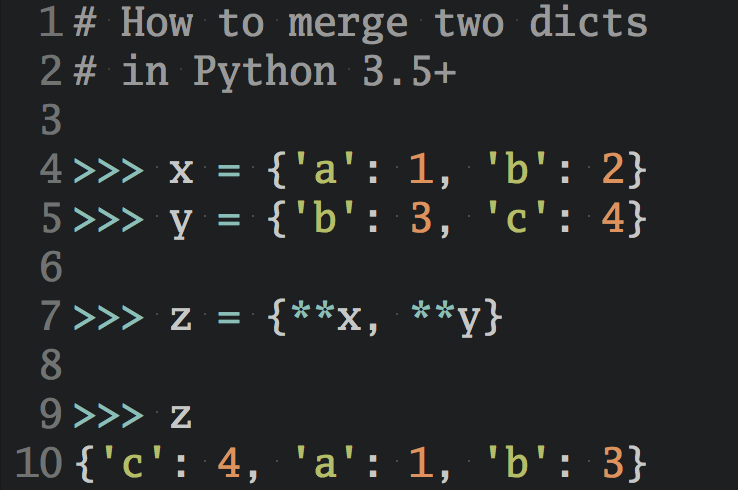
When I talk to developers in stable, more senior roles, I keep noticing the same thing: many haven’t had time to properly try AI coding tools. If you’re a junior who’s spent the last few months experimenting, you may have more hands-on AI experience than they do.
The reasons have nothing to do with senior developers being slow or stubborn. They come down to time and a kind of caution that I think is well placed.
I talk about this, along with more advice for junior developers, in this community video:

Free Starter Kit: Click here to get the Junior Dev AI Starter Kit with cheat sheets, a video course, and quizzes that help you sharpen your fundamentals and use AI tools well.
Take the Quiz: Test your knowledge with our interactive “Why Junior Developers Might Know More About AI Than Seniors” quiz. You’ll receive a score upon completion to help you track your learning progress:
Interactive Quiz
Why Junior Developers Might Know More About AI Than SeniorsCheck what you know about how junior developers can use hands-on AI experience as an edge and how to pair it with senior know-how.
A Full-Time Job Leaves Little Room to Experiment
Picture a developer who’s been at the same company for eight years. Their days are full of code reviews and a migration that’s three sprints behind. At nine in the evening, they’re not going to install three coding agents and compare how each one handles the same refactoring, and that’s fair. They’ve earned their evenings off.
There’s an emotional side, too. When you’ve spent years honing a skill, a tool that promises to do the work for you can feel like something scary scratching at the door, waiting to take your job. Unless AI sparks your curiosity, why invite it in after hours?
Their experience pays off once they do start. When an assistant generates a database migration, an experienced developer is much more likely to spot the operation that would lock a busy table.
Companies Have Good Reasons to Be Careful
Then there are employers. Companies don’t want just any AI client in their codebase when nobody can say for sure where the code and data end up. Licenses also cost money, so you can’t give every developer every tool. Put those two together, and many teams end up in the same place:
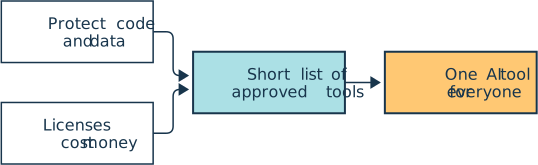
Most developers work on teams that have settled on one AI tool, and they code with that one assistant in whatever form it takes. Someone in that setup can use one AI tool thoughtfully without ever having tried a command-line coding agent. That’s where you can use diverse AI knowledge to your advantage.
Your Side Project Has No Compliance Department
When you’re job hunting, no security review stands between you and the next tool you want to try. For example, take a small Flask app from your portfolio and give the same task to a few different tools:
Add pytest tests for the login route, and explain what each test checks.
Try it in a chat window with ChatGPT, in an AI editor like Cursor, and with a command-line agent like Claude Code or Codex.
Then compare the results. Did any tool ask a clarifying question first? Which one touched files you didn’t expect, and which explanation finally made fixtures click? You now have firsthand opinions that many people in steady jobs haven’t had the chance to form yet.
A New Framework Is a Smaller Mountain Now
Say you learned Flask, and the job ad you’re excited about asks for Django. Before AI, getting far enough into a new framework to apply with confidence took a long time. It’s still not a weekend project, but now you can start from what you already know.
You can use an AI tool like Real Python’s Mentor AI to guide you through the next steps:
What would a Flask view look like in Django?
With AI on your side, you can build something small, break it, and ask the AI to explain the traceback before you let it fix anything. That gives you a credible interview answer: “I don’t know all the ins and outs of Django yet, but I know how to use AI to get there and to be confident in the code I’m shipping.”
You Arrive With a Backpack of AI Knowledge
All of this means you can arrive at your next job with a little backpack of AI knowledge. You might be the one who shows the team how to have GitHub Copilot review a pull request or how to write a CLAUDE.md file.
The backpack goes both ways, though. Your senior colleagues carry one too, and theirs is much heavier. The best version of this is a trade, where each side brings what the other is missing:
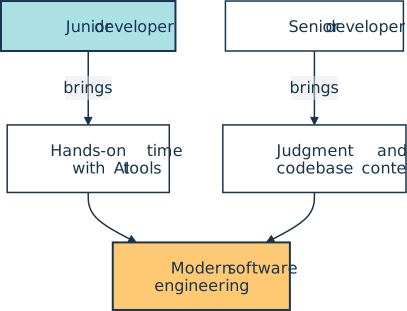
You show them a workflow that saves them an hour, and they show you why the code that workflow produced shouldn’t be merged. If you’re a senior developer or team lead reading this, it’s worth setting up that trade on purpose. Ask your curious junior to demo what they’ve been trying, and pair them with someone who’ll poke holes in it.
If you’re the junior and want to start packing, we put together the free Junior Dev AI Starter Kit. It walks you through four steps, from strengthening your fundamentals to talking about AI in interviews. It includes cheat sheets on Git and AI coding agents, our Getting Started With Claude Code video course, sample code and quizzes on AI debugging and code review, and ad-free community videos. All you need is a free Real Python account:
Free Starter Kit: Click here to get the Junior Dev AI Starter Kit and start packing your own backpack of AI knowledge.
Curiosity Is on Your Side
I don’t want any of this to sound like “just learn AI, and everything will be fine.” AI won’t fix the job market, and it doesn’t replace the fundamentals. It’s a strange and sometimes scary time to be starting out.
But one thing is in your favor: you have the curiosity and, for now, the freedom to follow it. Plenty of experienced developers would love more time for exactly that. Keep the joy in building things, and bring your AI skills to your next team with some humility. You’ll have plenty to learn from them and something to teach in return.

Free Junior Dev AI Starter Kit: Videos, Cheat Sheets, and Quizzes
Everything a junior developer needs to learn coding fundamentals and use AI tools well: a video, cheat sheets, sample code, a full video course, and quizzes to check your progress.
Further Reading
- Coding Fundamentals Won’t Get You Hired, the video this post is based on
- AI Coding Agents Guide: A Map of the Four Workflow Types
- How to Review AI-Generated Python Code Efficiently
- Episode #300: Maintaining Your Python Developer Instincts While Using LLM Tools
Take the Quiz: Test your knowledge with our interactive “Why Junior Developers Might Know More About AI Than Seniors” quiz. You’ll receive a score upon completion to help you track your learning progress:
Interactive Quiz
Why Junior Developers Might Know More About AI Than SeniorsCheck what you know about how junior developers can use hands-on AI experience as an edge and how to pair it with senior know-how.