Python 3.15 adds a frozendict built-in, giving dictionaries the immutable counterpart that lists and sets have had for years. Freezing a mapping buys you two things. You get safety, since nothing can deliberately or accidentally mutate it once it’s built. You also get hashability, which opens doors that stay shut for a regular dict. In this tutorial, you’ll use a frozen mapping as a dictionary key, a set member, and a cache argument.
By the end of this tutorial, you’ll understand that:
- Python 3.15 ships
frozendictas a built-in type, so you never have to import anything to use it. - A
frozendictis hashable only when all of its keys and values are hashable. frozendictdoesn’t inherit fromdict, so your existingisinstance()checks won’t accept one.- The freeze is shallow, so a nested list stays mutable and drags the whole mapping’s hashability down with it.
- The augmented assignment operator (
|=) rebinds your variable to a new object instead of mutating the old one.
Along the way, you’ll trace the fourteen-year road that three separate PEPs took to get here, watch the mutation methods vanish from a real REPL session, and work through the cases where reaching for a frozen mapping pays off. You’ll also see exactly where immutability has its limits.
Note: The examples in this tutorial were tested with Python 3.15.0rc2, so you may see minor cosmetic differences on the final 3.15 release.
Get Your Code: Click here to download the free sample code you’ll use to build immutable mappings you can hash, cache, and share across threads with Python 3.15.
Take the Quiz: Test your knowledge with our interactive “Python 3.15 Preview: frozendict” quiz. You’ll receive a score upon completion to help you track your learning progress:
Interactive Quiz
Python 3.15 Preview: frozendictTest your grasp of Python 3.15's frozendict: build immutable mappings, hash them, and use them as dictionary keys.
Get to Know Python 3.15’s New frozendict Type
Python’s dictionaries have long been the odd ones out among the built-in data containers. For example, you can think of a tuple as a read-only counterpart to a list and a frozenset as an immutable counterpart to a set. But until Python 3.15, nothing offered that immutable twin for a dict. Python 3.15 finally closes that asymmetry with a new built-in type.
PEP 814 adds frozendict to the built-in namespace as an immutable mapping type. It behaves like a dictionary whose contents are fixed once you build it, so you can read the mapping but never add, remove, or replace a key or a value. That restriction is what lets a frozen mapping be hashable, safely shared across threads, and used in places a regular dict can’t go.
Why did that take until 2026? Dictionaries have been in Python since the beginning, and the need for a frozen one isn’t exactly new.
Trace the History of Frozen Mappings
Victor Stinner first proposed a frozendict built-in back in 2012. PEP 416 laid out much the same design that eventually shipped, and Guido van Rossum rejected the PEP on the grounds that almost nobody was asking for one. The people who did use frozen mappings, he argued, treated them as a hint rather than a guarantee:
According to Raymond Hettinger, use of frozendict is low. Those that do use it tend to use it as a hint only, such as declaring global or class-level “constants”: they aren’t really immutable, since anyone can still assign to the name.
— Guido van Rossum
As things turned out, that rejection wasn’t a dead end. Guido closed the PEP by suggesting that exposing Python’s existing read-only dictionary proxy as a public type sounded worthwhile, and types.MappingProxyType arrived in Python 3.3 as a direct result. For over a decade, that proxy was the closest thing to an answer.
Seven years later, Yury Selivanov tried a different angle. PEP 603 proposed a frozenmap type for the collections module, built on a hash array mapped trie so that you could cheaply derive a modified copy. That PEP is still sitting in draft status today, never accepted and never formally rejected.
Meanwhile, the community had long since stopped waiting for the standard library to catch up. Third-party packages like frozendict and immutables filled the gap for anyone who needed an immutable mapping badly enough to add a dependency.
What finally changed the calculus was free threading. When multiple threads genuinely run Python code at the same time, a mapping that nobody can mutate stops being a stylistic preference and starts being a concurrency tool. PEP 814 landed for Python 3.15, fourteen years after the first attempt.
Compare MappingProxyType With frozendict
If you’ve reached for MappingProxyType before, then you might wonder what frozendict adds, given that the proxy already blocks writes:
>>> from types import MappingProxyType

>>> settings = {"debug": False}

>>> readonly = MappingProxyType(settings)
>>> readonly
mappingproxy({'debug': False})

>>> readonly["debug"] = True
Traceback (most recent call last):
  ...
TypeError: 'mappingproxy' object does not support item assignment
The catch is that a proxy isn’t a copy. It’s a live view onto a dictionary that somebody else still owns, so changes to the original show straight through:
>>> settings["debug"] = True
>>> readonly["debug"]
True
Nobody wrote through the proxy, and yet the value it reports changed. The proxy protects the object from you, not from whoever handed it to you.
The second limitation cuts deeper than the first. A proxy delegates hashing to whatever sits underneath it, so wrapping a dictionary leaves you with something you still can’t hash:
>>> hash(readonly)
Traceback (most recent call last):
  ...
TypeError: unhashable type: 'dict'
Read that error closely because it names dict rather than mappingproxy. A proxy is only ever as hashable as the object it wraps, which rules out using a proxy as a dictionary key, as a set member, or as a cached function’s argument. In contrast, a frozendict copies its contents and hashes them itself.
Try frozendict on Python 3.15
You’ll need Python 3.15 or later to follow along. The quickest route is uv, which downloads and caches an interpreter for you:
$ uv run --python 3.15 python
That command drops you straight into a REPL running Python 3.15, without touching your system installation or your current project.
If you’d rather manage versions the traditional way, then pyenv works just as well:
$ pyenv install 3.15
$ pyenv shell 3.15
$ python
Either approach leaves your existing interpreters alone. For the full picture, including the official installers, have a look at the guide to installing Python.
Because frozendict is a built-in type, you don’t need to import anything to check whether you’ve got the right interpreter:
Python 3.15
>>> frozendict
<class 'frozendict'>
Seeing that class object means you’re on Python 3.15 or later. On any earlier version, the same line fails, and Python even guesses at what you meant:
Python 3.14
>>> frozendict
Traceback (most recent call last):
  ...
NameError: name 'frozendict' is not defined. Did you mean: 'frozenset'?
That suggestion is so close, and yet so far. Python 3.14 knows about the frozen set but has nothing to offer for the frozen dictionary.
Construct Frozen Dictionaries
PEP 814 gives frozendict four construction forms, which will look familiar because they mirror the ones dict already accepts. You can call frozendict() with:
- Nothing at all
- Keyword arguments (
**kwargs) - A collection passed as a positional argument
- A collection and keyword arguments together
Note that there’s no literal syntax, so every frozen mapping starts with a constructor call.
Create an Empty Frozen Dictionary
The most straightforward call takes no arguments at all, and Python echoes it right back:
>>> frozendict()
frozendict()
An empty frozendict is displayed simply as frozendict(), without an empty mapping inside the parentheses. The same empty result is produced when you pass an empty dictionary or an empty iterable of key-value pairs:
>>> frozendict({})
frozendict()

>>> frozendict([])
frozendict()
In every other respect, it behaves like any empty container. It has a length of zero, and it’s falsy:
>>> len(frozendict())
0

>>> bool(frozendict())
False
That brings up a fair question. What good is a container that starts out empty and can never be filled?
The answer is that an empty frozen mapping earns its keep as a neutral element rather than as a container. It’s the mapping equivalent of the 0 you start a sum with. It’s a stand-in for nothing here that’s still a real object you can pass around, hash, and share.
That turns out to be particularly useful in three places, each of which you’ll encounter later in this tutorial:
- As a default argument value, where a frozen mapping can’t absorb writes the way the classic mutable default can.
- As a starting value for the dictionary union, where merging with an empty mapping is free rather than merely cheap.
- As a lookup key, where an empty frozen mapping hashes cleanly as a dictionary key or a cached call’s argument, while an empty
dictcan’t be hashed at all.
These examples use different properties of the same kind of object. An empty frozendict is a complete mapping with zero entries. It can be safely reused as a default because it’s immutable. It adds nothing to a union because it has no entries, and it serves as a lookup key because it’s hashable.
With the empty case covered, the remaining three construction forms all put key-value entries into the mapping. You’ll probably reach for the next one most often.
Pass Keyword Arguments
The most readable form takes keyword arguments, exactly like the dict() constructor:
>>> frozendict(name="John", age=42)
frozendict({'name': 'John', 'age': 42})
Notice that the string representation wraps a dictionary display in the type name, so you can always tell a frozen mapping from a regular one at a glance.
This form is limited in one way that catches people out. Keyword arguments have to be valid Python identifiers, so you can’t build a mapping with a key like "Content-Type" this way.
Freeze an Existing Mapping
Pass a single positional argument, and you get a frozen copy of whatever you handed over. That argument can be any mapping, including defaultdict, OrderedDict, ChainMap, Counter, and even a MappingProxyType. It can also be an iterable of key-value pairs, and you can combine either form with keyword arguments:
>>> person = {"name": "John", "age": 42}
>>> frozendict(person)
frozendict({'name': 'John', 'age': 42})

>>> frozendict([("name", "John"), ("age", 42)])
frozendict({'name': 'John', 'age': 42})

>>> frozendict(person, age=43)
frozendict({'name': 'John', 'age': 43})
The last call shows how conflicts resolve. Keyword arguments are applied after the positional collection, so age=43 wins over the 42 that came from person.
Now for the part that trips people up. The copy is shallow, which means frozendict freezes the mapping itself and leaves whatever the values point at completely untouched:
>>> settings = frozendict({"hosts": ["web-1", "web-2"]})
>>> settings["hosts"].append("web-3")
>>> settings
frozendict({'hosts': ['web-1', 'web-2', 'web-3']})
No exception, no complaint. Is that a bug? Not at all—you can’t rebind the "hosts" key, but the list it points to is as mutable as it ever was.
Note: Expecting frozendict to freeze nested values is the single most common misconception about frozen mappings. The guarantee covers one level and stops. If you need the whole structure frozen, then use immutable values throughout—tuples instead of lists, frozensets instead of sets, and nested frozendicts instead of nested dicts.
This isn’t a detail you can file away for later. It’s also what decides whether your mapping can be hashed at all, as you’ll find out shortly.
There may eventually be a shorter way to write all this. PEP 841 proposes an f{...} display syntax for frozen containers, so that f{"key": "value"} would build a frozendict the way {...} builds a dict. That PEP is still a draft targeting Python 3.16, so for now, a constructor call is how you make one. Whichever form you picked, what you get back reads just like a dictionary.
Explore the Read-Only Interface of frozendict
Everything you can do to a dictionary without changing it, you can do to a frozen one. Lookups, membership tests, iteration, and the view methods all behave identically because both types run on the same hash table underneath, a structure you can build yourself in Python. What’s genuinely interesting is how Python signals the operations you’ve lost.
Use the Read-Only Mapping Operations
Say you’re modeling the solar system, with each planet’s average distance from the sun in kilometers. Because those distances aren’t going to be revised any time soon, a frozen mapping fits:
>>> planets = frozendict({
...     "Mercury": 57_910_000,
...     "Venus": 108_200_000,
...     "Earth": 149_600_000,
...     "Mars": 227_900_000,
...     "Jupiter": 778_500_000,
...     "Saturn": 1_434_000_000,
...     "Uranus": 2_871_000_000,
...     "Neptune": 4_495_000_000,
... })
That’s a frozendict with eight entries, built from a regular dictionary literal passed as a single positional argument.
Everything you already know about reading a dictionary carries over unchanged. Length, membership tests, subscripting, and .get() all behave the way you’d expect:
>>> len(planets)
8

>>> planets["Earth"]
149600000

>>> "Pluto" in planets
False

>>> planets["Pluto"]
Traceback (most recent call last):
  ...
KeyError: 'Pluto'

>>> planets.get("Pluto", "a dwarf planet")
'a dwarf planet'
A missing key raises KeyError, and .get() returns the specified fallback, precisely as they would on a dict.
Iteration works the same way too, and the dictionary views you get back are the same types that dict returns. Here’s the solar system to scale, more or less:
>>> for name, distance in planets.items():
...     scaled = round(60 * distance / max(planets.values()))
...     print(" " * scaled + "\N{RINGED PLANET}", name)
...
 🪐 Mercury
 🪐 Venus
  🪐 Earth
   🪐 Mars
          🪐 Jupiter
                   🪐 Saturn
                                      🪐 Uranus
                                                            🪐 Neptune
The four inner planets bunch up against the left margin while Neptune drifts off toward the right. That’s a fair picture of how much empty space the outer solar system holds!
Identify the Missing Mutation Methods
Your attempts to change a frozendict don’t always fail in the same way. The difference can give you a useful clue about how immutability is implemented.
When you try to modify a frozendict using item assignment or the del statement, Python raises a TypeError:
>>> planets["Pluto"] = 5_906_000_000
Traceback (most recent call last):
  ...
TypeError: 'frozendict' object does not support item assignment

>>> del planets["Earth"]
Traceback (most recent call last):
  ...
TypeError: 'frozendict' object does not support item deletion
Those messages say the operation isn’t supported, which is Python’s standard phrasing when a type doesn’t implement the relevant special method.
Regular method calls, on the other hand, raise an AttributeError:
>>> planets.clear()
Traceback (most recent call last):
  ...
AttributeError: 'frozendict' object has no attribute 'clear'

>>> planets.update({"Pluto": 5_906_000_000})
Traceback (most recent call last):
  ...
AttributeError: 'frozendict' object has no attribute 'update'.
⮑ Did you mean to use a 'dict' object?
These methods aren’t merely disabled. They genuinely aren’t there, and Python’s suggestion machinery is reduced to pointing you at a different type entirely.
Together, these errors show that frozendict omits both the dictionary methods that alter contents and the special methods needed for item mutation, preserving the mapping after creation.
You can see the whole missing surface in one shot by taking a set difference against dict and pretty-printing it:
>>> from pprint import pp
>>> pp(set(dir(dict)) - set(dir(frozendict)))
{'__delitem__',
 '__ior__',
 '__setitem__',
 'clear',
 'pop',
 'popitem',
 'setdefault',
 'update'}
There are eight names, and every one of them performs a write operation. Keep .__ior__() in mind because its absence explains a behavior you’ll see later on.
Place frozendict in Python’s Type Hierarchy
Given how much they share, you’d be forgiven for assuming that frozendict subclasses dict, but it doesn’t. Have a look at their method resolution order:
>>> issubclass(frozendict, dict)
False

>>> dict.__mro__
(<class 'dict'>, <class 'object'>)

>>> frozendict.__mro__
(<class 'frozendict'>, <class 'object'>)
Both types descend directly from object, and neither knows anything about the other.
By not inheriting from dict, frozendict stays on the right side of two SOLID principles. It avoids violating the Liskov substitution principle, since callers expecting a mutable dictionary shouldn’t receive an object that rejects mutation. It also honors the interface segregation principle because a dict subclass would inherit all eight write methods you saw a moment ago and have to override every one of them just to raise an error.
PEP 814 deliberately rejected the idea of making frozendict a subclass of dict for another reason. A dict subclass still exposes the mutable dictionary implementation, so code could bypass an overridden .__setitem__() method by calling dict.__setitem__() directly and changing the instance’s contents. That would undermine the type’s immutability.
Keeping frozendict separate from dict avoids exposing this mutation path instead of trying to block every possible workaround.
Note: Any code that guards with isinstance(x, dict) will reject a frozendict. If you maintain a library that checks its arguments this way, then Python 3.15 gives you a new case to think about.
Where the two types do meet is their abstract base classes. Both register as a Mapping, but only dict is a MutableMapping:
>>> import collections.abc

>>> issubclass(dict, collections.abc.Mapping)
True
>>> issubclass(frozendict, collections.abc.Mapping)
True

>>> issubclass(dict, collections.abc.MutableMapping)
True
>>> issubclass(frozendict, collections.abc.MutableMapping)
False
There’s the explanation for the eight dict methods that are missing from frozendict. The MutableMapping interface is what promises .update(), .pop(), and the rest, and frozendict never signs up for it. Here’s how both types line up against their abstract base classes:
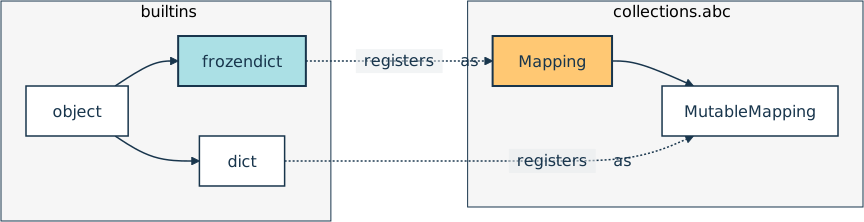
That also settles the isinstance() problem from a moment ago. Swapping isinstance(x, dict) for isinstance(x, collections.abc.Mapping) accepts both types, and MutableMapping narrows the check back down when your code does write. The same split gives you a rule for type hints: annotate a parameter as Mapping when your function only reads from it, and reach for MutableMapping or dict only when you intend to write.
Under the hood, the two types are closer than the hierarchy suggests. PEP 814 specifies that frozendict shares most of its C implementation with dict, with PyFrozenDictObject extending PyDictObject and adding one extra field. Lookups go through the same hash table machinery, so you’re not paying for the immutability on every read.
Merge, Compare, and Hash
Immutability doesn’t mean you’re stuck with whatever you built first. It means every operation that looks like a change hands you a new object instead, leaving the original exactly as it was. That distinction shows up in all three operations below, and the last of them is what makes frozen mappings worth reaching for in the first place.
Merge With the Union Operator
The union operator merges two dictionaries, and it lets you happily mix frozen and regular ones. The left-hand mapping determines the type of the result:
>>> dict(theme="light") | frozendict(cookie_consent=True)
{'theme': 'light', 'cookie_consent': True}

>>> frozendict(cookie_consent=True) | dict(theme="light")
frozendict({'cookie_consent': True, 'theme': 'light'})
When you put a dict on the left side of the union, you get a new dict containing the merged key-value pairs from both operands. Similarly, when you put a frozendict on the left, you get a new frozen mapping. Notice that the resulting mapping preserves insertion order. The key-value pairs from the left operand appear first, followed by those from the right operand.
Values resolve in the opposite direction from types. If the same key appears on both sides, then the value from the right-hand operand takes precedence:
>>> frozendict(theme="light") | frozendict(theme="dark", cookie_consent=True)
frozendict({'theme': 'dark', 'cookie_consent': True})
Here, the "theme" key appears in both mappings. Because the right-hand value wins, the theme becomes "dark". Meanwhile, keys that appear only once, like "cookie_consent", carry over unchanged.
Frozen mappings come with one small optimization that you get for free. When you merge a frozen dictionary with an empty mapping, there’s nothing to add, so Python doesn’t bother building a new object. Instead, it hands the existing frozen dictionary right back:
>>> config = frozendict(host="localhost")
>>> (config | frozendict()) is config
True
>>> (frozendict() | config) is config
True
>>> (config | {}) is config
True
Remember that is asks whether two names point to the exact same object in memory, which is a stricter question than whether they hold equal values. Because all three checks come back True, you know Python didn’t allocate anything. It spotted that the empty mapping had nothing to contribute and gave you config itself.
The shortcut only ever hands back a frozen dictionary, though. Swap in a regular dictionary, and you get a fresh object:
>>> settings = {"host": "localhost"}
>>> (frozendict() | settings) is settings
False
>>> frozendict() | settings
frozendict({'host': 'localhost'})
Python has to build something new here because handing you settings would give you a mutable dictionary from an expression that must produce an immutable one. That’s also why plain dictionaries never get this treatment at all. Reusing a mutable object would let two names quietly share future edits. Immutability is precisely what makes the reuse safe.
Finally, treat this as a bonus rather than a promise. PEP 814 pins down what the merged result equals, not which object you receive, so the identity shortcut is a CPython implementation detail that another interpreter is free to skip. The PEP is explicit about the same distinction elsewhere, noting that frozendict.copy() returns the same frozen dictionary in CPython.
Note: For a deeper explanation of the difference between equality and identity, see Python != Is Not is not: Comparing Objects in Python.
Why should you care about that? Because it makes an empty frozendict() a sensible starting point when you want to collapse a whole stack of mappings into one. Configuration is the classic example, where each layer refines the one below it:
>>> from functools import reduce
>>> from operator import or_

>>> global_settings = frozendict(theme="light", editor="vim", telemetry=True)
>>> user_settings = frozendict(theme="dark")
>>> project_settings = frozendict(editor="code", telemetry=False)

>>> layers = [global_settings, user_settings, project_settings]
>>> reduce(or_, layers, frozendict())
frozendict({'theme': 'dark', 'editor': 'code', 'telemetry': False})
The reduce() function walks your list from left to right, combining the running result with the next mapping using or_(), which is the function form of the union operator (|). That final frozendict() argument is the starting value, so the first merge is frozendict() | global_settings. Thanks to the shortcut you saw a moment ago, it costs nothing at all.
After that, each layer overrides whatever came before it. Your personal preference for a dark theme wins over the global default, while the project turns off telemetry and switches the editor.
Now, what if you seeded that fold with a plain {} instead? You’d pay twice for it. The left operand decides the result type, so you’d end up with a regular dict and lose the immutability you wanted in the first place. On top of that, merging an empty dict with a mapping does build a new object, so you’d pay for a copy on step one.
Watch |= Rebind Instead of Mutate
The augmented assignment operator is where immutability gets more interesting. On a dict, |= updates the object in place, which means Python modifies the existing mapping rather than building a new one, and your variable keeps pointing at the same object. A frozen mapping can’t be modified that way, so Python does the next best thing:
>>> config = alias = frozendict(host="localhost", port=8000)
>>> config is alias
True
>>> id(config)
140141948709728

>>> config |= {"host": "127.0.0.1"}
>>> config is alias
False
>>> id(config)
140141948709888
The identity changed, which means config is now pointing at a completely different object. Because frozendict doesn’t implement the .__ior__() special method, Python falls back to .__or__() and rebinds the name to the result.
That fallback has a consequence you need to see rather than take on faith. Any other variable still holding the original object keeps seeing the original value:
>>> config
frozendict({'host': '127.0.0.1', 'port': 8000})

>>> alias
frozendict({'host': 'localhost', 'port': 8000})
If config had been a regular dictionary, then alias would’ve shown the new hostname too because both variables would refer to one mutated object.
None of this is special to mappings. Augmented assignment mutates in place only when the type implements the matching in-place method, like .__ior__() or .__iadd__(). Immutable types can’t, so Python falls back to the binary operator and rebinds your name to a new object. That’s why += on a tuple or a str behaves the same way, leaving every other reference pointing at the old value.
Know When a frozendict Is Hashable
Everything up to this point has been a matter of convenience. Hashing is the feature that makes frozendict worth having. Can you hash any frozen mapping you like, then? Not quite. A frozen mapping is hashable only when all of its keys and all of its values are hashable.
There’s one familiar rule to get out of the way first. Dictionary keys must already be hashable, so an unhashable key is rejected straight away when you build the mapping, regardless of whether the mapping is mutable:
>>> frozendict([(set(), "value")])
Traceback (most recent call last):
  ...
TypeError: cannot use 'set' as a frozendict key (unhashable type: 'set')
In this case, you attempted to use an empty set as a dictionary key. That’s the same error a plain dictionary would give you, raised before the object ever exists. You’ll observe a similar error when passing a dict literal into your frozendict() constructor:
>>> frozendict({set(): "value"})
Traceback (most recent call last):
  ...
TypeError: cannot use 'set' as a dict key (unhashable type: 'set')
This time, the error happens even earlier. Python has to build the inner dict before it can pass it to frozendict(), and that dict rejects the unhashable key first. So frozendict() never gets a chance to see it.
Like a regular dict, a frozendict can contain unhashable values. That’s the only thing that can make a frozendict itself unhashable:
>>> settings = frozendict(hosts=["web-1", "web-2"])
>>> hash(settings)
Traceback (most recent call last):
  ...
TypeError: unhashable type: 'list'
Notice that you can successfully construct a frozen mapping with a mutable list as one of its values. That’s because frozendict freezes only the mapping itself. It doesn’t recursively freeze the objects stored as values. The list can still be mutated, and because lists are unhashable, this frozendict can’t itself be hashed.
Swap the mutable value for an immutable one, and the mapping hashes without complaint, though:
>>> settings = frozendict(hosts=("web-1", "web-2"))
>>> hash(settings)
6407270406738776424
Merely replacing the list with a tuple was enough to make your frozendict hashable. If you’d like to keep a nested structure hashable all the way down, then use this pattern:
>>> settings = frozendict({
...     "hosts": frozendict({
...         "web-1": "192.0.2.10",
...         "web-2": "192.0.2.11",
...     })
... })
>>> hash(settings)
8108088924820400372
Whenever you nest containers, each layer has to be immutable in its own right. A tuple replaces list, frozenset replaces set, and frozendict replaces dict. If you miss one, then the whole structure becomes unhashable.
Swap each value between its mutable and immutable form to watch that rule decide the outcome:
Notice how the result changes whenever one nested value changes between a mutable and immutable form. Every object contained in the frozendict must be hashable for the frozendict itself to be hashable.
As for how the number itself gets computed, PEP 814 specifies it as the hash of a frozen set built from the mapping’s items. You can verify that directly:
>>> platform = frozendict(os="linux", arch="amd64")
>>> hash(platform) == hash(frozenset(platform.items()))
True
That choice follows from how mappings have always compared. Two dictionaries with the same items are equal no matter what order you built them in, and Python requires equal objects to have equal hash values. Hashing a set of items rather than a sequence of them is what keeps the hash in step with that rule:
>>> frozendict(os="linux", arch="amd64") == frozendict(arch="amd64", os="linux")
True

>>> frozendict(os="linux", arch="amd64") == dict(os="linux", arch="amd64")
True

>>> list(frozendict(arch="amd64", os="linux"))
['arch', 'os']
Two mappings with the same items compare equal regardless of the order you built them in, and a frozen mapping compares equal to a regular one with matching contents. Insertion order is still preserved for iteration, as that last line shows. It has no bearing on equality.
Equal isn’t the same as interchangeable, though. A frozen mapping compares equal to a plain one with the same items, but that doesn’t make the plain one usable as a lookup key:
>>> lookup = {frozendict(): "empty"}
>>> lookup[frozendict()]
'empty'

>>> lookup[{}]
Traceback (most recent call last):
  ...
TypeError: cannot use 'dict' as a dict key (unhashable type: 'dict')
Python has to hash the key you’re looking up before it can go find a match, and {} fails that step. Equality only enters the picture once hashing has already succeeded.
The hash() computation is O(n) the first time, since it has to visit every item. That extra field in PyFrozenDictObject caches the result, so every subsequent hash of the same object is free. Without that cache, using frozen mappings as cache keys would cost more than it saved.
Use frozendict in Your Code
Theory is one thing, and the code you write on a Tuesday afternoon is another. Here are the situations where reaching for a frozen mapping actually changes what you write, grouped by the property doing the work. Some of them lean on immutability alone, while others need the hashing that immutability makes possible.
Protect Constants and Default Values
The first and most direct use is a constant that stays fixed. Python’s convention of writing the name in uppercase is a polite request, not an enforced rule, and a module-level dictionary is one careless import away from being edited:
const.py
ROLE_PERMISSIONS = frozendict(
    viewer=frozenset({"read"}),
    editor=frozenset({"read", "write"}),
    admin=frozenset({"read", "write", "delete", "manage_users"}),
)
Note the frozen sets on the inside. Because the freeze is shallow, using immutable values is what keeps the whole structure both tamper-proof and hashable.
Default argument values are the second case, and here, a frozen mapping fixes a genuine bug rather than a style issue. Python evaluates default arguments once, at definition time, so a mutable default is shared by every call:
safe_defaults.py
def fetch_buggy(url, headers={}, token=None):
    headers.setdefault("User-Agent", "acme/1.0")
    if token:
        headers["Authorization"] = f"Bearer {token}"
    print(f"GET {url}")
    print(f"    {headers}")
That function looks harmless. Watch what happens when you call it twice, once with a token and once without:
>>> from safe_defaults import fetch_buggy

>>> fetch_buggy("https://acme.test/me", token="admin-key")
GET https://acme.test/me
    {'User-Agent': 'acme/1.0', 'Authorization': 'Bearer admin-key'}

>>> fetch_buggy("https://partner.example/ping")
GET https://partner.example/ping
    {'User-Agent': 'acme/1.0', 'Authorization': 'Bearer admin-key'}
Read that second line again. The admin credential from the first call is still in the headers, now pointed at an unrelated third party. fetch_buggy() only prints what it would send, but hand those headers to a real HTTP client and the credential goes out on the wire. The first call wrote into the shared default dictionary, and the second call quietly reused that value.
A frozen default can’t absorb writes, which forces you into the correct pattern of building a fresh mapping on every call:
safe_defaults.py
# ...

def fetch(url, headers=frozendict(), token=None):
    headers = frozendict({"User-Agent": "acme/1.0"}) | headers
    if token:
        headers |= {"Authorization": f"Bearer {token}"}
    print(f"GET {url}")
    print(f"    {headers}")
The augmented assignment (|=) on the highlighted line rebinds the local name instead of mutating anything, so nothing survives past the end of the call. Start a fresh REPL before trying it, since your current session already has the old safe_defaults module loaded:
>>> from safe_defaults import fetch

>>> fetch("https://acme.test/me", token="admin-key")
GET https://acme.test/me
    frozendict({'User-Agent': 'acme/1.0', 'Authorization': 'Bearer admin-key'})

>>> fetch("https://partner.example/ping")
GET https://partner.example/ping
    frozendict({'User-Agent': 'acme/1.0'})
With frozendict, the default headers can be read but not changed. The first request therefore leaves the default value untouched, and the second request starts with the same clean set of headers as the first. The protection comes from the data structure itself, rather than from remembering to use headers=None and writing a special check inside the function.
Note: A frozen default prevents accidental mutations to shared data. However, it can’t tell you the difference between passing an empty mapping and leaving the argument out, as both look the same.
If that difference matters to you, then use a sentinel value. The sentinel tells you whether the caller provided a value, while the frozendict keeps the shared default safe. PEP 661 adds a standard way to create sentinel objects in Python 3.15.
The same reasoning extends to data classes, where the rule is enforced for you. The dataclasses module refuses a mutable default outright, and a frozen mapping sidesteps the default_factory ceremony:
>>> from dataclasses import dataclass

>>> @dataclass(frozen=True)
... class Person:
...     address: dict = {"city": "NY", "street": "123 Sesame St."}
...
Traceback (most recent call last):
  ...
ValueError: mutable default <class 'dict'> for field address is not allowed:
⮑ use default_factory

>>> @dataclass(frozen=True)
... class Person:
...     address: frozendict = frozendict(city="NY", street="123 Sesame St.")
...
>>> Person()
Person(address=frozendict({'city': 'NY', 'street': '123 Sesame St.'}))
Swapping one type for another turned an error into a working default, with no factory function in sight.
Note that frozen=True isn’t what rejects the mutable default, as dataclasses does that either way. The decorator argument blocks reassigning person.address, and it’s the frozendict that keeps the mapping itself from changing. That’s the same one-level rule from earlier, now applied to the instance instead of the mapping.
Use Whole Mappings as Dictionary Keys
Hashability means you can use an entire mapping wherever you’d previously have needed a tuple or a string built by hand.
Deduplicating CSV records is where this pays off most visibly. Every row that csv.DictReader yields is a regular dictionary. However, dictionaries can’t be stored in a set, which automatically removes duplicate members. By converting each row into an immutable frozendict first, you can put the rows into a set and remove duplicates in one expression:
dedupe_csv.py
import csv
import io
from operator import itemgetter

ORDERS = """\
order_id,customer,amount,fetched_at
1001,Ada,250.00,2026-08-13T09:00:00
1002,Grace,80.50,2026-08-13T09:00:00
1001,Ada,250.00,2026-08-13T09:00:00
1003,Linus,42.00,2026-08-13T09:00:00
1002,Grace,80.50,2026-08-13T09:05:00
1003,Linus,99.00,2026-08-13T09:05:00
"""

rows = list(csv.DictReader(io.StringIO(ORDERS)))
unique_rows = {frozendict(row) for row in rows}

print(f"Read {len(rows)} rows, kept {len(unique_rows)} after deduplication.")
for row in sorted(unique_rows, key=itemgetter("order_id", "fetched_at")):
    print(
        f"  {row['order_id']} {row['customer']:<6} "
        f"{row['amount']:>7} {row['fetched_at']}"
    )
Six records go in, and five come out, even though only three order IDs appear:
Read 6 rows, kept 5 after deduplication.
  1001 Ada     250.00 2026-08-13T09:00:00
  1002 Grace    80.50 2026-08-13T09:00:00
  1002 Grace    80.50 2026-08-13T09:05:00
  1003 Linus    42.00 2026-08-13T09:00:00
  1003 Linus    99.00 2026-08-13T09:05:00
Orders 1002 and 1003 each survive twice, but for different reasons. The two 1002 rows are identical apart from fetched_at, so the timestamp alone keeps them apart. The two 1003 rows also disagree on amount, which is 42.00 in one row and 99.00 in the other. Since a frozen mapping compares all of its fields, any single difference is enough to make two records distinct.
That distinction matters once you act on it. Dropping fetched_at and freezing only order_id, customer, and amount merges the 1002 pair and brings the count down to four. The 1003 rows stay separate because a changed amount is a real difference in the data rather than noise from when you fetched it.
Counting labeled events puts the same property to work in dictionary keys. Monitoring systems tag each event with a set of labels, and a frozen mapping of those labels makes a natural bucket key for a Counter:
>>> from collections import Counter

>>> stats = Counter()
>>> def record_event(**labels):
...     stats[frozendict(labels)] += 1
...
>>> record_event(endpoint="/login", outcome="failure", reason="bad_password")
>>> record_event(reason="bad_password", endpoint="/login", outcome="failure")
>>> record_event(endpoint="/login", outcome="success")
>>> record_event(outcome="success", endpoint="/checkout")
>>> len(stats)
3
Four calls produced three buckets. The first two calls passed the same labels in a different order, and because equality ignores order, they landed in the same bucket. That’s the entire point of the technique!
You can then query those buckets by inspecting the keys themselves:
>>> sum(
...     count
...     for labels, count in stats.items()
...     if labels.get("outcome") == "failure"
... )
2
Each key still contains the labels as named fields, so you can check one label by calling .get() on the frozen mapping. There’s no string parsing involved.
Memoization is the third variation on the same theme. When a function is expensive to run, functools.cache() stores each result and hands back the same object it returned the first time whenever the same arguments come around again, skipping the work entirely. To do that, it has to hash those arguments, which is why a function taking a mapping has never been cacheable:
>>> from functools import cache

>>> @cache
... def render_report(options):
...     print(f"computing report for {options}")
...     return f"<report {sorted(options.items())}>"
...
>>> render_report({"theme": "dark", "rows": 50})
Traceback (most recent call last):
  ...
TypeError: unhashable type: 'dict'
That failure is unchanged in Python 3.15. Plain dictionaries are still unhashable, and the @cache decorator rejects them.
Hand the same function a frozen mapping, though, and caching works, including across differently ordered but equal arguments. The printed line stands in for the expensive work, so it shows up only when the body runs:
>>> render_report(frozendict(theme="dark", rows=50))
computing report for frozendict({'theme': 'dark', 'rows': 50})
"<report [('rows', 50), ('theme', 'dark')]>"

>>> render_report(frozendict(rows=50, theme="dark"))
"<report [('rows', 50), ('theme', 'dark')]>"

>>> render_report.cache_info()
CacheInfo(hits=1, misses=1, maxsize=None, currsize=1)
The second call skipped the function body entirely and returned the cached result, even though the keyword order differed. Order-agnostic hashing pays for itself right there!
Pass Immutable Data Across Boundaries
The final group of use cases for frozen dictionaries focuses on what happens when data leaves your control.
For example, when you return an internal dictionary from a function, you’re effectively handing the caller a live reference to your object’s state. That breaks encapsulation, exposing more than you intended—a code smell playfully named indecent exposure. Wrapping the data in a frozendict lets you pass it along without also giving away the ability to mutate it:
exposure.py
from decimal import Decimal

class BankAccount:
    def __init__(self):
        self._balances = {"USD": Decimal("0"), "EUR": Decimal("0")}

    @property
    def balances(self):
        return frozendict(self._balances)
Callers can read every balance and change none of them.
There’s a fair comparison to draw here because returning self._balances.copy() would also protect the internal state. The difference is what happens when a caller tries to write:
>>> from decimal import Decimal
>>> from exposure import BankAccount

>>> account = BankAccount()
>>> account.balances["USD"] = Decimal("1_000_000")
Traceback (most recent call last):
  ...
TypeError: 'frozendict' object does not support item assignment
With a copy, that assignment would succeed and then silently vanish, leaving the caller convinced they’d deposited a million dollars. The frozen version fails loudly at the moment of the mistake, which is the better failure.
Finally, immutable objects are inherently thread-safe, meaning they’re safe to share between threads without explicit locks. And free threading is what makes that worth caring about now. When concurrent threads truly run in parallel rather than taking turns behind the GIL, shared mutable state gets expensive to reason about.
Note that a frozendict removes data races on the mapping itself, not in your program as a whole. The shallow immutability rule applies here too, so if a mapping’s value happens to be mutable, then two threads touching it still need coordination.
Decide When to Reach for frozendict
With both mutable and immutable dictionary types available, the choice comes down to what you need from the mapping. The following table lines up the differences that matter in practice:
| Capability | dict |
frozendict |
|---|---|---|
Inherits directly from object |
Yes | Yes |
Implements Mapping |
Yes | Yes |
Implements MutableMapping |
Yes | No |
| Preserves insertion order | Yes | Yes |
| Compares equal regardless of order | Yes | Yes |
| Hashes when its keys and values do | No | Yes |
| Blocks mutation at the top level | No | Yes |
| Supports a dedicated literal syntax | Yes | No |
They all come down to a single trade-off. You give up mutation, and in return, you get a stable hash value. Everything else follows from that, apart from the literal syntax, which is still on its way.
Reach for a frozendict when you need:
- A mapping as a dictionary key or a set member
- Constants or default arguments
- Data leaving a method
- A mapping crossing a thread boundary
Those cases share a common theme. The mapping is fixed, and you want the language to enforce it rather than rely on a convention.
On the other hand, stick with a dict when:
- You’re building a mapping incrementally.
- You’re working with libraries that type-check for
dict. - It’s an ordinary local variable that never leaves its local scope.
Converting a throwaway variable to a frozen mapping buys you nothing, anyway.
Above all, keep the depth limit in mind. The freeze covers one level, so a nested list or set stays mutable and makes the whole mapping unhashable:
>>> hash(frozendict(fruits={"apple", "orange", "banana"}))
Traceback (most recent call last):
  ...
TypeError: unhashable type: 'set'
One thing that shouldn’t drive your decision is speed. A frozendict uses the same C hash table as a dict, so lookups are just as fast, and the cached hash only helps when you hash the same object repeatedly. PEP 841’s proposed literal syntax would let the compiler fold a frozen mapping into a single constant, but that’s still waiting on Python 3.16. Choose a frozen mapping for what it says about your data, not for what it does to your benchmarks.
Conclusion
Python 3.15 closes a gap that stayed open for fourteen years and took three PEPs to fill. You now have a mapping you can hash, cache, use as a dictionary key, and pass between threads. What’s more, the type system enforces all of it instead of asking you to be careful.
In this tutorial, you’ve learned that:
frozendictarrived in Python 3.15 as a built-in, so typing the bare name is all it takes to check your interpreter.- A frozen mapping hashes only when its keys and values all hash, and unhashable values fail late, when you call
hash(). - Because
frozendictdescends straight fromobjectrather thandict, it isn’t aMutableMapping. Instead, it satisfies the immutableMappinginterface. - The freeze stops after one level, which leaves a nested list editable and blocks hashing entirely.
- Using the augmented assignment operator (
|=) builds a new object and rebinds the name, so any other reference keeps pointing at the old value.
The next step is to look at your own code for mappings that are built once and only read from. Module-level configuration, function defaults, and anything returned from a property are the usual suspects.
If you’d like to firm up the ideas underneath all this, then Python’s mutable vs immutable types guide covers the distinction in depth, and Python mappings surveys the wider family that frozendict has now joined.
You might also enjoy learning about other features introduced in Python 3.15:
Get Your Code: Click here to download the free sample code you’ll use to build immutable mappings you can hash, cache, and share across threads with Python 3.15.
Frequently Asked Questions
Now that you have some experience with frozendict in Python 3.15, you can use the questions and answers below to check your understanding and recap what you’ve learned.
These FAQs are related to the most important concepts you’ve covered in this tutorial. Click the Show/Hide toggle beside each question to reveal the answer.
No. Both types inherit directly from object, and issubclass(frozendict, dict) returns False. PEP 814 rejected inheritance on purpose because a subclass would let anyone call dict.__setitem__() on an instance and mutate it. frozendict and dict do register as a collections.abc.Mapping, so annotate read-only parameters with Mapping to accept either one.
No. A frozen mapping is hashable only when all of its keys and all of its values are hashable. Unhashable keys fail at construction, while unhashable values only fail when you call hash(). A frozendict holding a list or a set can’t be hashed, so use tuples and frozensets as values when you need one as a dictionary key.
You can’t change one, but you can derive a new one. The union operator merges a frozen mapping with any other mapping and returns a fresh object, so config | {"port": 9000} gives you the updated version. Writing config |= {"port": 9000} looks like an in-place update, though it rebinds your variable and leaves the original object untouched.
Use a frozendict when you want an independent snapshot that nobody can change. A MappingProxyType is a live view onto a dictionary that someone else still owns, so edits to the original show through the proxy, which is only ever as hashable as what it wraps. The proxy still has its place when you deliberately want a read-only window onto changing data.
Not on its own. A frozendict shares the same C hash table as a dict, so lookups take the same time. It does cache its hash after the first computation, which is what makes it practical as a cache key, and PEP 841’s proposed literal syntax would add compile-time folding in Python 3.16. Choose it for the guarantees it gives your data, not for speed.
Take the Quiz: Test your knowledge with our interactive “Python 3.15 Preview: frozendict” quiz. You’ll receive a score upon completion to help you track your learning progress:
Interactive Quiz
Python 3.15 Preview: frozendictTest your grasp of Python 3.15's frozendict: build immutable mappings, hash them, and use them as dictionary keys.